


Introduction: Why This UML Guide Matters to Real-World Practitioners
As someone who has navigated the complex landscape of software architecture and system design for over a decade, I understand the frustration of finding reliable, practical resources on Unified Modeling Language (UML). Too many guides are either overly academic or skim the surface without delivering actionable insights. That’s why I was genuinely impressed when I discovered Visual Paradigm’s “UML Practical Guide.” This isn’t just another theoretical overview—it’s a hands-on resource that bridges the gap between UML concepts and real-world application. Whether you’re a seasoned architect, a developer stepping into design responsibilities, or a business analyst looking to communicate requirements more effectively, this guide offers tangible value. In this review, I’ll walk you through what makes this resource stand out, share my experience applying its concepts, and help you decide if it’s the right fit for your modeling needs.
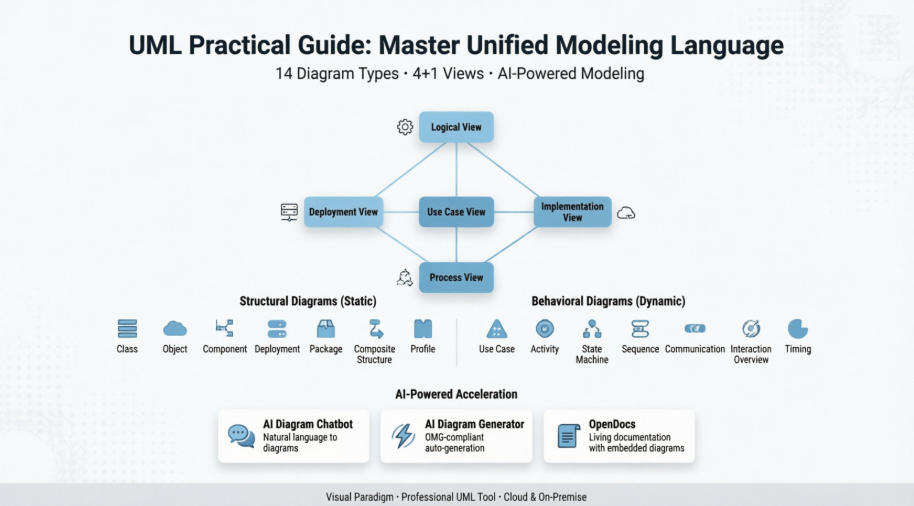
What Is UML, Really? A Practitioner’s Perspective
Before diving into diagrams and tools, let’s address the elephant in the room: Why should you care about UML?
From my experience working with cross-functional teams, UML serves as a universal visual language that transcends technical jargon. Created by the Object Management Group (OMG) with its first specification draft proposed in January 1997, UML has evolved into a standardized way to specify, visualize, construct, and document software—and even non-software—systems.
Key takeaways from my hands-on experience:
-
UML isn’t a programming language, but it can generate code in multiple languages through supporting tools
-
It follows object-oriented concepts, making it ideal for modern software development
-
The visual nature of UML diagrams helps align technical and non-technical stakeholders
-
Beyond software, I’ve successfully used UML to model manufacturing workflows and business processes
💡 Pro Tip from the Trenches: Don’t get bogged down trying to master all 14 diagram types at once. Start with use case and class diagrams—they deliver 80% of the value for most projects.
Understanding the 4+1 Views: A Game-Changer for System Architecture
One of the most valuable sections of this guide explains the 4+1 Views of Software Architecture. As someone who has struggled to communicate system design to diverse audiences, this framework transformed how I approach modeling.
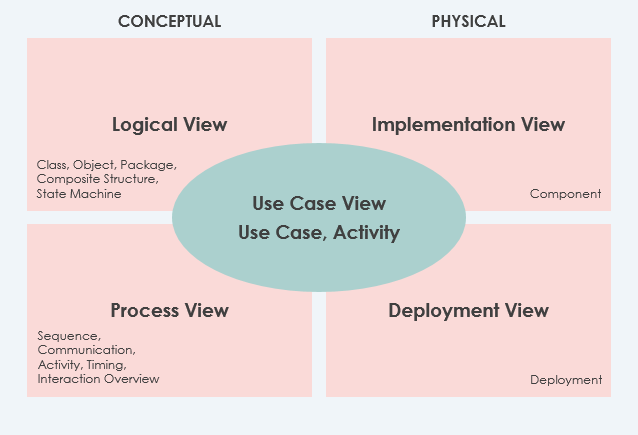
The Five Perspectives Explained (with Real-World Context):
| View | What It Covers | When I Use It | Mandatory? |
|---|---|---|---|
| Use Case View | System functionality, external interfaces, principal users | Requirements gathering, stakeholder workshops | ✅ Yes |
| Logical View | Classes, interfaces, packages, and their relationships | Design phase, code architecture planning | ✅ Yes |
| Implementation View | File system organization, development artifacts | Build configuration, version control setup | Optional |
| Process View | Runtime behavior, processes, threads, communication | Performance tuning, reliability planning | Optional |
| Deployment View | Hardware mapping, infrastructure layout | DevOps planning, cloud deployment strategy | Optional |
Bonus: Data View – A logical view specialization I’ve found invaluable when persistence is critical and automatic ORM mapping isn’t sufficient.
The central role of the Use Case View connecting all other perspectives is brilliant. In my projects, starting with use cases ensures every architectural decision traces back to actual user needs—a practice that has prevented countless scope creep incidents.
The 14 UML Diagram Types: A Practical Breakdown
The guide categorizes UML diagrams into Structural (static) and Behavioral (dynamic) types. Here’s my practitioner-focused review of each, with the original examples preserved:
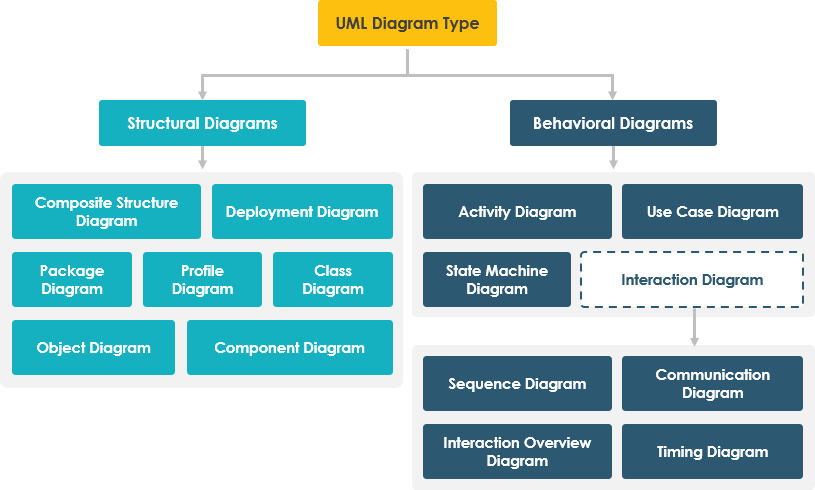
Structural Diagrams: Mapping the Static Blueprint
Class Diagrams – The Workhorse of OO Design
Class diagrams remain the most widely used UML artifact in object-oriented development. They describe objects, attributes, operations, and relationships.

My Experience: I use class diagrams daily for API design and database schema planning. The ability to map them directly to object-oriented languages like Java or C# makes forward/reverse engineering seamless.
Object Diagrams – Snapshot in Time
These show concrete instances of classes at a specific moment—perfect for debugging complex object interactions.

When to Use: During code reviews or when documenting edge cases in system behavior.
Component Diagrams – Implementation Architecture
These visualize physical components like libraries, files, and executables.

Practical Application: Essential for microservices architecture planning and dependency management.
Deployment Diagrams – Infrastructure Mapping
Critical for system engineers, these show how software maps to hardware nodes.

Real-World Value: Indispensable for cloud migration projects and DevOps handoffs.
Package Diagrams – Modular Organization
These illustrate dependencies between packages or modules.

My Workflow: I use these during refactoring to visualize module boundaries and reduce coupling.
Composite Structure Diagrams – Internal Class Anatomy
A UML 2.0 addition showing internal parts, ports, and connectors within a class.

Advanced Use Case: Perfect for modeling complex design patterns like Composite or Strategy.
Profile Diagrams – Domain-Specific Extensions
Enable creation of custom stereotypes for specialized domains.

When It Shines: When working with industry-specific frameworks or regulatory compliance modeling.
Behavioral Diagrams: Capturing Dynamic System Flow
Use Case Diagrams – Requirements Visualization
These model system functionality from the user’s perspective using actors and use cases.

My Recommendation: Start every project here. They’re powerful communication tools for non-technical stakeholders.
State Machine Diagrams – Object Lifecycle Modeling
Developed by David Harel, these track an object’s states and transitions triggered by events.
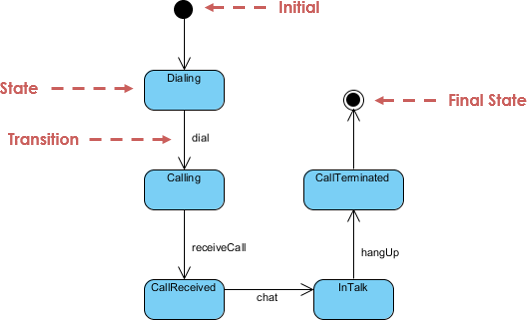
Practical Application: Essential for modeling order processing, user authentication flows, or IoT device states.
Activity Diagrams – Workflow and Process Mapping
These model computational and organizational processes, supporting parallel and concurrent flows.

Business Value: I’ve used these to document business processes for compliance audits and training materials.
Sequence Diagrams – Time-Ordered Interactions
These show how objects collaborate over time in a specific scenario.
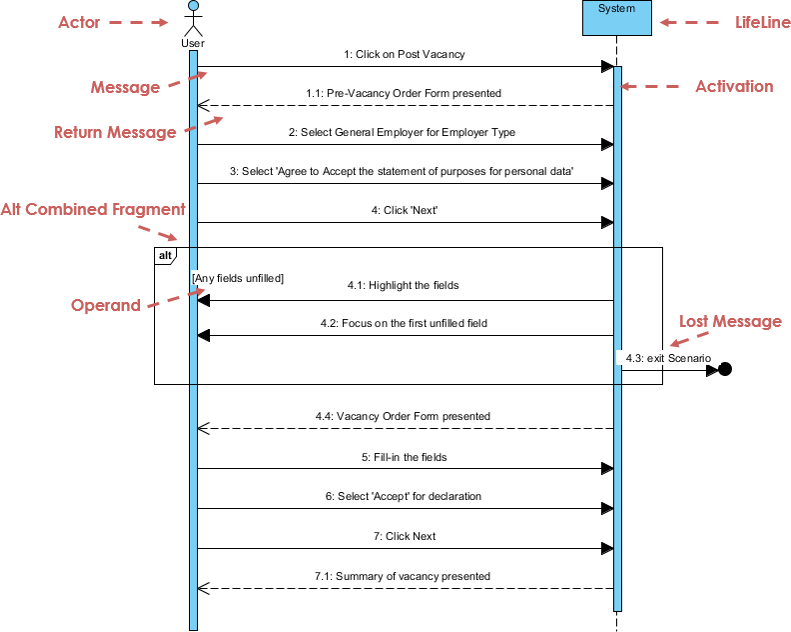
Debugging Superpower: Invaluable for tracing API call sequences and identifying race conditions.
Communication Diagrams – Collaboration-Focused Interactions
Similar to sequence diagrams but emphasizing object relationships over time sequence.

When to Choose This: When team discussions focus on “who talks to whom” rather than “when.”
Interaction Overview Diagrams – High-Level Flow Control
A variant of activity diagrams where nodes represent interactions or interaction occurrences.

Strategic Use: Perfect for executive summaries of complex system interactions.
Timing Diagrams – Time-Constrained Behavior
A specialized sequence diagram with reversed axes, focusing on behavior within specific time periods.

Niche but Critical: Essential for real-time systems, embedded software, or performance-critical applications.
Putting UML into Practice: AI-Powered Acceleration
One aspect that particularly impressed me was the guide’s forward-thinking approach to AI-assisted UML modeling. In today’s fast-paced development environment, these tools aren’t just nice-to-have—they’re productivity multipliers.
My Experience with Visual Paradigm’s AI Features:
-
What it does: Creates diagrams through natural language conversation
-
My verdict: Perfect for rapid prototyping and capturing initial requirements. I’ve cut diagram creation time by ~40% using this feature.
-
What it does: Provides step-by-step AI-guided workflows for architecture evolution
-
My verdict: Excellent for teams transitioning from sketches to detailed implementation views. The guided approach reduces onboarding time for junior architects.
-
What it does: Generates OMG-compliant UML diagrams directly in Visual Paradigm Desktop
-
My verdict: A time-saver for repetitive diagram creation. Ensures consistency across large projects.
📝 OpenDocs
-
What it does: Centralizes documentation with embedded AI-generated diagrams
-
My verdict: Transforms documentation from a chore into a living, interactive resource. Great for knowledge sharing across distributed teams.
Tool Evaluation: Why Visual Paradigm Earns My Recommendation
After testing multiple UML tools over the years, I appreciate that this guide doesn’t just teach concepts—it helps you choose the right implementation vehicle. Here’s my candid comparison based on hands-on experience:

The Top 5 UML Tools: A Practitioner’s Comparison
| Feature | Visual Paradigm | Lucidchart | ArgoUML | Enterprise Architect | StarUML |
|---|---|---|---|---|---|
| Diagram Coverage | Full UML 2.x suite + ERD, BPMN, etc. | Good variety, UML-focused | All standard UML | Extensive modeling languages | Wide feature range |
| Learning Curve | Intuitive with helpful wizards | Very gentle | Simple but dated UI | Steep for beginners | Moderate, customizable |
| Team Collaboration | Real-time sharing, comments, versioning | Strong web collaboration | Limited | Robust but complex setup | Basic capabilities |
| IDE Integration | Eclipse, IntelliJ, VS Code | Limited | Minimal | Extensive | Plugin-based |
| Deployment Flexibility | Cloud + on-premise options | Web-only | Open-source desktop | Primarily on-premise | Open-source desktop |
| Best For | Enterprise teams, complex projects | Quick collaboration, lightweight needs | Education, small projects | Large-scale enterprise architecture | Developers wanting customization |
Why Visual Paradigm Stands Out in My Workflow:
-
End-to-End Traceability: Linking UML models to user stories, backlogs, and code artifacts has eliminated documentation silos in my projects.
-
Agile + Enterprise Balance: Whether I’m running a two-week sprint or planning a multi-year enterprise transformation, the tool adapts without forcing workflow compromises.
-
Visual Diff & Impact Analysis: Before this feature, model evolution was risky. Now I can confidently refactor architectures with clear visibility into downstream effects.
-
Cross-Platform Consistency: Working across Windows, Mac, and Linux teams? No compatibility headaches.
-
Active Community & Support: The user forums and tutorial library have rescued me more times than I can count.


Who’s Actually Using This? (Spoiler: It’s Not Just Theorists)

From my network and industry observations, Visual Paradigm serves:
-
Fortune 500 engineering teams managing complex system portfolios
-
Government agencies requiring auditable, standards-compliant documentation
-
Universities teaching software architecture with industry-relevant tools
-
Startups scaling from MVP to enterprise-grade architecture
-
Consultancies delivering consistent modeling deliverables across clients
Conclusion: Is This Guide—and UML Modeling—Worth Your Time?
After thoroughly working through Visual Paradigm’s UML Practical Guide and applying its concepts across multiple projects, my verdict is clear: Yes, absolutely—with the right expectations.
This guide excels at:
✅ Providing immediately applicable diagramming techniques with real-world examples
✅ Balancing theoretical foundations with practical implementation guidance
✅ Introducing AI-powered acceleration without sacrificing modeling rigor
✅ Supporting diverse stakeholders from business analysts to system architects
Considerations before diving in:
⚠️ UML is a means to an end, not the end itself—focus on solving business problems, not perfect diagrams
⚠️ Start small: Master 2-3 diagram types before expanding your toolkit
⚠️ Tool choice matters: The guide’s Visual Paradigm focus is valuable, but evaluate against your team’s specific needs
My final recommendation: If you’re serious about improving system design communication, reducing architectural ambiguity, or accelerating development through better visualization, this guide is an exceptional resource. Pair it with hands-on practice using Visual Paradigm’s free tier or trial, and you’ll quickly see ROI in clearer requirements, fewer rework cycles, and more aligned teams.
The beauty of UML—and this guide’s approach—is that it scales with your needs. Whether you’re sketching a quick use case on a whiteboard or modeling a distributed microservices architecture, the principles remain consistent. In an era where software complexity continues to explode, that consistency isn’t just helpful—it’s essential.
Reference List
-
AI Diagram Chatbot: Natural language interface for instant UML diagram creation through conversational AI.
-
AI Diagram Generator Guide: Documentation for generating OMG-compliant UML diagrams directly within Visual Paradigm Desktop.
-
UML Tool Features Page: Detailed feature breakdown of Visual Paradigm’s UML modeling capabilities and standards compliance.
-
Full-Featured UML Tool Solution: Enterprise-grade UML solution page highlighting advanced modeling, collaboration, and integration features.
-
Free Online UML Tool: Web-based UML diagramming option for lightweight collaboration and quick prototyping.
-
Professional UML Tool Solution: Comprehensive UML modeling platform for professional software development teams.
-
Visual Paradigm Homepage: Main website for Visual Paradigm’s suite of modeling, project management, and enterprise architecture tools.
-
Free UML Tool Download: Access point for Visual Paradigm’s free tier UML modeling software with core diagramming capabilities.
-
Free UML Design Tool: Entry-level UML design solution for students, educators, and small project teams.
-
Enhanced AI Deployment Diagram Generation: Context-aware layout improvements for AI-generated Deployment Diagrams with smarter relationship handling.
-
Visual Paradigm Desktop AI Activity Diagram Generation: Guide to generating Activity Diagrams directly within Visual Paradigm Desktop using AI.
-
AI Sequence Diagram Example: ATM Cash Withdrawal: Practical example demonstrating how the AI Chatbot generates Sequence Diagrams from natural language descriptions.
-
AI Diagram Generator Overview: Comprehensive overview of AI-powered diagram generation capabilities across multiple UML and non-UML diagram types.
-
Enhance Design Thinking with New AI Diagram Generation: Article on leveraging AI diagram generation to accelerate design thinking and architectural planning.
-
AI Features Software Maintenance Requirement 2026: Important notice regarding subscription and maintenance requirements for accessing AI-powered tools starting January 2026.
-
Getting Started with AI: Click Start AI: Technical support guide for enabling and using AI features in Visual Paradigm.
-
YouTube: AI Diagram Generation Tutorial: Video tutorial demonstrating AI-powered UML diagram creation workflows.
-
YouTube: AI Use Case Modeling Demo: Video demonstration of AI-assisted Use Case modeling capabilities.
-
YouTube: AI Sequence Diagram Walkthrough: Step-by-step video guide for generating Sequence Diagrams using AI.
-
YouTube: AI Setup and Configuration: Video tutorial on setting up and configuring AI features in Visual Paradigm
Related posts:
 How to Use Visual Paradigm’s AI Chatbot to Generate and Refine Component Diagrams
 Visual Paradigm Community FREE Edition: Your Complete Guide to UML Modeling with AI-Powered Enhancement
 UML Class Diagrams vs. Sequence Diagrams: When to Use Which (and How AI Helps)
 ✨ Meet Your New Brainstorming BFF: OpenDocs Just Got Smarter (And So Much More Fun) ✨