


Introduction: The Documentation Dilemma in Modern Engineering
In today’s fast-paced software development and enterprise architecture environments, teams face a persistent challenge: keeping technical documentation synchronized with rapidly evolving system designs. Traditional workflows force engineers to export diagrams as static images, manually upload them to wikis or document platforms, and then struggle to update them when models change. This disconnect creates documentation debt, slows onboarding, and introduces ambiguity during reviews.
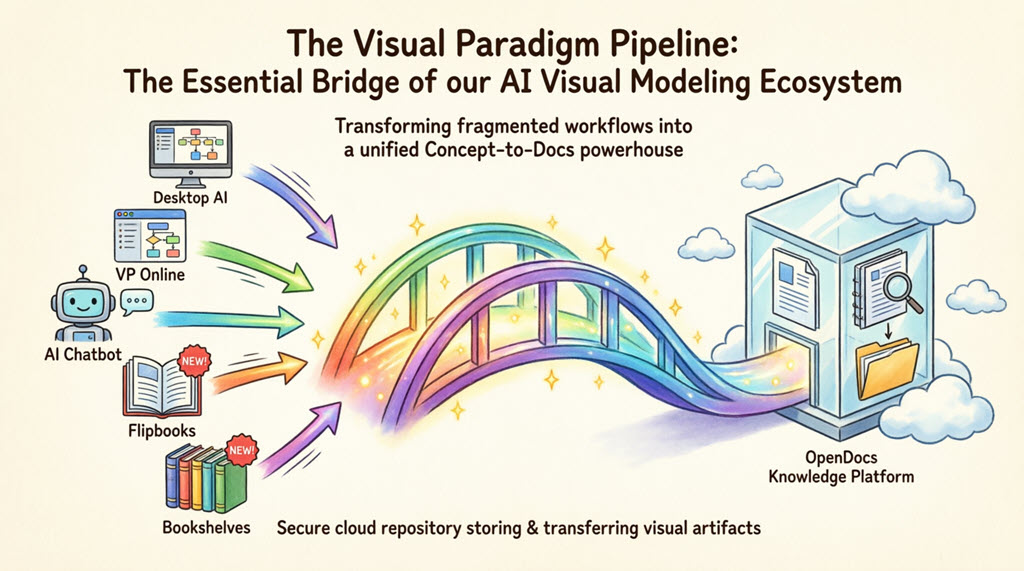
Visual Paradigm addresses this friction point with a unified ecosystem centered on the Pipeline—a secure, cloud-based asset transit hub that bridges desktop modeling tools, browser-based editors, and AI-powered assistants with OpenDocs, a dynamic knowledge management platform. This case study explores how organizations can leverage this integrated workflow to transform fragmented processes into a seamless “Concept-to-Docs” pipeline, where diagrams, models, and graphics flow as living artifacts directly into team documentation—without manual file management or version confusion.
Through real-world implementation patterns, workflow breakdowns, and engineering best practices, we demonstrate how the Pipeline serves as the connective tissue that empowers technical teams to maintain accurate, evolving documentation that scales with their projects.
“Before Pipeline, our architecture docs were always one sprint behind the actual system design. Now, when a developer updates a sequence diagram in Visual Paradigm Desktop, the embedded version in our OpenDocs spec updates with a single click.”
— Senior Technical Writer, SaaS Scale-up
The Visual Paradigm Ecosystem: Core Components
Content Producers: Desktop & Online Platforms
Visual Paradigm Desktop serves software developers, architects, and enterprise modelers who require deep, heavy-duty modeling capabilities. It supports comprehensive standards including UML, BPMN, ERD, SysML, and ArchiMate, with advanced features like AI-assisted diagram generation, version control integration, and team collaboration tools.
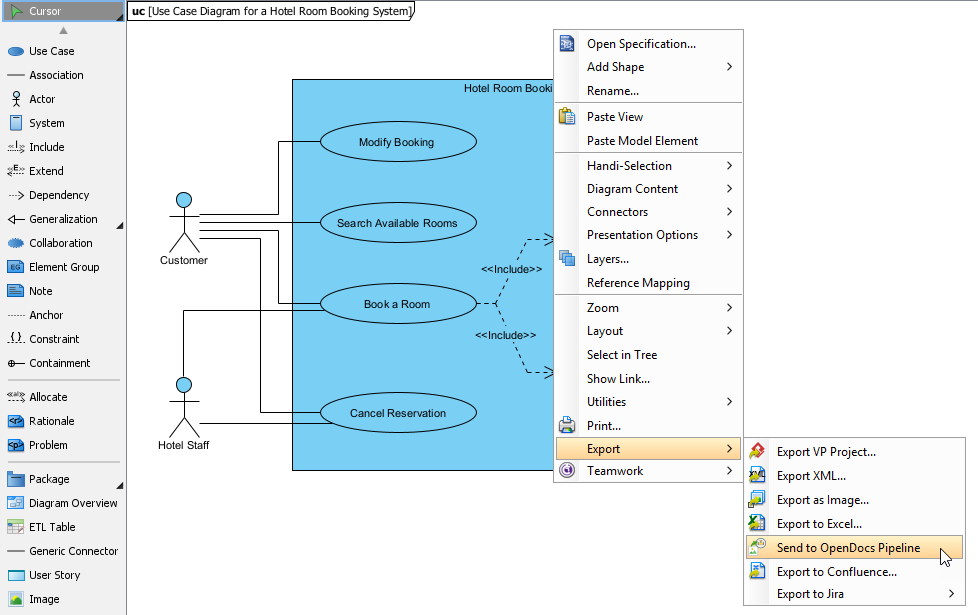
Visual Paradigm Online provides a zero-configuration, browser-based diagramming environment ideal for agile teams, rapid prototyping, and cloud-native workflows. Users can generate interactive flowcharts, AI chatbot outputs, flipbooks, and collaborative diagrams without local installation.
The Transport Hub: The Pipeline
The Pipeline functions as a centralized cloud registry that captures, catalogs, and secures creative assets from across the Visual Paradigm ecosystem. Key capabilities include:
- Metadata Cataloging: Automatic indexing of artifact properties, authors, timestamps, and project context
- Secure Cloud Storage: Enterprise-grade encryption and access controls for sensitive models
- Version History: Strict revision tracking with change logs and rollback capabilities
- Cross-Tool Interoperability: Seamless artifact transfer between Desktop, Online, AI Chatbot, and OpenDocs
The Destination: OpenDocs
OpenDocs is an AI-powered, team-based knowledge and document management platform designed to be “diagram-aware.” Unlike conventional wikis, OpenDocs enables:
- Rich Text Editing: Easy to use rich text editing tools
- Embedded, Re-editable Diagrams: Insert Pipeline artifacts that remain linked to source models
- Hierarchical Organization: Folder-based knowledge trees for scalable project structuring
- AI Content Assistance: Natural language prompts for diagram generation and content enhancement
- Secure Sharing: Read-only links for stakeholder collaboration without edit permissions
How the Relationship Functions: The End-to-End Workflow
The Push Mechanism: From Editors to Pipeline
Instead of exporting static PNGs or managing local file transfers, users initiate synchronization directly within their modeling environment:
- Open a diagram in Visual Paradigm Desktop or Online
- Navigate to Export > Send to OpenDocs Pipeline
- Optionally add a tracking comment describing the artifact’s purpose or version context
- Confirm the export to securely push the artifact to the cloud repository
For Desktop users, subsequent project commits can automate revision updates, ensuring the Pipeline always reflects the latest approved model state.
The Pull Mechanism: From Pipeline to OpenDocs
Within the OpenDocs text editor, technical writers and documentation specialists can instantly access synchronized artifacts:
- Open any document page and click Edit
- Position the cursor where the diagram should appear
- Click Insert on the toolbar, then select Pipeline from the sidebar
- Browse or search the artifact library, preview candidates, and select the desired asset
- The diagram embeds directly into the page as a live, contextual element
The Version Synchronization Link
The Pipeline maintains a continuous connection between source models and embedded documentation. When an architect modifies a system diagram in Desktop and pushes an update:
- An update indicator appears next to the artifact in the OpenDocs Pipeline panel
- Document owners can click the indicator to view the revision log, compare changes, and assess impact
- With one click, the embedded graphic swaps to the newest version while preserving document structure and surrounding content
This synchronization eliminates the risk of stale diagrams and ensures documentation always reflects current system architecture.
Supported Artifact Types and Integration Pathways
The Pipeline accommodates diverse visual assets across five primary integration channels:
1. Visual Paradigm Desktop to OpenDocs
Power users create intricate UML, BPMN, or enterprise architecture models in the professional desktop suite and export them to OpenDocs via the Pipeline. This pathway moves local modeling expertise into a globally accessible, collaborative knowledge base.
2. Visual Paradigm Online to OpenDocs
Cloud-native teams design technical flowcharts, wireframes, or marketing graphics directly in the browser. The Pipeline transfers these assets to documentation without local downloads, enabling fully remote, zero-installation workflows.
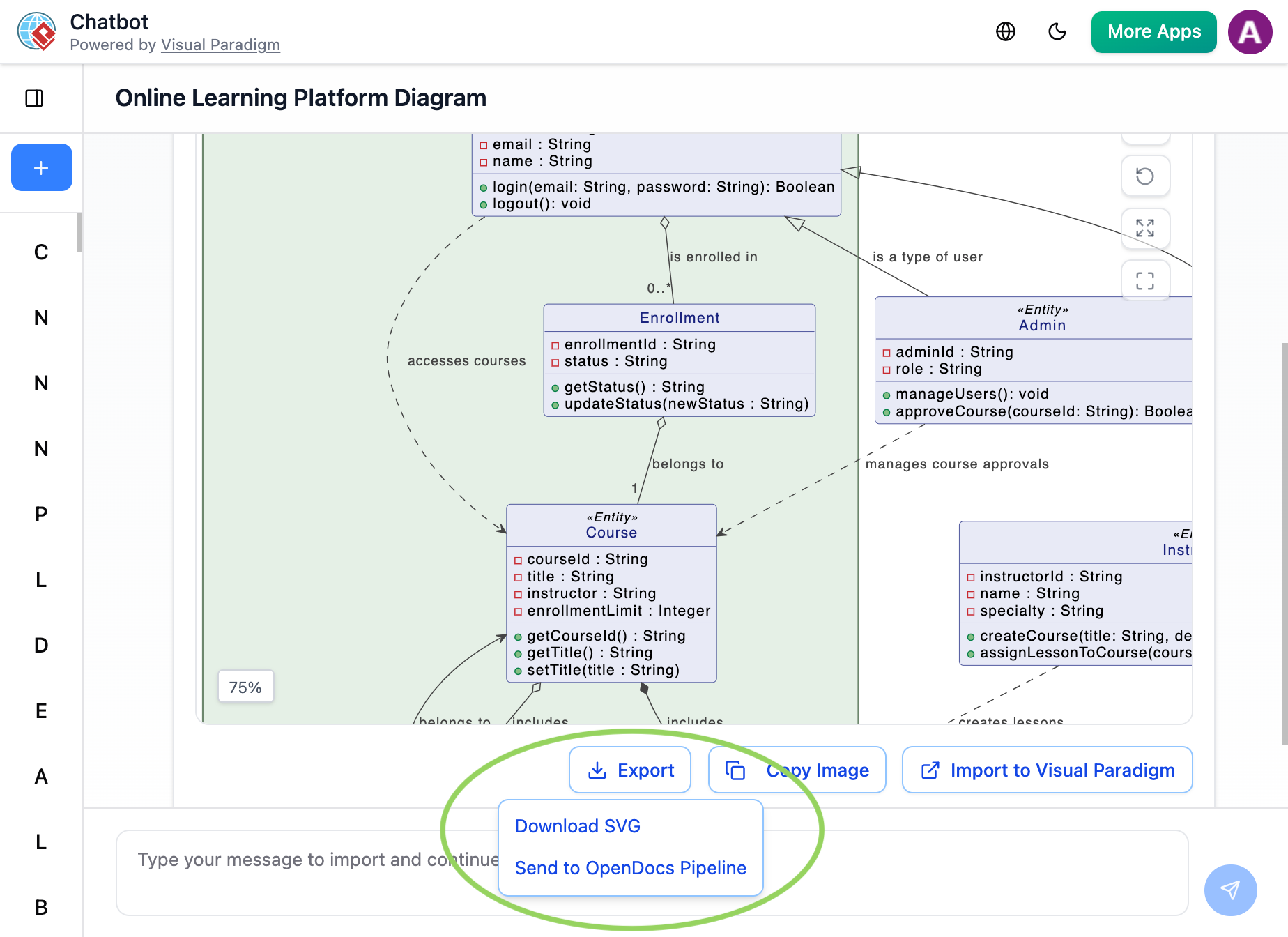
3. AI Chatbot to OpenDocs
Conversational modeling allows users to describe system requirements in natural language. The AI Chatbot generates corresponding diagrams (UML, flowcharts, architecture views), which can be sent directly to the Pipeline with one click for immediate insertion into OpenDocs pages.
4. Flipbooks to OpenDocs
Interactive digital publications created with VP Online’s flipbook engine can now flow through the Pipeline, enabling rich, flippable catalogs, training materials, or product brochures embedded directly within technical documentation.
5. Bookshelves to OpenDocs
Entire curated collections of resources—organized as Bookshelves—can be synchronized to OpenDocs, creating centralized libraries within documentation workspaces for scalable knowledge management.
Real-World Implementation Patterns
Living Documentation for Agile Teams
Engineering teams maintaining technical specifications report significant reductions in documentation debt. By keeping architecture diagrams synchronized with source models via the Pipeline, new engineers onboard faster, code reviews include accurate visual context, and architectural decision records remain current without manual upkeep.
Rapid Prototyping with AI-Assisted Modeling
Product managers and solution architects use the AI Chatbot to generate initial user journey maps, system context diagrams, or process flows from natural language prompts. These artifacts flow directly into project proposals or requirement documents via the Pipeline, accelerating stakeholder alignment and feedback cycles.
Cross-Functional Content Repurposing
Marketing, training, and enablement teams leverage the Pipeline to send slideshows, infographics, or process diagrams from Visual Paradigm Online into OpenDocs. This creates interactive online presentations or knowledge base articles without duplicate content creation efforts.
Engineering Best Practices for Pipeline Adoption
Artifact Management Conventions
- Naming Strategy: Adopt a consistent format such as
project-component-diagram-purpose-version(e.g.,auth-service-sequence-v2.1-refactor) - Metadata Discipline: Always add descriptive comments during export to document intent, author, and change scope
- Retention Policy: Archive obsolete artifacts quarterly to maintain Pipeline organization and searchability
Collaboration and Access Control
- Code Review Integration: Include Pipeline artifact URLs in pull request descriptions to provide visual context for proposed changes
- Permission Strategy: Restrict Pipeline write permissions to senior architects; grant read access to broader engineering and documentation teams
- Notification Workflow: Use OpenDocs’ @mentions to alert stakeholders when critical diagrams are updated or require review
Performance and Reliability Considerations
- Diagram Complexity: For large diagrams (>500 elements), consider modular sub-diagrams to optimize load times in OpenDocs
- Offline Resilience: Desktop changes sync to Pipeline upon reconnection; ensure stable network during critical export operations
- Backup Strategy: While Pipeline artifacts are cloud-backed, maintain local
.vppproject backups per organizational disaster recovery policies
Security and Compliance
- Sensitive Content: Avoid exporting diagrams containing credentials, internal network details, or proprietary algorithms to shared Pipeline spaces
- Audit Trail: Enable Pipeline activity logging for compliance-sensitive projects requiring change documentation
- External Sharing: Use OpenDocs’ read-only links for external stakeholders instead of granting direct Pipeline access
Troubleshooting Common Adoption Challenges
| Challenge | Recommended Resolution |
|---|---|
| “Send to OpenDocs Pipeline” option missing in Desktop | Verify license tier (Professional Edition or higher required) and confirm Desktop application is updated to latest stable release |
| Artifact not appearing in OpenDocs Pipeline panel | Check network connectivity to *.visual-paradigm.com; refresh Pipeline pane; confirm identical VP account credentials used in both tools |
| Diagram fails to embed or render in OpenDocs | Ensure diagram contains at least one element; retry insertion after clearing browser cache; verify browser compatibility |
| Revision history not updating after re-export | Confirm viewing correct artifact instance; check if document is locked by another user; validate Pipeline sync status |
| Slow load times for complex embedded diagrams | Optimize source diagram complexity; leverage OpenDocs’ lazy-loading preview mode; consider splitting large models into modular components |
Support Guidance: For persistent issues, contact Visual Paradigm support with artifact ID, VP Desktop version, browser details, and relevant console logs to accelerate resolution.
Conclusion: Building a Future-Ready Documentation Foundation
Visual Paradigm’s Pipeline integration with OpenDocs represents more than a convenience feature—it establishes a foundational shift in how technical teams approach documentation. By treating diagrams, models, and visual assets as first-class, versioned artifacts rather than static exports, organizations can maintain living documentation that evolves in lockstep with their systems and strategies.
The benefits extend beyond efficiency gains: accurate, synchronized documentation reduces onboarding friction, strengthens architectural governance, accelerates decision-making, and minimizes the risk of misalignment between design and implementation. As AI-assisted modeling, cross-tool interoperability, and collaborative knowledge management continue to mature, the Pipeline ecosystem provides a scalable infrastructure that grows with engineering ambitions.
Teams adopting this workflow report measurable improvements in documentation accuracy, reduced time spent on manual synchronization tasks, and higher confidence in the reliability of technical references. The gentle learning curve—paired with immediate productivity returns—makes this integration accessible to teams of all sizes and maturity levels.
For organizations committed to living documentation, collaborative knowledge management, and engineering excellence, the Visual Paradigm Pipeline and OpenDocs integration offers a proven pathway to transform conceptual models into authoritative, evolving knowledge assets.
Next Steps for Implementation:
- Start with a pilot project to validate workflow fit and team adoption
- Document team-specific conventions for artifact naming, metadata, and access control
- Integrate Pipeline usage into onboarding materials and engineering playbooks
- Expand usage incrementally across projects as confidence and value become evident
The future of technical documentation is dynamic, interconnected, and intelligent. With Visual Paradigm’s unified ecosystem, that future is accessible today.
Reference
- From Diagrams to Documentation: A Hands-On Review of Visual Paradigm’s Pipeline and OpenDocs: Independent community case study exploring real-world implementation experiences, Browse Share History feature walkthrough, and productivity outcomes for technical teams integrating Pipeline workflows.
- Visual Paradigm Pipeline: The Bridge for AI Modeling Ecosystem: Official guide detailing the Pipeline’s role as connective tissue across Visual Paradigm’s four AI pillars—Desktop, Online, OpenDocs, and AI Chatbot—with workflow diagrams and integration patterns.
- From Model to Manual: A Software Engineer’s Guide to Syncing Visual Paradigm Desktop Diagrams with OpenDocs: Engineering-focused tutorial covering prerequisites, step-by-step export/import procedures, version synchronization patterns, and production-ready best practices for adopting the Pipeline workflow.
- Sync AI Diagram to OpenDocs Pipeline Guide: Official release documentation with screenshots and instructions for exporting AI-generated or manually created diagrams from Visual Paradigm Desktop to the OpenDocs Pipeline repository.
- Visual Paradigm Online to OpenDocs Export: Step-by-step tutorial for cloud-based users to send diagrams created in Visual Paradigm Online directly to OpenDocs via the Pipeline, enabling zero-installation documentation workflows.
- Desktop Accessibility in Visual Paradigm Online: Feature overview explaining how Visual Paradigm Online brings desktop-grade modeling capabilities to the browser, with Pipeline integration for seamless artifact transfer to documentation platforms.
- Visual Paradigm OpenDocs: The Complete Guide to AI-Powered Knowledge Management: Comprehensive independent resource covering OpenDocs capabilities, AI diagram generation, hierarchical organization, and enterprise knowledge management strategies.
- OpenDocs Integration Demo Video: Visual walkthrough demonstrating the end-to-end workflow from diagram creation in Desktop/Online to embedding and synchronizing artifacts within OpenDocs documentation pages.
- AI Diagram to OpenDocs Pipeline Release: Release notes detailing the integration of Visual Paradigm’s AI Chatbot with the Pipeline workflow, enabling natural language-to-diagram-to-documentation automation.
- Seamless Documentation Journey: Sending Visual Paradigm Creations to OpenDocs: Personal implementation story from a technical writer, highlighting workflow optimizations, team adoption strategies, and measurable productivity gains from Pipeline integration.
- Visual Paradigm OpenDocs: The Complete Developer’s Guide: Developer-centric resource covering diagram embedding APIs, version control patterns, and automation techniques for advanced OpenDocs usage.
- OpenDocs Feature Overview: Official product page detailing OpenDocs capabilities including rich text editing, integrated diagram tools, hierarchical organization, AI assistance, and secure sharing options.