


📚 Key Concepts: C4 + UML Integration
What is the C4 Model?
The C4 model is a lightweight, hierarchical approach to visualizing software architecture, created by Simon Brown . It provides “maps of your code” at various zoom levels, similar to how Google Maps lets you zoom from world view to street level .
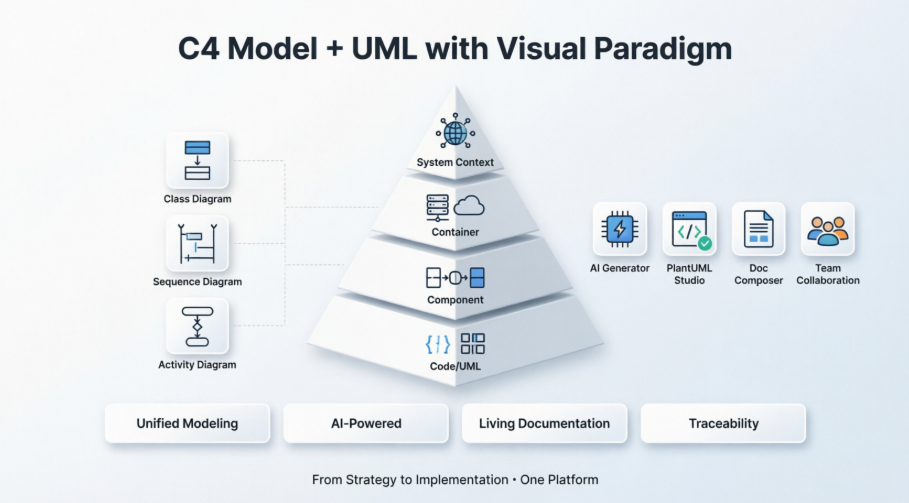
| Level | Diagram Type | Purpose | Primary Audience |
|---|---|---|---|
| C1 | System Context | Shows your system as a black box + external users/systems | Executives, Product, Stakeholders |
| C2 | Container | High-level technical building blocks (apps, databases, services) | Architects, DevOps, Tech Leads |
| C3 | Component | Internal structure of a single container | Developers, Engineering Teams |
| C4 | Code | Implementation details (UML class/ERD) | Developers (typically auto-generated) |
Why Integrate C4 with UML?
While C4 excels at hierarchical architecture communication, UML provides detailed behavioral and structural modeling. Together they create a synergistic approach:
-
C4 = Strategic zoom levels for communication
-
UML = Tactical detail for implementation (Class, Sequence, Activity diagrams)
-
Integration = Seamless navigation from high-level architecture to code-level design
“C4 provides the hierarchy; UML provides specific notations when you need them.”
🎯 User Experience: Real-World Insights
Adoption Workflow (Based on Team Feedback)
-
Week 1: Start with System Context diagrams in workshops to align stakeholders
-
Week 2: Build Container diagrams showing technology choices and communication protocols
-
Weeks 3-4: Create Component diagrams only for complex containers [
-
Ongoing: Embed diagram reviews into PR checklists and sprint rituals to prevent staleness
Common Pitfalls to Avoid
| Mistake | Impact | Solution |
|---|---|---|
| Mixing abstraction levels | Confusing diagrams | Keep one zoom level per diagram |
| Unlabeled relationships | Ambiguous architecture | Always use verb phrases on connectors |
| One-person documentation | Knowledge silos | Review diagrams as a team during architecture reviews |
| Not linking to code/docs | Isolated artifacts | Connect containers to runbooks, components to ADRs |
What Users Say About Visual Paradigm
-
“Drawing UML or ERD diagrams is extremely easy with Visual Paradigm. It has a very navigable interface with drag and drop functionality.”
-
“After six months of daily use across multiple teams, this tool has transformed how we approach system design.”
-
“The AI layer abstracts away the syntax learning curve while preserving the precision and version-control benefits of code-based diagrams.”
✨ Benefits of Using C4 with Visual Paradigm’s Ecosystem
🔹 Unified Modeling Environment
Visual Paradigm provides a single platform for both C4 and UML modeling, ensuring:
-
Consistency: Changes in C4 diagrams automatically reflect in linked UML diagrams
-
Collaboration: Teams can work on high-level architecture (C4) and detailed design (UML) simultaneously
-
Traceability: Navigate from Context → Container → Component → UML Class diagrams with one click
🔹 Full C4 Diagram Support (6 Types)
As of December 2025, Visual Paradigm Desktop offers native support for all six C4 diagram types :
-
System Landscape – Enterprise portfolio view
-
System Context – Big-picture system boundaries
-
Container – Technical building blocks
-
Component – Internal module structure
-
Dynamic – Runtime interaction flows (like UML Sequence)
-
Deployment – Infrastructure mapping (Kubernetes, cloud regions)
🔹 AI-Powered Acceleration
Visual Paradigm’s AI ecosystem dramatically reduces manual effort:
| AI Feature | Capability | Time Saved |
|---|---|---|
| AI Diagram Generator | Create C4 diagrams from natural language prompts (“Generate a Container diagram for an e-commerce system”) | ~80% reduction in initial diagram creation |
| C4 PlantUML Studio | Text-to-diagram with PlantUML code export for version control | Enables “diagrams as code” workflows |
| AI Chatbot | Interactive diagram creation, explanation, and refinement via conversation | Lowers learning curve for new team members |
🔹 Professional Tooling Features
-
Smart Sweeper: Auto-align and organize messy diagrams instantly
-
Sub-diagram Navigation: Right-click any element to drill down to its detailed view
-
Doc. Composer: Generate HTML/PDF architecture handbooks automatically
-
Team Collaboration: Version control, threaded comments, and real-time co-editing (Online)
🚀 Standout Reasons to Choose Visual Paradigm for C4+UML
1️⃣ First-Class C4 Support
Unlike generic drawing tools, Visual Paradigm treats C4 as a native modeling language with:
-
Official notation and color schemes built-in
-
Semantic element types (Person, Software System, Container, Component)
-
Relationship validation based on element types
2️⃣ Hybrid Workflow Flexibility
Choose your approach based on team needs:
🖥️ Visual Paradigm Desktop
   → Offline enterprise modeling, deep UML integration, advanced documentation

☁️ Visual Paradigm Online
   → Cloud collaboration, AI-first workflows, lightweight browser access
Both platforms share the same C4 model semantics, enabling seamless switching.
3️⃣ AI That Understands Architecture
Visual Paradigm’s AI doesn’t just draw boxes—it understands architectural intent:
“Generate a C4 Container Diagram for an e-commerce system with React frontend, Go microservices, PostgreSQL, and Kafka event bus” → Produces a semantically correct, properly connected diagram
4️⃣ Future-Proof Documentation
-
Drift Detection: Tools like Archyl (integrating with VP workflows) can compare diagrams against actual code to flag outdated elements
-
Export Flexibility: JSON for CI/CD integration, PlantUML for text-based versioning, PDF/PNG for presentations
-
Living Documentation: Link diagrams to ADRs, runbooks, and API specs for contextual navigation
5️⃣ Proven Adoption Success
Teams report measurable benefits after adopting C4+Visual Paradigm:
-
“Improved clarity: Architectural diagrams provided a clear shared understanding across distributed teams”
-
“Better stakeholder alignment and fewer misunderstandings in implementation”
-
“Architecture documentation that actually gets read and maintained”
🛠️ Getting Started: Quick Implementation Guide
Step 1: Install & Configure
-
Download Visual Paradigm Desktop (30-day Enterprise trial) or access VP Online
-
Enable C4 palette: Diagram → New → Search “C4”
Step 2: Create Your First C4 Hierarchy
1. Start with System Context Diagram
   → Add your system + external actors/systems
   → Label all relationships with verbs

2. Right-click your system → "Create Container Diagram"
   → Add deployable units (web app, API, DB, queue)
   → Include technology in parentheses: "Order Service (Go)"

3. Drill into a container → Create Component Diagram
   → Show internal modules: Controllers, Services, Repositories
   → Keep focused on one container only
Step 3: Enhance with UML Where Needed
-
Use UML Sequence Diagrams for complex runtime flows referenced in C4 Dynamic diagrams
-
Generate UML Class Diagrams from code for Level 4 details (auto-sync where possible)
-
Apply UML stereotypes to C4 elements for additional metadata
Step 4: Automate & Maintain
-
Use AI Generator for initial drafts, then refine manually
-
Set up documentation generation via Doc. Composer for stakeholder reports
-
Schedule quarterly diagram reviews as part of architecture governance
📊 Decision Framework: When to Use C4+UML in Visual Paradigm
✅ Ideal For:
-
Microservices or distributed system architecture documentation
-
Teams needing to communicate with both technical and non-technical stakeholders
-
Organizations adopting “diagrams as code” or living documentation practices
-
Projects requiring traceability from business context to implementation
⚠️ Consider Alternatives If:
-
You only need quick whiteboard-style sketches (try Miro or Excalidraw)
-
Your team exclusively uses PlantUML text files (C4-PlantUML may suffice)
-
Budget constraints prevent tool investment (start with free C4 templates)
💡 Pro Tip: “Always start from the context and work your way down — never begin with Component diagrams. Keep one diagram per view; resist the temptation to cram everything into a single picture.”
By combining C4’s communication-focused hierarchy with UML’s implementation precision—and leveraging Visual Paradigm’s AI-powered ecosystem—teams can create architecture documentation that is clear, consistent, collaborative, and actually maintained. This isn’t just diagramming; it’s building a shared language for your software system’s evolution. 🏗️✨
References
-
Mastering C4 Diagrams in Visual Paradigm: A Hands-On Review of All Four Creation Methods: Comprehensive practitioner review comparing manual modeling, AI generation, PlantUML integration, and API-based approaches for C4 diagram creation in Visual Paradigm.
-
The AI Revolution in C4 Architecture Diagramming: A Comprehensive Guide: In-depth exploration of how AI is transforming traditional C4 modeling workflows, featuring step-by-step tutorials for Visual Paradigm’s AI-powered tools.
-
Comprehensive C4 Model Software | Visual Paradigm: Official feature overview detailing Visual Paradigm’s support for all six C4 diagram types, AI-powered generation capabilities, and enterprise reporting features.
-
C4 Diagram Tool Features | Visual Paradigm: Central hub documenting the full capabilities of Visual Paradigm’s C4 modeling solution, including desktop and online platform comparisons.
-
C4 Diagram Tool Solution | Visual Paradigm: Solution-focused page highlighting use cases, benefits, and implementation strategies for C4 modeling with Visual Paradigm.
-
Visual Paradigm Full C4 Model Support Release: Official release announcement detailing native support for all six C4 diagram types in Visual Paradigm Desktop, with technical implementation notes.
-
AI Diagram Generator: Complete C4 Model: Release notes for the AI-powered feature that generates entire C4 model suites from single text prompts, including workflow examples.
-
From Prompt to Architecture: My Hands-On Review of Visual Paradigm’s AI-Powered C4 Diagram Studio: First-person review comparing traditional manual control versus AI-powered speed for C4 diagram creation.
-
Mastering C4 Diagrams: All Four Creation Methods: Detailed comparison of manual modeling, AI generation, PlantUML integration, and programmatic API approaches.
-
C4 Model Support Discussion | Visual Paradigm Forums: Community forum thread discussing implementation experiences, feature requests, and user tips for C4 modeling in Visual Paradigm.
-
Beginner’s Guide to C4 Model Diagrams | Visual Paradigm Blog: Accessible introduction to C4 modeling concepts with practical examples using Visual Paradigm templates.
-
Online C4 Model Tool | Visual Paradigm: Feature page for the web-based C4 diagram editor, highlighting drag-and-drop functionality, templates, and collaboration features.
-
Visual Paradigm C4 Tutorial | YouTube: Video walkthrough demonstrating C4 diagram creation workflows in Visual Paradigm, suitable for visual learners.
-
Diagrams as Code: The Power of C4: Deep dive into treating architecture diagrams as version-controlled code artifacts, with practical CI/CD integration examples.
- AI-Powered C4-PlantUML Markdown Editor Release: Announcement of the integrated Markdown editor that combines AI-generated PlantUML code with live preview for documentation-as-code workflows.
-
C4-PlantUML Studio | Visual Paradigm: Feature page for the specialized browser-based tool that bridges AI-powered diagram generation with PlantUML code export for version control.
-
From Blank Page to Architecture Blueprint: A Review of Visual Paradigm’s AI-Powered C4-PlantUML Studio: Practitioner review highlighting how the C4-PlantUML Studio addresses real-world documentation challenges with AI assistance.