


Introduction
As a Product Manager with over seven years of experience in roadmapping, user research, and analytics, I have always struggled with one specific bottleneck in technical documentation: the disconnect between visual design and written specification. We often find ourselves creating architecture diagrams in one tool, exporting them as static images, uploading them to a wiki or documentation platform, and then realizing we need to make a small change—forcing us to repeat the entire cycle.
Recently, Visual Paradigm announced a significant enhancement to their ecosystem: the integration of VPasCode with OpenDocs. Having tested this new pipeline, I wanted to share my experience from a product management perspective. This isn’t just a feature update; it’s a workflow revolution for teams that value agility and accuracy in their technical documentation. Here is how this integration changes the game for engineers, technical writers, and product leaders alike.
The Problem: Static Diagrams in a Dynamic World
In traditional workflows, diagrams are often treated as “snapshots” rather than living assets. When a system architecture evolves during a sprint, the documentation rarely keeps pace because updating the visual asset is cumbersome. This leads to outdated docs, confusion among stakeholders, and wasted engineering time.
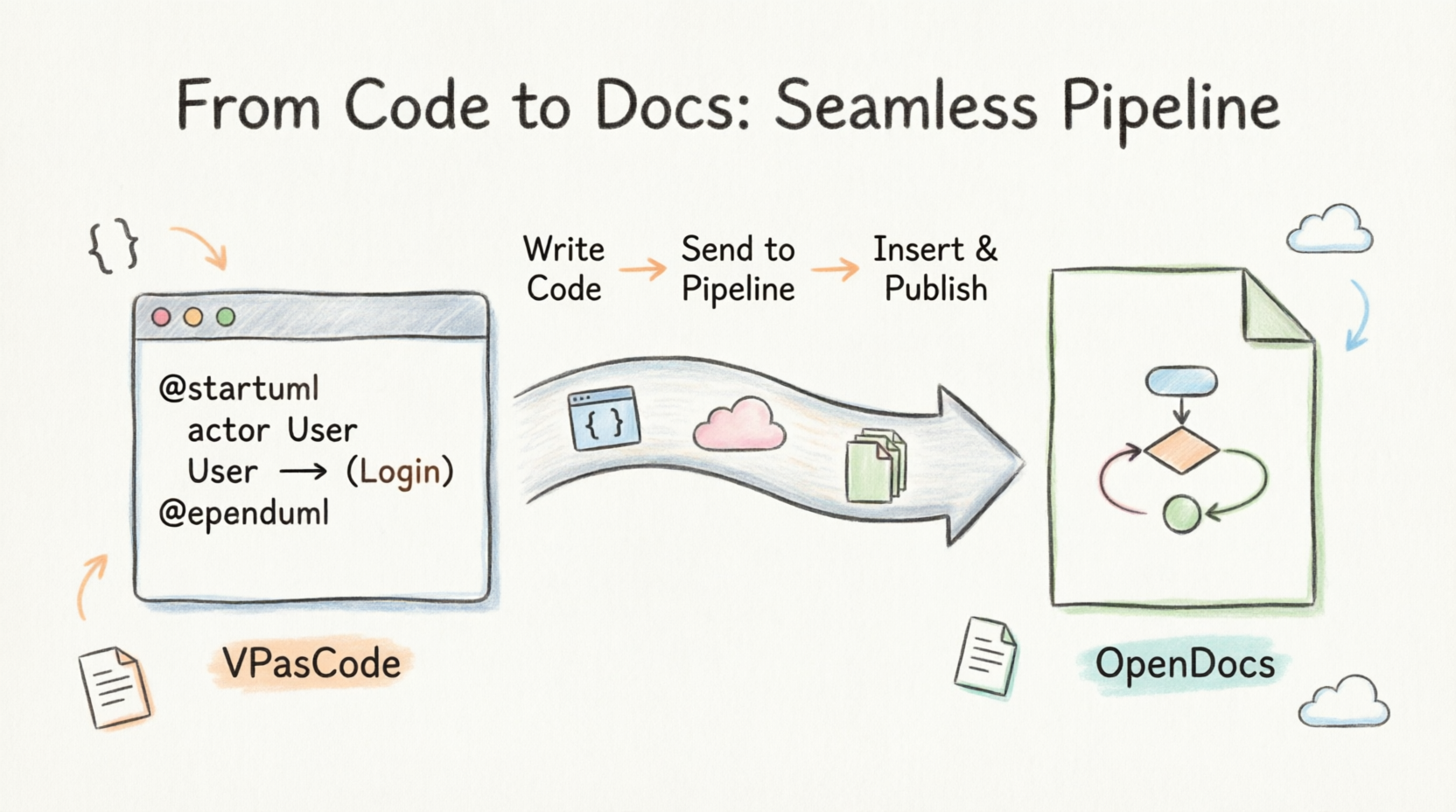
Visual Paradigm has addressed this by bridging the gap between their text-to-diagram platform, VPasCode, and their AI-powered knowledge management platform, OpenDocs. The result is a seamless pipeline that allows visuals to flow directly into documentation without manual exporting or re-uploading.
Real-World Use Cases: Why This Matters
During my evaluation, I identified three key scenarios where this integration shines, particularly for cross-functional teams.
1. Software Architecture & Technical Specs
For engineering teams, maintaining accurate system architecture diagrams is critical. With VPasCode, engineers can edit complex system architectures using PlantUML or microservices sequence diagrams in Mermaid. Once the logic is solid, they can push the diagram straight to the OpenDocs pipeline.
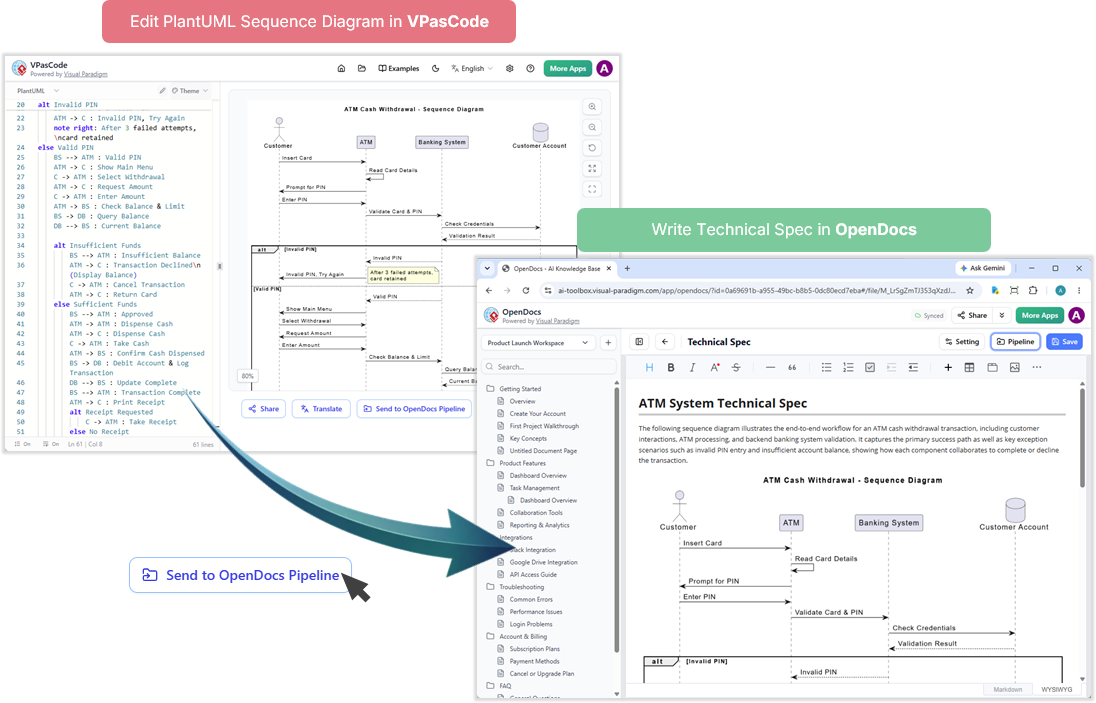
From a PM’s perspective, this means I can switch over to OpenDocs and write the full technical specification document around that live blueprint. The diagram is no longer a detached image; it’s an integral part of the spec that can be updated instantly if requirements change.
2. Agile Sprint Retrospectives & Roadmaps
Project managers and Scrum Masters often need to visualize timelines, Gantt charts, or Kanban workflows. Instead of saving these locally or taking screenshots, you can outline them textually in VPasCode and pipeline them directly into OpenDocs.
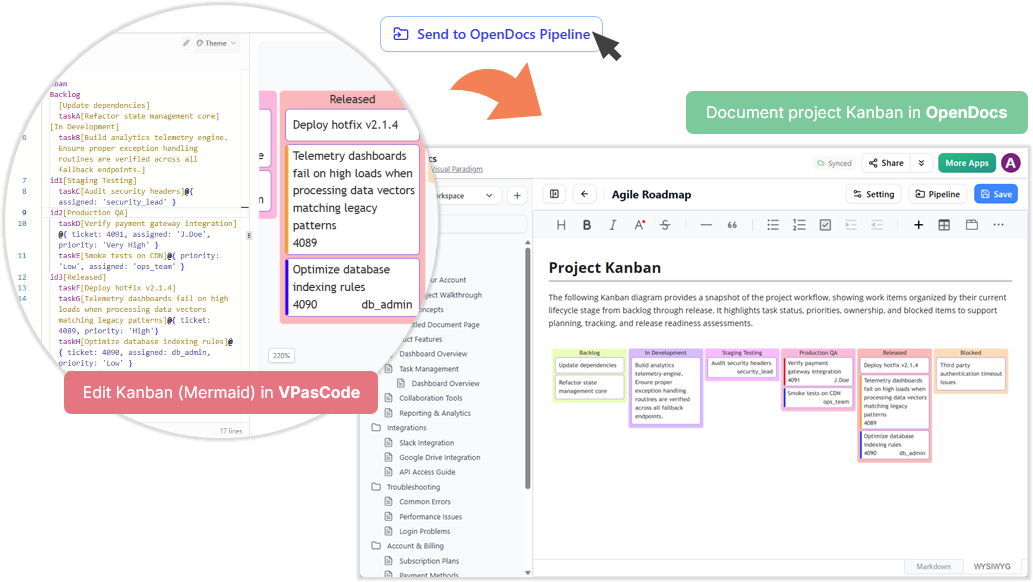
This drops the visual directly into a shared team handbook or sprint documentation page for collaborative viewing. It ensures that everyone is looking at the most current version of the project timeline, reducing miscommunication during stand-ups and retrospectives.
3. Rapid Documentation Updates
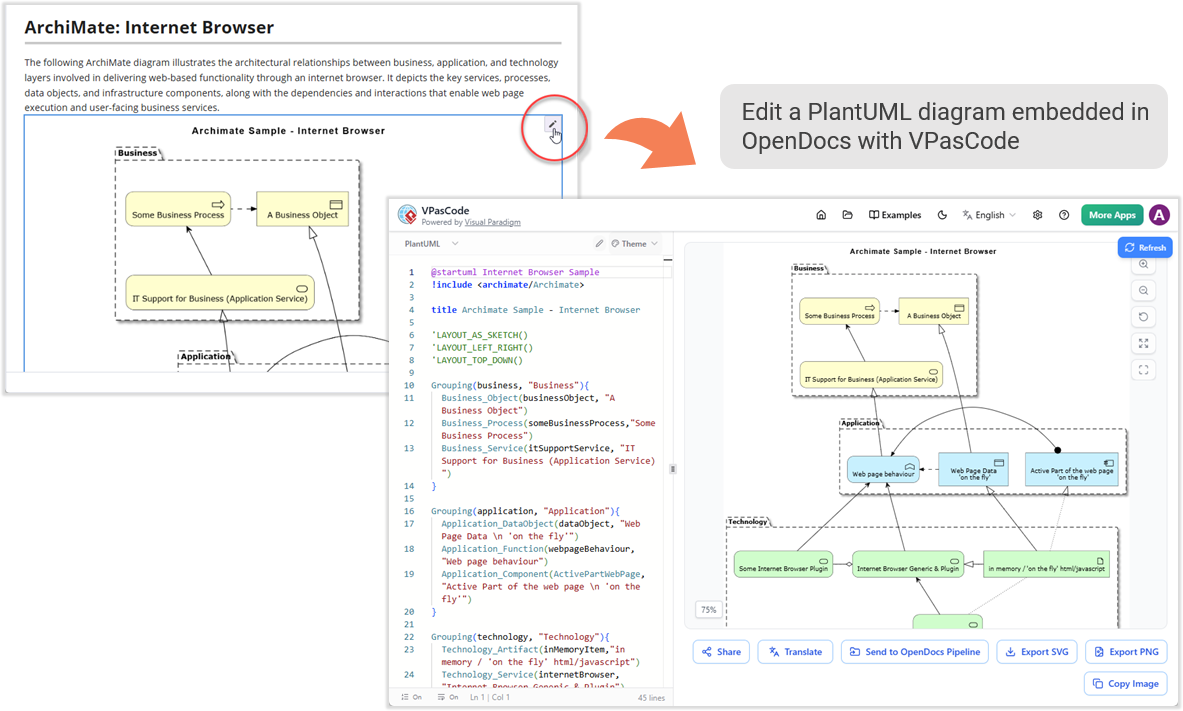
Perhaps the most powerful feature is the ability to make quick changes. If a system flow changes, a technical writer doesn’t need to regenerate the entire asset. They can click the edit pencil directly inside OpenDocs, refine the text-to-diagram script in VPasCode, and update the documentation instantly via the pipeline. This ensures documentation keeps pace with rapid code alterations, a common challenge in agile environments.
How It Works: A 5-Step Guide to the Pipeline
Moving your diagrams from drafting to documentation takes only a matter of seconds. Here is the step-by-step workflow I experienced:
Step 1: Initiate the Transfer
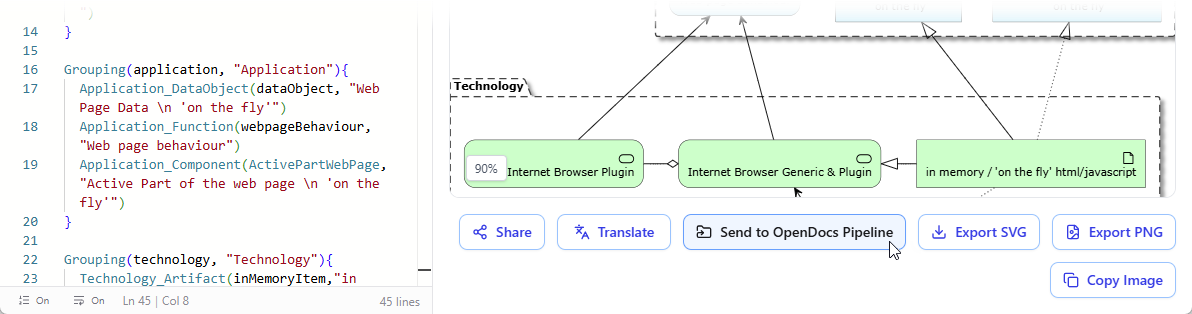
Inside the VPasCode interface, look under the diagram viewer on the right-hand side and click the “Send to OpenDocs Pipeline” button.
Step 2: Add Context (Optional)
A prompt will appear asking for an optional description. You can use this to note down details about the diagram, log a brief changelog, or simply skip it if you are in a rush.
Step 3: Confirm and Send
Click Confirm. Your diagram code and preview are instantly packaged and securely routed to your OpenDocs workspace pipeline. You can choose to keep refining your code in VPasCode or head directly over to OpenDocs.
Step 4: Access the Pipeline
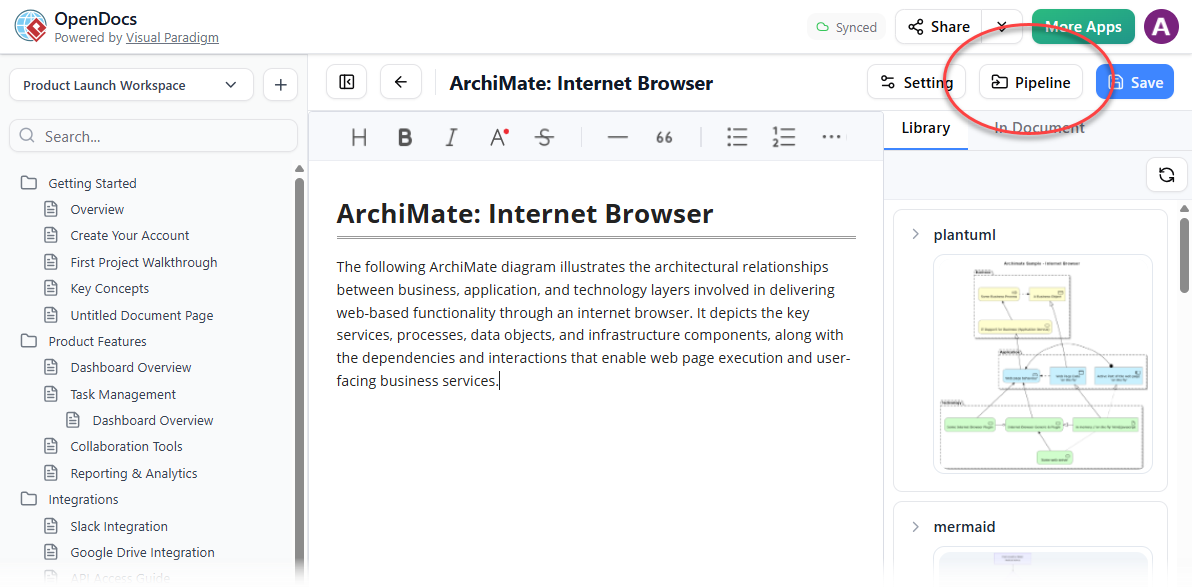
Navigate over to your OpenDocs Dashboard. Edit any documentation page where you want the visual to live and open up the Pipeline pane. Your newly sent diagram will be waiting for you in the list.
Step 5: Insert and Publish
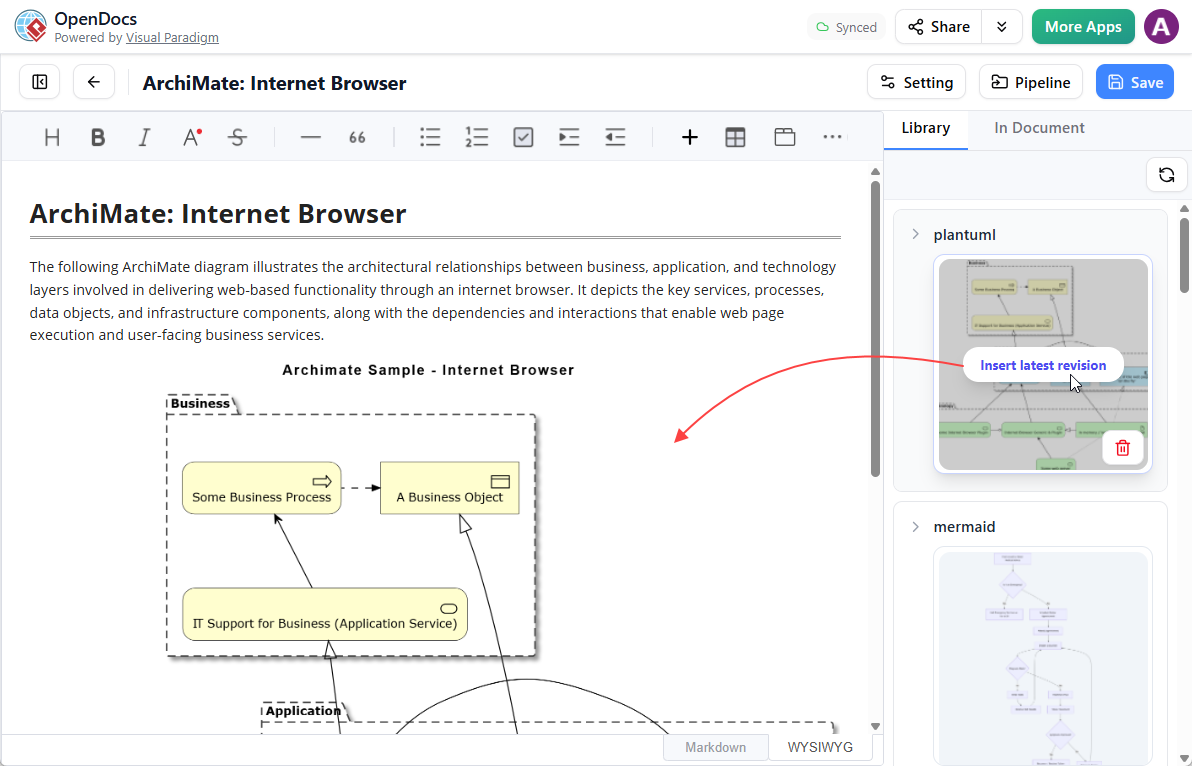
Hover over the thumbnail of your diagram inside the Pipeline pane, click the Insert button, and watch it drop perfectly into your document. From there, you can continue typing out the rest of your knowledge base page.
Need to Make a Quick Change?
If you spot an error or need to expand the diagram later, there is no need to rebuild it from scratch. Simply click the tiny Pencil button located at the top right of the inserted image inside OpenDocs. This action securely opens up the code script back inside the VPasCode editor. Modify the text syntax, rerun the pipeline steps above, and replace the old image in your documentation flawlessly.
A Recap of the VPasCode Ecosystem
If you are new to VPasCode, it provides a comprehensive, unified environment for rendering text-to-diagram syntaxes in real-time. Whether you are using a free tier or advanced AI utilities, it supports a vast catalog of visual representations:
-
PlantUML: ArchiMate, C4, Sequence, Use Case, Class, Object, Activity, Component, Deployment, State, Timing, ERD, Chen ERD, Network, WBS, and more.
-
Mermaid: Flowchart, Class, Sequence, Entity Relationship Diagram, State Diagram, Mind Map, C4, Gantt, Quadrant, Requirement Diagram, Timeline, User Journey, Git Graph, Kanban, etc.
-
Graphviz: Digraph, Graph, Flowchart, Organization Chart, Cluster, and Data Flow.
Note: Free features include real-time previewing, URL sharing, and vector/raster exports (SVG/PNG). Paid editions (Visual Paradigm Online Combo Edition or Desktop Professional Edition with active maintenance) unlock advanced core capabilities like AI code error fixing and AI translation.
Part of a Highly Integrated Visual Paradigm Ecosystem
This new pipeline is part of a broader vision to position Visual Paradigm as a highly cohesive, robust ecosystem where design and knowledge retention live hand-in-hand. OpenDocs acts as the central repository for your team’s collective intelligence, and you can pipe content into it from virtually all of your favorite Visual Paradigm platforms:
-
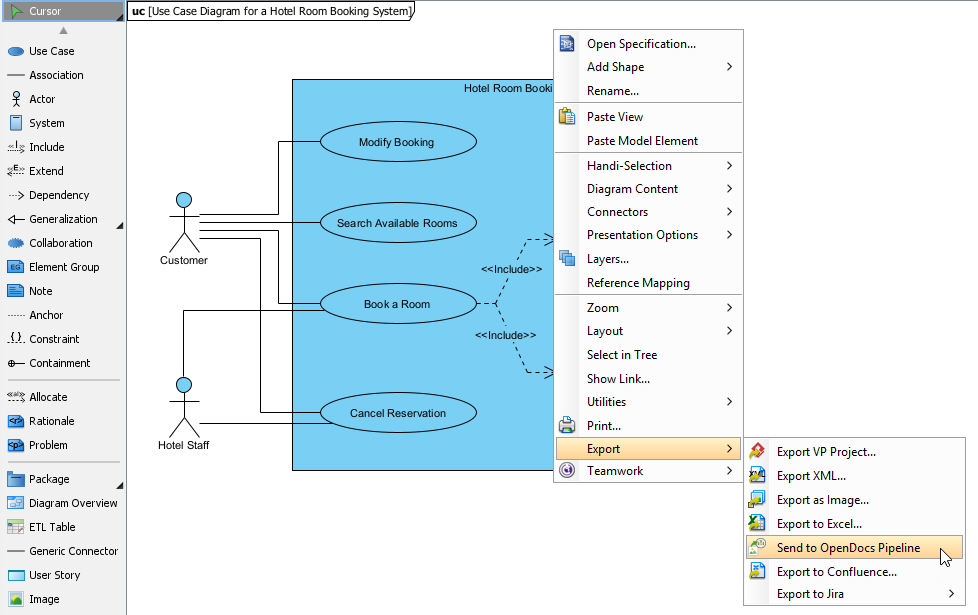
Desktop Modeling to Docs: Send your enterprise-grade blueprints from Visual Paradigm Desktop seamlessly to your documentation pipeline.
-
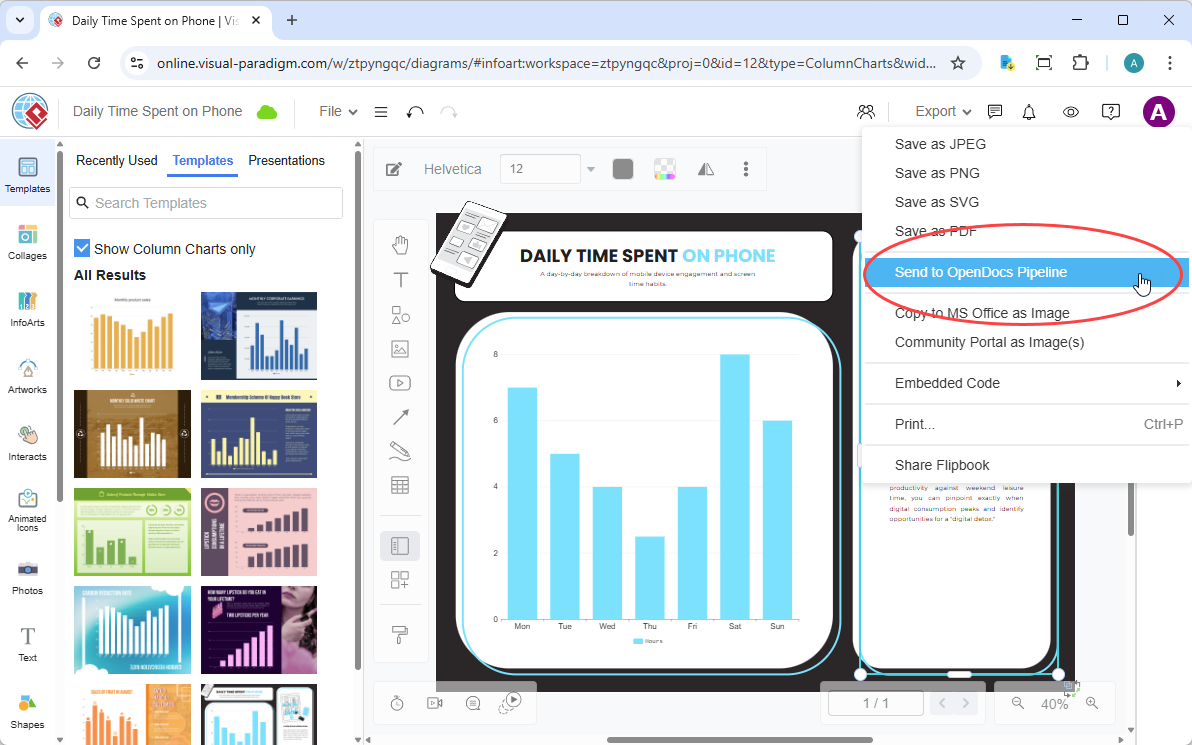
VP Online to Docs: Export your web-based cloud diagrams or structural graphs natively from Visual Paradigm Online into OpenDocs.
-
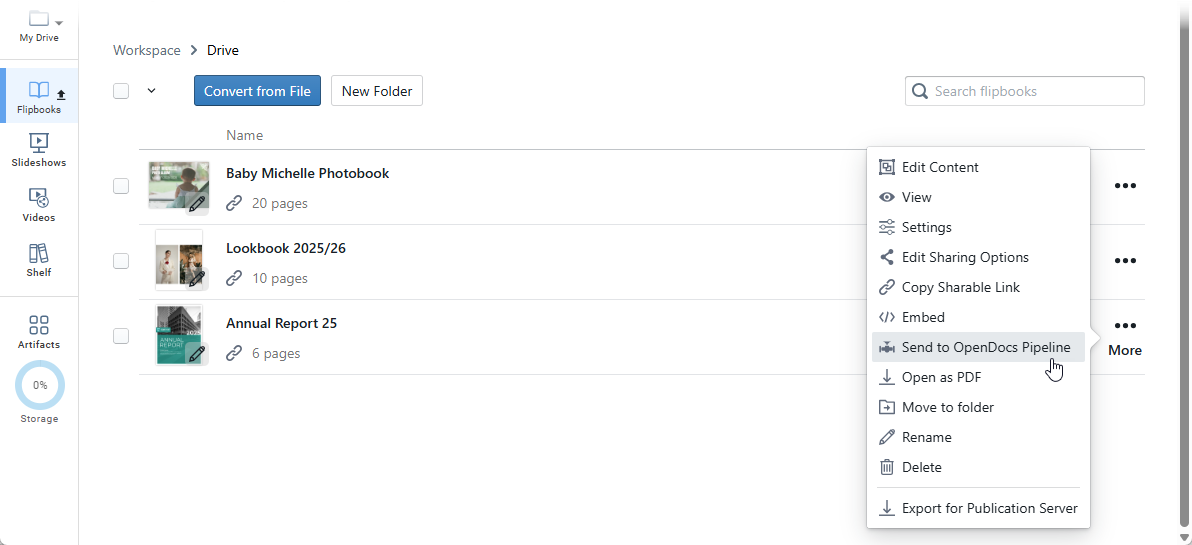
Digital Bookshelves to Docs: Embed or share interactive flipbooks and organized digital bookshelves from VP Online straight into your knowledge portals.
-
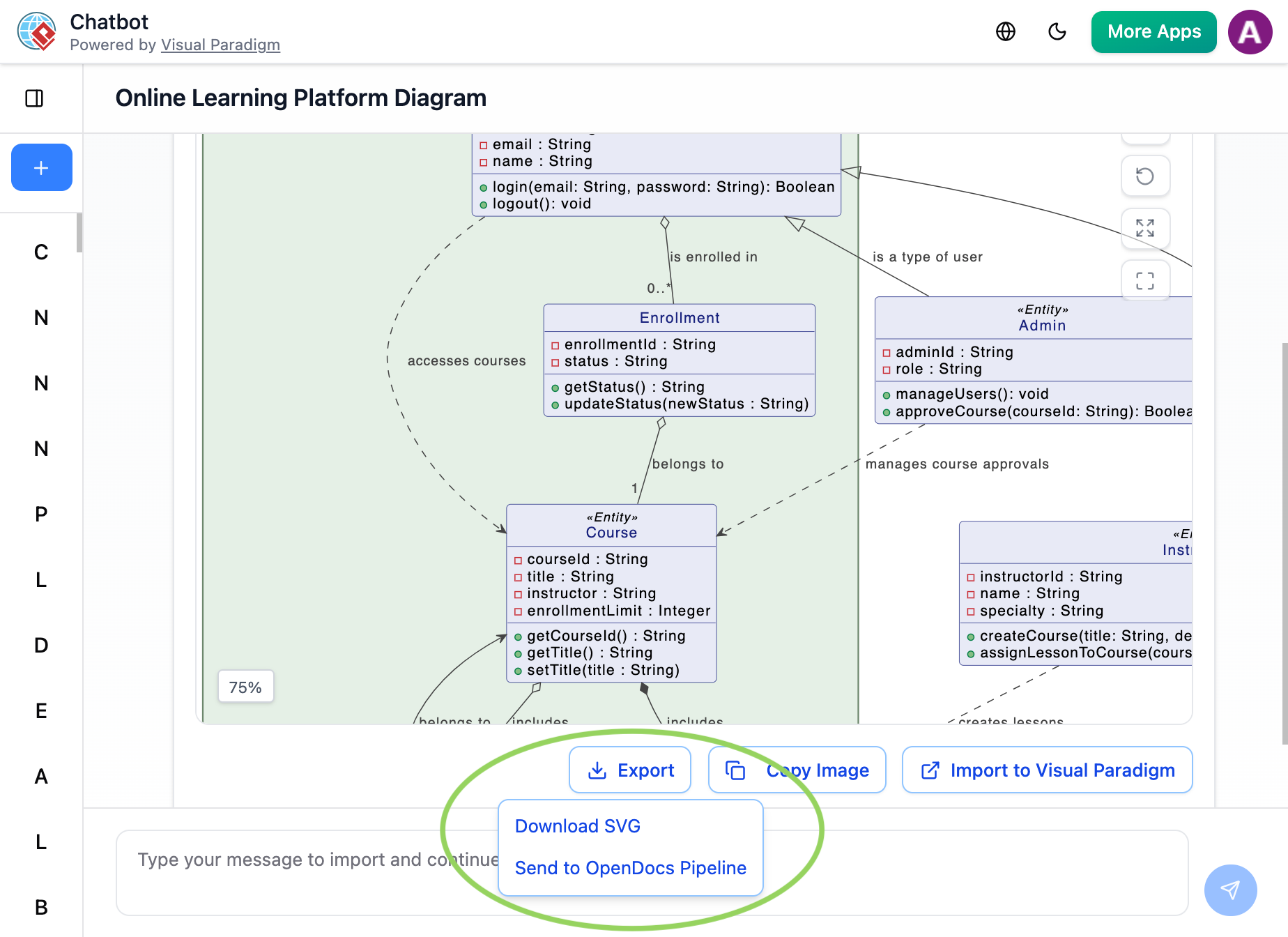
AI Chatbots to Docs: Prompt our AI system to generate a brand-new visual concept and send it directly into the OpenDocs pipeline for immediate context building.
Conclusion
The integration of VPasCode with OpenDocs is more than just a convenience feature; it’s a strategic advantage for teams aiming to maintain high-quality, up-to-date documentation. By eliminating the friction between diagram creation and documentation, Visual Paradigm has created a workflow that respects the dynamic nature of modern software development.
For Product Managers, this means clearer communication with engineering teams and more accurate specifications. For developers, it means less time managing static assets and more time focusing on code. And for technical writers, it means documentation that finally keeps pace with product evolution.
If you are looking to supercharge your technical documentation workflow, I highly recommend experiencing the unified power of text-to-diagramming and fluid knowledge management today. Visit VPasCode and set up your workspace on OpenDocs to see how this pipeline can transform your team’s productivity.
References
-
VPasCode – Text-to-Diagram Platform | PlantUML, Mermaid …: The official feature page for VPasCode detailing its core capabilities, multi-engine support, and AI-driven features.
-
Mastering VPasCode: The Ultimate Guide to AI-Powered Diagram-as-Code with Multi-Engine Support: A comprehensive guide on mastering the VPasCode platform, focusing on AI-powered diagram-as-code workflows and multi-engine support.
-
Comprehensive Guide to VPasCode by Visual Paradigm: An in-depth documentation guide covering the complete feature set and usage instructions for the VPasCode platform.
-
Introducing VPasCode: The Ultimate Unified Text-to-Diagram Platform: The official release announcement introducing VPasCode as a unified, cloud-native text-to-diagram platform.
-
Introducing Visual Paradigm 18.1: A New Era of Unified Ecosystems and AI-Driven Innovation: Release notes for Visual Paradigm 18.1 highlighting the new unified ecosystems and AI-driven innovations across the platform.
-
Introducing Visual Paradigm 18.1: A New Era of Unified Ecosystems and AI-Driven Innovation: A blog post discussing the launch of Visual Paradigm 18.1 and its focus on unified ecosystems and AI capabilities.
-
Revolutionizing Diagram Maintenance: How VPasCode’s AI Auto-Fix Eliminates Syntax Frustrations: A detailed guide explaining how the new AI auto-fix feature resolves syntax errors and streamlines diagram maintenance.
-
Visual Paradigm Online: The main web portal for accessing Visual Paradigm’s suite of online applications, including VPasCode.
-
Break Language Barriers Natively with VPasCode’s New AI Diagram Translation: Release notes introducing the AI diagram translation feature designed to support international development teams.
-
From Code to Clarity: A Beginner’s Guide to Seamless Diagramming with VPasCode and OpenDocs: A beginner-friendly guide on leveraging VPasCode and OpenDocs integration for seamless diagramming and documentation workflows.
-
VPasCode Overview: The official overview page for VPasCode, outlining its core functionalities as a text-to-diagram platform.
-
Seamlessly Connect Diagramming to Documentation: VPasCode Integrates with OpenDocs: Release notes announcing the direct integration between VPasCode and OpenDocs to streamline the diagram-to-documentation pipeline.
Related posts:
 From Concept to Cloud: A Product Manager’s Guide to Visual Paradigm’s New AI App Studio
 ERD Guide: Avoiding Common Anti-Patterns in Database Schema Design
 Visual Paradigm Community FREE Edition: Your Complete Guide to UML Modeling with AI-Powered Enhancement
 🎨 Send Your Visual Paradigm Online Creations Directly to OpenDocs