


Introduction
In the fast-paced world of software development and business analysis, clarity is currency. For years, professionals have faced a persistent dilemma: choose between the precision and version-control benefits of code-based diagramming or the visual ease of drag-and-drop tools. Often, this meant juggling multiple applications, struggling with syntax errors in isolated environments, or losing the ability to easily share dynamic documentation.
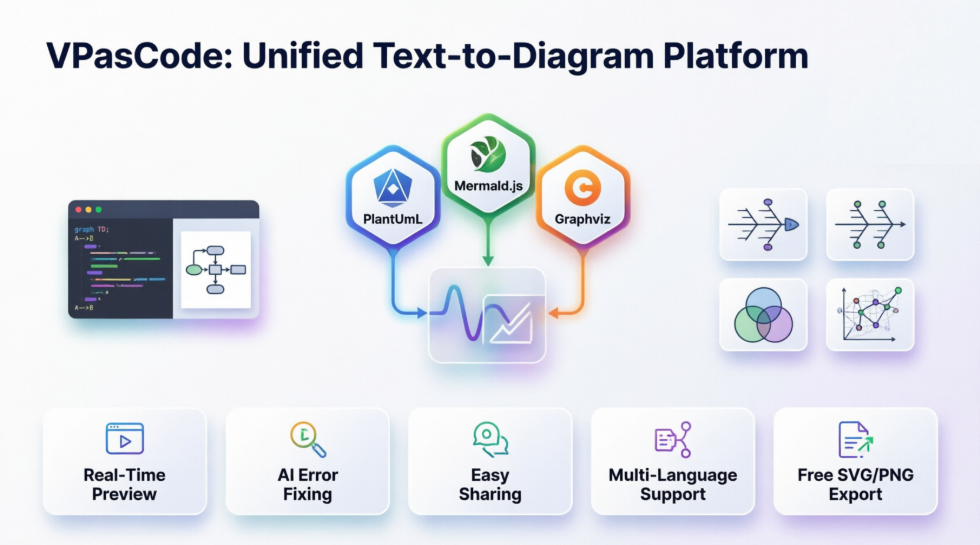
Enter VPasCode (Visual Paradigm as Code), a groundbreaking unified platform that bridges this gap. By integrating the world’s most popular open-source text-to-diagram languages—PlantUML, Mermaid.js, and Graphviz—into a single, seamless web-based environment, VPasCode transforms how teams create, share, and maintain visual documentation. This case study explores how VPasCode is redefining the workflow for engineers, architects, and product managers by turning simple text into professional, interactive diagrams instantly.
The Challenge: Fragmented Documentation Workflows
Before the advent of unified platforms like VPasCode, technical teams often struggled with fragmented toolchains. A system architect might use one tool for UML diagrams, a developer another for flowcharts, and a business analyst a third for strategic maps. This siloed approach led to several critical issues:
-
Context Switching: Moving between different applications broke focus and reduced productivity.
-
Version Control Difficulties: Binary image files from traditional diagramming tools are difficult to track in Git, making it hard to see who changed what and why.
-
Syntax Barriers: While code-based diagramming offers precision, debugging syntax errors without immediate visual feedback or AI assistance could be time-consuming and frustrating.
-
Collaboration Friction: Sharing static images via email or chat often resulted in outdated information circulating among stakeholders.
The Solution: VPasCode – A Unified Diagram-as-Code Environment
VPasCode addresses these challenges by providing an integrated environment that combines a powerful code editor with a high-performance diagram renderer. It allows users to write diagrams using familiar syntaxes and see them render in real-time. Whether you are creating complex enterprise architecture models or simple mind maps, VPasCode provides a consistent interface for all your diagramming needs.
Core Capabilities
At its heart, VPasCode supports three major diagramming engines out of the box:
-
PlantUML: Ideal for robust enterprise and software architecture diagrams, including sequence, class, and component diagrams.
-
Mermaid.js: Perfect for modern, markdown-inspired charts, timelines, and agile artifacts like Kanban boards and user journey maps.
-
Graphviz: Leveraging the DOT language for complex network structures and data flow visualizations.
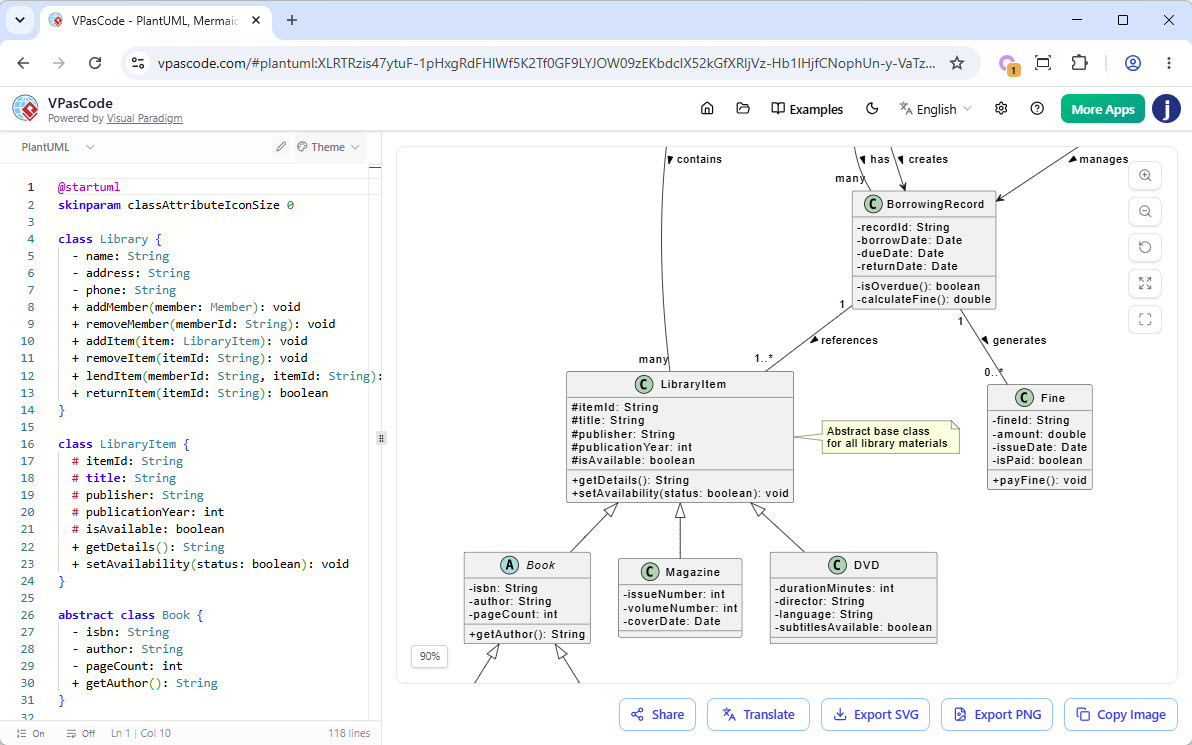
This multi-engine support means users no longer need to learn new tools for different diagram types. They can switch between syntaxes within the same editor, maintaining a single source of truth for their visual documentation.
Features That Empower Users
VPasCode is designed to be accessible to everyone, offering a robust free tier while providing advanced AI-assisted features for premium users.
Free Features
-
Multi-Engine Support: Full access to PlantUML, Mermaid.js, and Graphviz.
-
Real-Time Preview: See diagrams update instantly as you type, reducing the feedback loop.
-
Easy Sharing: Generate unique URLs to share live diagrams with teammates or clients, ensuring everyone is looking at the latest version.
-
Flexible Exports: Download diagrams as high-quality PNG images or scalable SVG vector graphics for use in presentations or documentation.
Premium AI Features
For users with Visual Paradigm Online Combo Edition or Desktop Professional Edition (with active maintenance), VPasCode offers groundbreaking AI capabilities:
-
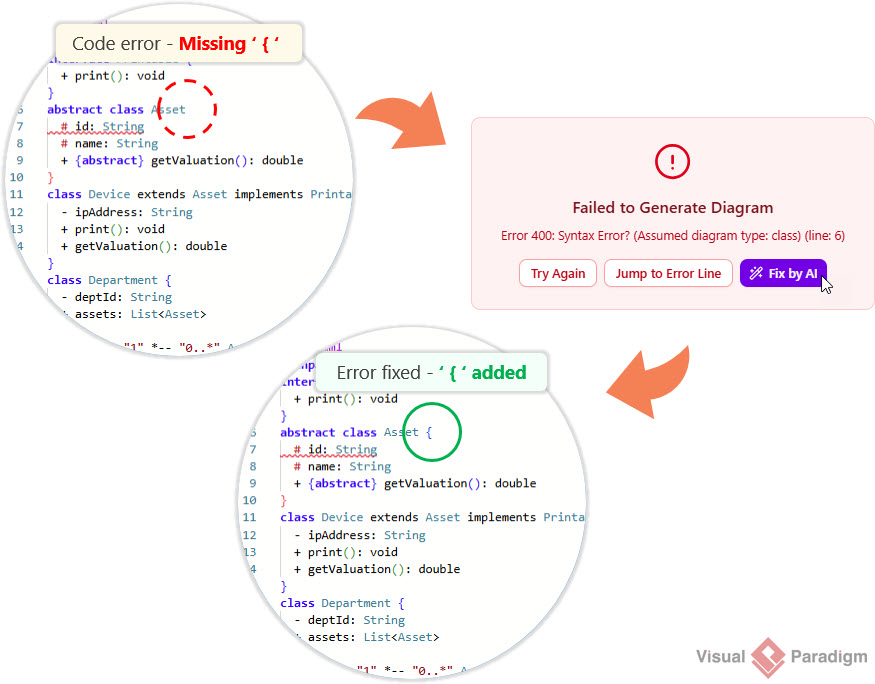
AI Code Error Fixing: Stuck on a syntax error? The built-in AI analyzes your code and fixes errors automatically, saving time and reducing frustration.
-
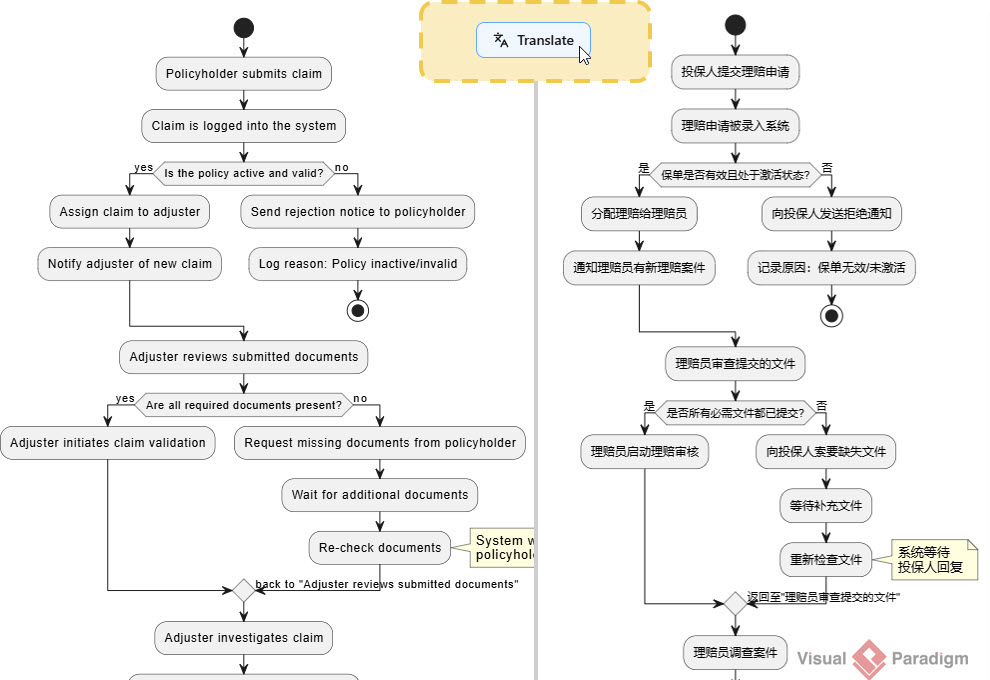
AI Translation: Break language barriers by seamlessly translating text and labels within diagrams into multiple languages with a single click. This feature is invaluable for global teams working on multinational projects.
Impact on Teams and Workflows
The adoption of VPasCode has significant implications for various roles within an organization:
-
Software Engineers: Can keep diagram definitions close to their codebase, enabling better version control and easier updates.
-
System Architects: Benefit from the ability to create complex architecture diagrams using standardized notations like C4 models and ArchiMate, all within a single tool.
-
Product Managers: Can quickly create user journey maps, Kanban boards, and strategic Wardley Maps to communicate vision and strategy effectively.
-
Business Analysts: Use Ishikawa and Venn diagrams to facilitate root cause analysis and requirement gathering sessions.
By unifying these capabilities, VPasCode reduces the learning curve for new team members and ensures consistency across all visual documentation.
Expanding Horizons: New Mermaid Diagram Types
Visual Paradigm has recently expanded VPasCode’s capabilities by adding support for four advanced Mermaid diagram types: Ishikawa, Event Modeling, Venn, and Wardley Maps. These additions cater to specific needs in quality management, system design, logical analysis, and strategic planning.
1. Ishikawa (Fishbone) Diagrams for Root Cause Analysis
Ishikawa diagrams are essential for quality management and problem-solving sessions. They help teams visualize the potential causes of a specific problem, organized into categories.
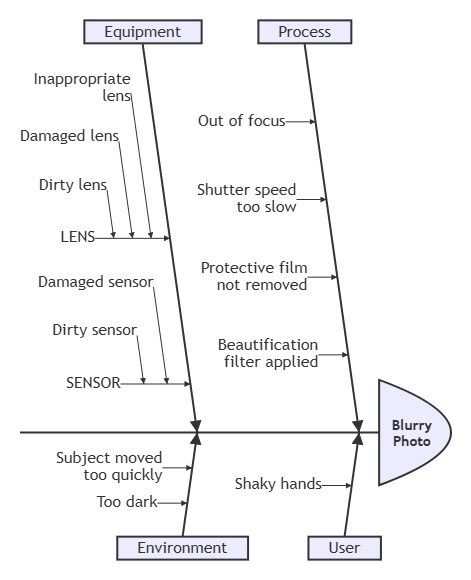
With VPasCode, creating these diagrams is straightforward. Users define the problem statement and then list causes under hierarchical branches. For example, analyzing a “Blurry Photo” issue can involve categorizing causes under Process, User, Equipment, and Environment. The intuitive indentation-based syntax makes it easy to structure complex cause-and-effect relationships without getting bogged down in formatting details.
Conclusion
VPasCode represents a significant leap forward in the realm of diagram-as-code tools. By combining the power of PlantUML, Mermaid.js, and Graphviz with an intuitive interface and advanced AI features, it offers a comprehensive solution for modern documentation needs. Whether you are troubleshooting a production issue with a Fishbone diagram, mapping out a new feature with Event Modeling, or strategizing with Wardley Maps, VPasCode provides the tools you need to succeed.
As organizations continue to embrace agile methodologies and remote collaboration, the demand for clear, accessible, and version-controlled visual documentation will only grow. VPasCode is well-positioned to meet this demand, empowering teams to create beautiful, professional diagrams in seconds. With its continuous expansion of supported diagram types and AI-driven enhancements, VPasCode is not just a tool; it is a partner in your journey towards clearer communication and more efficient workflows.
To experience the power of VPasCode firsthand, visit https://www.vpascode.com/editor/ and start creating your first diagram today. No credit card is required, and no installation is needed—just your browser and your ideas.
Reference
- Comprehensive Guide to VPasCode by Visual Paradigm: A detailed overview of VPasCode features, including syntax handling and AI integration.
- Introducing VPasCode: The Ultimate Unified Text-to-Diagram Platform: Official release notes introducing VPasCode and its core capabilities.
- Clarity by Design: Streamlining Infrastructure Documentation with VPasCode and Graphviz: A guide on using VPasCode for infrastructure documentation with Graphviz support.
- Mastering VPasCode: The Ultimate Guide to AI-Powered Diagram as Code with Multi-Engine Support: An advanced guide covering AI features and multi-engine support in VPasCode.
- How the Visual Paradigm AI Chatbot and VPasCode Function as an Integrated Ecosystem for Diagramming: Insights into the integration between VPasCode and Visual Paradigm’s AI chatbot.
- VPasCode Features Overview: A summary of key features offered by VPasCode.
- Break Language Barriers Natively with VPasCode’s New AI Diagram Translation: Release notes on AI-driven diagram translation capabilities.
- Case Study: Accelerating Software Architecture Documentation with VPasCode – A Diagram as Code Revolution: A real-world case study demonstrating the impact of VPasCode on software architecture documentation.
Related posts:
 From Frustration to Fluency: How VPasCode’s Transparent AI Transforms Diagram-as-Code Workflows
How to Use Visual Paradigm’s AI Chatbot to Generate and Refine Component Diagrams
From Frustration to Fluency: How VPasCode’s Transparent AI Transforms Diagram-as-Code Workflows
How to Use Visual Paradigm’s AI Chatbot to Generate and Refine Component Diagrams
 AI-Powered SysML Requirement Diagrams: A Modern Approach to Systems Engineering
 A Practitioner’s Review of Visual Paradigm Pipeline’s “Concept-to-Docs” Revolution