
VP OpenDocs: Mastering Live Embedding for Dynamic Process Visualization
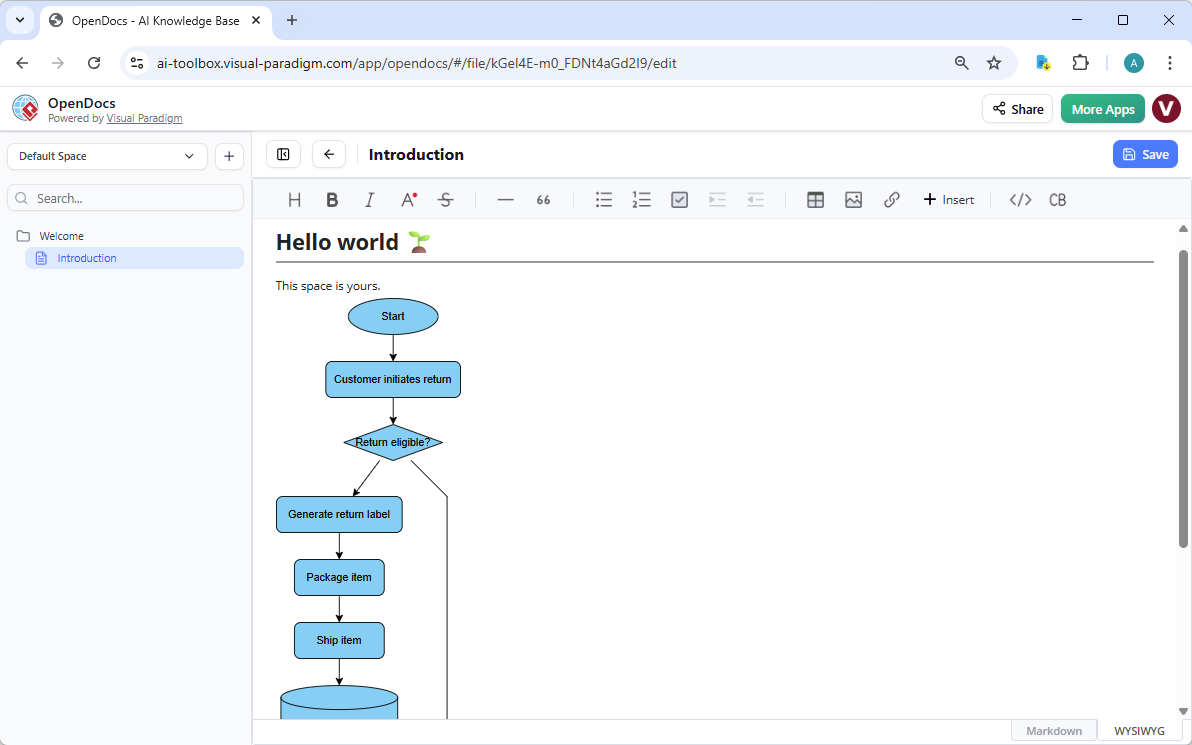
In the rapidly evolving landscape of technical documentation, static images and PDFs are no longer sufficient. Today’s agile teams require documentation that breathes, evolves, and integrates directly into the workflow. Visual Paradigm OpenDocs has revolutionized this space with its Live Embedding capability. This tutorial explores how to leverage this technology to create “living” documents, using the Customer Return Process flowchart shown in our interface as a prime example.
What is Live Embedding?
Traditionally, when you created a process diagram in a tool like Visual Paradigm, you would export it as an image (PNG, JPG) or a static PDF. If a process changed later, you would have to recreate the image, update the file, and re-upload it to your documentation platform. The documentation would then be “stale.”
Live Embedding changes this paradigm entirely. It allows the flowchart to exist as an editable visual block directly within the document editor. This means the diagram is not just a picture; it is a functional, interactive component of the document itself. The “Supplementary note” in our context emphasizes Visual Paradigm OpenDocs: Creating living life documents, highlighting that the documentation stays as current as your processes.
Step-by-Step: Building the Customer Return Process
Let’s break down the specific process diagram visible in the screenshot to understand the modeling concepts at play. This is a classic Flowchart used to map out a business logic sequence.
1. The Starting Point
The diagram begins with an Ellipse shape labeled Start. In standard flowcharting conventions, this symbolizes the entry point of the process. It is the trigger that initiates the workflow.
2. The Process Action
The arrow leads to a Rectangle labeled Customer initiates return. This represents a specific process step or action taken by an entity (the customer). In modeling terms, this is the first transformation of data or state within the system.
3. The Decision Logic (Diamond)
Next, we encounter a Diamond shape labeled Return eligible?. This is the most critical part of any process logic. It represents a decision point where the flow branches based on a condition (Yes/No, True/False).
- Path A (Yes): If the return is eligible, the flow proceeds downwards to generate a label.
- Path B (No): If the return is not eligible, the flow branches to the right, presumably to an end state or a rejection notification (though the full path is cut off, the logic implies a divergence).
4. The Sequential Workflow
Following the “Yes” path, the diagram outlines a linear sequence of operations:
- Generate return label: The system creates the necessary documentation for the logistics provider.
- Package item: The physical handling of the product.
- Ship item: The final handover to the logistics channel.
5. Data Persistence
The process concludes at a Cylinder shape. In standard diagramming syntax, a cylinder represents a Database or data repository. This indicates that the status of the return process is being recorded and stored for future reference, audit trails, or customer service queries.
The Power of Collaborative Refinement
The true value of OpenDocs lies in the “Team members can refine it collaboratively” aspect mentioned in the context. In a standard static diagram, a developer might have to ask a business analyst to update a flow. In OpenDocs:
- Direct Editing: Team members can click on the block and edit the text or add new shapes directly within the document view.
- Real-time Sync: There is no “export/import” lag. If a developer changes the “Ship item” step to “Ship via Drone,” the document updates instantly.
- Single Source of Truth: The documentation is the diagram. There is no confusion between the design file and the documentation file.
Technical Implementation
While the interface provides a WYSIWYG (What You See Is What You Get) experience, understanding the underlying structure helps in managing the system architecture. OpenDocs utilizes a JSON-based structure to store the diagram data, ensuring that the visual block is lightweight yet fully editable.
Below is a conceptual representation of how the logic of our “Return Eligible” decision might be structured in code (similar to JSON or a flow definition language) to illustrate the data behind the visual:
{
  "flowchart": {
    "id": "return-process-01",
    "nodes": [
      { "id": "start", "type": "ellipse", "label": "Start" },
      { "id": "init-return", "type": "process", "label": "Customer initiates return" },
      { "id": "check-eligibility", "type": "decision", "label": "Return eligible?" },
      { "id": "generate-label", "type": "process", "label": "Generate return label" },
      { "id": "package-item", "type": "process", "label": "Package item" },
      { "id": "ship-item", "type": "process", "label": "Ship item" },
      { "id": "db-record", "type": "database", "label": "Record in DB" }
    ],
    "edges": [
      { "from": "start", "to": "init-return" },
      { "from": "init-return", "to": "check-eligibility" },
      { "from": "check-eligibility", "to": "generate-label", "condition": "true" },
      { "from": "generate-label", "to": "package-item" },
      { "from": "package-item", "to": "ship-item" },
      { "from": "ship-item", "to": "db-record" }
    ]
  }
}Conclusion
By integrating Visual Paradigm into your documentation workflow via OpenDocs, you transform your documentation from a passive repository of information into an active tool for process management. The “Customer Return” flowchart in our example is not just a picture; it is a living representation of your business logic, ready to be refined and updated by your entire team.