
Unified AI Workspace: Bridge NotesKeep and Visual Paradigm for System Modeling
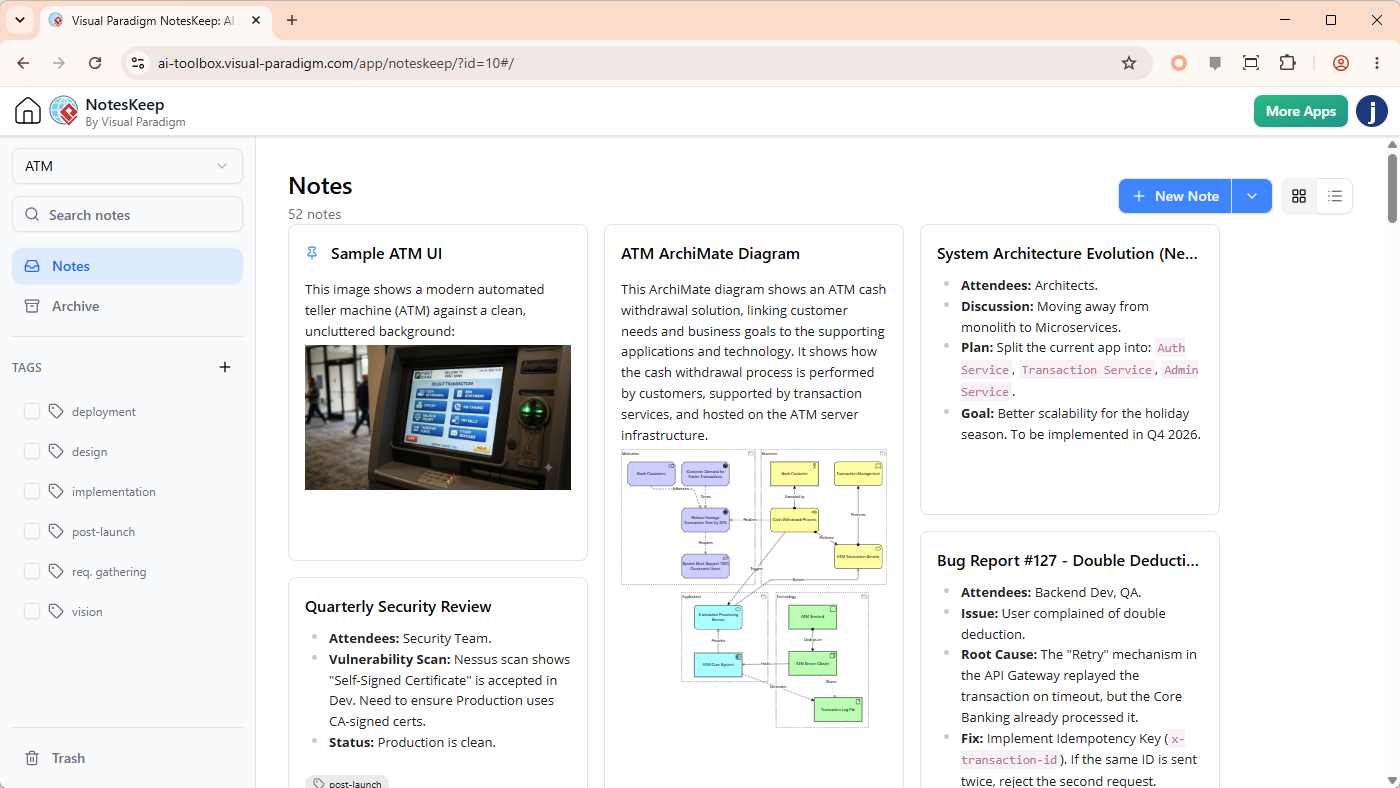
In the modern software development lifecycle (SDLC), the friction between documentation and modeling is often the biggest bottleneck. Developers write requirements in text editors, while architects create diagrams in specialized tools. Visual Paradigm’s NotesKeep ecosystem solves this by acting as a centralized knowledge hub that bridges the gap between unstructured text and structured visual models.
This tutorial explores how to leverage the NotesKeep interface shown in the system architecture diagram to organize knowledge, apply multi-dimensional tagging, and seamlessly integrate this data into the Visual Paradigm AI Chatbot for automated diagram generation.
1. Structuring Knowledge in the Workspace
The foundation of an effective AI-assisted workflow is organized input. The screenshot of the NotesKeep interface reveals a robust card-based layout designed for high-density information retention. Instead of scattered files, the system encourages the creation of specific project workspaces.
When setting up your environment, you should focus on two primary areas:
- Rich-Text Content & Import: The system supports multi-format ingestion. You can upload Microsoft Word (.docx), PDF documents, Markdown (.md) files, and even Excel spreadsheets directly into a project. This is critical for bringing legacy documentation or existing specs into the AI environment without manual re-typing.
- Visual Evidence: As seen in the “Sample ATM UI” card, the platform allows you to embed images directly alongside text. This context is vital for AI models that can analyze UI mockups to generate corresponding User Stories or Use Case diagrams.
2. The Power of Multi-Dimensional Tagging
The sidebar in the interface highlights the system’s reliance on a robust tagging mechanism. This is not merely for organization; it is the key to filtering the AI’s context window.
By applying tags such as #architecture, #requirements, or #deployment, you create a semantic layer over your data. The AI Chatbot uses these tags to understand the scope of your request. For example, if you ask the AI to “Generate an architecture diagram,” it looks specifically for notes tagged with #architecture, ensuring the generated output aligns with your specific architectural patterns rather than general business processes.
3. From Text to Diagram: The AI Workflow
The core value proposition of this ecosystem is the transformation of static notes into dynamic models. The “ATM ArchiMate Diagram” card in the interface demonstrates the output of this process. Here is how the system works logically:
- Context Aggregation: The AI scans your workspace for specific notes. It identifies the “ATM ArchiMate Diagram” note which describes a solution linking customer needs to business goals.
- Entity Extraction: The AI parses the text to identify key actors (e.g., “Bank Customers”, “ATM Transaction Service”) and their relationships.
- Model Generation: Using the extracted entities, the AI constructs a formal diagram (such as an ArchiMate diagram) that visualizes the flow of transactions and system dependencies.
This workflow effectively turns a text-based bug report or a simple architectural note into a professional-grade technical diagram in seconds.
4. Managing System Evolution and Decisions
Beyond static modeling, NotesKeep serves as a living repository for architectural decisions. The “System Architecture Evolution” card in the interface illustrates how teams can document strategic shifts.
This specific note details a migration plan: “Moving away from monolith to Microservices.” It lists key attendees, the plan (splitting into Auth, Transaction, and Admin services), and a strategic goal (better scalability). When connected to the AI, this note allows the system to generate future-state diagrams that reflect the target microservices architecture, rather than just documenting the current monolithic state.
5. Technical Implementation and Best Practices
To maximize the utility of the Visual Paradigm AI Ecosystem, ensure your notes follow a structured format. The AI thrives on clear entity definitions and relationship descriptions. When writing notes intended for diagram generation, use a format that explicitly defines the source and target of interactions.
For example, when documenting a bug report like “Double Deduction,” ensure you clearly state the technical root cause (e.g., “Retry mechanism replayed transaction”) so the AI can generate a deployment diagram showing the API Gateway and the Idempotency Key logic required to fix the issue.
By mastering the organization of NotesKeep, you transform a chaotic collection of requirements and diagrams into a cohesive, AI-ready knowledge base.