
From Student to Architect: A Guide to Visual Paradigm Editions and Modeling Standards
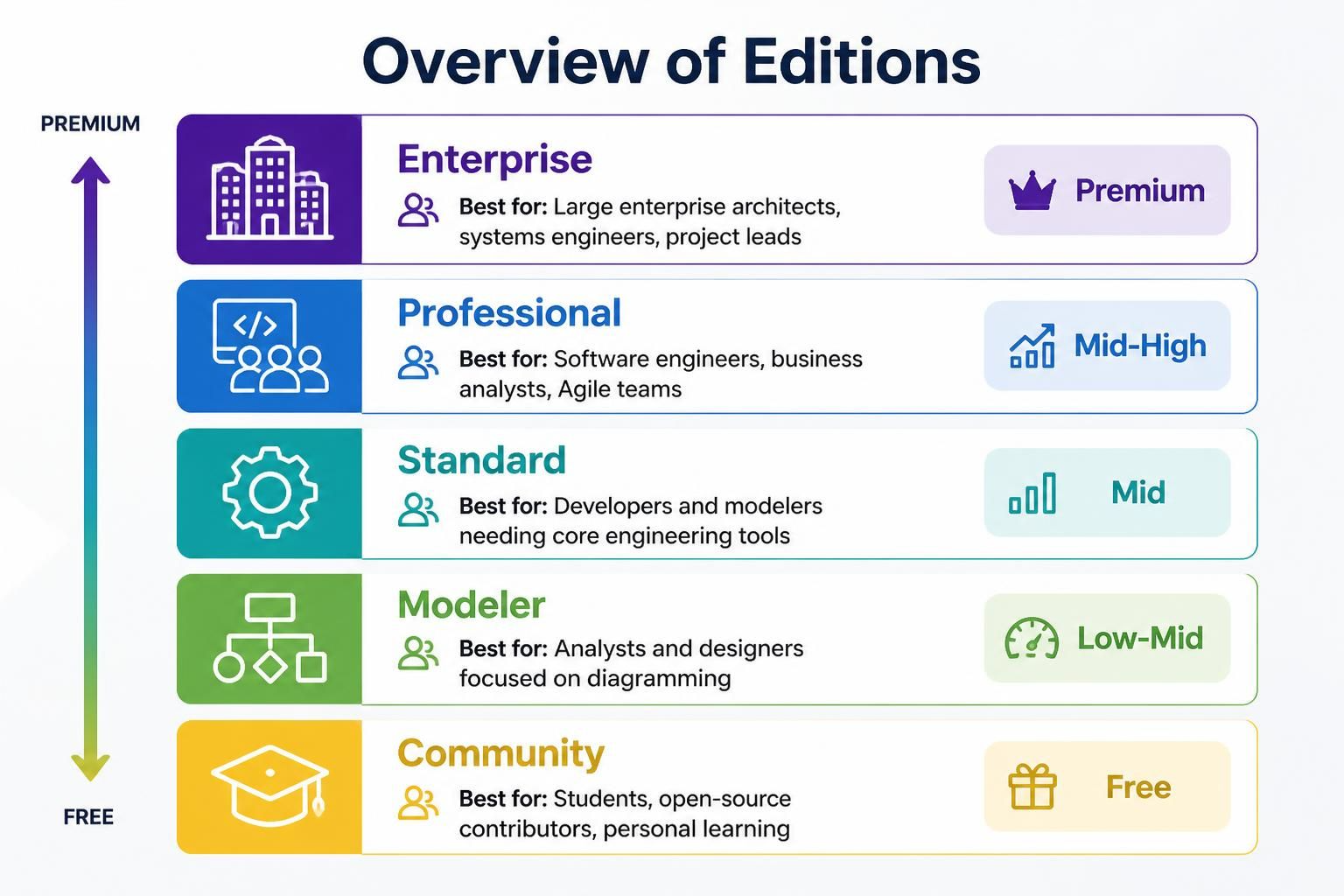
Visual Paradigm is a powerful modeling tool used across the software development lifecycle, but navigating its various editions can be daunting. Whether you are a student learning the ropes of UML, a software engineer generating Java code, or an enterprise architect designing a massive system using TOGAF, there is a specific version of the tool tailored for your needs. This tutorial breaks down the five main editions—Community, Modeler, Standard, Professional, and Enterprise—explaining the capabilities, limitations, and ideal use cases for each.
1. Community Edition: The Gateway to Modeling
Designed primarily for students, hobbyists, and those new to systems engineering, the Community Edition serves as a free entry point into the world of visual modeling. It allows users to experience the core capabilities of Visual Paradigm without a financial commitment.
- Best For: Students, open-source contributors, and individuals on a budget.
- Key Capabilities: Access to basic UML, SysML, and ERD tools. It is perfect for mastering modeling concepts and creating diagrams for academic projects.
- Limitations: The most significant constraint is the watermark. All exported diagrams will include a single-lined watermark, making it unsuitable for commercial or professional client delivery. It also lacks advanced engineering features like code generation.
How to Start with Community Edition
If you are a student working on a software engineering project, you can use this edition to create UML diagrams to model your system’s architecture. For example, you might design a Class Diagram to visualize the structure of your code or a Sequence Diagram to map out user interactions.
2. Modeler Edition: Focus on Visualization
For business analysts and system designers who need to create clear visual documentation without the overhead of complex engineering tasks, the Modeler Edition is the ideal choice. This edition bridges the gap between free tools and full engineering suites.
- Best For: Analysts and designers focused purely on diagramming.
- Key Capabilities: It includes essential modeling languages (UML & SysML), ERD support for database design, and Online Editing capabilities. It also features IDE Integration, allowing you to connect with popular development environments.
- What’s Excluded: This edition does not support advanced code and database engineering (generation/reverse-engineering), BPMN, DFD, or team collaboration features.
Use Case: Database Schema Visualization
If your primary goal is to document a database schema or create high-level system architecture diagrams for a presentation, the Modeler Edition provides the necessary visual tools without requiring you to manage complex code generation workflows.
3. Standard Edition: Core Engineering for Developers
The Standard Edition is built for developers who need core engineering capabilities. It removes the watermarks of the Community edition and adds robust code and database engineering features, making it a strong choice for individual developers or small teams.
- Best For: Developers needing core engineering capabilities and modelers who don’t require full Agile project management tools.
- Key Capabilities: Complete Unified Modeling Language (UML) support, Code & Database Engineering (generate and reverse-engineer code), BPMN & DFD for business processes, and basic team sharing.
- What’s Excluded: It lacks the advanced collaboration features of higher editions and does not support enterprise architecture frameworks like TOGAF or DoDAF.
Engineering Workflow
In the Standard Edition, you can reverse-engineer an existing codebase into a UML Class Diagram to understand legacy systems, or generate Java or C++ code directly from your UML models. This bidirectional flow is essential for maintaining consistency between design and implementation.
4. Professional Edition: Agile & Full Software Engineering
The Professional Edition is the sweet spot for software engineers and Agile development teams. It adds comprehensive UI wireframing and Scrum canvases to the engineering suite, making it a complete tool for software development projects.
- Best For: Software engineers, business analysts, and Agile development teams.
- Key Capabilities: Includes everything in the Standard Edition plus UI Wireframing for design mockups and Scrum Canvases for Agile project management. It supports full UML, SysML, and ERD modeling.
- What’s Excluded: Full enterprise architecture frameworks (TOGAF, DoDAF, ArchiMate) are still not included in this tier.
Integrating Agile and Design
This edition allows teams to practice Scrum methodologies directly within the modeling environment. You can manage user stories, sprints, and tasks while simultaneously designing the UI wireframes and database schemas for the features being developed.
5. Enterprise Edition: The Ultimate Architectural Suite
Designed for large enterprise architects and systems engineers managing complex organizational frameworks, the Enterprise Edition is the most comprehensive version. It supports the full spectrum of industry-standard frameworks.
- Best For: Large enterprise architects, systems engineers, and project leads.
- Key Features: Complete support for TOGAF, DoDAF, NAF, MODAF, and ArchiMate frameworks. It includes AI-Powered Business Tools, advanced collaboration, and a full engineering suite.
- Ideal Use Cases: Organizations implementing enterprise architecture frameworks, large-scale system design, and complex business process modeling.
Enterprise Architecture Standards
In large organizations, consistency across different departments is crucial. The Enterprise Edition ensures that all stakeholders—from business analysts to IT architects—can work within the same framework (e.g., TOGAF), ensuring that business goals align perfectly with technical implementation.
Quick Comparison Table
To help you decide which edition fits your workflow, review the following comparison of key capabilities.
| Feature / Capability | Enterprise | Professional | Standard | Modeler | Community |
|---|---|---|---|---|---|
| Core UML, SysML, ERD | ✅ Yes | ✅ Yes | ✅ Yes | ✅ Yes | ✅ Yes (Watermarked) |
| BPMN & DFD | ✅ Yes | ✅ Yes | ✅ Yes | ✅ Yes | ❌ No |
| Code & Database Engineering | ✅ Yes | ✅ Yes | ✅ Yes | ❌ No | ❌ No |
| Team Collaboration & Wireframing | ✅ Yes | ✅ Yes | ✅ Yes | ❌ No | ❌ No |
| Scrum Canvas & PM Guides | ✅ Yes | ✅ Yes | ✅ Yes | ❌ No | ❌ No |
| AI-Powered Business Tools | ✅ Yes | ✅ Yes | ❌ No | ❌ No | ❌ No |
| TOGAF, DoDAF & ArchiMate | ✅ Yes | ❌ No | ❌ No | ❌ No | ❌ No |
| Price | Premium | Mid-High | Mid | Low-Mid | Free |
Conclusion
Choosing the right edition of Visual Paradigm depends on your specific role and the complexity of your projects. Whether you are a student learning the fundamentals or an enterprise architect managing a global system, understanding the feature set of each edition ensures you can work efficiently and effectively.