
Mastery of BPMN 2.0: Architecting Executable Business Processes with Visual Paradigm
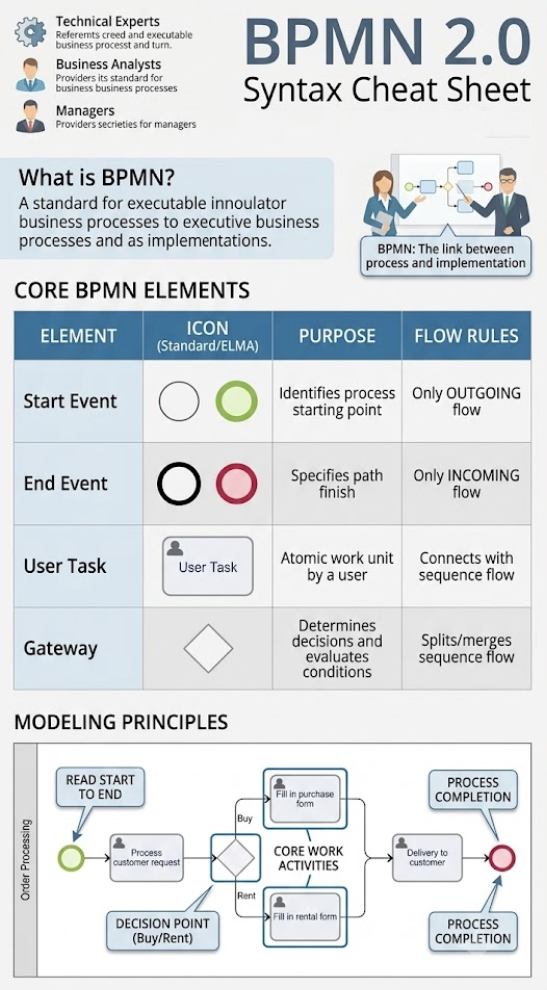
Welcome to the definitive guide on Business Process Model and Notation (BPMN) 2.0. Whether you are a technical expert defining executable logic or a business analyst mapping out a vision, BPMN serves as the universal “lingua franca” of process management. In this tutorial, we will deconstruct the core syntax, explore the logical rules of flow, and demonstrate how to implement these concepts using Visual Paradigm.
Understanding the BPMN Ecosystem
BPMN is not merely a drawing tool; it is a standard for executable business processes. It bridges the gap between abstract business requirements and the technical implementation details. By standardizing notation, it ensures that a process designed by a business user can be understood, simulated, and even automated by a developer without ambiguity.
Who is this for?
- Technical Experts: Refer to this syntax to build executable, rule-based business processes.
- Business Analysts: Use this to provide a clear, standard representation of business operations.
- Managers: Leverage the high-level view to understand process efficiency and decision points.
The Four Pillars of BPMN: Core Elements
To construct any valid BPMN diagram, you must master the four fundamental building blocks. These are the “atoms” of your process model.
1. Events (The “What Happens”)
Events are depicted by circles and represent things that occur during the process. They are passive; they do not do work themselves, but rather trigger or result from work.
- Start Event: The trigger that initiates the process (e.g., a customer request).
- End Event: The termination of the process (e.g., order fulfillment).
- Intermediate Event: Something that happens in the middle of the flow.
2. Activities (The “Work”)
Activities are the actual work performed within the process. They are represented by rounded rectangles.
- Tasks: The smallest unit of work (atomic). For example, “Read Start to End” or “Fill in purchase form.”
- Sub-Processes: A grouping of tasks that can be collapsed for simplicity or expanded for detail.
3. Gateways (The “Decisions”)
Gateways are diamonds used to control the divergence (splitting) and convergence (merging) of flows. They determine the path the process takes based on conditions.
- Exclusive Gateway (XOR): A decision point where only one path is taken (e.g., Buy OR Rent).
- Parallel Gateway (AND): A split or merge where all paths are executed simultaneously.
4. Flow Objects (The “Connections”)
These connect the elements together.
- Sequence Flow: Solid arrows showing the order of activities.
- Message Flow: Dashed arrows showing communication between different participants (swimlanes).
Modeling Principles: The Order Processing Example
Let’s apply these concepts to a real-world scenario: Order Processing. Imagine a workflow where a customer requests an order, and the system must decide how to handle it.
Step 1: Defining the Entry and Exit
Every process needs a clear start and finish. We begin with a Start Event (green circle) and end with an End Event (red circle). This establishes the lifecycle of the process instance.
Step 2: The Core Work
The process moves to a User Task labeled “Process customer request.” This is an atomic work unit assigned to a human actor. From here, the flow must branch based on the nature of the request.
Step 3: The Decision Point (Gateway)
We introduce a Gateway to evaluate the request. This is a critical modeling decision. The diagram shows a split into two distinct paths:
- Buy: The user fills in a Purchase Form.
- Rent: The user fills in a Rental Form.
After the forms are completed, the flows must converge back to a single path before proceeding to delivery. This ensures that regardless of the choice (Buy or Rent), the next step is consistent.
Step 4: Convergence and Completion
The process concludes with a “Delivery to customer” task, followed by a “Process Completion” End Event. This structure ensures that the business logic is sound: all paths eventually lead to a successful closure.
Tooling: Visual Paradigm
To effectively model these complex diagrams, you need robust software. For this tutorial, we utilize Visual Paradigm.
Visual Paradigm is the industry-standard tool for BPMN 2.0 modeling. It allows you to:
- Drag-and-Drop Modeling: Easily place Start Events, Tasks, and Gateways onto the canvas.
- Validation: The tool automatically checks for syntax errors, such as a Start Event having an incoming flow (which is invalid).
- Executable Logic: Unlike basic drawing tools, Visual Paradigm allows you to define the actual business rules that drive the gateways, making the diagram executable.
Summary of Flow Rules
To maintain a clean and valid model, adhere to these strict rules:
- Start Event: Can ONLY have outgoing flows. It cannot be the target of another flow.
- End Event: Can ONLY have incoming flows. It cannot trigger further work.
- Tasks: Must be connected by sequence flows to represent the logical progression of work.
By mastering these elements and utilizing Visual Paradigm, you transform abstract ideas into a structured, executable blueprint for your organization’s success.