
Mastering the VP Unified Platform: Centralized Cloud Drive & AI Synergy
In the modern era of software development and enterprise architecture, one of the most significant challenges is the fragmentation of information. Teams often find themselves switching between desktop modeling tools, cloud-based document editors, and web-based diagramming studios. This fragmentation creates “data silos,” where artifacts created in one application are invisible to others.
This tutorial explores the architecture of the Visual Paradigm Unified Platform. By leveraging the synergy between the Visual Paradigm Desktop ecosystem and the Cloud Platform, we will demystify how this system acts as a single source of truth, enabling true Desktop-Web interoperability.
1. The Architecture of a Unified Cloud Drive
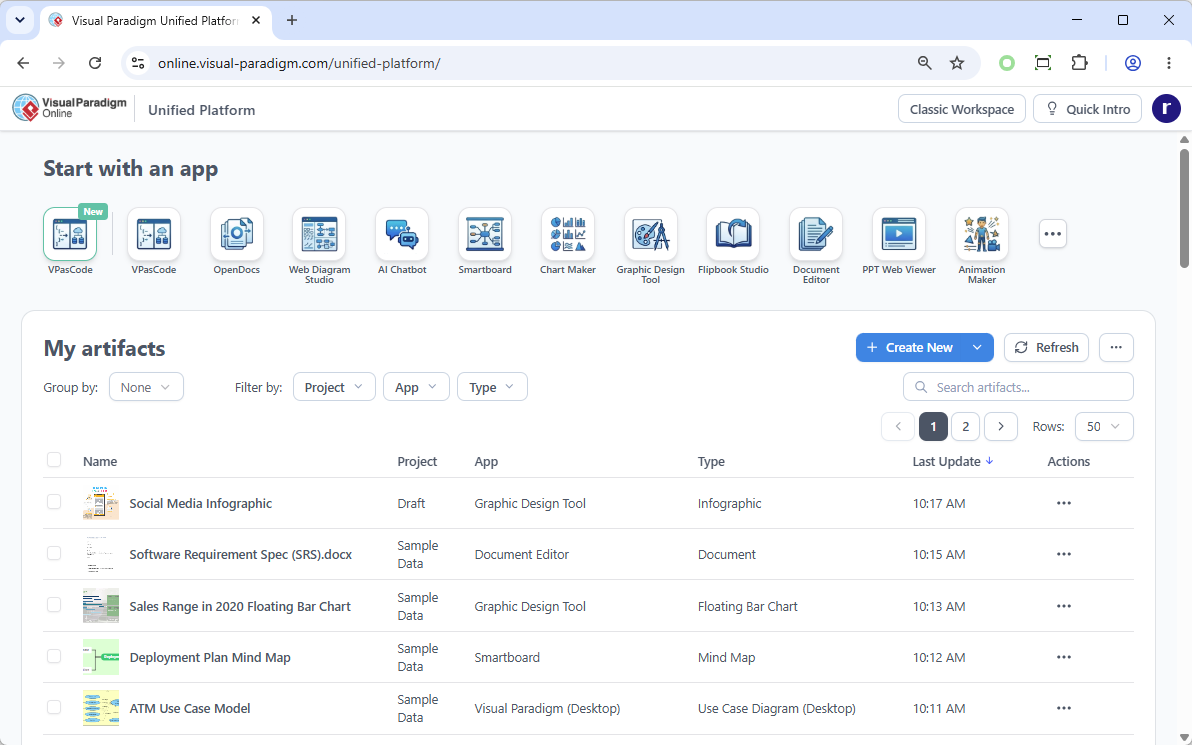
The core concept presented in the interface is the Centralized Cloud Drive. Rather than treating the web interface as a separate entity from your desktop software, the Unified Platform functions as a file system aggregation layer. It indexes artifacts regardless of where they were originally created.
Understanding the “Single Source of Truth”
When you view the “My artifacts” dashboard, you are not seeing a simple list of files stored in a cloud bucket. You are seeing a logical view of your entire project ecosystem. This architecture ensures that:
- Visibility: Artifacts created in the Visual Paradigm Desktop (e.g., a Use Case Diagram) are immediately visible in the cloud interface.
- Accessibility: Documents created in the Document Editor are accessible alongside complex system models.
- Consistency: You eliminate the need to manually sync folders or email attachments. The platform manages the linking between the project data and the visual representation.
2. Navigating the VP Ecosystem via the Unified Interface
The interface shown is a gateway to the vast Visual Paradigm (VP) ecosystem. The “Start with an app” section is not merely a launcher; it represents a modular architecture where different tools serve specific modeling needs while sharing the same underlying project data.
Key Applications in the Unified Ecosystem
By analyzing the icons available in the “Start with an app” row, we can categorize the platform’s capabilities into three distinct modeling layers:
- Architectural & System Modeling:
- VPasCode: A powerful tool for generating diagrams from code or generating code from diagrams (Model-Driven Development).
- Web Diagram Studio: Specialized for UI/UX wireframing and web architecture.
- Visual Communication & Data Visualization:
- Chart Maker: Converts data into professional charts.
- Graphic Design Tool: For infographics and marketing materials.
- Smartboard: Ideal for brainstorming and mind mapping (as seen in the “Deployment Plan Mind Map” artifact).
- Documentation & Collaboration:
- OpenDocs: A collaborative document editor for writing specifications.
- Flipbook Studio: For presenting models in a book-like format.
3. Technical Deep Dive: Desktop-Web Interoperability
The most critical technical feature of this platform is Desktop-Web Interoperability. The screenshot explicitly lists an artifact named “ATM Use Case Model” with the App type “Visual Paradigm (Desktop).” This demonstrates that the platform does not require you to migrate your work to the web to view it.
This architecture relies on a robust synchronization engine. When you work in the desktop application:
- You create a model (e.g., a UML Use Case Diagram).
- The desktop tool uploads the metadata and the model file to the Unified Platform cloud.
- The cloud index updates, adding the artifact to the “My artifacts” list with a timestamp (e.g., “10:11 AM”).
- You can now click this artifact in the browser to open it, or continue working in the desktop tool, and the changes sync back.
Managing Artifacts Efficiently
The “My artifacts” table provides advanced filtering capabilities that are essential for large-scale architecture management. The columns Project, App, and Type allow for granular sorting.
For example, you can filter the view to show only Document types created in the Document Editor within the Sample Data project. This prevents the “needle in a haystack” problem when searching for specific diagrams or specifications.
4. Implementing a Unified Workflow
To maximize the efficiency of the Visual Paradigm Unified Platform, follow this architectural workflow:
- Start Centralized: Always initiate work within the Unified Platform or sync it to your desktop. Avoid creating isolated files on your local hard drive.
- Select the Right Tool: Use the “Start with an app” hub to select the specialized tool for your current task (e.g., use VPasCode for architecture, Smartboard for brainstorming).
- Maintain Context: Ensure that your artifacts are grouped by project. Notice how the “Social Media Infographic” and “Software Requirement Spec” are linked to specific projects or drafts.
- Leverage Interoperability: Switch seamlessly between desktop and web. If you need to present a model to a stakeholder who doesn’t have the desktop software, simply open the artifact in the Unified Platform’s web viewer.
Conclusion
The Visual Paradigm Unified Platform transforms the chaotic process of managing software artifacts into a streamlined, centralized experience. By treating the cloud interface as a single source of truth that bridges the gap between desktop modeling power and web-based accessibility, it empowers teams to focus on design and logic rather than file management.