
Mastering VP QueryBase: The Three Pillars of Model Data Extraction
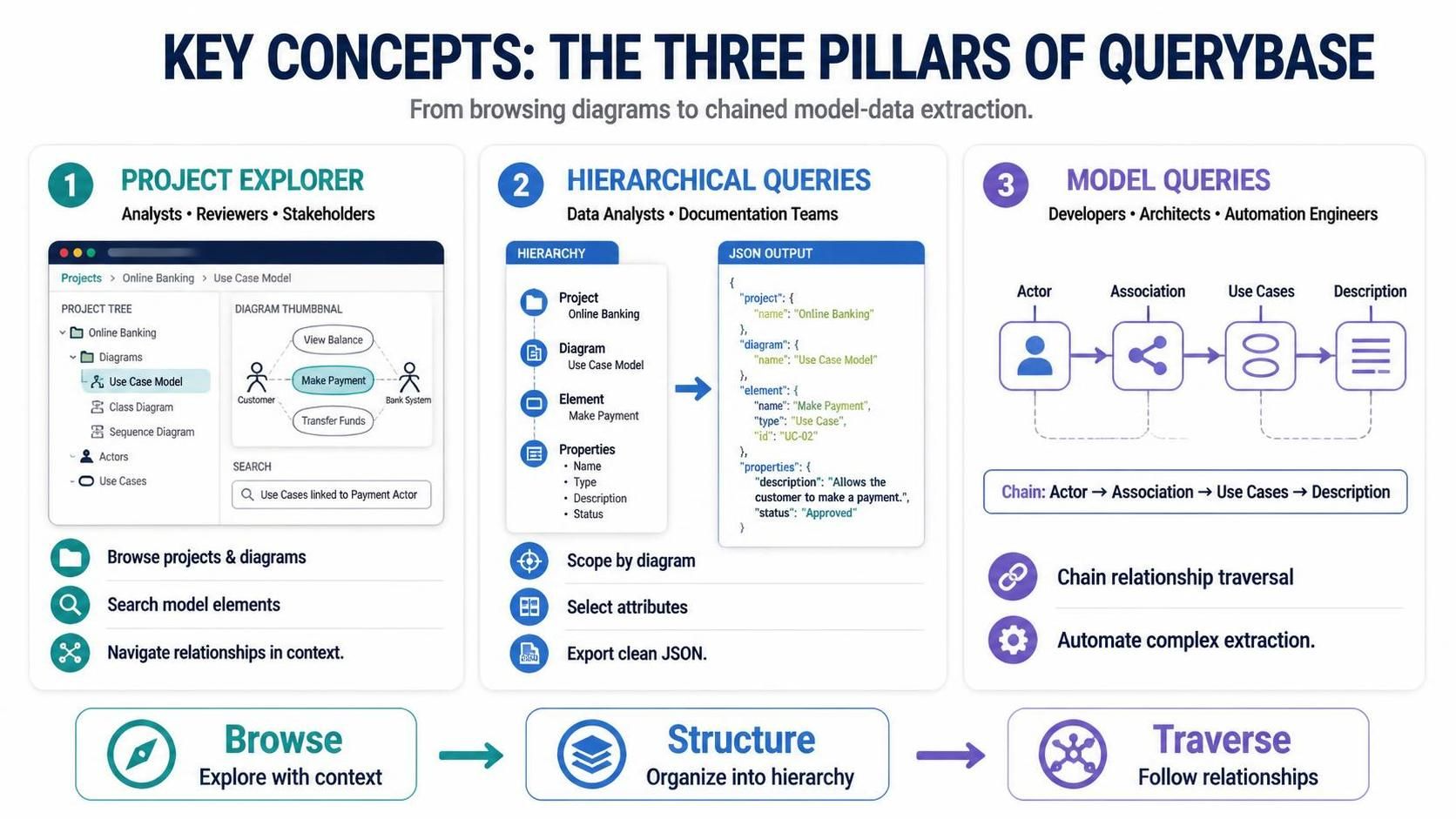
In the realm of enterprise architecture and software modeling, data is often trapped within static diagrams. Visual Paradigm’s QueryBase serves as the bridge, transforming passive UML diagrams into actionable, queryable data assets. Rather than treating models merely as visual documentation, QueryBase treats them as structured databases.
This tutorial breaks down the system architecture of QueryBase into its three core functional pillars: the Project Explorer, Hierarchical Queries, and Model Queries. Understanding this progression is essential for moving from simple visualization to advanced data automation.
Pillar 1: The Project Explorer (Interactive Browsing)
The foundation of QueryBase is the Project Explorer. Designed primarily for Business Analysts and Reviewers, this component functions as a high-fidelity web-based model browser. It moves beyond simple file tree navigation to offer a contextual, interactive experience.
- Context-Aware Navigation: Users can drill down from the Project level to individual Diagrams and Shapes. The system maintains context using interactive breadcrumbs, ensuring you never lose track of your location within the model hierarchy.
- Conditional Model Search: Instead of searching by file name, you can query model semantics. For example, a user can instantly locate specific elements based on logical criteria, such as “Find all Use Cases associated with the ‘Payment’ Actor.”
- Visual Integration: The Explorer links directly to diagram thumbnails, allowing users to visually verify the element they are searching for without leaving the interface.
Pillar 2: Hierarchical Queries (Structured Extraction)
Once elements are identified, the next step is organization. The Hierarchical Queries engine is designed for Data Analysts and Documentation Teams who need to export data for external processing.
This feature transforms the visual model into a strict, multi-level JSON hierarchy. It allows for the “Scope” of the data to be defined, filtering by specific diagrams or project sections before extraction.
The output structure follows a predictable path: Project > Diagram > Diagram Element > Properties. This ensures that the resulting JSON payload is clean and ready for ingestion into data warehouses or documentation tools.
Example: Hierarchical JSON Output
Below is an example of how QueryBase structures a standard “Make Payment” Use Case into a JSON hierarchy:
{
  "project": {
    "name": "Online Banking"
  },
  "diagram": {
    "name": "Use Case Model"
  },
  "element": {
    "name": "Make Payment",
    "type": "Use Case",
    "id": "UC-02"
  },
  "properties": {
    "description": "Allows the customer to make a payment.",
    "status": "Approved"
  }
}
Pillar 3: Model Queries (Chained Data Mining)
The most advanced capability of the system is Model Queries (Chained Data Mining). This feature targets Developers, Architects, and Automation Engineers who need to traverse complex relationships across the model.
Unlike standard exports, Model Queries act as a query pipeline builder. It mimics the behavior of a graph database, allowing you to chain operations together. You do not just extract a node; you traverse the edges connecting it to other nodes.
The Traversal Workflow
A complex data extraction can be defined as a linear chain of steps. Consider the following workflow logic:
- Start: Filter for a specific Actor (e.g., “Customer”).
- Traverse: Follow the connected Association relationships.
- Extract: Retrieve all linked Use Cases.
- Finalize: Retrieve the specific Description property of each Use Case.
This automation saves hours of manual cross-referencing, allowing for the generation of complex reports in a single automated step.
Summary: From Browse to Traverse
The architecture of QueryBase represents a logical progression of data utility:
- Browse: Use the Project Explorer to explore and search with context.
- Structure: Use Hierarchical Queries to organize data into a clean JSON hierarchy.
- Traverse: Use Model Queries to follow relationships and automate complex extractions.
By mastering these three pillars, users can unlock the full value of their Visual Paradigm models, turning them from static diagrams into dynamic data sources.