
Mastering Visual Paradigm: From UML Requirements to Implementation
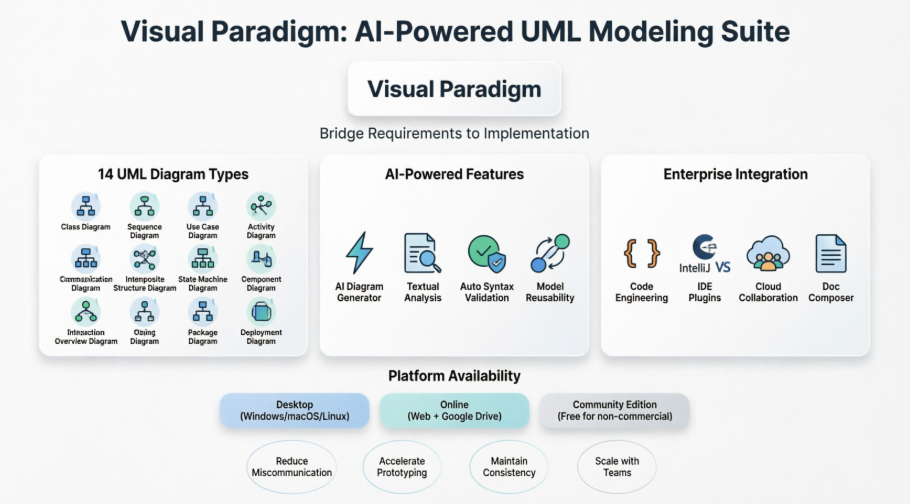
In the modern software development lifecycle, the gap between abstract requirements and concrete implementation is often bridged by a single, robust modeling tool. Visual Paradigm stands out as an industry leader in this space, offering a comprehensive suite that supports the entire journey from initial concept to deployed code. This tutorial explores how to leverage the tool’s architecture, specifically focusing on the integration of AI-powered features, the full spectrum of 14 UML diagram types, and seamless enterprise integration.
1. The Foundation: The 14 UML Diagram Types
At the heart of Visual Paradigm is its support for the complete UML (Unified Modeling Language) standard. Effective modeling requires knowing which diagram to use for a specific aspect of the system. The suite categorizes these into logical groups:
- Structural Diagrams: These define the static architecture of the system.
- Class Diagram: The backbone of object-oriented design.
- Component Diagram: Visualizes the organization of software components.
- Deployment Diagram: Maps the physical hardware and software nodes.
- Package Diagram: Organizes model elements into groups.
- Behavioral Diagrams: These describe the dynamic behavior of the system.
- Use Case Diagram: Captures functional requirements and user interactions.
- Sequence Diagram: Details the flow of messages between objects over time.
- State Machine Diagram: Describes the lifecycle of an object.
- Activity Diagram: Models the flow of control, similar to a flowchart.
- Interaction Diagrams: These focus on the communication between parts.
- Communication Diagram: Shows object interactions via links.
- Timing Diagram: Emphasizes time constraints and changes in state.
- Interaction Overview Diagram: A high-level activity diagram using interaction diagrams as nodes.
2. Bridging the Gap: AI-Powered Modeling
One of the most significant advancements in Visual Paradigm is the integration of Artificial Intelligence to accelerate the modeling process. Instead of manually drawing every element, users can utilize the AI Diagram Generator. This feature allows you to input natural language descriptions of your system, and the AI generates the corresponding UML structure.
Additionally, the Textual Analysis feature allows for reverse engineering or forward engineering from text-based specifications, ensuring that your diagrams remain synchronized with your documentation.
AI-Powered Features Overview
- AI Diagram Generator: Create diagrams from text prompts.
- Textual Analysis: Analyze requirements text for model elements.
- Auto Syntax Validation: Real-time checking of model integrity.
- Model Reusability: AI suggestions for optimizing existing patterns.
3. Enterprise Integration: From Model to Code
A modeling tool is only as good as its ability to integrate with your existing development workflow. Visual Paradigm excels in this area by connecting directly with your IDEs and Cloud platforms.
IDE and Cloud Connectivity
The platform supports IntelliJ IDEA and VS Code via plugins, allowing developers to view and edit models directly within their coding environment. This reduces context switching and ensures that the code remains consistent with the design.
Furthermore, Cloud Collaboration enables real-time teamwork, ensuring that distributed teams are always working from the latest version of the architecture.
Code Engineering Workflow
The “Bridge Requirements to Implementation” capability is best visualized through a standard engineering workflow:
1. REQUIREMENT PHASE
   - Use Case Diagram (Functional Requirements)
   - Activity Diagram (Process Flows)

2. DESIGN PHASE
   - Class Diagram (Static Structure)
   - Sequence Diagram (Interaction Logic)
   - State Machine (Object Lifecycle)

3. IMPLEMENTATION PHASE
   - Forward Engineering (Generate Java/C#/Python code)
   - IDE Integration (VS Code / IntelliJ)

4. MAINTENANCE PHASE
   - Reverse Engineering (Update model from code)
   - Doc Composer (Generate technical documentation)
4. Platform Availability
Whether you are working on a Windows workstation, a Mac, or a Linux server, Visual Paradigm offers a native Desktop experience. For remote teams, the Online version hosted on Google Drive offers accessibility from any browser. For smaller projects or learning purposes, the Community Edition provides a free entry point into the tool’s capabilities.
Summary of Benefits
- Reduce Miscommunication: Visual diagrams clarify complex logic.
- Accelerate Prototyping: AI tools speed up initial design.
- Maintain Consistency: Auto-validation ensures standards compliance.
- Scale with Teams: Cloud features support large organizations.
By understanding these core components—the 14 diagram types, AI features, and integration capabilities—you can fully leverage Visual Paradigm to build robust, scalable, and well-documented software systems.