
Mastering UML Use Cases: Modeling ATM Architecture with Visual Paradigm
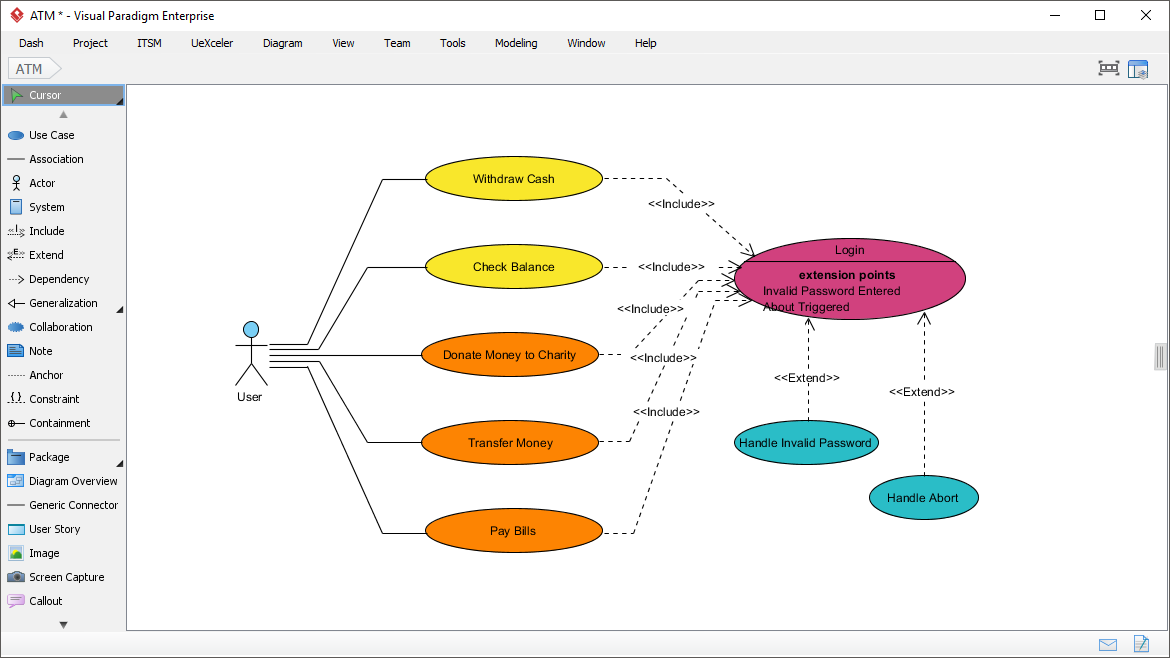
In the realm of software engineering and system analysis, the Use Case Diagram serves as a fundamental bridge between non-technical stakeholders and the development team. As highlighted in the provided screenshot from Visual Paradigm, these diagrams do more than just list features; they define the boundaries of the system and illustrate how users interact with it to achieve specific goals.
This tutorial dissects the complex relationships found in the ATM system architecture shown above. We will move beyond simple identification of elements and explore the architectural logic behind <<include>> and <<extend>> relationships, which are critical for building robust, maintainable software.
The Anatomy of the System
Before analyzing the logic, we must understand the core components visible in the diagram:
- The Actor: Represented by the stick figure labeled “User,” this is the external entity initiating the interaction. In a real-world scenario, this could be a bank customer or an administrator.
- Use Cases (Ovals): These represent specific functional requirements.
- Core Functions: “Withdraw Cash,” “Check Balance,” “Donate Money,” “Transfer Money,” and “Pay Bills.”
- System Processes: “Login,” “Handle Invalid Password,” and “Handle Abort.”
- Associations (Solid Lines): These connect the Actor to the Use Cases, indicating that the User initiates these specific actions.
Distinguishing Include vs. Extend
The most critical architectural decisions in this diagram lie in the dashed arrows connecting the use cases. Visual Paradigm allows for precise modeling of these dependencies, which dictate the flow of control.
1. The <<Include>> Relationship (Mandatory Behavior)
An <<include>> relationship indicates that the behavior of the included use case is part of the base use case’s execution. It is mandatory.
In the screenshot, observe the dashed arrows originating from Withdraw Cash, Check Balance, Donate Money, Transfer Money, and Pay Bills, all pointing to Login.
Architectural Logic: This design enforces a strict security requirement: Every financial transaction or inquiry requires the user to authenticate first. If the <<include>> relationship were removed, a user could theoretically check their balance without logging in, creating a security vulnerability. By including “Login” in these use cases, the system ensures that the authentication step is reused across multiple scenarios without cluttering the diagram with repetitive login steps.
2. The <<Extend>> Relationship (Optional/Exceptional Behavior)
An <<extend>> relationship represents optional or conditional behavior. The extended use case only executes if a specific condition is met.
Notice the arrows originating from Handle Invalid Password and Handle Abort pointing back to Login.
Extension Points: The diagram explicitly lists extension points inside the Login use case: Invalid Password Entered and About Triggered. This is a best practice in system design. It defines exactly where in the “Login” sequence the system might diverge.
- Handle Invalid Password: If the user enters the wrong password, the flow extends to this use case. It is not part of the normal happy path.
- Handle Abort: If the user decides to cancel the process, the flow extends to this use case.
Modeling Best Practices with Visual Paradigm
When using tools like Visual Paradigm, proper modeling goes beyond drawing shapes. The diagram shown illustrates how to manage complexity by separating the “Happy Path” (the main goal) from the “Exception Path” (error handling).
By grouping the transaction use cases (Withdraw, Check Balance, etc.) and having them all include the “Login” use case, you create a highly modular design. If the bank decides to change the authentication protocol (e.g., adding Two-Factor Authentication), you only need to modify the Login use case. You do not need to touch the individual transaction diagrams. This is the essence of high cohesion and low coupling.
Conclusion
Effective system architecture relies on clear communication of requirements. By using <<include>> for mandatory dependencies like authentication and <<extend>> for error handling and optional flows, architects can create diagrams that are not just visual representations, but functional blueprints for developers. The diagram above is a textbook example of how to model a secure, modular banking system.