
Mastering UML Use Case Modeling: Stock Trading Platform Architecture
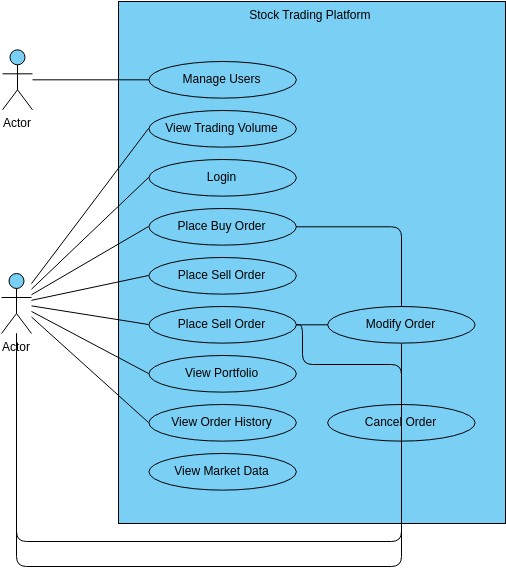
Welcome to this comprehensive tutorial on Use Case Modeling. In this guide, we will deconstruct the architecture of a Stock Trading Platform. Use Case diagrams are the blueprint of software requirements; they define “who” does “what” within a system. By the end of this article, you will understand how to model complex financial interactions, handle multiple actor types, and structure system boundaries effectively.
1. The Anatomy of the Stock Trading System
The diagram we are analyzing represents a robust financial application. It is encapsulated within a system boundary labeled Stock Trading Platform. This boundary is crucial because it defines what is “in scope” for the system versus what is external.
The diagram features two distinct Actors (represented by stick figures). In modeling terms, an Actor represents a role played by a human or an external system that interacts with the system of interest.
- The Administrator: The top actor represents a system administrator or staff member. Their primary responsibility is governance and security.
- The Investor/Trader: The bottom actor represents the end-user who trades assets. This actor has a much broader range of interactions.
Key System Features (Use Cases)
Inside the blue boundary, you will see ovals representing Use Cases. These are the functional requirements of the system. Let’s break down the critical workflows:
- Authentication & Security:
Loginis the gateway. Without this, no other functionality is accessible. - Market Intelligence:
View Trading VolumeandView Market Dataprovide the real-time information necessary for decision-making. - Portfolio Management:
View Portfolioallows users to track their holdings and performance over time. - Transaction Execution: The core functionality includes
Place Buy OrderandPlace Sell Order. These are the actions that trigger financial movement. - Order Lifecycle Management: Orders are not static. The system includes
Modify OrderandCancel Order, which are vital for risk management in volatile markets. - Administrative Control:
Manage Usersensures that the platform remains secure and compliant.
2. Advanced Modeling Concepts: Relationship Logic
When building this diagram, we must pay close attention to the lines connecting actors to use cases. However, we also need to look at the lines connecting use cases to other use cases. This is where the diagram gets sophisticated.
The “Modify Order” Logic
Notice the connection between Place Sell Order and Modify Order. In advanced modeling, we often use the <<extend>> or <<include>> relationships.
- If we use Include, it means that modifying an order is a mandatory part of placing an order (unlikely in this context).
- If we use Extend, it implies that a user can place an order, but the option to modify it is an optional behavior that only occurs under specific conditions (e.g., if the order is pending).
In the visual representation, the line connecting Modify Order to Place Sell Order suggests a dependency. The system logic dictates that you cannot modify an order that hasn’t been placed. This dependency is a critical business rule to capture in the model.
3. Implementation Strategy: From Diagram to Code
Once the diagram is approved by stakeholders, it serves as the specification for the backend developers. Here is how you might translate the Place Sell Order use case into a conceptual logic structure:
graph TD
    User[Trader Actor] -->|Triggers| Login[Login Use Case]
    Login -->|Authenticates| Auth[Authentication Service]
    Auth -->|Grants Access| Dashboard[View Market Data]
    Dashboard -->|Initiates| PlaceSell[Place Sell Order]

    subgraph Business Rules
        PlaceSell -->|Checks| StockStatus[Stock Availability]
        StockStatus -->|Validates| ModifyOrder[Modify Order Logic]
        ModifyOrder -->|If Pending| CancelOrder[Cancel Order Logic]
    end
4. Why This Modeling Matters
Creating a use case diagram for a Stock Trading Platform is not just about drawing shapes; it is about validating business logic before writing a single line of code.
By visualizing the Modify Order and Cancel Order flows, developers can identify potential race conditions or data consistency issues early. For example, if a user tries to cancel an order that has already been executed, the system must handle that gracefully. The diagram helps us ask these questions during the design phase.
Conclusion
The Stock Trading Platform use case diagram is a testament to structured system design. It clearly delineates the roles of the Administrator and the Trader, ensuring that every action, from logging in to canceling a trade, is accounted for. By mastering these diagrams, you bridge the gap between abstract requirements and concrete software implementation.