
Mastering UML Sequence Diagrams: Visualizing System Interactions Over Time
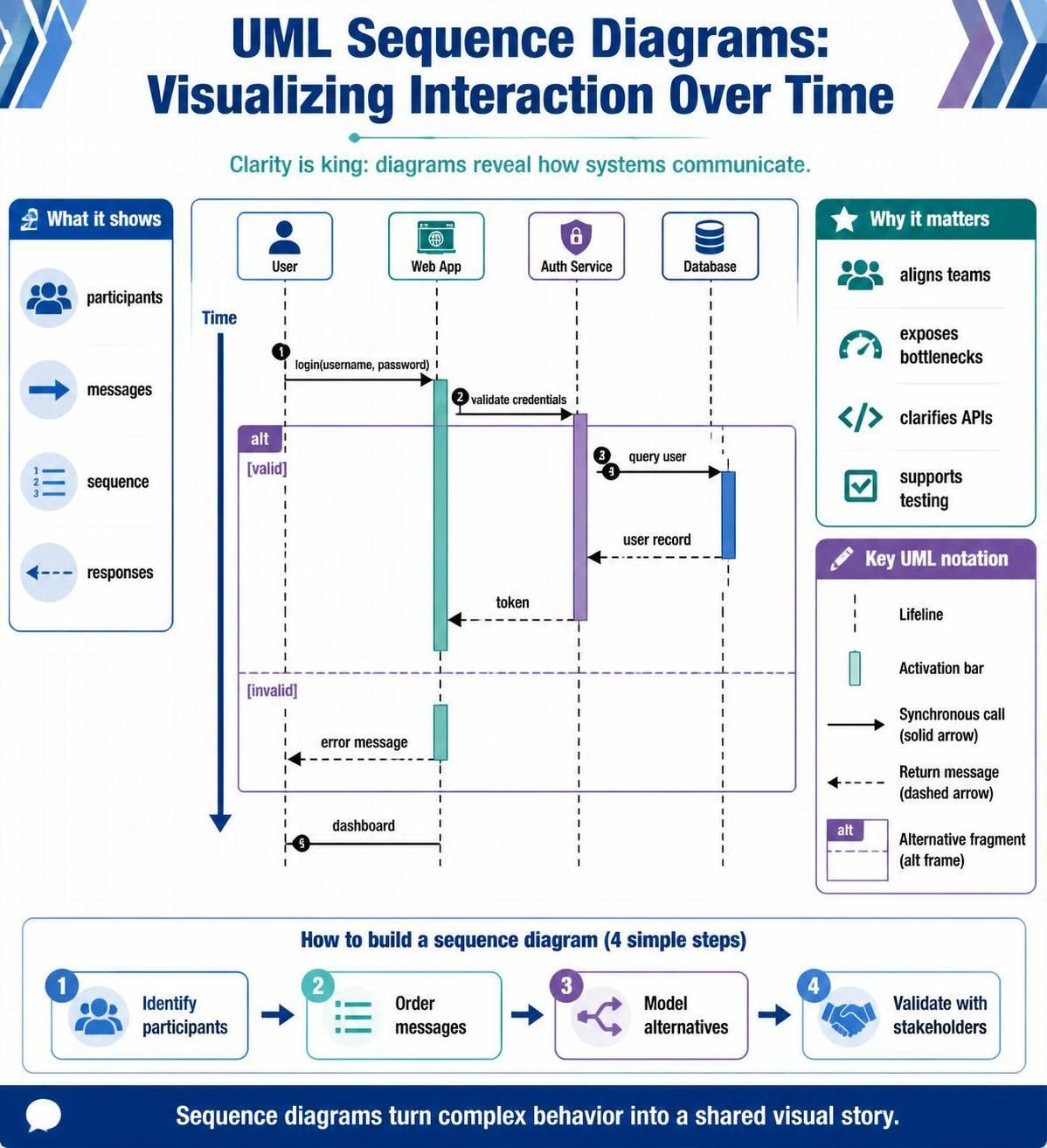
In the complex landscape of software development, clarity is king. As systems grow in sophistication, the need for precise documentation and effective communication among developers, architects, and stakeholders becomes critical. While code defines the logic, diagrams define the flow. Among the various Unified Modeling Language (UML) tools available, the Sequence Diagram stands out as an indispensable asset for visualizing how objects interact over time.
This guide provides a deep dive into sequence diagrams, exploring their core components, best practices for creation, and advanced features like combined fragments. Whether you are designing a new microservice architecture or documenting legacy code, mastering sequence diagrams will enhance your ability to communicate system behavior clearly and efficiently.
Understanding the Core Components
Before diving into the mechanics of a specific interaction, it is essential to understand the fundamental building blocks that make up a UML Sequence Diagram. These elements transform abstract logic into a visual timeline.
1. Participants (Lifelines)
The vertical dashed lines extending downwards from the top represent Lifelines. Each lifeline corresponds to a specific participant in the system, such as a User, a Web Application, an Authentication Service, or a Database. These participants are the actors responsible for executing the logic of the interaction.
2. Activation Bars
Notice the rectangular bars placed on the lifelines, such as the purple bar on the “Auth Service” or the teal bar on the “Web App”. These are called Activation Bars (or Focus of Control). They indicate the period during which an object is actively performing an operation or waiting for a response.
3. Messages and Responses
The horizontal arrows represent the flow of messages between participants. The diagram distinguishes between two primary types of communication:
- Synchronous Calls (Solid Arrow): Represented by a solid line with a filled arrowhead. This implies a blocking call where the sender waits for the receiver to complete the task before proceeding.
- Return Messages (Dashed Arrow): Represented by a dashed line with an open arrowhead. This indicates a response returning data from the receiver back to the sender.
Decoding Complex Logic with Combined Fragments
Real-world applications rarely follow a single linear path. To handle conditional logic, loops, or parallel processes, UML utilizes Combined Fragments. The diagram prominently features an alt (alternative) frame, which is crucial for modeling decision-making processes.
In the “Login” example, the system must decide whether the credentials provided are correct. This is modeled using an alt frame divided into two sections:
- Option [valid]: If the credentials are correct, the system queries the database, retrieves a user record, and issues a token.
- Option [invalid]: If the credentials fail, the system skips the database interaction and immediately returns an error message to the user.
This visual branching allows stakeholders to instantly understand the different paths the software can take based on runtime data.
Step-by-Step: Building Your First Diagram
Creating a professional sequence diagram is a systematic process. Follow these four steps to model any interaction effectively.
Step 1: Identify Participants
Start by listing all the actors involved in the scenario. In the provided example, the participants are the User, Web App, Auth Service, and Database. Ensure you include all external systems and internal modules required to complete the task.
Step 2: Order Messages Chronologically
Map out the flow of data from top to bottom. Begin with the triggering event (e.g., the user clicking “Login”) and trace the subsequent calls. Ensure that every message sent has a corresponding return message, unless the interaction is asynchronous or fire-and-forget.
Step 3: Model Alternatives
Introduce logic using combined fragments. As seen in the diagram, use the alt frame to separate successful authentication flows from error handling. This prevents the diagram from becoming cluttered and makes the “happy path” and “edge cases” distinct.
Step 4: Validate with Stakeholders
Once the diagram is drafted, review it with the team. Does the interaction flow match the actual code logic? Are the APIs and data formats clear? A well-constructed diagram serves as a single source of truth for the entire team.
Tooling: Visual Paradigm
To create these diagrams with precision and efficiency, leveraging the right tool is essential. Visual Paradigm offers a robust environment for designing UML models without the overhead of complex configuration.
Creating Sequence Diagrams in Visual Paradigm
Visual Paradigm streamlines the modeling process, allowing you to focus on architecture rather than layout. Here is how you can utilize its features:
- Drag-and-Drop Interface: Simply drag participants (actors, objects, systems) onto the canvas. Visual Paradigm automatically aligns them, ensuring a clean and professional look.
- Smart Connections: When drawing messages, the tool intelligently suggests connection points (lifelines and activation bars), ensuring your arrows are perfectly aligned.
- Combined Fragments Library: Access a dedicated palette for combined fragments. Select the alt (alternative) frame and define your conditions (e.g.,
[valid],[invalid]) directly within the frame header. - Reverse Engineering: If you are documenting legacy code, Visual Paradigm can automatically generate sequence diagrams from existing Java, C#, or C++ codebases, saving hours of manual documentation.
By mastering the concepts of lifelines, activation bars, and alternative fragments, and utilizing tools like Visual Paradigm, you ensure that your system architecture is not only functional but also clearly understood by everyone involved in the project.