
Mastering UML Sequence Diagrams: A Step-by-Step Guide to Modeling System Behavior
In the realm of software engineering, visualizing how different parts of a system interact over time is critical. UML Sequence Diagrams serve as the definitive map of a system’s runtime behavior. They align developers, testers, and stakeholders by providing a clear view of the expected behavior of a system. Whether you are designing a modern microservices API or documenting the logic of a legacy monolith, understanding the core principles of sequence modeling is essential.
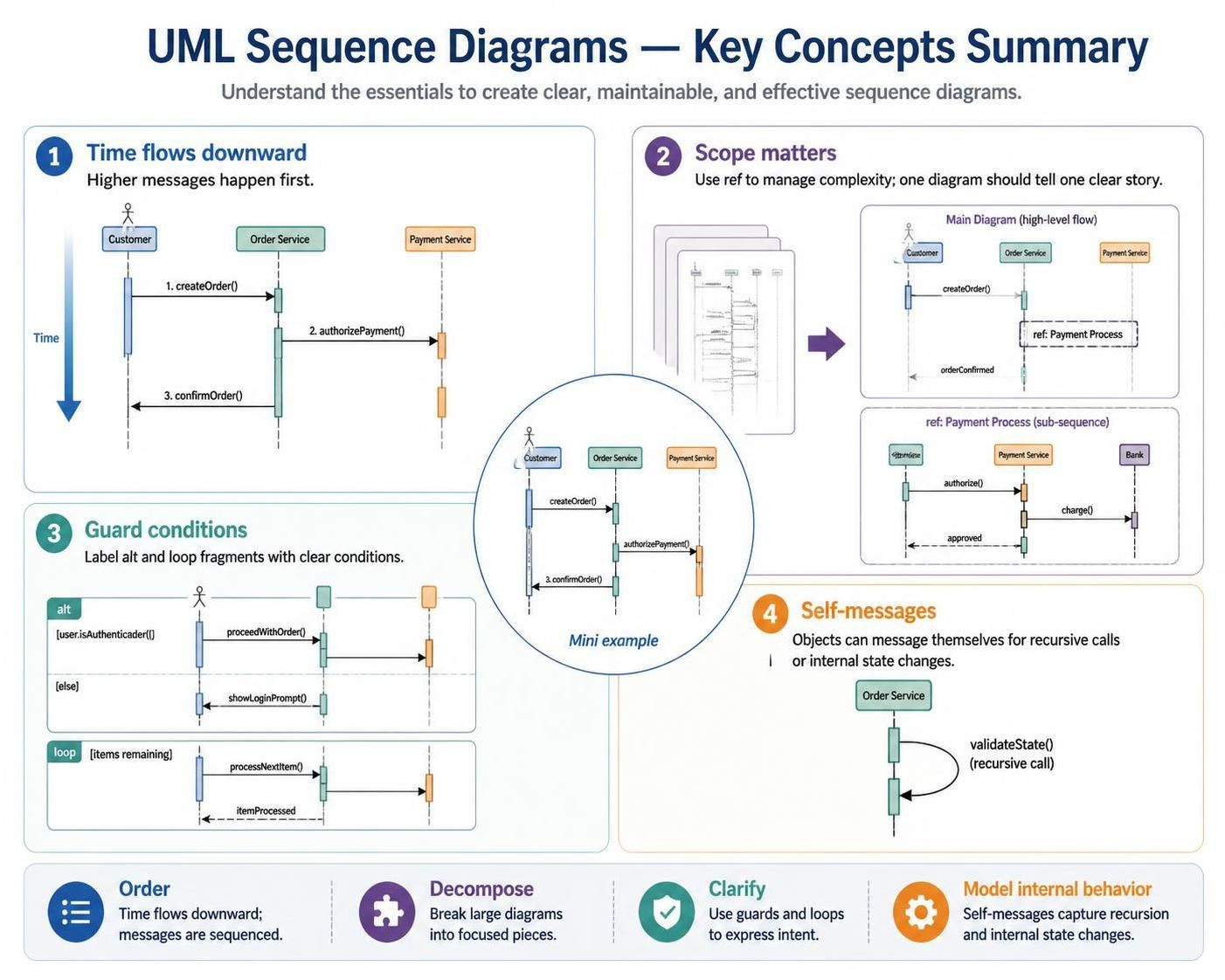
This tutorial breaks down the four key concepts illustrated in the summary diagram, guiding you through the mechanics of time, scope, logic, and internal behavior, and demonstrating how to leverage tooling like Visual Paradigm to bring these models to life.
1. The Flow of Time: Vertical Positioning
The most fundamental rule of a UML Sequence Diagram is the passage of time. Unlike flowcharts where arrows dictate flow, sequence diagrams rely on spatial positioning. Time flows downward.
Messages sent from the top of the diagram are executed first, while messages lower on the page occur later in the process. This vertical arrangement allows you to trace the chronological order of events from the initial trigger to the final response.
Consider a standard “Create Order” scenario involving a Customer, an Order Service, and a Payment Service:
Customer -> Order Service: 1. createOrder()
Order Service -> Payment Service: 2. authorizePayment()
Payment Service --> Order Service: 3. confirmOrder()
In this sequence, the createOrder() message is the starting point. The authorizePayment() message happens strictly after that, and the final confirmation occurs only after the payment logic has been processed.
2. Managing Scope: The Power of Ref
Complex systems can lead to “spaghetti” diagrams that are difficult to read. A best practice in UML modeling is to ensure that a single diagram tells one clear story. If a sequence spans multiple pages or becomes too cluttered, you must break it up.
This is where the Ref (Reference) combined fragment is invaluable. Instead of drawing every single message for a sub-process (like a payment gateway interaction), you can encapsulate that logic into a separate, detailed sub-sequence diagram and reference it from the main diagram.
For example, in a high-level view, the Order Service might simply call a “ref: Payment Process”. This keeps the main diagram clean and readable. You can then create a separate diagram titled “ref: Payment Process (sub-sequence)” that details the specific interactions with the Bank, containing messages like authorize() and charge().
3. Guard Conditions and Logic
Real-world systems rarely follow a single linear path. They make decisions, skip steps, and repeat actions. UML Sequence Diagrams handle this complexity using combined fragments, specifically alt (alternative) and loop fragments.
To maintain clarity, it is crucial to always label these fragments with clear Guard Conditions. These conditions act like the “if” statements in code, defining exactly when a specific block of logic will execute.
- Alt Fragments (Decision Making): Use this to model branching paths. For instance, you might have a condition like
[user.isAuthenticated()]. If true, the system proceeds with the order; if false (the[else]block), it shows a login prompt. - Loop Fragments (Iteration): Use this to model repeated actions. A condition like
[items remaining]indicates that the system will continue to process items until the list is empty.
4. Self-Messages: Internal Behavior
It is a common oversight to forget that objects can interact with themselves. Self-messages are represented by an arrow that starts on a lifeline and loops back to the same lifeline.
These messages are vital for modeling internal state changes or recursive calls. For example, an Order Service might need to validate its own state before accepting a new order. This is drawn as a message named validateState() looping back to the Order Service lifeline, indicating that the object performs a calculation or check internally without interacting with external actors.
Conclusion: From Static Drawings to Living Artifacts
Mastering the distinction between synchronous and asynchronous messaging, and effectively utilizing combined fragments for complex logic, allows you to model even the most intricate architectures with clarity. However, the true power of these diagrams emerges when they are integrated into a robust development lifecycle.
When paired with a powerful tool like Visual Paradigm, sequence diagrams transition from static drawings to living artifacts. Visual Paradigm allows these models to drive code generation and validate system integrity, ensuring that your design matches your implementation. Whether you are mapping out a microservices API or documenting a legacy monolith, following these core principles ensures your sequence diagram remains the definitive map of your system’s runtime behavior.