
From Static Sketches to Dynamic Documentation: Mastering PlantUML Variables in VPasCode
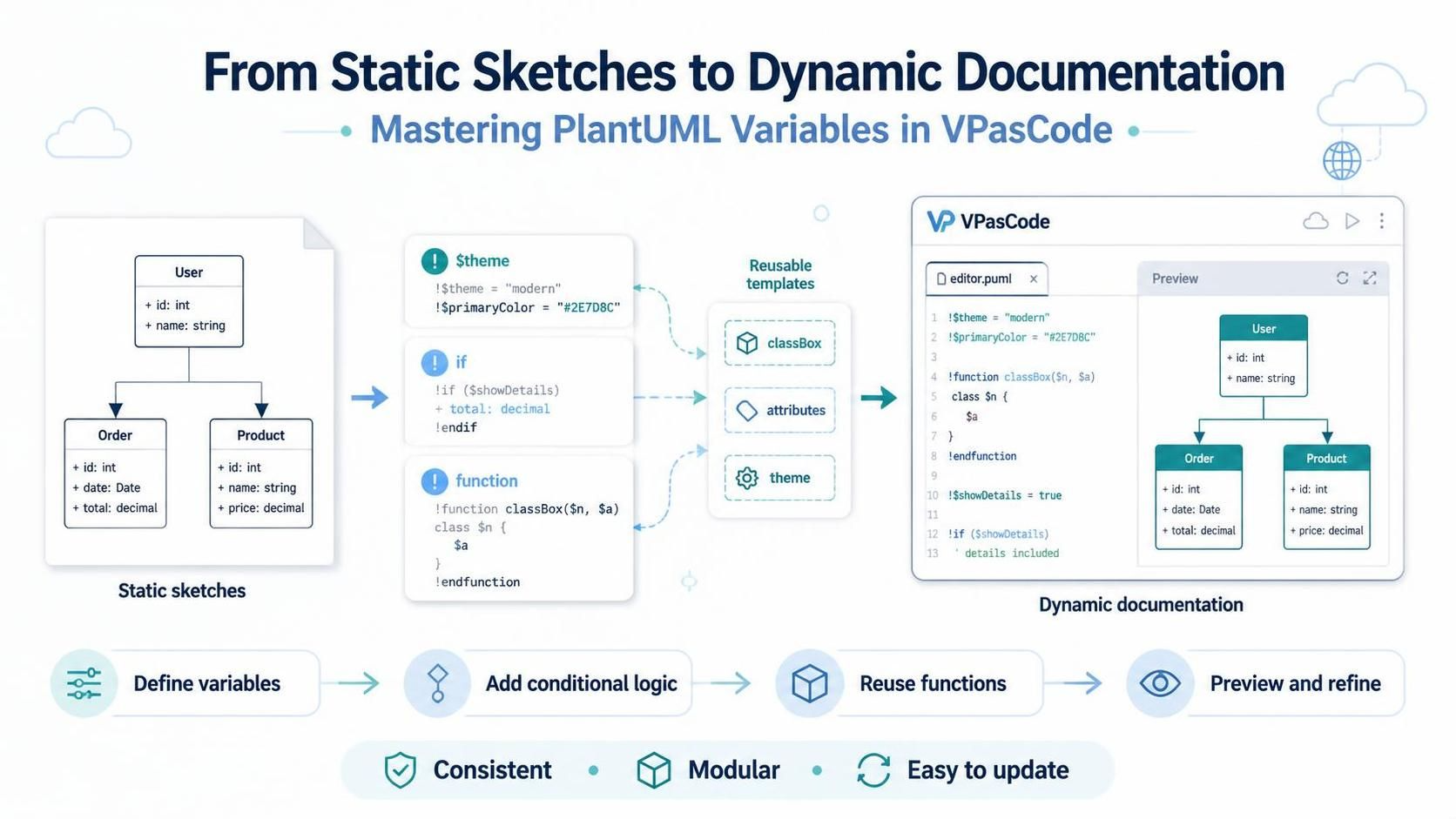
In modern software architecture, diagrams are no longer static illustrations—they are living documentation that must evolve alongside your codebase. However, maintaining consistency across multiple diagrams often leads to repetitive, hard-to-manage scripts. This tutorial explores how to transform your workflow using PlantUML variables, preprocessor directives, and conditional logic within Visual Paradigm VPasCode.
The Evolution: From Static Sketches to Dynamic Templates
Traditionally, creating a Class Diagram involves manually typing out every attribute and operation for every class. If you need to add a common attribute, like id: int, to ten different classes, you must manually update ten lines of code. This approach is fragile; a single typo can break the diagram, and maintaining consistency across large systems is a nightmare.
VPasCode introduces a paradigm shift by treating diagram code as a dynamic script. By leveraging the PlantUML preprocessor, we can define variables, functions, and logic to generate diagrams programmatically. This transforms your documentation from rigid text into a flexible, modular template.
Step 1: Defining Variables for Consistency
The foundation of dynamic documentation is the use of variables. Instead of hardcoding values like colors or attributes, we assign them to variables. This allows for a “Single Source of Truth” for your styling and data structures.
For example, consider a theme where you want to enforce a primary color across your entire architecture. Rather than repeating #2E7D8C everywhere, we define it once:
&!theme = "modern"
$primaryColor = "#2E7D8C"
By using the $ symbol, you declare a variable that can be referenced throughout your script. This ensures that if you need to change your brand color, you only need to update one line of code, and the entire diagram updates instantly.
Step 2: Encapsulating Logic with Functions
As your diagrams grow, you will notice patterns. Perhaps every class in your system requires an ID, a Name, and a Date. Instead of repeating this block for every single class, we can encapsulate this logic into a custom function.
PlantUML allows you to define functions using the function directive. You can pass parameters (like the class name) and define what happens inside that block.
&function classBox($n, $a)
  class $n {
    $a
  }
&endfunction
Here, $n represents the class name, and $a represents the attributes to be injected. This function acts as a reusable template, significantly reducing code bloat.
Step 3: Adding Conditional Logic
One of the most powerful features of VPasCode is the ability to toggle features on or off using conditional logic. This is incredibly useful for managing different levels of detail in your documentation without maintaining separate files.
Suppose you have a specific attribute that should only appear in a “Detailed” view. You can use the if directive to control this:
&if ($showDetails)
  + total: decimal
&endif
If $showDetails is set to true, the total attribute is rendered. If it is false, that line is ignored by the renderer. This allows you to create a single script that can generate both high-level overviews and detailed technical specifications.
Step 4: Putting It All Together in VPasCode
Visual Paradigm VPasCode provides a browser-based workspace that supports these dynamic features. You can write your logic in the editor, and the Preview pane renders the diagram in real-time. The workflow follows a logical progression:
- Define variables: Set up your themes and global constants.
- Add conditional logic: Decide which elements should be visible based on your current goal.
- Reuse functions: Apply your custom templates to your classes.
- Preview and refine: See the changes instantly and iterate.
Conclusion
By mastering PlantUML variables in VPasCode, you move beyond static sketching. You gain the ability to write dynamic, modular diagrams that are consistent, easy to update, and perfectly aligned with your software architecture. Whether you are designing a complex enterprise system or a simple microservice, these tools ensure your documentation evolves as fast as your code.