
Mastering PlantUML Class Diagrams in VPasCode: A Step-by-Step Guide
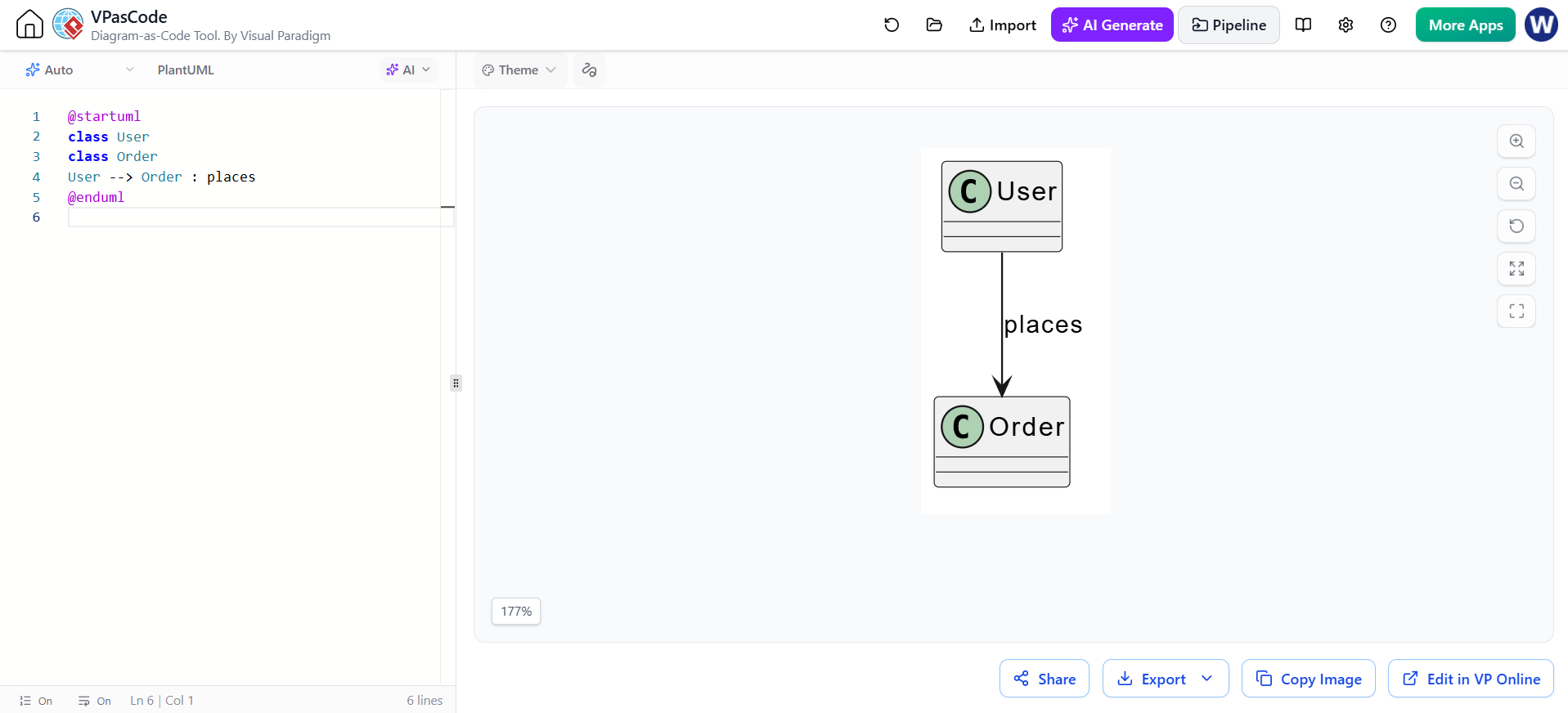
In the fast-paced world of software architecture, visualizing system structure is just as critical as writing the code itself. This tutorial explores the fundamentals of creating Class Diagrams using PlantUML within the Visual Paradigm VPasCode environment. We will dissect the specific code snippet shown in the screenshot, demonstrating how to define classes and establish relationships effectively.
What is VPasCode?
VPasCode is Visual Paradigm’s “Diagram-as-Code” tool. It allows developers and architects to define visual diagrams using plain text code rather than dragging and dropping shapes. This approach offers version control compatibility, rapid iteration, and a clean separation between the logic of the system and its visual representation.
Understanding the Building Blocks
Let’s break down the code provided in the screenshot to understand the syntax of a PlantUML Class Diagram.
@startuml
class User
class Order
User --> Order : places
@enduml
1. The Directive Block
Every PlantUML diagram requires a start and end directive to define the scope of the rendering engine.
@startuml</code>: Signals the beginning of a diagram definition.</li>
    <li><code>@enduml
2. Declaring Classes
The lines class User and class Order explicitly define the entities (or classes) involved in our system.
In the diagram, you will see these rendered as boxes with a header containing the class name. The “C” icon in the top-left corner of the box visually confirms that these are Class elements. While PlantUML can sometimes infer classes from relationships, explicitly declaring them (as done here) is a best practice for maintainability.
3. Defining Relationships
The core of a class diagram is the relationship between classes. The line User --> Order : places defines the following:
User: The source class.-->: A solid line with an arrowhead, typically representing an association or dependency.Order: The target class.: places: The relationship label (navigation name) describing the action occurring between the two entities.
Why Explicit Declaration Matters
In the example above, we explicitly declared class User and class Order. While you could technically just write User --> Order : places and PlantUML would automatically create the boxes for you, doing so is often discouraged for larger systems.
Explicitly defining classes allows you to:
- Organize Code: You can group class definitions logically before defining relationships.
- Enhance Readability: It makes the diagram’s scope immediately obvious to anyone reading the text file.
- Facilitate Maintenance: If you need to add attributes or methods to a class later, having the class declaration at the top makes it easier to find and edit.
Visualizing the Result
When the VPasCode editor renders this code, it produces a clean, professional diagram. The arrow flows vertically from the User class to the Order class, with the label “places” positioned along the connector. This visualizes a standard “One-to-Many” or “One-to-One” association depending on your business logic (i.e., a User places an Order).
Conclusion
By mastering the basic syntax of @startuml, class declarations, and relationship arrows, you can rapidly prototype system architectures. The VPasCode tool simplifies this process, providing instant visual feedback to your textual definitions.