
Mastering PlantUML Class Diagrams in VPasCode: Syntax and Visibility Mastery
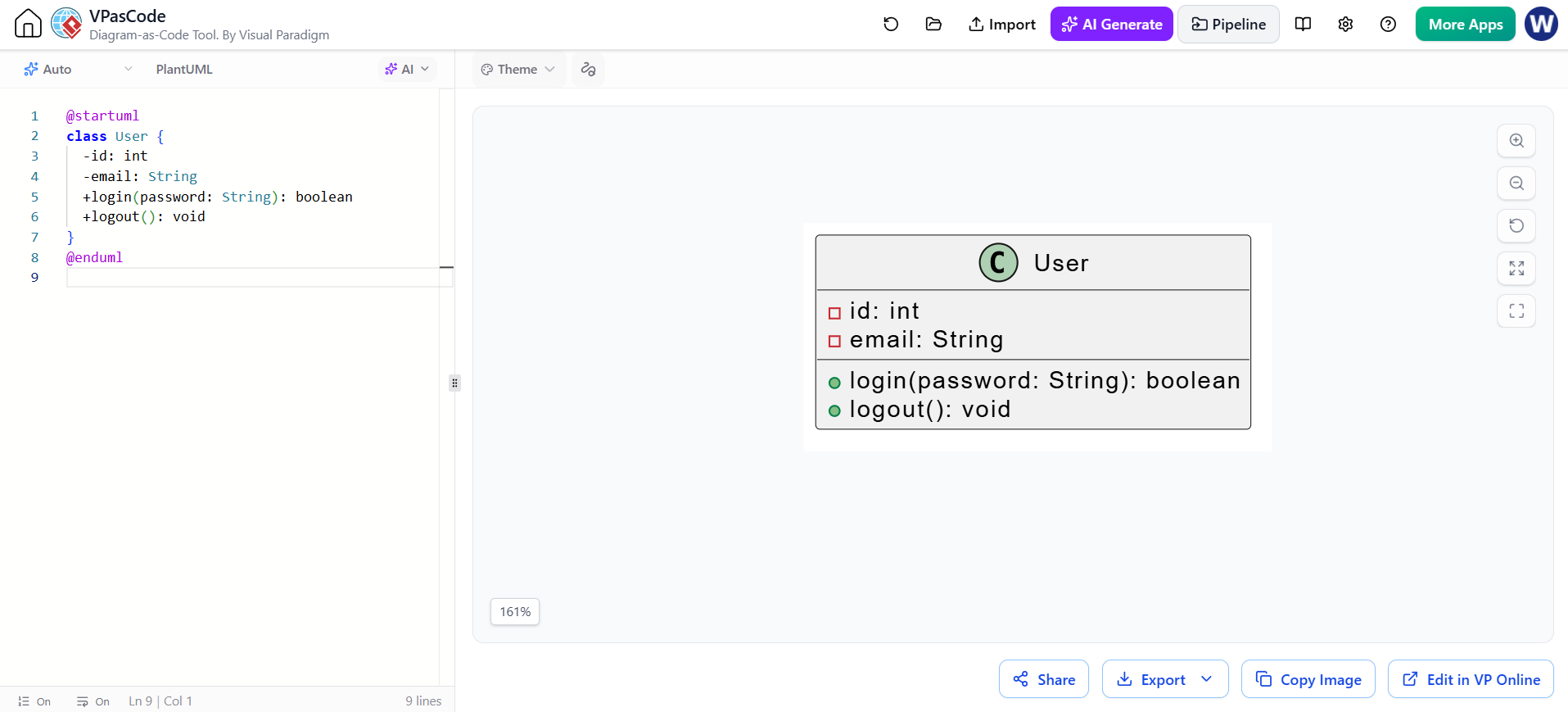
Welcome to this comprehensive guide on creating Class Diagrams using PlantUML within the VPasCode environment. Visual Paradigm’s diagram-as-code tools allow developers and architects to define system structures textually, ensuring version control compatibility and rapid iteration. In this tutorial, we will dissect the anatomy of a class definition, explore visibility markers, and understand how to structure operations effectively.
The Anatomy of a PlantUML Class
In object-oriented modeling, a class serves as the blueprint for objects. In PlantUML, we represent this using the class keyword followed by the class name. The visual representation is generated based on the content enclosed within curly braces { }.
Let’s look at the fundamental syntax structure using a User class as our example:
@startuml
class User {
  -id: int
  -email: String
  +login(password: String): boolean
  +logout(): void
}
@enduml
This code block defines a class named User. Inside the braces, we define two distinct types of members:
- Attributes (Fields): These represent the data state of the object (e.g.,
id,email). - Operations (Methods): These represent the behaviors or functions the object can perform (e.g.,
login,logout).
Defining Visibility Markers
One of the most critical aspects of Class Diagrams is encapsulation. PlantUML uses specific symbols (markers) to denote the access level of a member. These markers appear as small icons in the rendered diagram and prefixes in the code.
The following table outlines the standard visibility markers supported by PlantUML:
- Public (+): Represented by a plus sign. Members with this visibility are accessible from anywhere. In diagrams, these often appear with a green circle icon.
- Private (-): Represented by a minus sign. These are accessible only within the class itself. In diagrams, these often appear with a red square icon.
- Protected (#): Represented by a hash symbol. Accessible within the class and its subclasses.
- Package-private (~): Represented by a tilde. Accessible only within the same package or namespace.
Attribute Syntax: Name : Type
When defining attributes, the standard convention is to place the visibility marker, followed by the member name, a colon, and finally the data type.
  -id: int
  -email: String
In the example above, -id: int defines an integer attribute named id that is private. The colon : is the strict separator required by the syntax to distinguish the name from the type.
Structuring Operations and Methods
Operations are defined similarly to attributes but utilize parentheses ( ) to denote parameters. This is the hallmark of distinguishing a method from a variable.
Method Parameters and Return Types
An operation syntax follows this pattern:
+operationName(parameterType: parameterName): returnTypeLet’s break down the login method from our example:
+login(password: String): boolean+: The method is public.login: The name of the operation.(password: String): The method accepts one parameter namedpasswordof typeString.: boolean: The method returns a value of typeboolean.
For methods that do not take arguments or return values, we use empty parentheses and the void type:
+logout(): voidAlternative Syntax: Type Before Name
PlantUML is flexible and supports a notation style common in languages like Java or C++, where the type precedes the member name. While the Name: Type style is often preferred for readability in diagrams, the Type Name style is fully supported.
You can write:
class User {
  +String email
  +void logout()
}
VPasCode will render this identically to the Name: Type syntax, allowing you to choose the style that best fits your team’s coding conventions.
Conclusion
By mastering these syntax rules—specifically the use of braces, the colon separator, and the visibility markers—you can efficiently model complex system architectures directly within your text editors. Whether you are defining simple attributes or complex operations with parameters, PlantUML provides a robust framework for visualizing your software design.