
Mastering Online Shopping Use Cases with UML
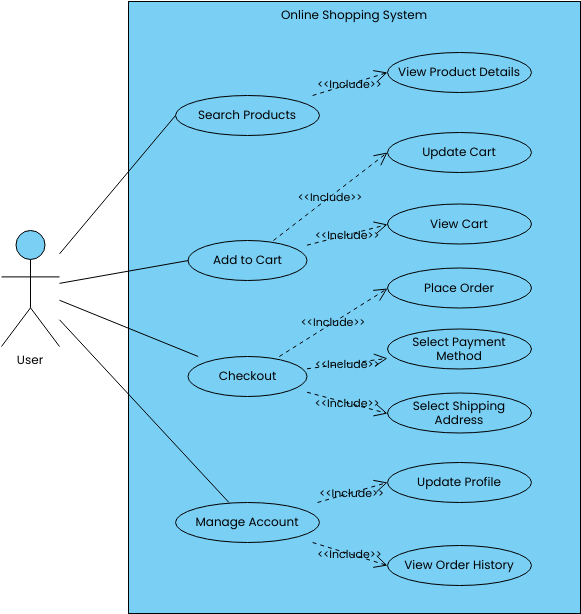
In the realm of software engineering, visualizing how a system interacts with its users is paramount to success. This tutorial dissects the Online Shopping System use case diagram, serving as a comprehensive guide for beginners on how to model complex business processes using industry-standard UML (Unified Modeling Language) techniques. Whether you are designing a new e-commerce platform or refining an existing one, understanding the logic behind these diagrams is the first step toward building robust software architecture.
Understanding the Core Components
Before we dive into the specific flows of the shopping system, let’s establish the foundational elements present in this diagram. A use case diagram is essentially a map of user interactions, composed primarily of three distinct elements:
- The Actor (User): Represented by the stick figure on the left, the “User” is the external entity initiating the interaction. In this specific model, the User is the primary driver, representing the customer navigating the store.
- The Use Cases: These are the ovals within the system boundary (the blue box). They represent specific functional goals the user wants to achieve, such as Search Products, Add to Cart, or Manage Account.
- The System Boundary: The large rectangle labeled “Online Shopping System” defines the scope. Anything inside is part of the software; anything outside is an external entity.
Decoding the Relationships: The Power of «Include»
The most critical concept in this diagram is the relationship type used between the ovals: the «Include» relationship. Unlike an “extends” relationship, which implies optional behavior, an “include” relationship indicates that one use case must incorporate the behavior of another to complete its task.
Think of the «Include» relationship as a “Must-Have” dependency. If a User wants to Add to Cart, they cannot do so without the system Viewing the Cart first to confirm the addition, or Updating the Cart to reflect the new item count. The diagram explicitly shows this logic using dashed arrows with the label <<include>>.
Breakdown of Key Workflows
Let’s walk through the specific logic flows depicted in the diagram to understand how the system handles critical operations:
-
Product Discovery: The flow begins with Search Products. The diagram cleverly links this to View Product Details. This implies that the search function is incomplete without the ability to inspect the specific attributes of the item found.
-
Cart Management: The Add to Cart use case is a hub of activity. It includes Update Cart (likely to verify the item count) and View Cart (to allow the user to review what they are buying).
-
The Checkout Process: This is the most complex interaction. The Checkout use case breaks down into three mandatory sub-processes:
- Place Order: The finalization of the transaction.
- Select Payment Method: The user must choose how to pay.
- Select Shipping Address: The system must know where to deliver the goods.
-
Account Management: Post-transaction, the user can Manage Account, which is shown to include Update Profile and View Order History, ensuring the user maintains control over their data and past purchases.
Modeling Best Practices & Tools
Creating diagrams like this requires precision. As noted in the context, tools like Visual Paradigm Online are instrumental in creating professional-level diagrams. These tools enforce the strict syntax rules of UML, ensuring that the «include» arrows are correctly oriented (pointing from the base use case to the included use case) and that the system boundary is clearly defined.
For developers and analysts, mastering this modeling technique allows you to translate abstract requirements into concrete code structures. It ensures that no mandatory step—like selecting a shipping address during checkout—is accidentally overlooked during the development phase.
Conclusion
The Online Shopping System use case diagram is more than just a collection of shapes; it is a blueprint of the user experience. By clearly defining the relationships between searching, cart management, and checkout, this diagram provides a clear roadmap for the software development lifecycle. Whether you are a beginner learning the ropes or a pro refining your architecture, mastering these visual models is essential for delivering high-quality software solutions.