
Mastering MVC Booking Systems: A UML Sequence Diagram Guide
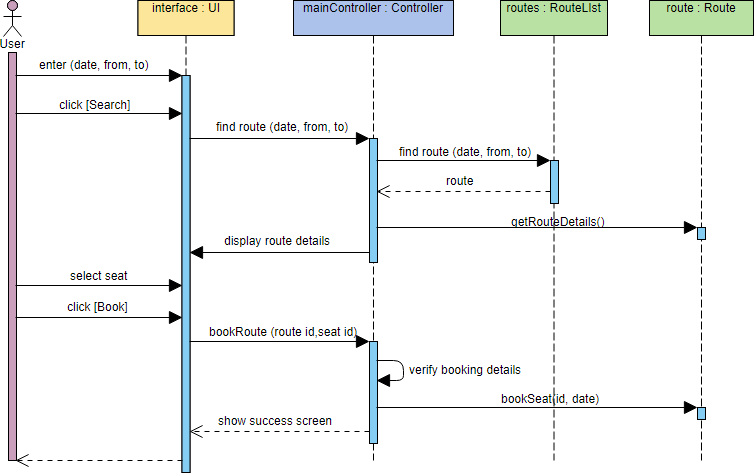
Sequence diagrams are a cornerstone of Object-Oriented System Design, illustrating how objects interact over time to perform a specific task. In this tutorial, we will deconstruct a classic Booking System example. This diagram is an excellent representation of the MVC (Model-View-Controller) architectural pattern, demonstrating how a User Interface (View) delegates logic to a Controller, which then manages the Data (Model).
Understanding the Core Components
Before diving into the flow of messages, we must identify the four distinct lifelines (objects) participating in this scenario. Each plays a specific role in the architecture:
- The Actor (User): Represented by the stick figure on the far left, this is the external entity initiating the process. In this case, the user wants to book a seat.
- The Boundary Object (interface): Labeled as
interface : UI, this represents the graphical user interface (GUI). Its sole responsibility is to capture user input and display results. It does not contain business logic. - The Controller Object (mainController): Labeled as
mainController : Controller, this is the “brain” of the operation. It coordinates the actions, deciding when to fetch data and when to process the final transaction. - The Entity Objects (Model): These represent the persistent data.
routes: RouteList: A collection or list of available routes.route: Route: A specific instance of a route containing details.
Tracing the Booking Logic
The diagram follows a linear flow from the moment the user enters a search request until the booking is confirmed. Let’s break down the interaction steps:
1. The Search Phase
The process begins when the user enters date and location details into the interface. Upon clicking [Search], the interface sends a message find route (date, from, to) to the mainController.
Crucially, the controller does not search the database directly itself. Instead, it delegates this task to the routes : RouteList object. Once the list retrieves the data, it returns a route object to the controller.
2. The Selection Phase
With the data in hand, the controller calls display route details back to the interface. The user then selects a specific seat and clicks [Book]. This triggers a new message from the interface to the controller: bookRoute (route id, seat id).
3. The Booking Phase
This is where the Model logic is finalized. The controller receives the booking request and performs a local check: verify booking details (a self-message). Finally, it sends the command bookSeat(id, date) to the specific route : Route object to commit the transaction.
Upon success, the flow reverses: the route confirms the booking, the controller sends a show success screen message to the interface, and the user sees the confirmation.
Tooling for Professional Modeling
To create and maintain diagrams with this level of architectural clarity, using the right software is essential. Visual Paradigm is the industry-standard tool for this task.
Using Visual Paradigm for Architecture
Visual Paradigm provides a robust environment for drawing Sequence Diagrams. It supports the automatic generation of code from your diagrams and vice versa, ensuring that your documentation always matches your actual application code.
When working with Visual Paradigm, you can easily:
- Define Lifelines: Drag and drop the Actor, Boundary, Controller, and Entity stereotypes to automatically set up the MVC structure.
- Manage Activation Bars: The vertical blue bars (known as “activation bars” or “execution occurrences”) in the diagram above visually represent the period during which an object is performing an action. Visual Paradigm allows you to adjust these dynamically.
- Validate Logic: Use the tool’s validation features to ensure that all dependencies between your Controller and Entity objects are correctly defined before generating your system documentation.
By mastering these concepts and utilizing tools like Visual Paradigm, you can effectively communicate complex system behaviors to both technical and non-technical stakeholders.