
Mastering Context Diagrams: AI Chatbot Logic with VPasCode Subgraphs
In the realm of system architecture and data flow modeling, clarity is paramount. When visualizing complex processes, a flat list of steps can quickly become overwhelming for stakeholders. This is where subgraphs in Mermaid flowcharts, powered by tools like VPasCode (Visual Paradigm as Code), become indispensable. They allow developers and architects to visually partition a system into logical domains, such as “Customer” vs. “Service,” without breaking the flow of data.
This tutorial will guide you through the architecture of a standard request-handling process, demonstrating how to use subgraphs to group related steps, manage system boundaries, and maintain a clean, readable diagram code.
The Architecture of a Request Handling Process
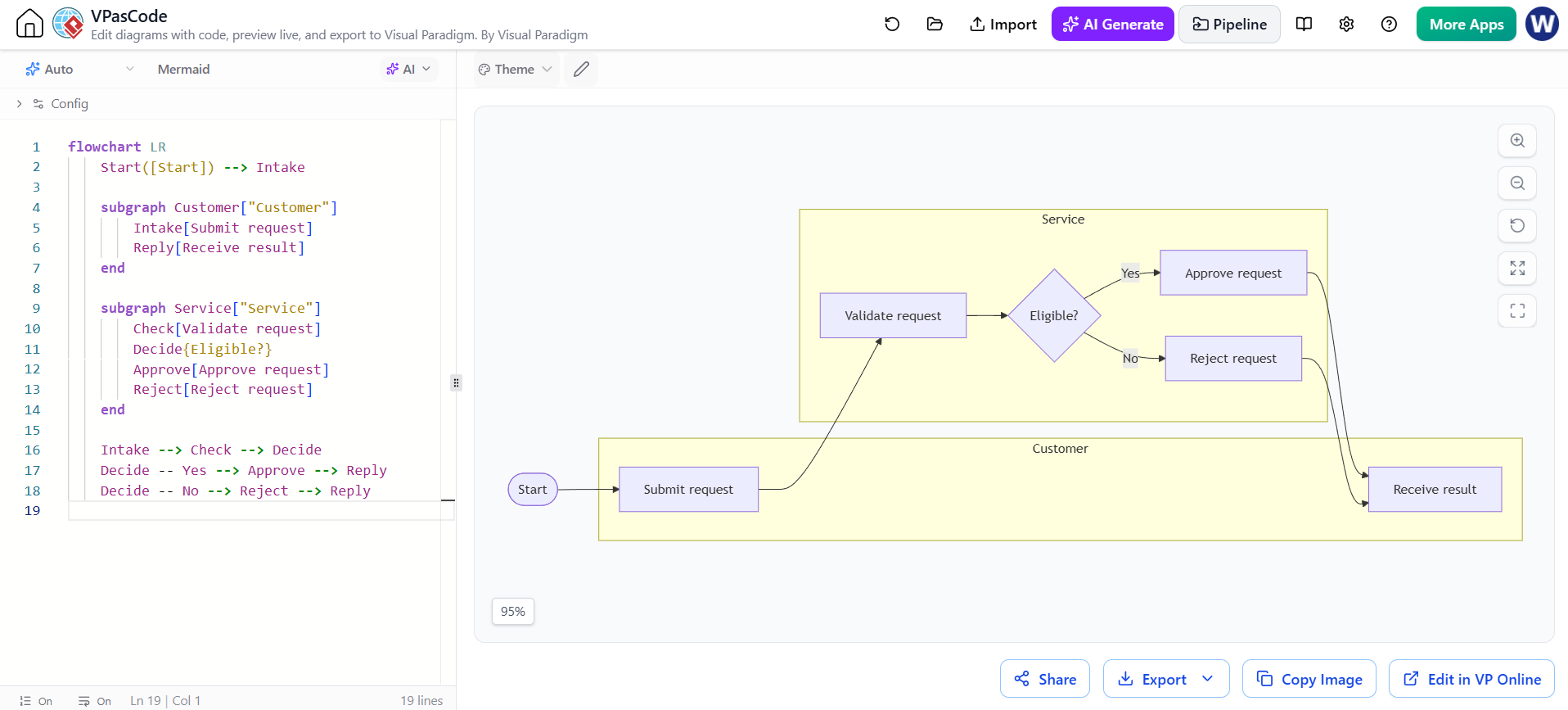
Before diving into the code, let’s deconstruct the system architecture represented in the diagram. We are modeling a workflow where a user initiates a request, a service validates it, and a decision is made regarding the request’s eligibility.
The architecture is divided into two distinct Actors or Bounded Contexts:
- The Customer Context: This represents the external entity initiating the action. In our diagram, this includes the Start of the process, the Submit request action (Intake), and the final Receive result action (Reply).
- The Service Context: This represents the backend logic handling the business rules. It includes the Validate request (Check), the decision diamond Eligible? (Decide), and the outcomes of Approve or Reject.
Why Use Subgraphs?
Without subgraphs, a diagram is just a long line of nodes. By wrapping specific nodes in a subgraph, we achieve two goals:
- Visual Clustering: It creates a physical boundary (like the yellow boxes in the VPasCode editor) that groups related functionality.
- Logical Ownership: It implies that the steps inside belong to a specific team or system component, which is crucial for high-level architectural reviews.
Step-by-Step Implementation in VPasCode
VPasCode allows you to write code that renders instantly into a diagram. This “Diagram as Code” approach ensures that your documentation stays in sync with your actual system design. Here is how the Mermaid syntax constructs this specific architecture.
First, we define the flow direction. LR stands for Left-to-Right, which is standard for linear process flows.
flowchart LR
    Start([Start]) --> Intake
We then define the Customer subgraph. This encapsulates the user-facing entry and exit points.
subgraph Customer["Customer"]
    Intake[Submit request]
    Reply[Receive result]
end
Next, we define the Service subgraph. This contains the internal processing logic, including the decision point.
subgraph Service["Service"]
    Check[Validate request]
    Decide{Eligible?}
    Approve[Approve request]
    Reject[Reject request]
end
Finally, we draw the connections. Notice how the flow crosses between the subgraphs. The Intake node connects to Check, and the Decide node connects back to nodes in the Customer subgraph via the Reply node.
Intake --> Check --> Decide
Decide -- Yes --> Approve --> Reply
Decide -- No --> Reject --> Reply
Best Practices for Grouping
While subgraphs are powerful, they must be used judiciously to avoid clutter. The VPasCode environment renders these groups dynamically, but the logic must remain sound.
- Avoid Over-Grouping: If you create too many subgraphs, the diagram becomes fragmented. Use subgraphs only when the grouping adds semantic meaning (e.g., separating UI from Backend, or Frontend from Database).
- Manage Cross-Connections: As seen in the diagram, arrows cross between the “Customer” and “Service” boxes. This is acceptable and necessary to show data flow, but ensure the lines are straight where possible. If arrows crisscross excessively, the diagram becomes a “spaghetti diagram” that is hard to follow.
Conclusion
By using VPasCode and Mermaid, you transform static diagrams into living documentation. The ability to use subgraphs allows you to model complex, multi-system interactions while maintaining a high-level view of the architecture. Whether you are designing a simple workflow or a distributed system, keeping your code clean and your groups logical is the key to effective communication.