
Mastering BPMN User Story Integration in Visual Paradigm
In modern business process management, bridging the gap between high-level process modeling and detailed software requirements is critical. Visual Paradigm (VP) offers a powerful feature for this: integrating User Stories directly into BPMN diagrams. This tutorial explores how to attach functional requirements to specific activities within a process flow, ensuring that every step of the “Register,” “Add Items,” and “Checkout” journey is traceable to a specific business need.
The Architecture of Integrated Modeling
When you view a BPMN diagram, you typically see the flow of control—how data moves from one task to another. However, to build a robust system, you need to define what each task is accomplishing in terms of user value. This is where the integration of User Stories comes in.
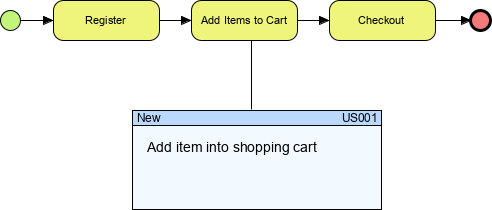
Visual Paradigm allows you to extend the standard BPMN notation by adding a container for requirements. This container acts as a “card” or “ticket” attached to a specific element. In the provided diagram, we see a shopping cart process. The task Add Items to Cart is the critical action where the user interacts with the system. By linking a User Story to this specific node, we create a direct traceability link between the process model and the software backlog.
Decoding the Diagram Elements
Let’s break down the visual components shown in the architecture:
- The Process Flow: The yellow rounded rectangles represent standard BPMN Tasks (Register, Add Items to Cart, Checkout). The green circle is the Start Event, and the red circle is the End Event.
- The Connector: The vertical line connecting the Add Items to Cart task to the box below represents a “Requirement” or “Information” association. In Visual Paradigm, this is often a specific relationship type that links the Process Model to the Requirement Model.
- The User Story Container: The blue-topped box labeled US001 is the User Story artifact. It contains the text “Add item into shopping cart.” This is not just a label; it is a structured object within the Visual Paradigm repository.
Step-by-Step: Integrating User Stories with Tasks
To replicate this architecture in your own Visual Paradigm projects, follow these steps to ensure your business process model is fully integrated with your development requirements.
1. Define the Business Process
First, ensure your BPMN diagram is complete. Create the tasks that represent your business logic. In our example, we have established the flow: Start → Register → Add Items → Checkout → End.
2. Select the Target Task
Identify the specific task that requires a user story. In this scenario, the task is Add Items to Cart. This task is a logical breakpoint where a user requirement is explicitly needed.
3. Create or Link the User Story
Visual Paradigm allows you to create a new User Story or link an existing one from the “Requirement” package. To link the story to the diagram:
- Right-click on the Add Items to Cart task in the canvas.
- Select Association or Requirements (depending on your specific VP version configuration).
- Choose to Create New User Story or Link Existing.
4. Configure the Integration Properties
Once linked, the system generates the container seen in the diagram. You will need to configure the metadata to ensure it aligns with Agile methodologies:
- ID (US001): Assign a unique identifier. This is crucial for traceability in tools like Jira or Azure DevOps if you export the data.
- Status (New): Indicate the current state of the requirement.
- Description: Enter the core requirement text: “Add item into shopping cart.”
The result is a hybrid view where the process logic (BPMN) and the functional logic (User Story) coexist on the same plane.
Advanced Configuration: VPasCode and Automation
For users who prefer automation or require strict version control, Visual Paradigm supports modeling via code. You can define the structure of this integration programmatically using VPasCode. This ensures that the relationship between the Task and the User Story is preserved even when the model is synchronized across teams.
// Define the BPMN Process
$process = new BPMNProcess("ShoppingCartProcess");

// Define the Tasks
$registerTask = new BPMNTask("Register");
$addToCartTask = new BPMNTask("Add Items to Cart");
$checkoutTask = new BPMNTask("Checkout");

// Define the User Story Requirement
$story = new UserStory("US001");
$story.setTitle("Add item into shopping cart");
$story.setStatus("New");

// Create the Association (The vertical line)
$process.associate($addToCartTask, $story);
When this code is executed within the Visual Paradigm environment, it automatically renders the BPMN flow and attaches the User Story container to the specific task, exactly as depicted in the visual model.
Why This Integration Matters
The architecture shown here represents a “Single Source of Truth.” By integrating the User Story directly into the BPMN diagram:
- Traceability: Developers can click a task to see the requirement immediately.
- Gap Analysis: Business analysts can visually see if a task exists without a corresponding User Story (or vice versa).
- Communication: It simplifies stakeholder reviews by combining the “How” (Process) with the “What” (Requirement) in a single view.
By mastering this integration, you ensure that your system architecture is not just a flowchart, but a comprehensive blueprint for development.