
Master Business Logic with VPasCode in Visual Paradigm
In the world of systems engineering and software architecture, clarity is paramount. When stakeholders need to understand a complex workflow—such as processing an online order—diagrams are far more effective than paragraphs of text. However, drawing these diagrams manually can be time-consuming and prone to formatting inconsistencies.
This tutorial explores how to leverage VPasCode, a powerful tool within the Visual Paradigm ecosystem, to model decision logic and process flows efficiently using the PlantUML syntax. We will analyze a specific scenario: an order processing system that checks inventory availability and branches into success or failure paths.
Understanding the Architecture: Code-Based Diagramming
VPasCode represents a shift from “drag-and-drop” modeling to “code-as-model.” This approach treats diagrams as text files that are compiled into visual representations. This offers several advantages:
- Version Control Friendly: Text-based diagrams can be managed using Git, allowing for diff tracking and collaboration without binary file conflicts.
- Speed and Precision: Typing logic is often faster than drawing boxes and arrows, and the parser ensures strict adherence to syntax rules.
- Consistency: The rendering engine automatically handles alignment and spacing, ensuring a professional look every time.
Deconstructing the Order Processing Logic
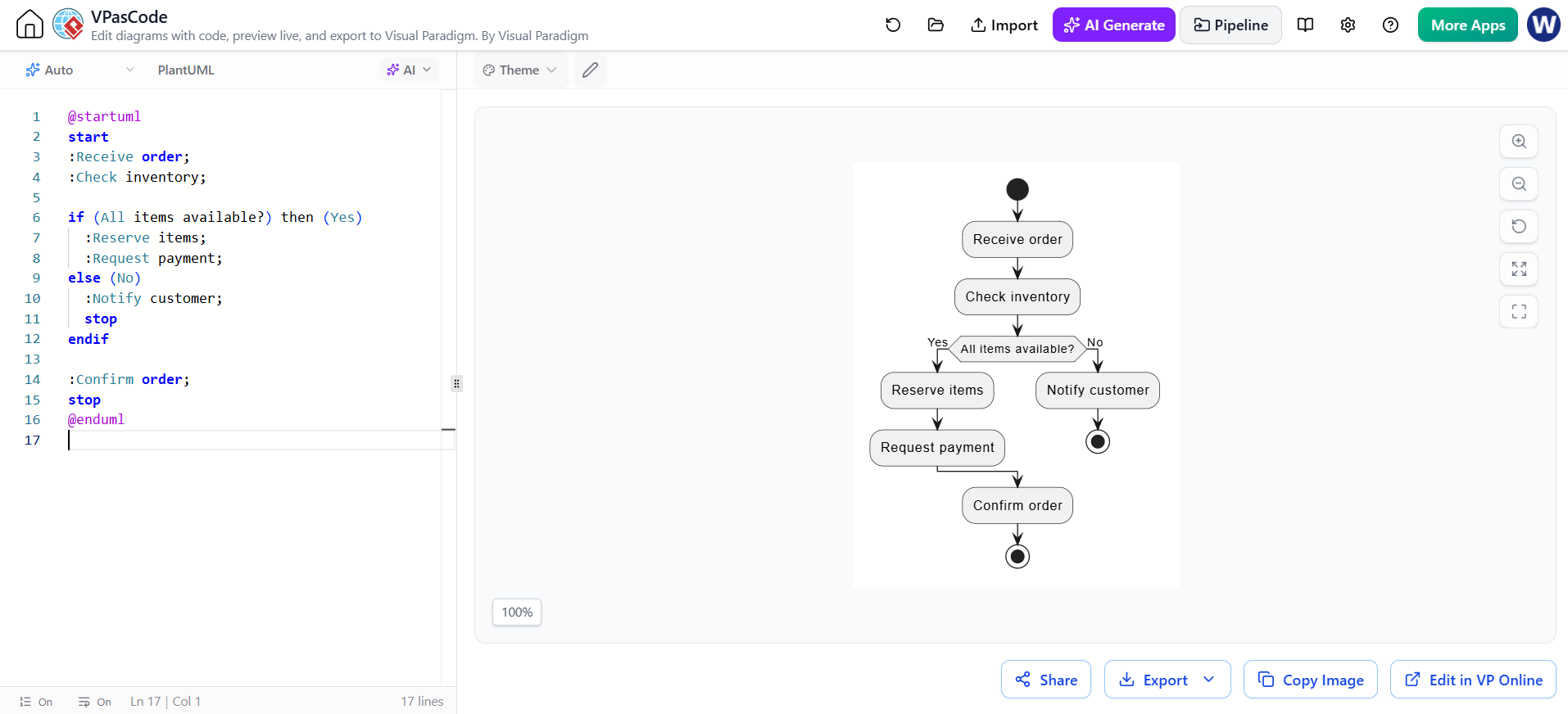
The diagram provided illustrates a standard decision-making process. Let’s break down the components of the code and how they translate into the visual flow chart.
1. The Entry and Initial Actions
The process begins with the start keyword, followed by a sequence of actions. In PlantUML activity diagrams, actions are denoted by a colon prefix (e.g., :Action Name).
start
:Receive order;
:Check inventory;
Visually, this creates a linear flow where the “Receive order” node connects directly to the “Check inventory” node. This represents the initial phase of the system where data is ingested and validated.
2. Modeling Decisions: The If-Else Statement
The core of this diagram is the decision point. The system must determine if the requested items are in stock. In the code, this is handled by the if statement structure.
Key Concept: Labeling Outcomes
Notice the syntax used: if (All items available?) then (Yes). The prompt asks the question, and the parentheses define the specific label for the “True” branch. This is crucial for readability. The diagram should communicate the result of the condition, not just repeat the question.
The code snippet below demonstrates how to structure this logic clearly:
if (All items available?) then (Yes)
  :Reserve items;
  :Request payment;
else (No)
  :Notify customer;
  stop
endif
3. Handling Branches and Termination
When the condition evaluates to “No,” the flow enters the else block. Here, the system notifies the customer of the unavailability. The command stop is used to explicitly end this specific branch of the process. Without it, the visualizer might attempt to draw an arrow to the next undefined element.
Conversely, the “Yes” path proceeds through “Reserve items” and “Request payment.” Crucially, after the endif command, the diagram automatically merges these two divergent paths back into a single flow, leading to the final confirmation step.
4. The Conclusion
The final steps involve confirming the order and terminating the entire process.
:Confirm order;
stop
The second stop marks the successful completion of the “Happy Path” (the ideal scenario where the order is processed successfully).
Best Practices for Effective Modeling
When designing these diagrams, it is essential to communicate the business logic clearly to stakeholders. A common pitfall is omitting error paths to keep the diagram “clean.” However, a complete model must account for every meaningful outcome.
By explicitly modeling the “No” branch where the customer is notified, we ensure that the failure mode is visible. If a stakeholder asks, “What happens if the item isn’t in stock?”, the diagram provides the answer immediately.
Conclusion
By utilizing VPasCode, you can create robust, maintainable, and clear system architecture diagrams. The transition from manual drawing to code-based modeling empowers technical writers and architects to focus on logic and flow rather than pixel-perfect alignment. Whether you are documenting a simple order process or a complex enterprise workflow, the principles of clear decision labeling and explicit path termination remain fundamental.