
BPMN Sequential Multi-Instance Markers in Visual Paradigm
In the complex landscape of Business Process Management (BPMN), handling collections of data requires precise control over execution flow. One of the most critical elements for managing data-driven processes is the Multi-Instance Marker. While parallel processing is often the default assumption for efficiency, there are specific architectural scenarios where strict, step-by-step execution is required. This tutorial explores the Sequential Multi-Instance Marker, detailing how to model resource-constrained environments using Visual Paradigm.
Understanding the Multi-Instance Concept
A multi-instance activity allows a single task to be repeated multiple times. Instead of running a task once, the process engine creates multiple instances of that task based on a provided data collection (such as a list of orders, a set of files, or a queue of items).
There are two primary execution modes for these instances:
- Parallel: Multiple instances run simultaneously (e.g., sending 100 emails at once).
- Sequential: Instances run one after another, strictly in a linear order.
In this guide, we focus on the Sequential mode, which is vital when system resources are limited.
The Visual Symbol: Identifying the Marker
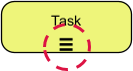
When modeling in Visual Paradigm, the specific behavior of the task is indicated by a distinct visual marker located at the bottom center of the activity box.
For a sequential multi-instance task, the symbol consists of three horizontal parallel lines (≡). This icon serves as a visual cue to the process architect and the reader that the following task is not a simple one-off action, but a looped process.
Execution Flow: The Linear Constraint
The defining characteristic of the Sequential Multi-Instance marker is its strict execution logic. Unlike parallel loops where the engine spawns tasks concurrently, a sequential loop adheres to a “lock-step” execution model:
- The engine retrieves the first item from the data collection.
- Instance A executes and must reach a completion state.
- Only after Instance A is fully complete does the engine proceed to retrieve the second item.
- Instance B begins.
This ensures that no two instances of the task are active in the system at the same time. If the data collection contains 10 items, the process will take 10 times the duration of a single task, but it guarantees that only one unit of work is in progress at any given moment.
Real-World Application: Resource Constrained Environments
Why would a business process require sequential execution? The answer usually lies in physical or digital resource constraints.
Consider a Safety Equipment Inspection workflow. A safety inspector has a batch of 10 pressure valves to test. However, the facility has only one testing rig available. It is physically impossible to test Valve 1 and Valve 2 simultaneously.
In this scenario, a Parallel Multi-Instance marker would be an error, as it would imply the system expects to spawn 10 concurrent testing threads, leading to process failures or bottlenecks. Instead, the model must utilize the Sequential Multi-Instance marker to dictate that:
Test Valve 1 → Finish Report → Move to Valve 2 → Finish Report → Repeat.
Implementation Guide in Visual Paradigm
To implement this pattern effectively in Visual Paradigm, you must configure the task properties explicitly. Visual Paradigm defaults many multi-instance settings to parallel execution to maximize throughput, so manual configuration is essential.
- Create the Task: Drag a Task object onto your diagram.
- Enable Multi-Instance: Double-click the task to open the properties window. Navigate to the Multi-Instance tab.
- Configure Loop Type: You will see a dropdown menu for the loop type. Ensure this is set to Sequential.
- Define Data Collection: In the loop data item section, specify the collection variable (e.g.,
ListOfValves). This tells the engine how many times to loop.
Summary
The Sequential Multi-Instance Marker (≡) is a powerful tool for modeling processes that require linear, step-by-step processing of data collections. By strictly enforcing that Instance B cannot start until Instance A is complete, it accurately reflects real-world limitations such as single-user workstations, physical machinery, or serialized data entry. Mastering this concept ensures your BPMN models in Visual Paradigm are not just visually correct, but logically robust.