
Automating BPMN Modeling with Visual Paradigm AI
In the modern landscape of software development, bridging the gap between high-level business requirements and executable technical specifications is often the most challenging hurdle. Traditional modeling requires deep domain knowledge and hours of manual diagramming. However, with the advent of Generative AI integrated into enterprise-grade tools like Visual Paradigm, this barrier is rapidly dissolving.
This tutorial explores how to leverage the AI Diagram Generation feature within Visual Paradigm to instantly create complex Business Process Diagrams (BPMN) from natural language descriptions. We will walk through the architecture of the input, the generation process, and how to validate the resulting model.
Understanding the AI Diagram Generation Architecture
The AI Diagram Generation tool acts as an intelligent bridge between unstructured text and structured BPMN 2.0 notation. Instead of manually placing shapes on a canvas, the user provides a semantic description of the workflow, and the system parses the intent to construct the logical flow.
The Input Mechanism
The core of this process is the Topic field. This is where the user defines the scope of the business process. The AI engine utilizes Natural Language Processing (NLP) to identify key entities (actors), actions (tasks), and decision points (gateways) within the text.
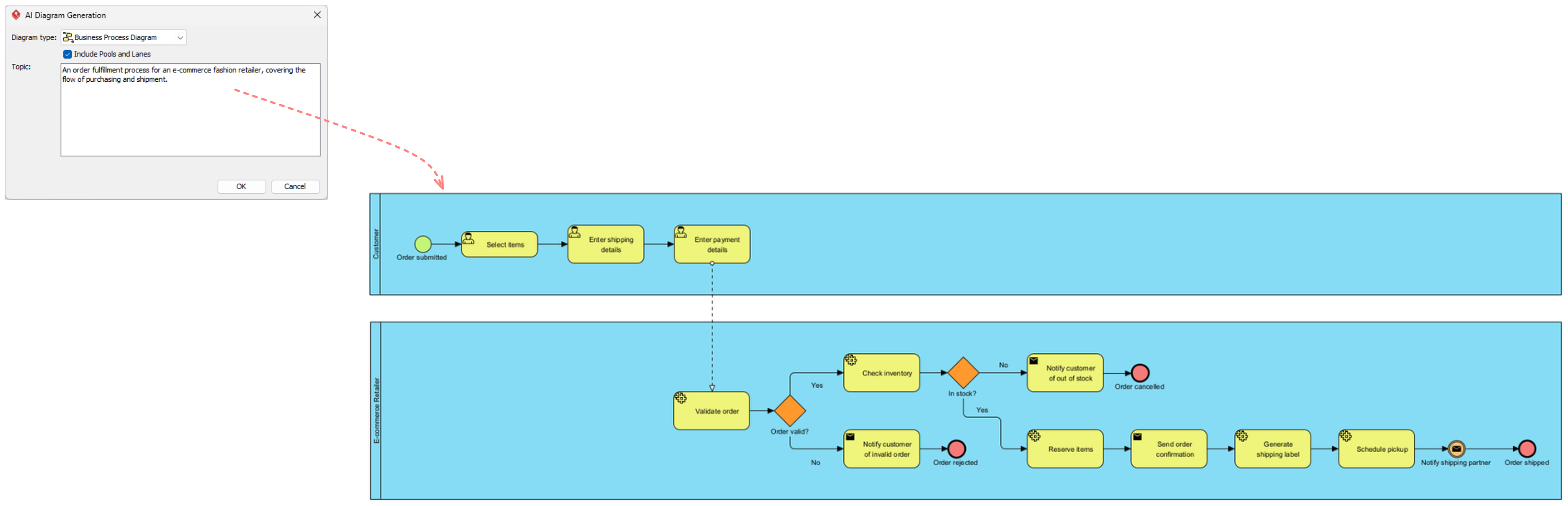
In the example scenario—an e-commerce fashion retailer—the system identifies the following structural elements:
- Actors: Customer, E-commerce Website (System).
- Triggers: “Order submitted”.
- Tasks: “Select items”, “Enter shipping details”, “Validate order”, “Check inventory”.
- Logic/Gateways: Implicit decision points like “In stock?”, “Order valid?”.
Visual Paradigm’s AI engine parses this input and automatically instantiates Pools and Lanes to separate the responsibilities of the Customer from the System.
Generating the BPMN Model
Once the user clicks “OK”, the AI engine performs a semantic mapping operation. It translates the narrative text into standard BPMN 2.0 XML. The resulting diagram is not just a static image; it is a fully functional data model containing:
- Sequence Flows: Defining the order of execution.
- Gateways: Exclusive gateways (XOR) for decision making (e.g., “Yes” vs. “No”).
- Event Enders: Terminating events (e.g., “Order cancelled”).
- Associations: Connecting data objects to specific tasks.
Step-by-Step Workflow Analysis
Let us deconstruct the generated diagram shown in the interface to understand how the AI interpreted the text.
1. The “Happy Path” (Customer Lane)
The AI correctly identified the primary user journey in the top lane. It created a Start Event (“Order submitted”) followed by a sequence of User Tasks:
[Start Event] --> [User Task: Select Items] --> [User Task: Enter Shipping Details] --> [User Task: Enter Payment Details]This sequence represents the standard, error-free flow of a customer completing a purchase. The AI prioritizes this “Happy Path” as the default logic.
2. The System Processing (E-commerce Website Lane)
The AI creates a second lane for the backend system. It recognizes that after payment, the system must perform validation. The diagram shows:
[Start Event: Payment Complete] --> [User Task: Validate Order] --> [Exclusive Gateway: Order valid?]Here, the AI intelligently infers a decision point. If the order is invalid, the flow diverts to an Error Event or an Error Message. If valid, it proceeds to “Check Inventory”.
3. Handling Exceptions and Logic
One of the most powerful aspects of this generation is how it handles conditional logic. The text mentions “covering the flow of purchasing and shipment.” The AI infers the necessary branching:
- Inventory Check: A gateway labeled “In stock?” splits the flow.
- Out of Stock: If “No”, the AI creates a path to “Notify customer of out of stock” and terminates the process with a “Order cancelled” end event.
- In Stock: If “Yes”, the flow continues to “Reserve Items”, “Send order confirmation”, “Generate shipping label”, and finally “Notify shipping partner”.
Best Practices for AI-Assisted Modeling
While the AI can generate a diagram in seconds, the resulting model is a starting point for refinement. To ensure the generated BPMN accurately reflects business reality, follow these architectural best practices:
1. Define the “Happy Path” First
When writing your prompt, focus primarily on the successful execution of the process. The AI is exceptionally good at generating the linear flow of success. Once the core structure is in place, you can manually add specific exception handling (e.g., payment failures, system downtime) that might be too complex for a single-pass AI generation.
2. Validate with Simulation
Visual Paradigm includes robust simulation capabilities. Once the AI generates the diagram, run a simulation to verify the logic. Check for:
- Deadlocks: Are there paths where the process gets stuck?
- Unreachable Tasks: Are there tasks that the logic can never reach?
- Logic Gaps: Does every gateway have a “Yes” and “No” path defined?
3. Collaborative Refinement
The generated diagram serves as an excellent artifact for stakeholder collaboration. Walk through the AI-generated model with Product Owners and developers. Use the visual representation to ask: “If the inventory is low, what happens next?” This often reveals nuances that the AI might have oversimplified.
Conclusion
The integration of AI into Visual Paradigm transforms BPMN modeling from a manual, time-consuming drafting exercise into a rapid, iterative design process. By leveraging the AI Diagram Generation feature, teams can instantly visualize complex workflows, validate logic through simulation, and ensure that the “Happy Path” and exception flows are clearly documented before a single line of code is written.
Whether you are an analyst documenting a legacy system or a developer planning a new feature, this tool provides a seamless bridge between business intent and technical execution.