
Architecting Order Checkout Logic with VPasCode and AI Chatbot Flows
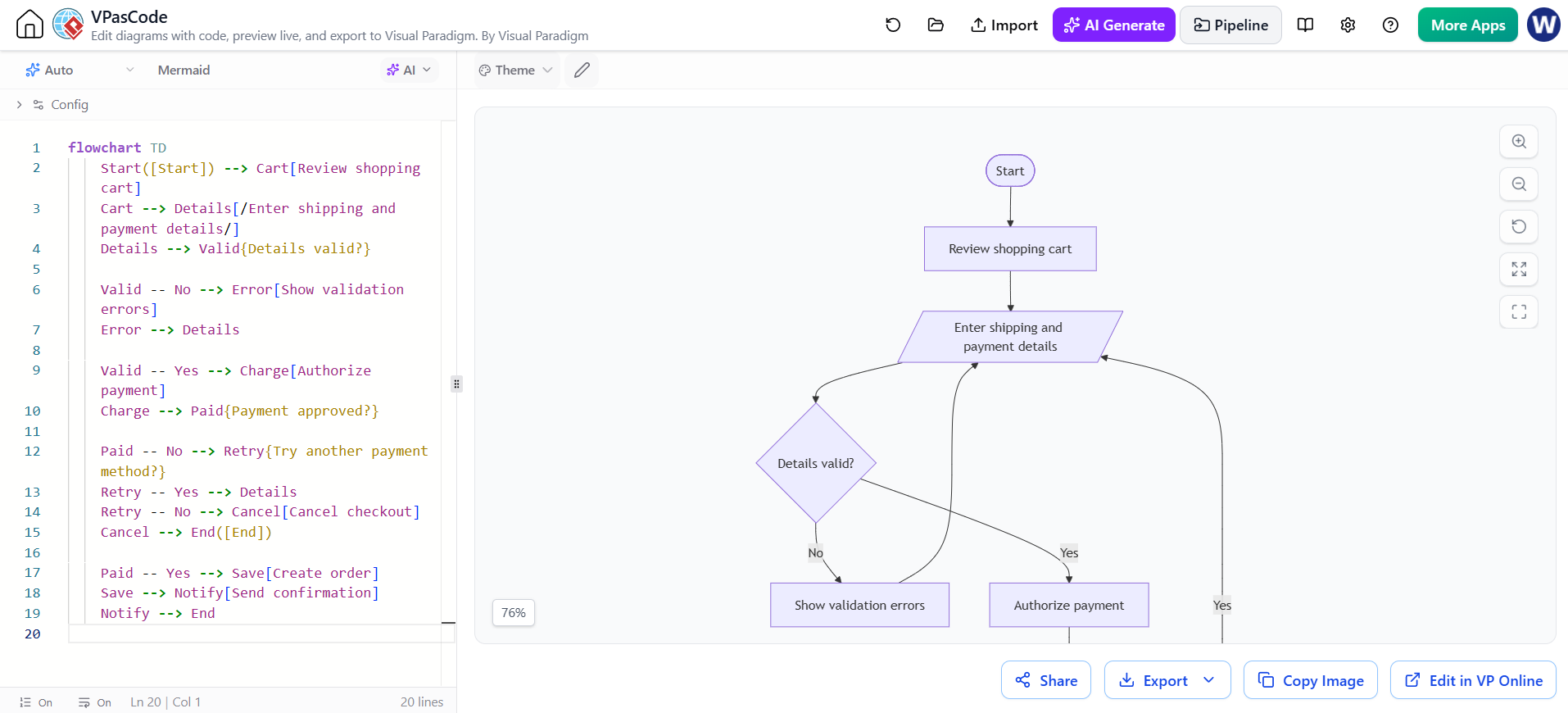
In the realm of software architecture, few tasks are as critical as mapping out the user journey and system logic before writing a single line of application code. Visual Paradigm’s VPasCode editor transforms this process by allowing developers to define complex system flows using a syntax-driven approach, similar to Markdown or Mermaid.js. This tutorial explores a practical example: the Order Checkout Process.
By leveraging the VPasCode editor, we can visualize the intricate dance between user input, data validation, payment authorization, and system completion. This guide will walk you through the specific modeling concepts used in the provided flowchart, deconstructing the syntax to help you build robust, error-resistant system diagrams.
Understanding the Anatomy of a VPasCode Flowchart
The flowchart provided represents a standard Level 0 Data Flow Diagram (DFD) or a detailed Process Flow. In VPasCode, this is defined using a specific syntax that links “Nodes” (shapes) via “Edges” (connectors).
The syntax generally follows this pattern:
ID[Shape Label] --> NextID[Next Shape Label]Here, ID is the unique identifier for the node, [Label] is the text displayed on the shape, and the arrow --> defines the direction of the process flow. Let’s break down the specific logic used in the Order Checkout example.
1. Defining Process Stages and Start/End Points
The flow begins with a standard start point and moves through critical data collection phases. In the diagram, we see the transition from reviewing the cart to entering sensitive details.
Start([Start]) --> Cart[Review shopping cart]
Cart --> Details[/Enter shipping and payment details/]
Key Concept: Shape Syntax
Start([Start]): The parentheses()denote a terminal shape (usually an oval), indicating the entry point.Details[/Enter ...]: The square brackets[]are used for text labels. The forward slash/before the text indicates a Parallelogram shape. In flowcharting, this shape specifically represents Input/Output operations, which is semantically perfect for entering shipping details.
2. Handling Logic and Validation (The Decision Node)
The core of the checkout system is validation. The system must ensure data is correct before proceeding. In VPasCode, decision points are represented by diamond shapes using curly braces {}.
Details --> Valid{Details valid?}Once the decision is made, the flow must branch. The syntax for branching is distinct:
Valid -- No --> Error[Show validation errors]
Valid -- Yes --> Charge[Authorize payment]
Here, -- No --> and -- Yes --> define the specific paths taken based on the outcome of the decision node. This logic creates a “loop” where the user is sent back to re-enter data if validation fails.
3. Implementing Retry Logic and Termination
A robust checkout process must handle payment failures gracefully. The diagram demonstrates a nested decision structure for payment retries.
Paid -- No --> Retry{Try another payment method?}
Retry -- Yes --> Details
Retry -- No --> Cancel[Cancel checkout]
This segment introduces two critical architectural patterns:
- Re-entry Loops: If the user chooses “Yes” on the retry, the path leads back to
Details, allowing them to input new payment info without restarting the entire checkout. - Termination Paths: If the user chooses “No”, the flow moves to
Canceland then toEnd, effectively terminating the session.
4. The Success Path
Finally, when the payment is approved, the system executes the completion sequence:
Paid -- Yes --> Save[Create order]
Save --> Notify[Send confirmation]
Notify --> End
This linear sequence ensures that data persistence (creating the order) and user communication (sending the email) happen strictly after financial validation.
Why Use Text-Based Modeling?
While dragging and dropping shapes is intuitive, it often leads to “spaghetti diagrams” where connectors cross over each other, making the logic hard to follow. VPasCode offers several advantages:
- Version Control Friendly: Diagrams are plain text files. You can track changes in Git, review diffs in pull requests, and revert changes easily.
- Consistency: The visual layout is automatically generated based on the logic. You don’t have to manually align nodes or adjust connectors.
- Speed: Complex logic loops (like the retry mechanism) can be written and visualized in seconds using simple text commands.
Conclusion
The Order Checkout flowchart is a classic example of how software requirements translate into visual logic. By mastering the VPasCode syntax—specifically the use of shape delimiters like [], {}, and ()—you can effectively document system architectures that are both human-readable and technically precise. Whether you are designing a simple user flow or a complex distributed system, the code-first approach ensures your documentation remains as maintainable as your codebase.