
Architecting Connected Knowledge with VP OpenDocs
In the world of software engineering, a persistent challenge has always been the “documentation gap.” Architects create detailed diagrams, developers write code, and PMs track requirements, but often these artifacts exist in silos. When the code changes, the diagram often doesn’t, leading to “rotting” documentation that is no longer useful.
Visual Paradigm OpenDocs addresses this fundamental issue by acting as a “connected documentation hub.” Rather than treating documentation as a static byproduct of development, OpenDocs positions it as a dynamic, living artifact that evolves alongside your models. This tutorial explores the system architecture behind OpenDocs, explaining how it unifies diagrams, requirements, and procedural notes into a single source of truth.
The Core Philosophy: Contextualized Modeling
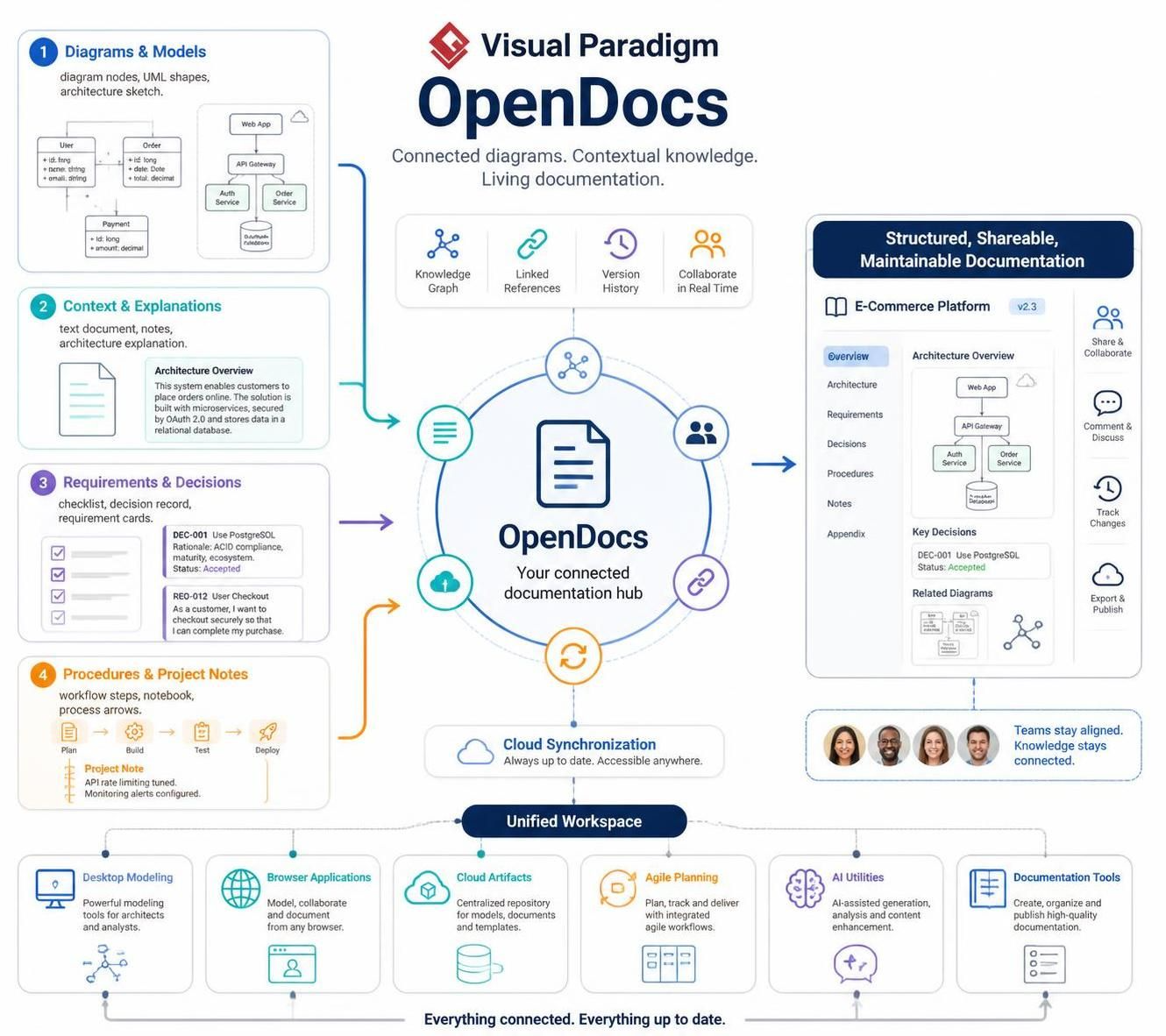
At the heart of OpenDocs is the concept that diagrams are not just images; they are data nodes that require context to be truly valuable. The system architecture is designed around four primary input streams that feed into the central documentation engine.
1. Diagrams & Models (The Visual Layer)
The first pillar is the visual representation of the system. OpenDocs ingests standard modeling artifacts such as UML class diagrams, architecture sketches, and entity-relationship models. In the ecosystem, a simple class diagram (like the User/Order example) is not just a picture; it is a structured data container that can be linked to external logic.
2. Context & Explanations (The Narrative Layer)
Visuals often lack the “why” behind the “what.” OpenDocs solves this by allowing users to attach text documents, notes, and architecture explanations directly to the diagram nodes. This transforms a static diagram into a narrative document, explaining design rationale, security protocols (like OAuth), and database choices.
3. Requirements & Decisions (The Governance Layer)
Documentation is incomplete without traceability. OpenDocs integrates requirement cards and decision records (e.g., “DEC-001: Use PostgreSQL”) directly into the workspace. This ensures that every architectural decision is linked to a specific requirement, providing a clear audit trail for compliance and quality assurance.
4. Procedures & Project Notes (The Operational Layer)
Finally, the system captures operational workflows. Whether it’s a “Plan -> Build -> Test -> Deploy” pipeline or a specific project note about API rate limiting, these procedural elements are treated as first-class citizens within the documentation structure.
System Architecture: From Inputs to Unified Output
The architecture of Visual Paradigm OpenDocs functions as a centralization engine. It pulls data from the four input streams mentioned above and applies a set of structural capabilities to transform them into shareable documentation.
- The Knowledge Graph: This is the engine’s brain. It creates semantic links between the visual diagram nodes and the text-based requirements. When you view a diagram, the system understands that the “Order” entity is related to the “DEC-001” decision.
- Linked References: The system maintains bidirectional links. If a requirement changes, the diagram can be flagged for review, ensuring consistency across the project.
- Version History: Because the documentation is treated as code-like artifacts, OpenDocs tracks changes over time, allowing teams to revert to previous states if necessary.
The output of this process is a Structured, Shareable, Maintainable Documentation page. This is not a PDF export; it is a web-based, interactive view that includes an overview, architecture diagrams, key decisions, and related diagrams, all rendered in real-time.
The Unified Workspace & Cloud Synchronization
OpenDocs does not exist in a vacuum. It sits at the center of a Unified Workspace that integrates various tools:
- Desktop Modeling: For architects and analysts creating the core UML models.
- Browser Applications: For lightweight, cloud-based collaboration.
- Cloud Artifacts: Serving as a centralized repository for templates and documents.
- Agile Planning: Ensuring documentation tracks with agile workflows.
- AI Utilities: Leveraging AI for generation, analysis, and content enhancement.
This ecosystem relies on Cloud Synchronization to ensure that the documentation is always up to date. Whether a team member is working on a desktop or a browser, the “Single Source of Truth” remains consistent.
Implementation Strategy: Building a Living Document
To effectively utilize the OpenDocs architecture, teams should adopt a workflow that treats documentation as a continuous integration task. Below is a conceptual logic flow for how data is structured within the OpenDocs environment.
// Conceptual Logic: The OpenDocs Knowledge Graph
// This snippet illustrates how the system links
// structural data (Requirements) with visual data (Diagrams)

class KnowledgeNode {
    constructor(type, id, content) {
        this.type = type; // e.g., "Requirement", "Diagram", "Decision"
        this.id = id;     // Unique identifier
        this.content = content;
        this.links = [];  // Array of linked KnowledgeNodes
    }

    // Method to link a decision to a diagram node
    linkTo(targetNode, relationshipType) {
        this.links.push({
            target: targetNode,
            type: relationshipType,
            timestamp: Date.now()
        });
        // Trigger a re-render of the documentation view
        this.triggerUpdate();
    }

    triggerUpdate() {
        // In a real implementation, this pushes to the Cloud Synchronization service
        console.log(`Document updated: ${this.id} is now connected to ${this.links.length} other nodes.`);
    }
}

// Usage Example:
const dec001 = new KnowledgeNode("Decision", "DEC-001", "Use PostgreSQL");
const dbNode = new KnowledgeNode("DiagramNode", "DB-01", "PostgreSQL Database");

// Establish the link
dec001.linkTo(dbNode, "Justifies");
In practice, Visual Paradigm handles this linking automatically through its GUI. When you add a decision record (like “DEC-001: Use PostgreSQL”) and associate it with a database entity in your diagram, the system creates the link shown in the code logic above. The resulting documentation automatically displays the decision under a “Key Decisions” section, creating a traceable narrative.
Conclusion: The Future of Connected Documentation
Visual Paradigm OpenDocs represents a shift from “document-first” to “model-first” documentation. By structuring the workspace around a central hub that connects diagrams, requirements, and procedural notes, teams can ensure that their knowledge remains connected even as the project evolves. The result is a “living documentation” system where the documentation is always up to date, accessible, and aligned with the actual software being built.