
Mastering Advanced BPMN: Loop Logic, Gateways, and Event-Driven Timers
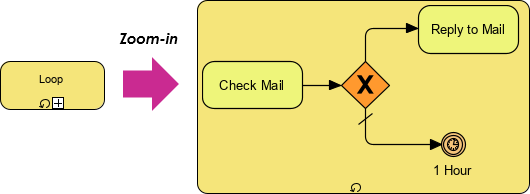
In the realm of Business Process Model and Notation (BPMN), simplicity often masks profound power. The diagram presented here illustrates a sophisticated yet compact workflow involving a loop structure, a conditional decision point, and a time-based event trigger. By understanding the components shown in this specific visual Paradigm (VP) model, we can unlock the ability to build robust, self-healing, and time-aware business processes.
This tutorial breaks down the technical architecture of the diagram, explaining how the loop, the exclusive gateway, and the timer event interact to create a dynamic system.
1. The Core Concept: Iterative Loops
The starting point of our analysis is the Loop element, represented as a rounded rectangle with a specific icon inside. In BPMN, a loop is not merely a visual cue; it is a structural constraint that dictates execution flow.
When a process enters a loop, it does not simply repeat a task. Instead, the engine evaluates a condition. If the condition is true, the process returns to the start of the loop or the specific activity. In the context of this diagram, the Check Mail activity is nested within this loop structure.
- Function: It forces the process to stay in a specific state until a specific criteria is met.
- Application: This is ideal for polling scenarios, such as “Wait for user input” or “Retry until success.”
2. The Decision Engine: Exclusive Gateway
Following the Check Mail task, the flow encounters a diamond-shaped symbol marked with an X. This is the Exclusive Gateway (also known as an XOR Gateway).
The “X” signifies that the process must choose exactly one path out of the available options. It cannot go both ways simultaneously. This is the brain of the operation:
- Condition Evaluation: Upon arriving at the gateway, the engine evaluates the context (e.g., “Was the email opened?” or “Is the flag set?”).
- Path Selection:
- If the condition is met, the flow moves to the Reply to Mail task.
- If the condition is not met, the flow follows the alternative path (indicated by the diagonal line).
3. The Time-Trigger: Event Subprocess
The most advanced concept in this diagram is the path that leads to the Timer Event (the circle with a clock icon and the label “1 Hour”). This represents a mechanism for handling timeouts or non-responses.
Unlike a standard sequence flow that moves immediately, this path is triggered by the passage of time. In Visual Paradigm, this is often modeled as an Event Subprocess or a boundary event attached to the loop or a specific activity.
How it works technically:
- The process enters the loop and checks the mail.
- It fails to find the necessary condition to proceed to “Reply to Mail”.
- Simultaneously, the engine starts a “1 Hour” timer.
- If the condition is not met within that hour, the timer fires, executing the event logic (which might be logging a timeout, sending an alert, or breaking the loop).
4. Visual Paradigm Tooling Implementation
To replicate this architecture in Visual Paradigm, you do not need to write code. The tool’s “Smart Modeling” capabilities allow you to drag and drop these elements. However, to ensure the model is technically accurate, you must configure the specific properties of the Loop and the Gateway.
Configuration Steps for Visual Paradigm
- Create the Loop: Insert a Loop shape. In the properties window, set the Loop Type to “Standard” or “Conditional.”
- Define the Condition: Create a variable (e.g.,
emailFound). Set the gateway condition toemailFound == true. - Configure the Timer: For the “1 Hour” path, ensure you select the “Event Subprocess” option in the element palette. In the properties, set the “Start Event” to “Timer” and define the duration as “PT1H” (ISO 8601 duration format).
5. Why This Architecture Matters
Static diagrams are useful for documentation, but dynamic models like this are useful for execution. By combining a loop (persistence), a gateway (logic), and a timer (safety net), you create a process that is resilient to failure.
If a user takes too long to reply, the system doesn’t hang indefinitely; it triggers the “1 Hour” event. If the user replies immediately, the system skips the wait and proceeds to the “Reply to Mail” task. This efficiency is the hallmark of modern BPMN modeling.