
Mastering the Loan Approval Lifecycle: A BPMN 2.0 Swimlane Tutorial
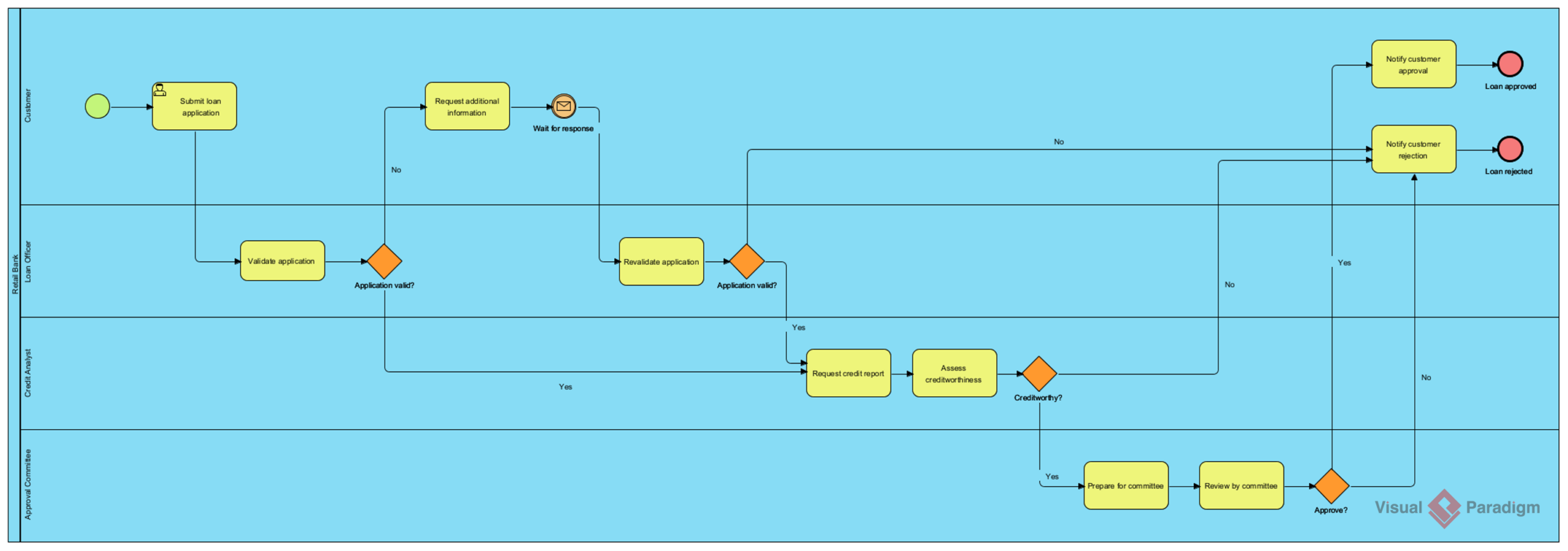
Business Process Model and Notation (BPMN) 2.0 is the industry standard for visualizing complex business workflows. Unlike static flowcharts, BPMN is executable and capable of representing the “who, what, where, and when” of a process. This tutorial guides you through the architectural design of a Loan Application & Approval Process, a classic example used to demonstrate multi-party collaboration and decision logic.
Understanding the Architecture: Swimlanes and Roles
The process above is structured using Swimlanes (also known as Pools and Lanes). This architectural pattern is crucial because it explicitly assigns responsibility. It ensures that every task in the diagram is associated with a specific actor, preventing ambiguity about who performs which action.
Let’s break down the actors visible in this loan management system:
- Customer: The initiator of the process. Their role involves submitting data and waiting for external events (like a request for more information).
- Bank Loan Officer: The gatekeeper. They perform the initial validation of the application’s completeness and validity.
- Credit Analyst: The technical expert. This role involves the heavy lifting of data analysis, specifically assessing creditworthiness.
- Approval Committee: The final decision-making body. They handle high-value or complex cases that require a consensus.
Step-by-Step Process Analysis
1. The Entry Point and Initial Validation
The process begins with a Start Event (the green circle) triggered by the Customer submitting a loan application. This task triggers the first handoff to the Bank Loan Officer.
The Officer must perform a Validation Gate (the orange diamond). This is a crucial decision point. The logic is binary:
- Yes: The application is valid. The flow moves to the next stage.
- No: The application is invalid. The flow loops back to the Customer to Request Additional Information. Note the use of an Intermediate Event (the envelope icon) which signifies a message signal sent to the customer.
2. The Credit Assessment Phase
Once the application is valid, the process moves to the Credit Analyst lane. Here, the process splits into two distinct steps:
- Request Credit Report: An automated or manual retrieval of data.
- Assess Creditworthiness: The Analyst reviews the data.
Following the assessment, the process hits another Exclusive Gateway labeled Creditworthy?. If the answer is No, the process immediately routes to the rejection notification. If Yes, it proceeds to the final decision stage.
3. The Committee Approval Loop
The Approval Committee acts as the final arbiter. This phase involves a Prepare for Committee task followed by the actual Review by Committee.
They reach a final decision point (Approve?). If they reject the loan, the flow merges with other rejection paths. If they approve, the flow triggers a notification to the Customer and ends the process successfully.
4. Termination and Outcomes
The diagram features two distinct End Events (red circles):
- Loan Approved: The successful completion of the workflow.
- Loan Rejected: A termination state where the process ends without a loan being granted. This is critical for tracking failure rates and customer churn.
Implementation with Visual Paradigm
Building this diagram manually requires precision to ensure all gateways have both “Yes” and “No” paths. Visual Paradigm streamlines this workflow through its intuitive drag-and-drop editor.
When modeling this in Visual Paradigm, the following features are essential for a professional result:
- Resource Catalog: Use the resource catalog to easily assign tasks to specific swimlanes (e.g., dragging the “Customer” lane onto the diagram to auto-assign the Start Event).
- Automatic Validation: Visual Paradigm includes a real-time validation engine. It will automatically flag if a gateway lacks a label or if a lane contains a task but no outgoing flow.
- Traceability: The tool allows you to link specific tasks to requirements or user stories, ensuring the diagram is not just a drawing, but a mapped business requirement.
Conclusion
Understanding the flow of a loan application is fundamental to banking operations. By visualizing this process using BPMN 2.0 swimlanes, organizations can clearly identify bottlenecks (such as the “Request additional information” loop) and optimize the flow for better customer experience. Tools like Visual Paradigm provide the necessary infrastructure to turn these architectural concepts into executable business models.