
Mastering BPMN Manual Tasks and Human Interaction Flows
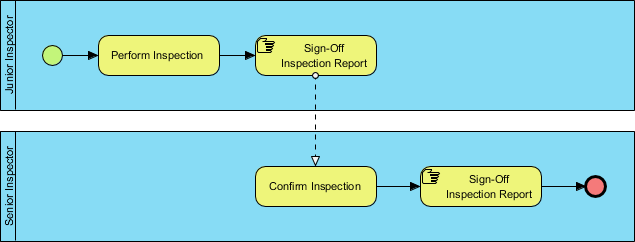
Welcome to this technical tutorial on Business Process Model and Notation (BPMN). In modern process engineering, distinguishing between automated system logic and human-driven decision-making is critical. This guide analyzes a specific “Cart Inspection” scenario, demonstrating how to model human-centric workflows where tasks are executed without the aid of software execution engines.
Understanding how to represent these “Sign-Off” activities correctly ensures that your process diagrams accurately reflect the reality of the business operations, preventing confusion between what a computer does and what a human must physically verify.
Understanding the “Cart Inspection” Process Architecture
The diagram presented depicts a classic two-tier inspection workflow. It highlights the transition of responsibility from a “Junior Inspector” to a “Senior Inspector.” This structure is vital for quality assurance processes where a preliminary check is followed by a final authorization.
The architecture relies heavily on Swimlanes (Pools) to segregate responsibilities. By separating the lanes, we can clearly visualize the “Handoff” points where the process moves from one role to another. The flow is not just a sequence of events; it is a flow of artifacts and responsibilities.
The Junior Inspector’s Role
The process initiates with the Junior Inspector. Their primary responsibility is the physical act of inspection. In BPMN terms, this is represented as a standard Task. Once the inspection is complete, the Junior Inspector must perform a critical control step: the Sign-Off Inspection Report.
Notice the specific iconography used for this sign-off. It is not a simple text box; it is a specialized BPMN symbol indicating that a document or report is being finalized. This symbol often implies a need for a physical signature or a digital equivalent that requires human intervention.
The Transition to the Senior Inspector
The most complex part of this diagram is the interaction between the two lanes. The Junior Inspector completes their sign-off, but the process cannot end there. It must be validated by the Senior Inspector.
This is where the Message Flow (represented by the dashed line) becomes crucial. Unlike a sequence flow, which indicates the order of steps within a single process, a message flow indicates communication between different participants (or in this case, different swimlanes acting as distinct participants). The Senior Inspector receives the signal that the inspection is ready for confirmation.
Deep Dive: Modeling Manual Tasks
The prompt for this article emphasizes that the tasks about sign-off are manual tasks. This is a vital concept in system architecture. It means that the process engine (the software running the workflow) does not automatically execute these steps. It waits for a human to intervene.
Here is how we model this distinction:
- Automated Tasks: Usually represented by a simple rectangle. These are executed by the software engine (e.g., “Calculate Tax”).
- Manual Tasks: Represented by the icons seen in this diagram. These require a human to perform the action.
The “Sign-Off” Symbol
The icon used for Sign-Off Inspection Report is a specialized task type. It often includes a document or a signature symbol to indicate that the output of this task is a formal record. In the context of the Junior Inspector, this task marks the completion of their duty and the creation of a deliverable for the Senior Inspector.
Visual Paradigm Implementation
To replicate this specific architecture and symbol set, we utilize Visual Paradigm. This tool provides a comprehensive set of BPMN 2.0 standards that allow for precise modeling of complex interactions.
Step 1: Defining the Swimlanes
First, create a Pool and define two distinct Swimlanes: “Junior Inspector” and “Senior Inspector”. This visual separation is the foundation of the diagram’s clarity.
Step 2: Adding Manual Tasks
Within the “Junior Inspector” lane, drag a Task element. To represent the “Sign-Off” nature of the task, you would typically select a specific task type or use a custom icon if your organization’s standards dictate it. Visual Paradigm allows you to easily customize the shape to include the document icon seen in the reference diagram.
Step 3: Connecting the Lanes
To represent the handoff from the Junior to the Senior Inspector, use a Message Flow. Select the dashed line tool. Click on the “Sign-Off” task in the Junior lane and drag it to the “Confirm Inspection” task in the Senior lane. This visual cue tells the reader that a message (the report) has been sent, not just that the process has moved to the next step.
<!-- BPMN XML Conceptual Representation -->
<!-- This snippet illustrates the conceptual structure of the swimlanes and tasks -->

<!-- Junior Inspector Lane -->
<swimlane name="Junior Inspector">
  <task name="Perform Inspection"/>
  <task name="Sign-Off Inspection Report"/>
</swimlane>

<!-- Senior Inspector Lane -->
<swimlane name="Senior Inspector">
  <task name="Confirm Inspection"/>
  <task name="Sign-Off Inspection Report"/>
</swimlane>

<!-- Message Flow between lanes -->
<messageFlow sourceRef="Sign-Off Inspection Report" targetRef="Confirm Inspection"/>
Step 4: Finalizing the Flow
The Senior Inspector then performs their own sign-off. This finalizes the entire process. The diagram ends with a thick red circle, known as the End Event, which signifies that the Cart Inspection process is complete and no further actions are required.
Why This Architecture Matters
In many organizations, the “Sign-Off” is the most critical control point in a process. It is where liability is transferred. By modeling these as manual tasks in Visual Paradigm, we ensure that the process documentation explicitly states: “This step requires a human to verify and sign.” It prevents the misconception that a system could automatically approve a cart inspection without human oversight.
Conclusion
This tutorial has broken down the “Cart Inspection” process, highlighting the importance of separating manual human tasks from automated flows. By using Visual Paradigm to model these interactions correctly, you create diagrams that are not just pretty pictures, but accurate blueprints for business operations. Whether you are a process engineer, a business analyst, or a system architect, mastering these distinctions is key to building robust, human-centric systems.