


Introduction
Modern professionals operate in a landscape cluttered with fragmented tools, siloed data, and disjointed workflows. The cognitive load of context-switching between a desktop modeling environment, a browser-based project management app, and an AI text generator has become a significant bottleneck in enterprise productivity. Enter the Visual Paradigm Unified Platform—a groundbreaking ecosystem unveiled in June 2026 that completely reimagines how digital work is conceptualized, built, and managed.
This platform is not merely a user interface refresh; it is a masterclass in software orchestration. By acting as a universal hub, the Unified Platform brings together Visual Paradigm’s core pillars—Desktop, Online, Chatbot, Webapps, OpenDocs, Pipeline, and VPasCode. It ensures these components remain loosely coupled while being seamlessly glued together through a centralized data drive and unified workspace. This comprehensive guide explores the intricate architecture of the Unified Platform and how its integrated ecosystem empowers teams to move from raw ideas to production-ready assets without ever leaving their flow state.
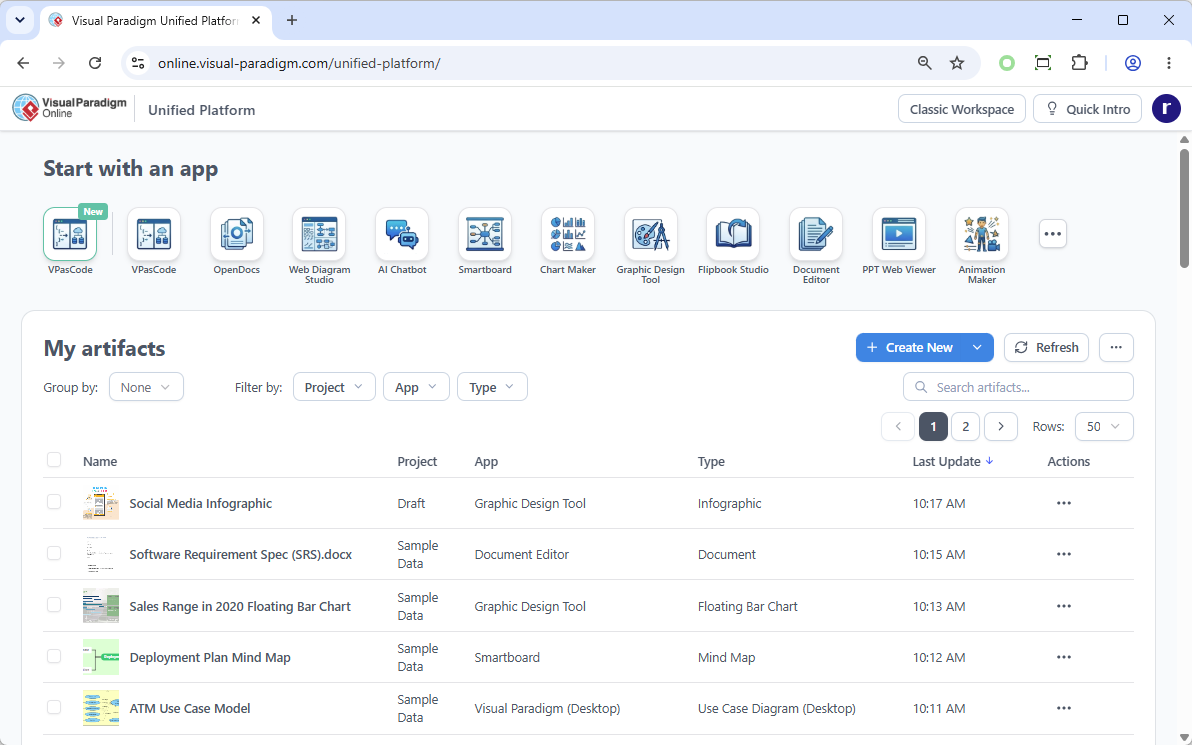
The Architecture of Integration: Loosely Coupled, Seamlessly Glued
To understand the true power of the Unified Platform, one must look at its underlying software philosophy: loose coupling with seamless integration.
Historically, software suites forced disparate tools into a single, monolithic codebase, leading to bloated applications and slow performance. The Unified Platform takes a different approach. Each core component functions as a highly specialized, independent engine. However, they are bound together by the Unified Drive—a centralized, cloud-synced file system that acts as the connective tissue for the entire ecosystem.
1. Desktop & Online: The Hybrid Workspace
Visual Paradigm Desktop handles heavy, offline-capable enterprise modeling, while Visual Paradigm Online provides accessible, browser-based collaboration. The Unified Platform bridges these environments by embedding the cloud experience directly inside the Desktop app via a secure, integrated browser. This allows local system architecture and cloud assets to coexist flawlessly, granting users the raw processing power of desktop software alongside the real-time sharing capabilities of the web.
2. The 100+ Webapps Hub
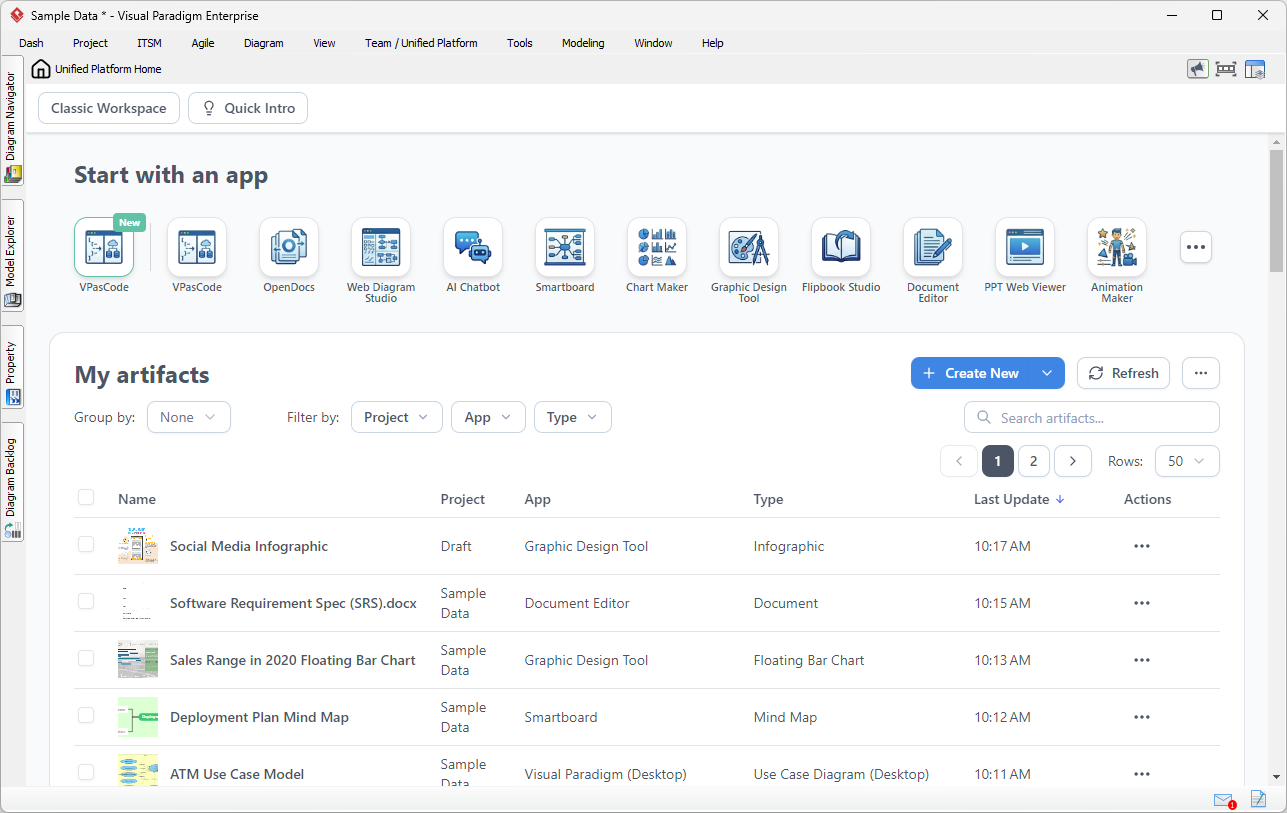
Instead of installing dozens of disconnected applications, the platform aggregates over 100 specialized micro-apps—ranging from Agile sprint planners and Gantt charts to UX wireframing and business infographics—into a single, categorized dashboard.
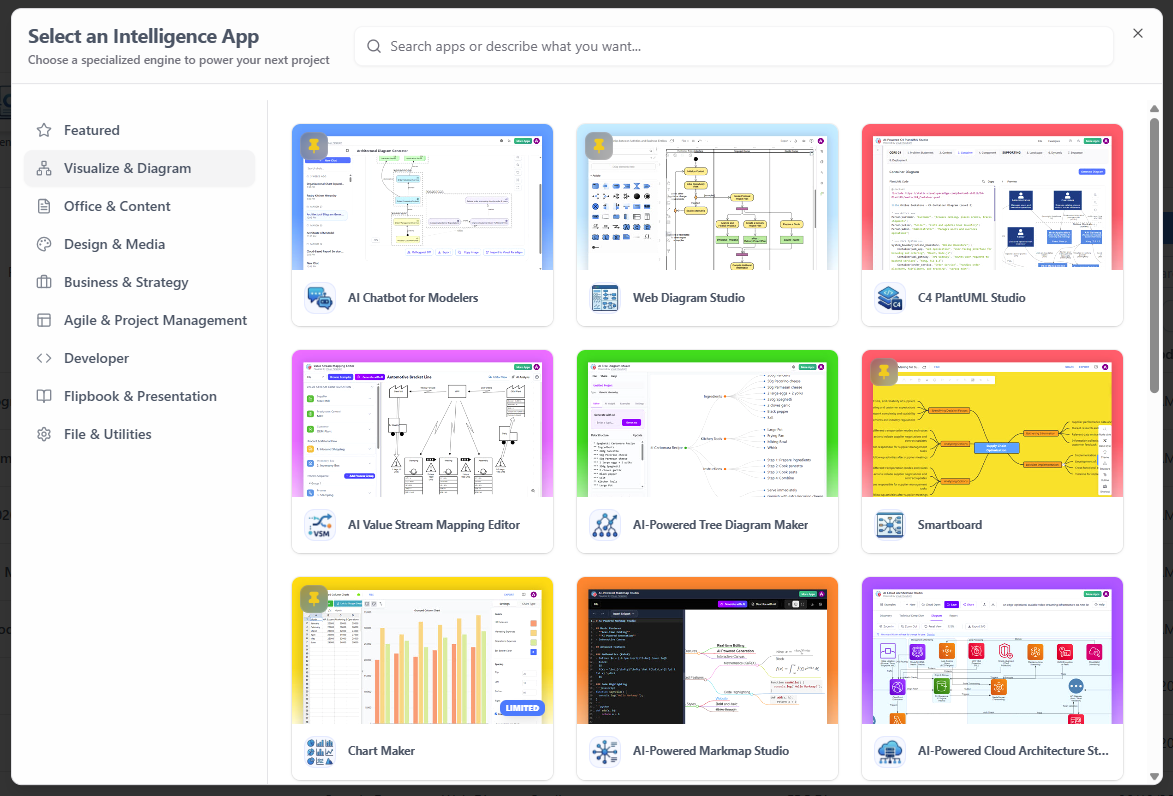
3. OpenDocs & Pipeline: The Frictionless Documentation Engine
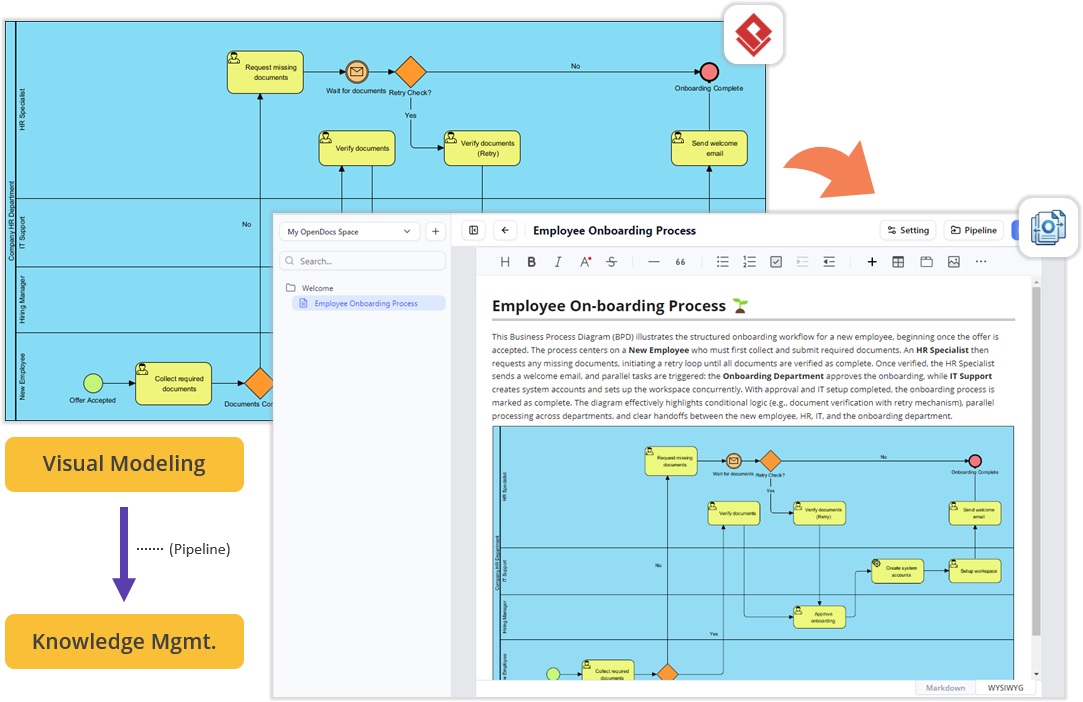
OpenDocs serves as the collaborative document editor, while Pipeline acts as the intelligent conduit between the desktop and the cloud. Because the components are loosely coupled, you can build complex diagrams in VP Desktop, push them through Pipeline, and drag-and-drop them directly into an OpenDocs manual. The link remains live and dynamic without requiring manual image exports.
4. VPasCode & AI Chatbot: The Generative Layer
The platform embeds cutting-edge AI directly into the creative workflow. VPasCode translates natural language prompts into production-ready diagrams and code, while the AI Chatbot provides contextual assistance. These tools are not isolated add-ons; they are woven into the centralized “Create” menu, allowing users to spin up visual assets instantly.
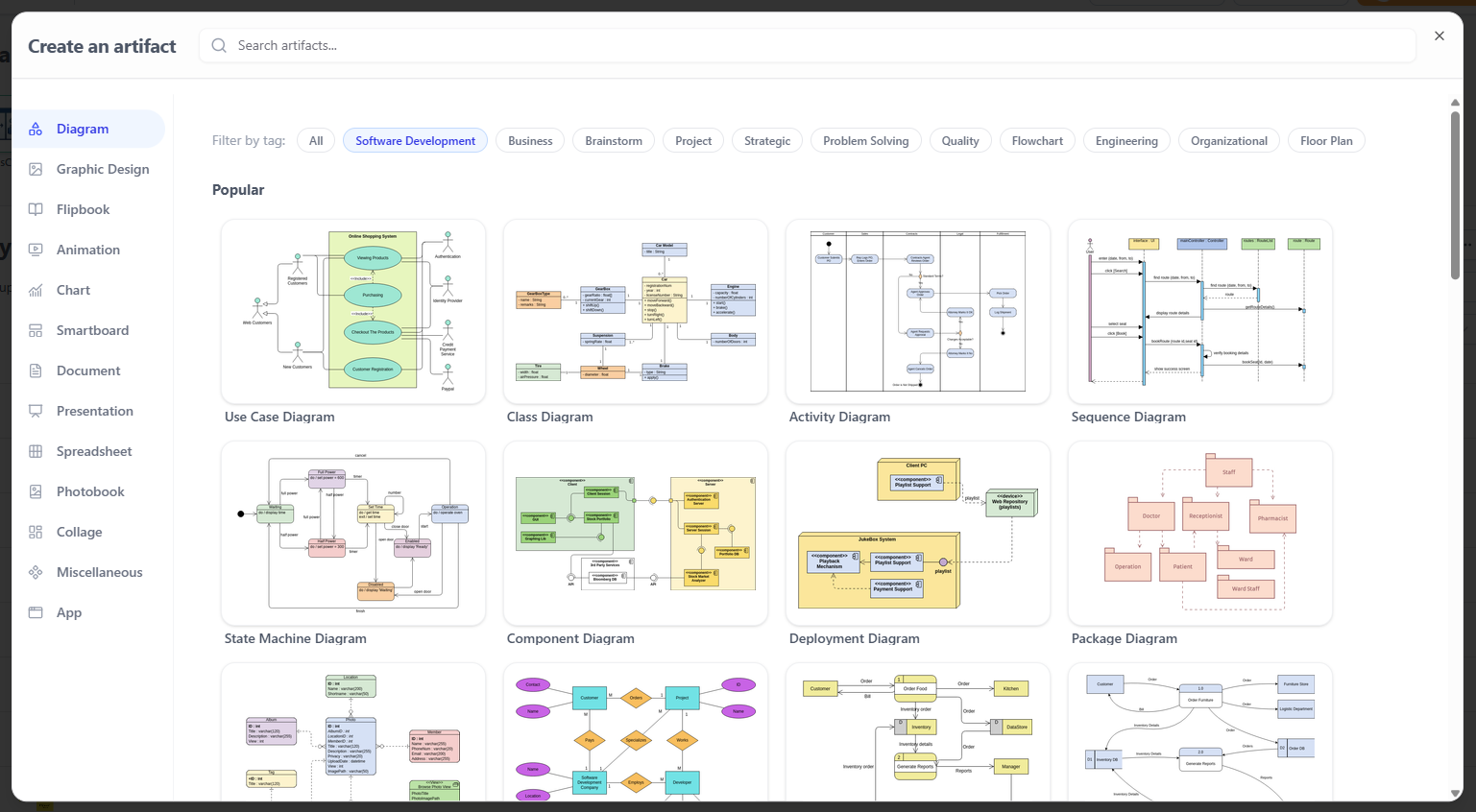
The Unified Drive: A Single Source of Truth
At the heart of this seamless integration is the Unified Drive. In traditional workflows, a project manager might have UML diagrams saved in a desktop folder, sprint plans in a third-party web app, and requirement documents in a local word processor.
The Unified Drive eliminates this fragmentation. It acts as a universal file system where every artifact, diagram, and project created across any of the 100+ apps is automatically indexed and organized.
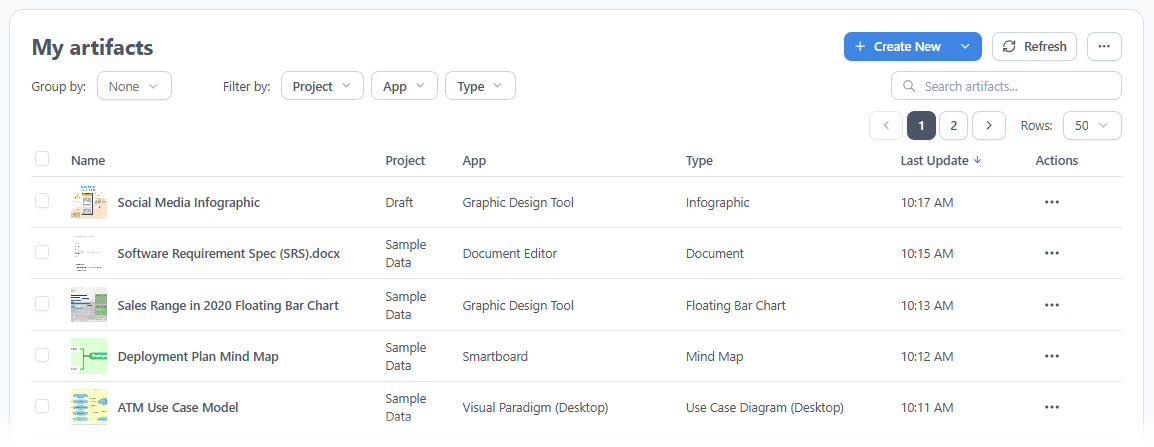
Real-World Scenarios: The Ecosystem in Action
How does this “loosely coupled, seamlessly glued” architecture impact daily workflows? By embedding the Unified Platform directly into your desktop client, context-switching is eliminated entirely.

Scenario 1: System Modeling to Product Requirements
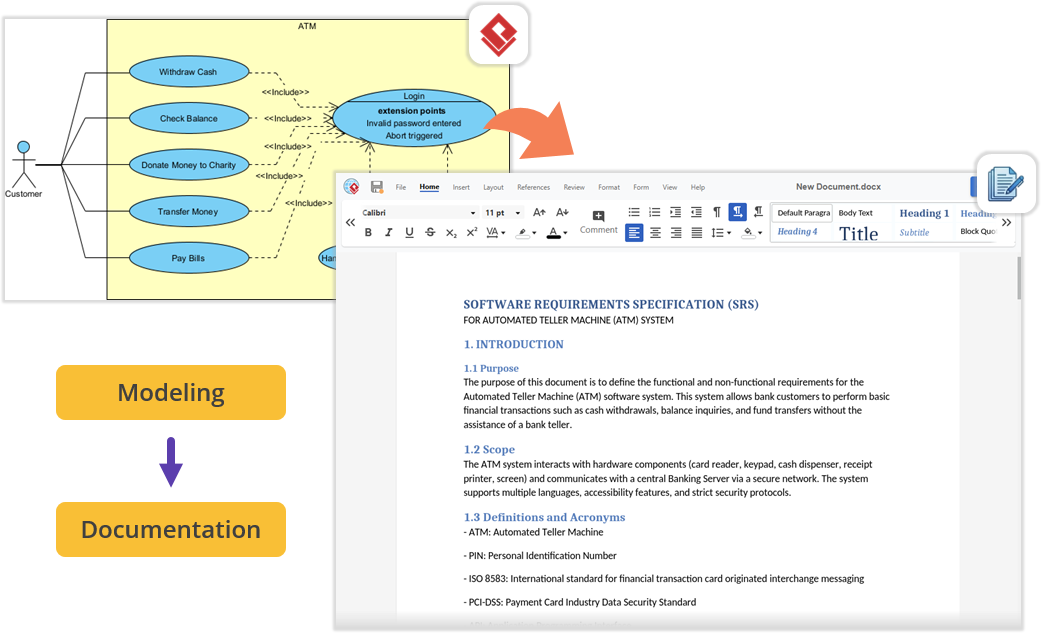
Imagine you are architecting a software module using UML inside Visual Paradigm Desktop. Once the models are complete, you need to write the Product Requirement Specification (PRD). Instead of minimizing the app and opening a local word processor, you open the embedded Unified Platform. From there, you launch the Document Editor app to write your requirements right next to your active modeling environment—keeping everything perfectly organized under a single project space.
Scenario 2: Effortless Documentation via Pipeline
For teams streamlining technical manuals, the flow between the desktop workspace and cloud features is frictionless. You build diagrams locally in VP Desktop and send them to the cloud-based Pipeline. Switching to the OpenDocs app within the Unified Platform panel, you will find your Pipeline pane waiting. You can write your guides and simply drag-and-drop your desktop-generated diagrams directly into the document canvas. No broken image links, no manual exports.
Scenario 3: Supercharging Agile and Management
Software development requires project management and team alignment. The Unified Platform instantly unlocks specialized PM and Agile applications. Within the same interface where you manage codebase models, you can jump into apps dedicated to Stakeholder Management, build interactive Gantt Charts, map out a RACI Matrix, or design a prototype using the Website Builder. It perfectly bridges the gap between engineering design and project execution.
How to Access the Unified Ecosystem
Getting started with the new ecosystem is straightforward, whether you prefer working in a browser or inside the desktop software.
For Visual Paradigm Online Users
-
Log into your VP Online account.
-
Upon successful login, you will automatically be redirected to the new Unified Platform dashboard.
-
You can also bookmark and visit the platform directly at the Unified Platform portal.
For Visual Paradigm Desktop Users
To view your synchronized diagrams and access the 100+ embedded apps right inside your desktop client:
-
Ensure you are logged in: Connect your desktop application to your cloud repository by selecting Team / Unified Platform > Select Repository and entering your credentials.
-
Open the Platform: Navigate to Team / Unified Platform > Unified Platform in the main menu.

-
An embedded browser will open directly inside your workspace, revealing the centralized cloud drive and your entire app ecosystem.
Conclusion
The Visual Paradigm Unified Platform represents a monumental shift in digital productivity, moving away from the era of fragmented toolsets and into an age of intelligent orchestration. By maintaining a “loosely coupled” architecture, Visual Paradigm ensures that heavy desktop modeling, agile web applications, and generative AI tools like VPasCode remain fast, specialized, and highly performant. Yet, through the “seamless glue” of the Unified Drive and Pipeline, these distinct engines operate as a single, cohesive organism.
For enterprise architects, product managers, and creative teams, this means the end of administrative friction. The boundaries between local processing and cloud collaboration have dissolved, allowing users to focus entirely on ideation and execution rather than file management. As AI capabilities continue to deepen within this ecosystem, the Unified Platform stands as a compelling vision of the future—one where the journey from a raw thought to a fully documented, production-ready system is limited only by your imagination.
References
-
Visual Paradigm Unified Platform: Project Management UI Enhancements: Details on project management interface improvements within the Unified Platform.
-
Introducing Visual Paradigm 18.1: A New Era of Unified Ecosystems and AI-Driven Innovation: Overview of version 18.1’s unified ecosystem and AI capabilities.
-
Visual Paradigm Official Website: The main hub for Visual Paradigm products, resources, and information.
-
Visual Paradigm Online: Unified Platform: The cloud-based entry point for the Unified Platform experience.
-
Visual Paradigm Unified Platform: Quick Introduction: A beginner-friendly guide to getting started with the platform.
-
Announcing the All-New Visual Paradigm Unified Platform: The official launch announcement for the Unified Platform.
-
Visual Paradigm Desktop Product Updates: Latest updates and enhancements for the desktop application.
-
Visual Paradigm Updates Hub: The central repository for all Visual Paradigm release notes and product updates.
-
Sync AI Diagram to OpenDocs Pipeline Guide: Instructions on utilizing Pipeline to sync desktop diagrams directly into OpenDocs.