
A comprehensive walkthrough of flowcharts in PlantUML — from core concepts to working examples.
1. What “Flowchart” Means in PlantUML
PlantUML does not have a diagram type literally called flowchart. The equivalent — and what you should use for process flows, algorithms, and business logic — is the Activity Diagram (new syntax, also called the beta or SDL syntax). It produces BPMN-like rounded boxes, condition diamonds, and swimlanes.
| Requirement | PlantUML answer |
|---|---|
| Boxes + arrows + decisions | Activity diagram (new syntax) |
| Business process with roles/departments | Activity diagram + swimlanes |
| State transitions rather than steps | State machine diagram |
| Quick text-mode flowchart | Mermaid (alternative) |
2. Key Concepts
2.1 Structural elements
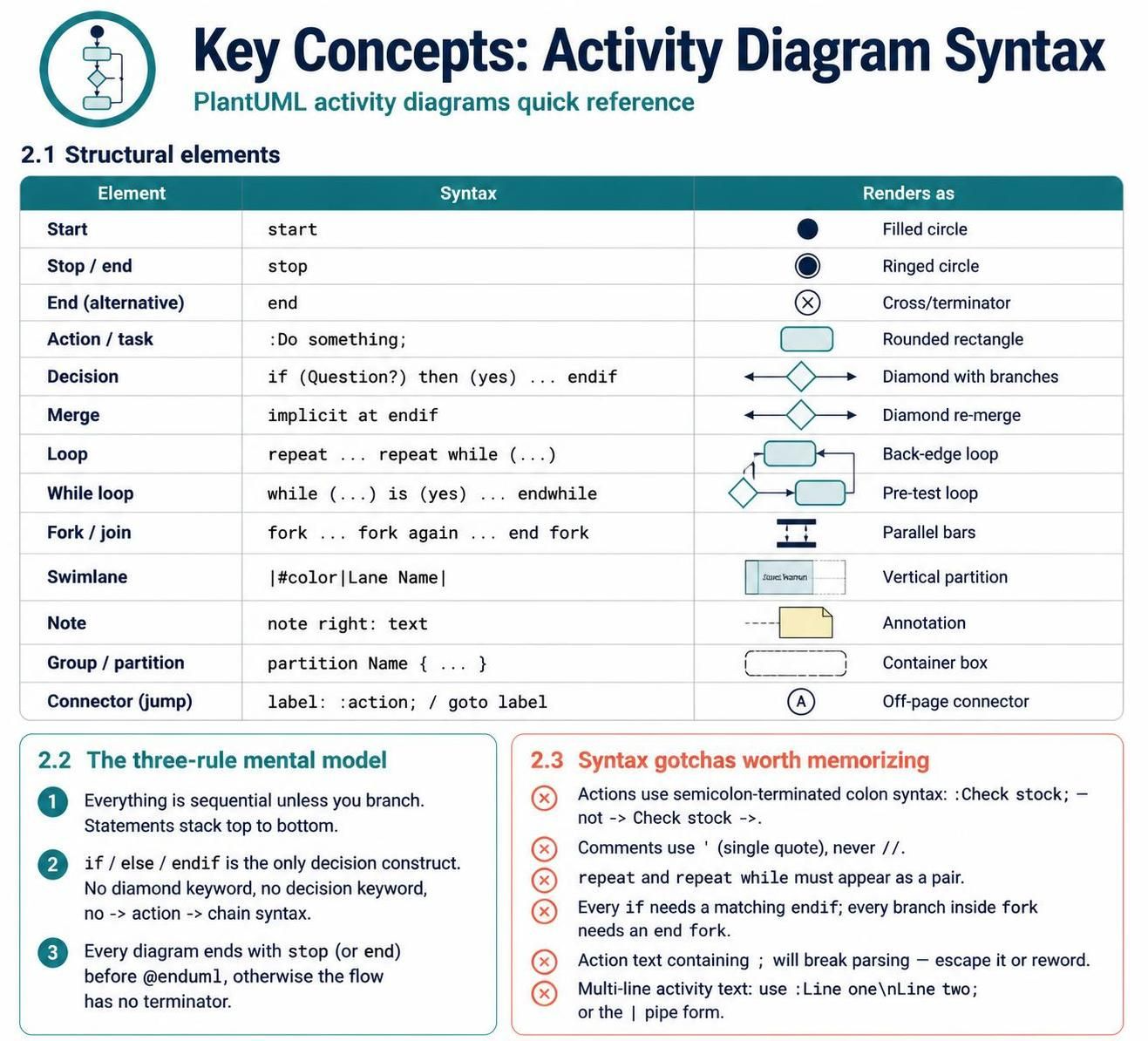
| Element | Syntax | Renders as |
|---|---|---|
| Start | start |
Filled circle |
| Stop / end | stop |
Ringed circle |
| End (alternative) | end |
Cross/terminator |
| Action / task | :Do something; |
Rounded rectangle |
| Decision | if (Question?) then (yes) ... endif |
Diamond with branches |
| Merge | implicit at endif |
Diamond re-merge |
| Loop | repeat ... repeat while (...) |
Back-edge loop |
| While loop | while (...) is (yes) ... endwhile |
Pre-test loop |
| Fork / join | fork … fork again … end fork |
Parallel bars |
| Swimlane | |#color|Lane Name| |
Vertical partition |
| Note | note right: text |
Annotation |
| Group / partition | partition Name { ... } |
Container box |
| Connector (jump) | label: :action; / goto label |
Off-page connector |
2.2 The three-rule mental model
-
Everything is sequential unless you branch. Statements stack top to bottom.
-
if / else / endifis the only decision construct. Nodiamondkeyword, nodecisionkeyword, no-> action ->chain syntax. -
Every diagram ends with
stop(orend) before@enduml, otherwise the flow has no terminator.
2.3 Syntax gotchas worth memorizing
-
Actions use semicolon-terminated colon syntax:
:Check stock;— not-> Check stock ->. -
Comments use
'(single quote), never//. -
repeatandrepeat whilemust appear as a pair. -
Every
ifneeds a matchingendif; every branch insideforkneeds anend fork. -
Action text containing
;will break parsing — escape it or reword. -
Multi-line activity text: use
:Line one\nLine two;or the|pipe form.
3. Usage Cases
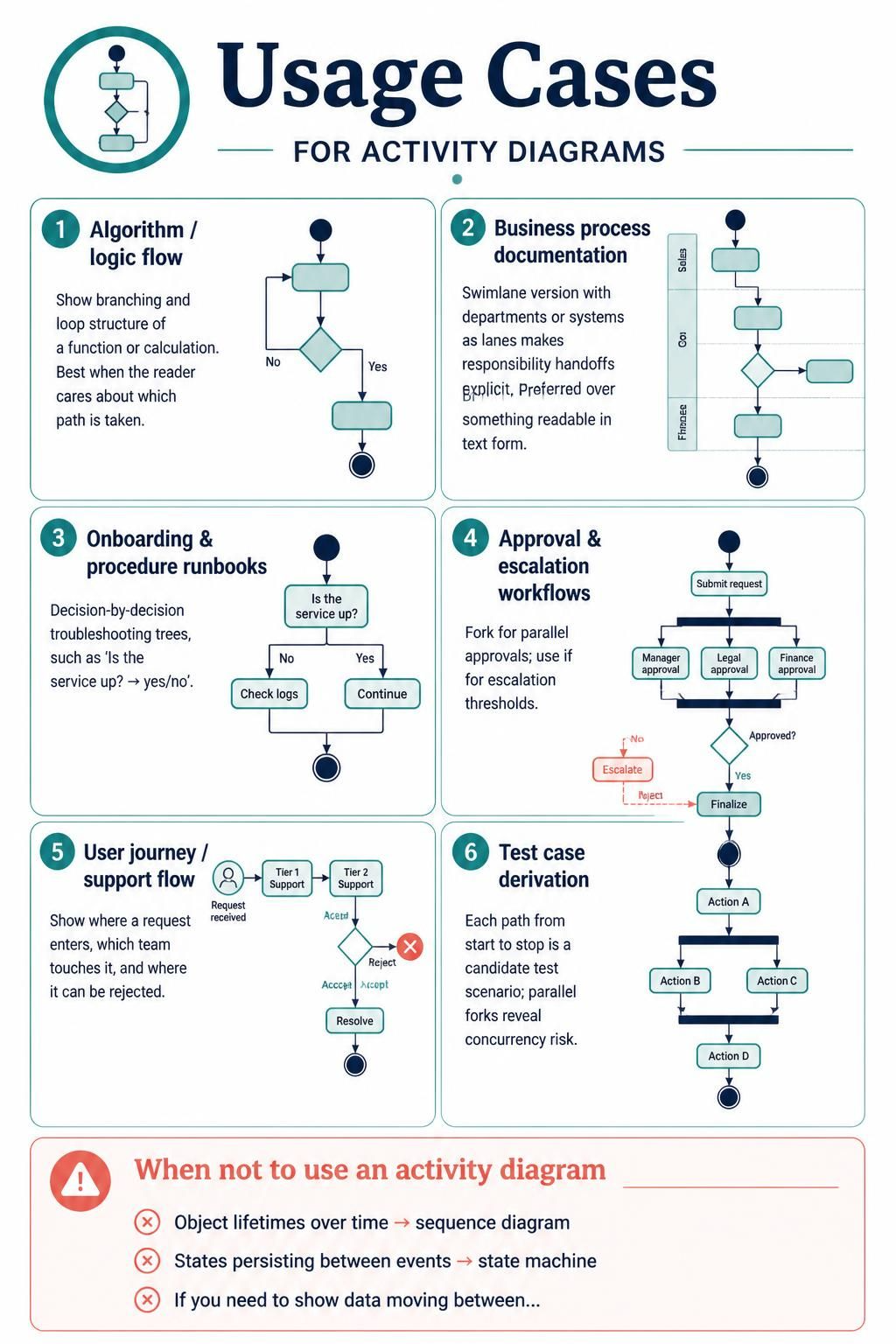
Algorithm / logic flow — Show branching and loop structure of a function or calculation. Best when the reader cares about which path is taken.
Business process documentation — Swimlane version with departments or systems as lanes makes responsibility handoffs explicit. Preferred over BPMN when you want something readable in text form.
Onboarding & procedure runbooks — Decision-by-decision troubleshooting trees (“Is the service up? → yes/no”).
Approval & escalation workflows — Fork for parallel approvals, if for escalation thresholds.
User journey / support flow — Where a request enters, which team touches it, where it can be rejected.
Test case derivation — Each path from start to stop is a candidate test scenario; parallel forks reveal concurrency risk.
When NOT to use it — If you need object lifetimes over time, use a sequence diagram. If you need states persisting between events, use a state machine. If you need to show data moving between stores, use a data flow diagram.
4. Diagram Examples
Example 1 — Minimal algorithm flowchart
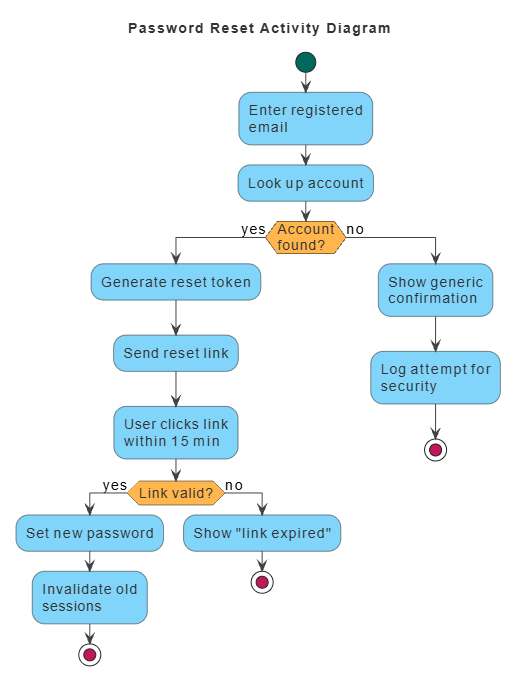
@startuml
skinparam defaultFontSize 14
skinparam defaultFontColor #333333
<style>
  element { MaximumWidth 100 }
  start   { Backgroundcolor #00695C }
  stop    { Backgroundcolor #C2185B }
  activity{ Backgroundcolor #81D4FA; MaximumWidth 150 }
  diamond { Backgroundcolor #FFB74D; MaximumWidth 80 }
  arrow   { LineColor #424242; Fontcolor #000000 }
  swimlane{ Fontcolor #000000; FontSize 14 }
</style>
title Password Reset Activity Diagram

start
:Enter registered email;
:Look up account;
if (Account found?) then (yes)
  :Generate reset token;
  :Send reset link;
  :User clicks link within 15 min;
  if (Link valid?) then (yes)
    :Set new password;
    :Invalidate old sessions;
    stop
  else (no)
    :Show "link expired";
    stop
  endif
else (no)
  :Show generic confirmation;
  :Log attempt for security;
  stop
endif

@enduml
Example 2 — Loop, fork, and retry logic
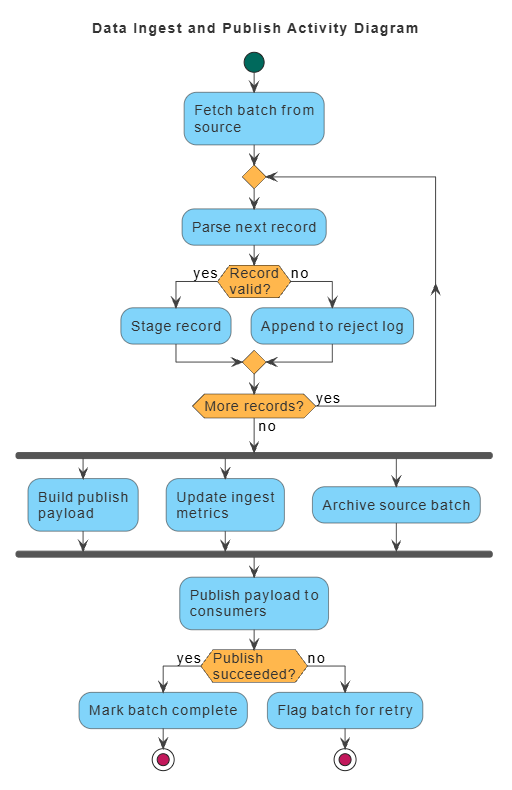
@startuml
skinparam defaultFontSize 14
skinparam defaultFontColor #333333
<style>
  element { MaximumWidth 100 }
  start   { Backgroundcolor #00695C }
  stop    { Backgroundcolor #C2185B }
  activity{ Backgroundcolor #81D4FA; MaximumWidth 150 }
  diamond { Backgroundcolor #FFB74D; MaximumWidth 80 }
  arrow   { LineColor #424242; Fontcolor #000000 }
  swimlane{ Fontcolor #000000; FontSize 14 }
</style>
title Data Ingest and Publish Activity Diagram

start
:Fetch batch from source;
repeat
  :Parse next record;
  if (Record valid?) then (yes)
    :Stage record;
  else (no)
    :Append to reject log;
  endif
repeat while (More records?) is (yes) not (no)

fork
  :Build publish payload;
fork again
  :Update ingest metrics;
fork again
  :Archive source batch;
end fork

:Publish payload to consumers;
if (Publish succeeded?) then (yes)
  :Mark batch complete;
  stop
else (no)
  :Flag batch for retry;
  stop
endif

@enduml
Example 3 — Swimlane process with roles
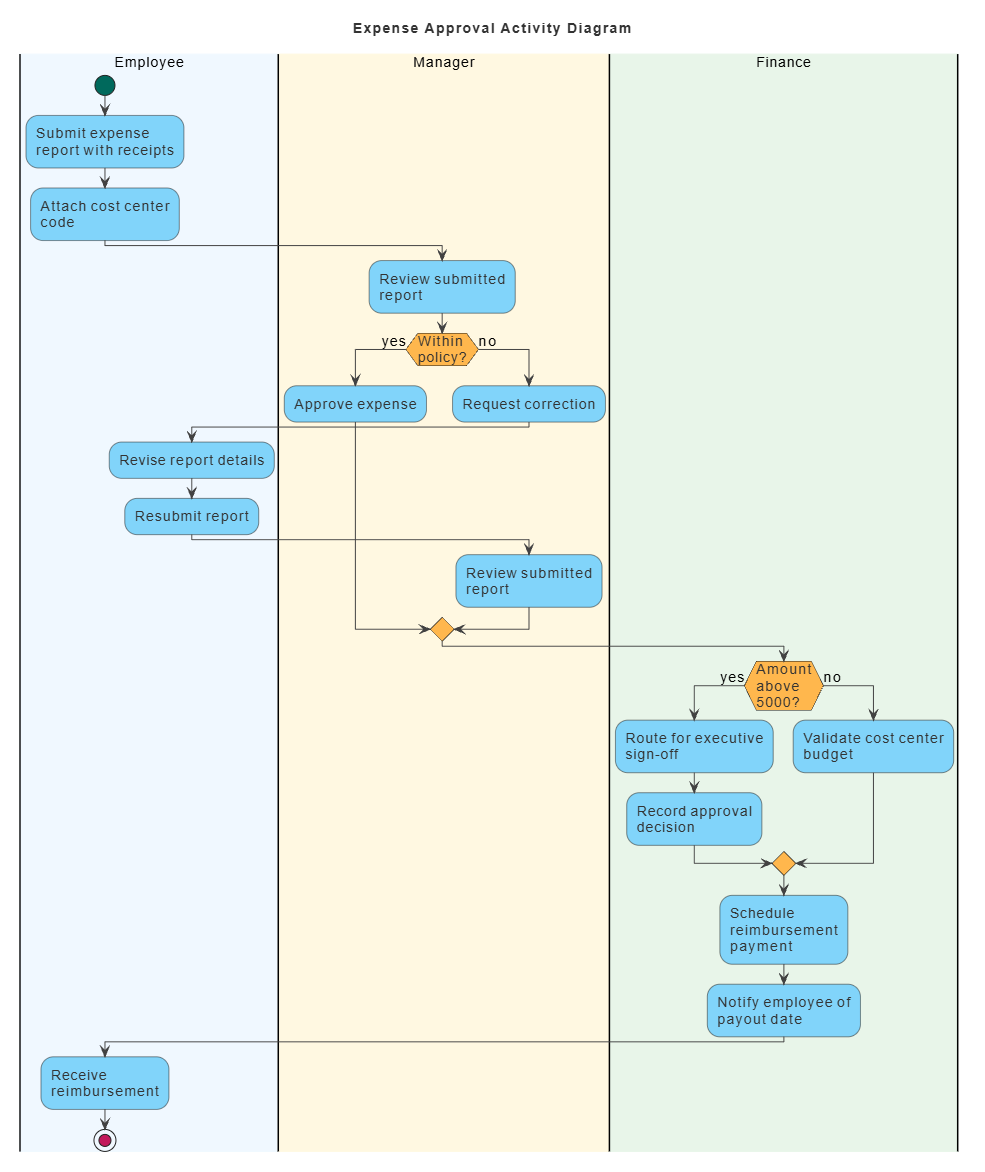
@startuml
skinparam defaultFontSize 14
skinparam defaultFontColor #333333
<style>
  element { MaximumWidth 100 }
  start   { Backgroundcolor #00695C }
  stop    { Backgroundcolor #C2185B }
  activity{ Backgroundcolor #81D4FA; MaximumWidth 150 }
  diamond { Backgroundcolor #FFB74D; MaximumWidth 80 }
  arrow   { LineColor #424242; Fontcolor #000000 }
  swimlane{ Fontcolor #000000; FontSize 14 }
</style>
title Expense Approval Activity Diagram

|#F0F8FF|Employee|
start
:Submit expense report with receipts;
:Attach cost center code;

|#FFF8E1|Manager|
:Review submitted report;
if (Within policy?) then (yes)
  :Approve expense;
else (no)
  :Request correction;
  |#F0F8FF|Employee|
  :Revise report details;
  :Resubmit report;
  |#FFF8E1|Manager|
  :Review submitted report;
endif

|#E8F5E9|Finance|
if (Amount above 5000?) then (yes)
  :Route for executive sign-off;
  :Record approval decision;
else (no)
  :Validate cost center budget;
endif
:Schedule reimbursement payment;
:Notify employee of payout date;

|#F0F8FF|Employee|
:Receive reimbursement;
stop

@enduml
Example 4 — While loop and labeled connector (jump)
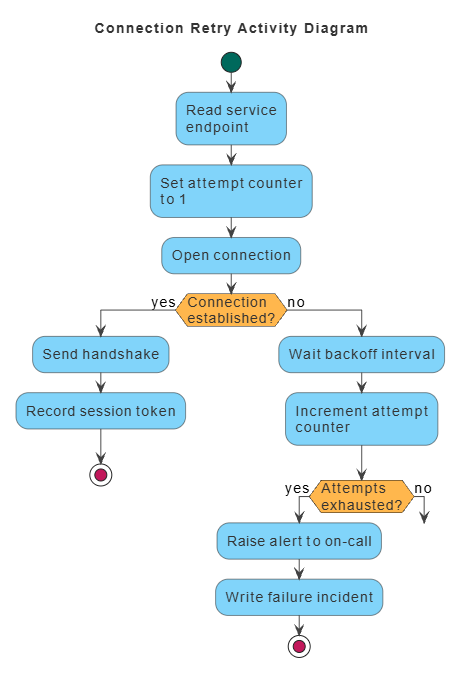
@startuml
skinparam defaultFontSize 14
skinparam defaultFontColor #333333
<style>
  element { MaximumWidth 100 }
  start   { Backgroundcolor #00695C }
  stop    { Backgroundcolor #C2185B }
  activity{ Backgroundcolor #81D4FA; MaximumWidth 150 }
  diamond { Backgroundcolor #FFB74D; MaximumWidth 80 }
  arrow   { LineColor #424242; Fontcolor #000000 }
  swimlane{ Fontcolor #000000; FontSize 14 }
</style>
title Connection Retry Activity Diagram

start
:Read service endpoint;
:Set attempt counter to 1;
label retryStart
:Open connection;
if (Connection established?) then (yes)
  :Send handshake;
  :Record session token;
  stop
else (no)
  :Wait backoff interval;
  :Increment attempt counter;
  if (Attempts exhausted?) then (yes)
    :Raise alert to on-call;
    :Write failure incident;
    stop
  else (no)
    goto retryStart
  endif
endif

@enduml
Example 5 — Partitioned flow with notes and multi-line actions
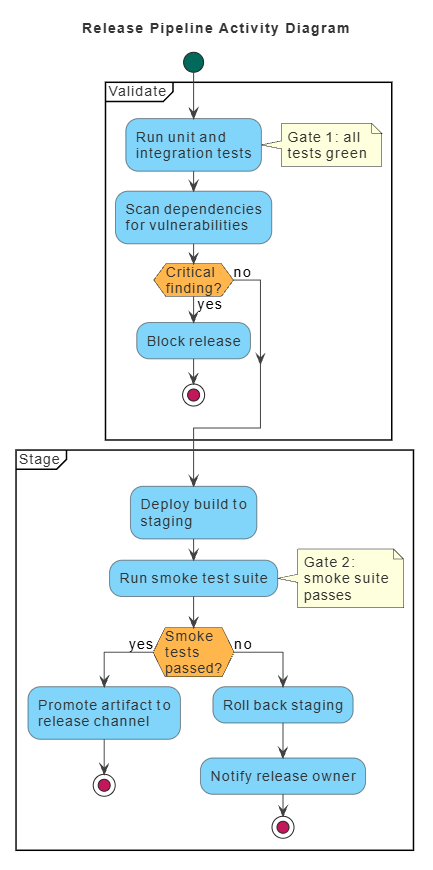
@startuml
skinparam defaultFontSize 14
skinparam defaultFontColor #333333
<style>
  element { MaximumWidth 100 }
  start   { Backgroundcolor #00695C }
  stop    { Backgroundcolor #C2185B }
  activity{ Backgroundcolor #81D4FA; MaximumWidth 150 }
  diamond { Backgroundcolor #FFB74D; MaximumWidth 80 }
  arrow   { LineColor #424242; Fontcolor #000000 }
  swimlane{ Fontcolor #000000; FontSize 14 }
</style>
title Release Pipeline Activity Diagram

start
partition "Validate" {
  :Run unit and integration tests;
  note right: Gate 1: all tests green
  :Scan dependencies for vulnerabilities;
  if (Critical finding?) then (yes)
    :Block release;
    stop
  else (no)
  endif
}

partition "Stage" {
  :Deploy build to staging;
  :Run smoke test suite;
  note right: Gate 2: smoke suite passes
  if (Smoke tests passed?) then (yes)
    :Promote artifact to release channel;
    stop
  else (no)
    :Roll back staging;
    :Notify release owner;
    stop
  endif
}

@enduml
5. Quick Syntax Cheatsheet
start
:Action text;
if (Condition?) then (yes)
  :Yes path;
elseif (Other condition?) then (maybe)
  :Maybe path;
else (no)
  :No path;
endif

while (Condition?) is (yes)
  :Loop body;
endwhile

repeat
  :Loop body;
repeat while (Continue?) is (loop) not (done)

fork
  :Branch A;
fork again
  :Branch B;
end fork

|#E3F2FD|Lane One|
:Task in lane one;
|#FFF3E0|Lane Two|
:Task in lane two;

partition "Phase Name" {
  :Grouped task;
}

note right: Annotation text
goto labelName
labelName :Target action;
stop
6. Design Tips
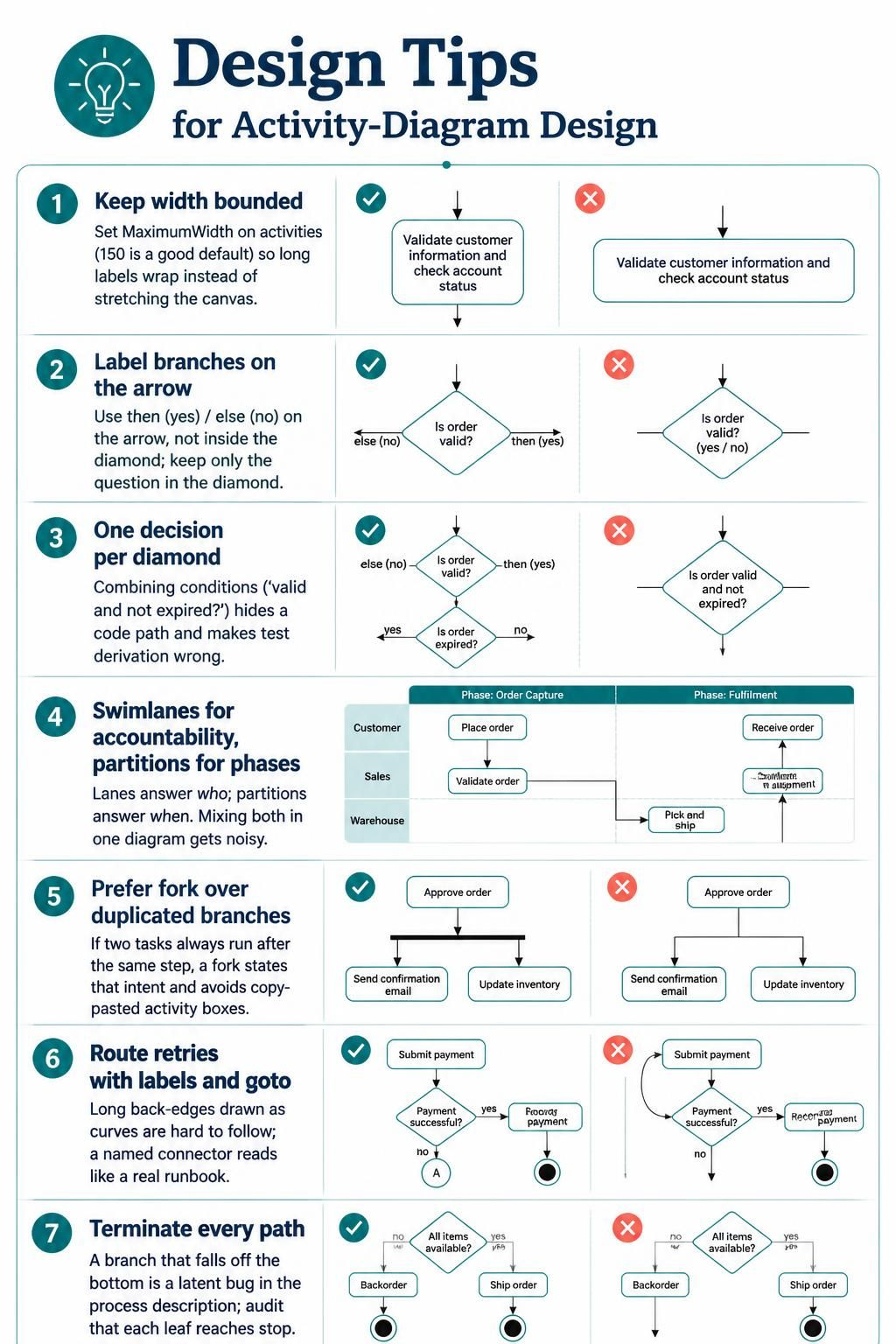
Keep width bounded. Set MaximumWidth on activities (150 is a good default) so long labels wrap instead of stretching the canvas.
Label branches on the arrow, not inside the diamond. then (yes) / else (no) puts the label where readers scan; the diamond holds only the question.
One decision per diamond. Combining conditions (“valid and not expired?”) hides a code path and makes test derivation wrong.
Use swimlanes for accountability, partitions for phases. Lanes answer who, partitions answer when. Mixing both in one diagram gets noisy.
Prefer fork over duplicated branches. If two tasks always run after the same step, a fork states that intent and avoids copy-pasted activity boxes.
Route retries with labels and goto. Long back-edges drawn as curves are hard to follow; a named connector reads like a real runbook.
Terminate every path. A branch that falls off the bottom of the diagram is a latent bug in the process description — audit that each leaf reaches stop.
Tooling Spotlight: Visual Paradigm AI Chatbot & VPasCode
To fully leverage the power of Visual Paradigm’s ecosystem, it is essential to understand the two primary engines driving its intelligent diagramming capabilities: the Visual Paradigm AI Chatbot for interactive design and VPasCode for programmatic precision. These tools work in tandem to bridge the gap between natural language ideation and technical implementation.
1. Visual Paradigm AI Chatbot
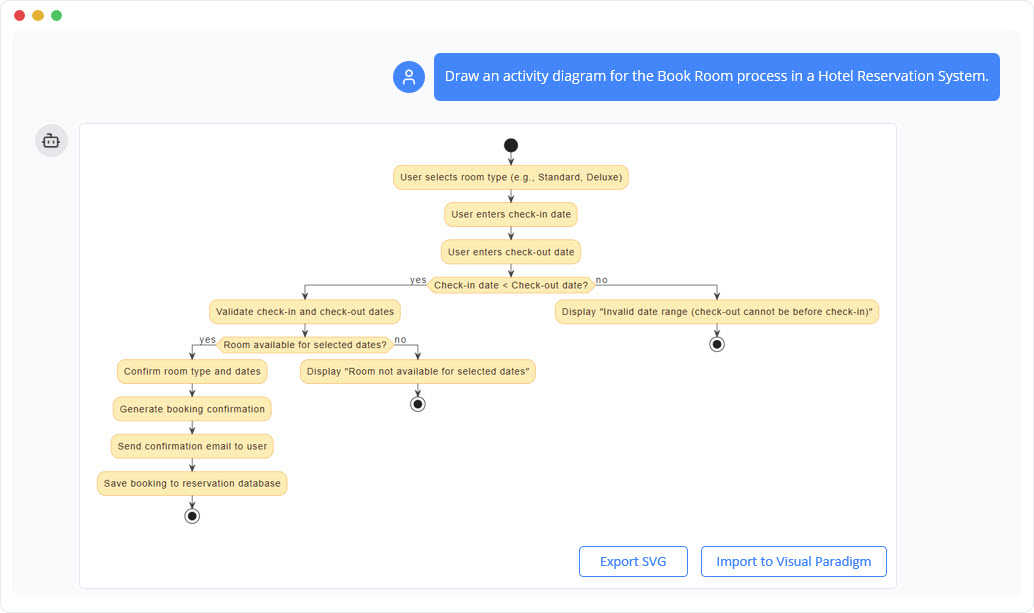
The AI Chatbot serves as your conversational co-pilot within the Visual Paradigm interface. It transforms static diagramming into a dynamic, iterative dialogue.
-
Natural Language Interaction: Instead of manually dragging shapes, you describe your intent. You can say, “Create a user login flow,” and the chatbot generates the initial structure.
-
Iterative Refinement: The chatbot excels at incremental changes. You can refine existing diagrams with prompts like:
-
“Add a ‘Forgot Password’ branch after the login failure.”
-
“Simplify this section by merging these three steps.”
-
“Change all decision nodes to blue and process nodes to green.”
-
-
Context-Aware Suggestions: The AI analyzes your current diagram to identify missing logic, such as unhandled error states or infinite loops, and proactively suggests improvements.
-
Documentation Generation: Beyond visual elements, the chatbot can generate textual summaries, step-by-step guides, or technical specifications based on the flowchart, ensuring your documentation stays synchronized with your visuals.
2. VPasCode (Visual Paradigm as Code)
VPasCode is the bridge between visual modeling and code-centric workflows. It allows you to treat diagrams as code, enabling version control, automation, and developer-friendly integration.
-
Script-Based Editing: VPasCode allows you to manipulate diagram elements using scripts. This is ideal for bulk updates, such as renaming multiple nodes consistently or applying standard styling rules across hundreds of diagrams.
-
Export to Code Formats: You can export your AI-generated flowcharts into standard diagram-as-code formats like PlantUML, Mermaid, and Graphviz. This ensures your diagrams can be stored in Git repositories alongside your source code, facilitating peer reviews and change tracking.
-
Programmatic Tweaks: For advanced users, VPasCode enables direct script injection to fine-tune layout algorithms, connector routing, or node positioning beyond what the automatic AI layout provides.
-
CI/CD Integration: By exporting to formats like Mermaid or PlantUML, you can integrate diagram generation into your Continuous Integration/Continuous Deployment (CI/CD) pipelines, ensuring that documentation is automatically updated whenever process logic changes in the codebase.
Synergy in Action
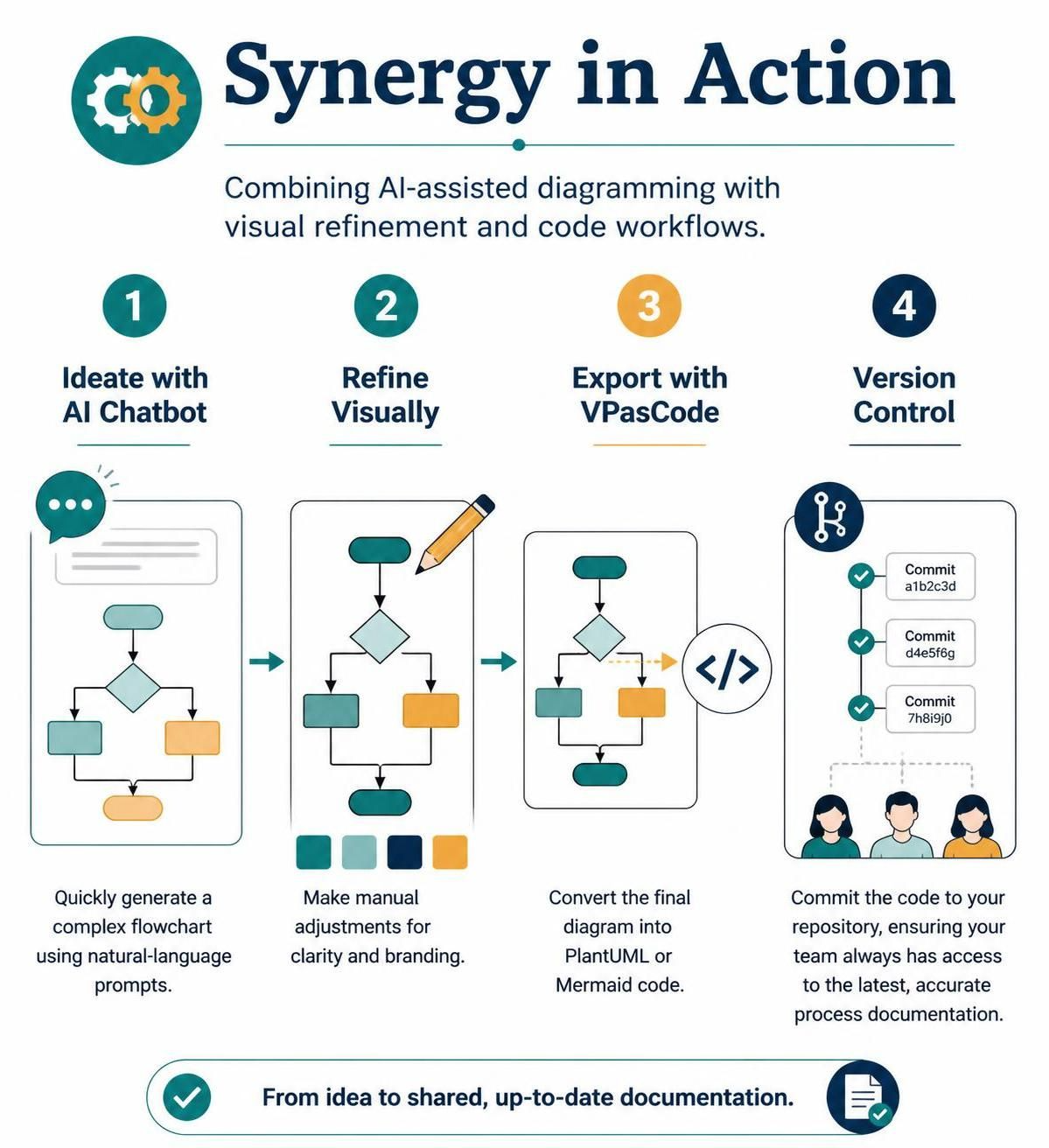
The true power lies in combining these tools:
-
Ideate with AI Chatbot: Quickly generate a complex flowchart using natural language prompts.
-
Refine Visually: Make manual adjustments for clarity and branding.
-
Export with VPasCode: Convert the final diagram into PlantUML or Mermaid code.
-
Version Control: Commit the code to your repository, ensuring your team always has access to the latest, accurate process documentation.
Conclusion
Visual Paradigm has redefined the landscape of process modeling by seamlessly integrating artificial intelligence into its core toolset. By leveraging the AI Chatbot for rapid, conversational creation and VPasCode for precise, code-compatible output, professionals can now produce high-quality, standardized flowcharts with unprecedented speed and accuracy.
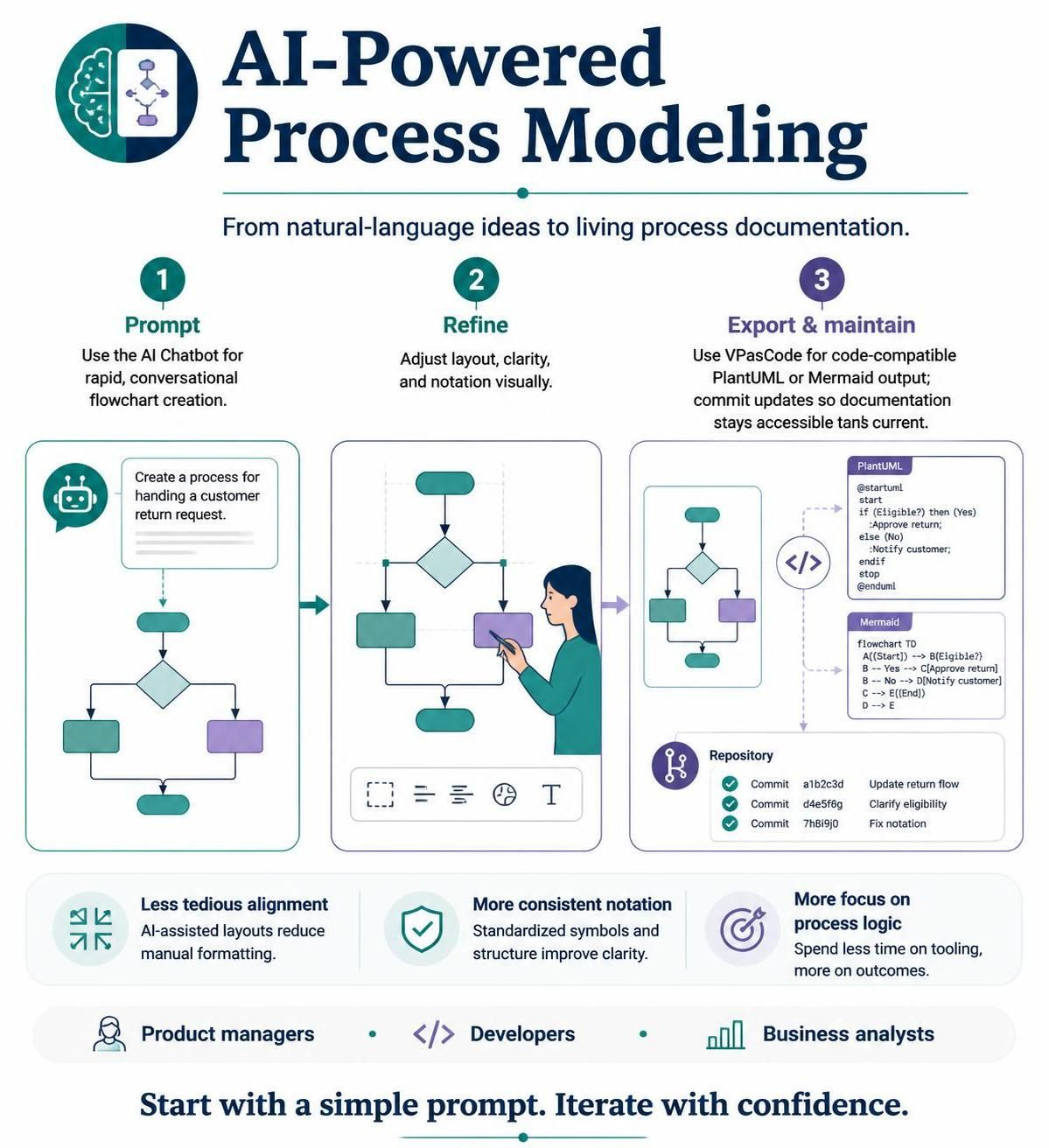
This ecosystem eliminates the traditional bottlenecks of manual diagramming—such as tedious alignment and inconsistent notation—while preserving the flexibility needed for complex, real-world processes. Whether you are a product manager mapping user journeys, a developer documenting system architecture, or a business analyst optimizing operational workflows, Visual Paradigm’s AI-powered tools empower you to focus on logic and clarity rather than formatting.
As organizations continue to prioritize agile documentation and clear communication, adopting these intelligent tools is no longer just a convenience—it is a strategic advantage. By mastering the interplay between natural language prompts, visual refinement, and code-based export, you ensure that your process documentation remains living, accurate, and deeply integrated into your development lifecycle. Start with a simple prompt, iterate with confidence, and let Visual Paradigm handle the complexity.