Introduction
In modern software development and enterprise architecture, a persistent challenge has plagued teams for decades: the disconnect between visual design and textual documentation. Engineers spend hours crafting intricate system architectures, sequence diagrams, and workflow charts, only to export them as static images that quickly become outdated the moment code changes. Technical writers struggle to keep documentation synchronized with evolving systems, leading to “documentation drift”—a state where written specifications no longer reflect reality.
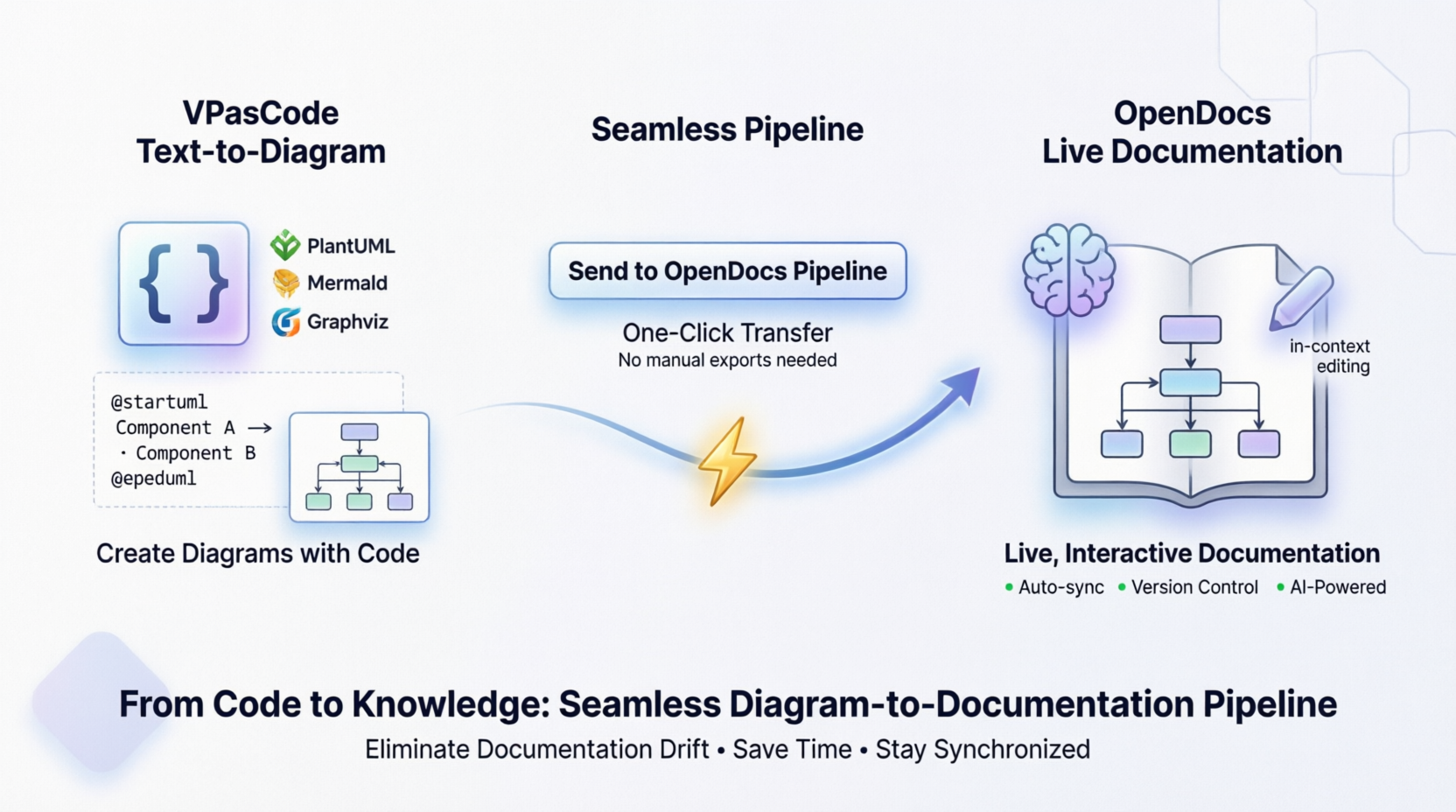
Visual Paradigm has addressed this critical gap with a groundbreaking integration that transforms how teams create, manage, and maintain technical knowledge. By connecting VPasCode, their powerful text-to-diagram platform, with OpenDocs, their AI-powered knowledge management system, they have created a seamless pipeline that keeps visuals and documentation in perfect harmony. This case study explores how this integration revolutionizes technical workflows, eliminates redundant tasks, and ensures that organizational knowledge remains accurate, accessible, and alive.
The Challenge: Static Diagrams in a Dynamic World
Traditional documentation workflows follow a fragmented pattern:
- A developer creates a diagram using specialized tools or code-based generators
- The diagram is exported as a PNG or SVG file
- The image is manually uploaded to a documentation platform
- When changes occur, the entire process repeats from step one
This approach introduces several critical problems:
- Version Control Issues: It becomes nearly impossible to track which diagram version corresponds to which documentation update
- Time Waste: Manual exporting, downloading, and re-uploading consumes valuable engineering hours
- Knowledge Silos: Diagrams exist separately from the context that explains them
- Outdated Information: Static images rarely get updated, leading to misleading documentation
Organizations needed a solution that would treat diagrams not as static artifacts, but as living components of their knowledge base—components that could be edited, versioned, and synchronized automatically.
The Solution: VPasCode to OpenDocs Pipeline Integration
Visual Paradigm’s answer to this challenge is the VPasCode to OpenDocs Pipeline, a feature that enables users to send diagrams directly from the VPasCode environment into OpenDocs with minimal effort. This integration represents more than a convenience feature; it fundamentally reimagines the relationship between visual modeling and technical writing.
What is VPasCode?
VPasCode is Visual Paradigm’s text-to-diagram platform that allows creators to build rich visuals using popular formats including:
- PlantUML: Supporting ArchiMate, C4, Sequence, Use Case, Class, Object, Activity, Component, Deployment, State, Timing, ERD, Chen ERD, Network, WBS, and more
- Mermaid.js: Including Flowchart, Class, Sequence, Entity Relationship Diagram, State Diagram, Mind Map, C4, Gantt, Quadrant, Requirement Diagram, Timeline, User Journey, Git Graph, Kanban, and others
- Graphviz: Covering Digraph, Graph, Flowchart, Organization Chart, Cluster, and Data Flow diagrams
The platform provides real-time previewing, URL sharing, and vector/raster exports (SVG/PNG) in its free tier. Paid editions unlock advanced capabilities such as AI code error fixing and AI translation.
What is OpenDocs?
OpenDocs is Visual Paradigm’s next-generation, AI-powered knowledge management platform that merges technical text documentation with live, interactive diagramming into a unified source of truth. Key capabilities include:
Live Diagram Embedding:
- Dynamic embedding of diagrams directly from cloud or desktop sources
- In-context editing that allows users to modify source models without leaving the document
- Automatic version control that tracks background updates
AI-Powered Automation:
- Text-to-diagram generation from plain English prompts
- Rich component generation for specialized diagrams including UML Profile Diagrams, Data Flow Diagrams (DFD), PERT charts, and Project Timelines
- Content refinement assistants for drafting text, summarizing reports, and simplifying technical steps
Workspace & Organization:
- Tree-structured spaces with hierarchical nested folder structures
- Rich text writing
- Web accessibility through any modern browser with zero installation required
Real-World Use Cases
The VPasCode-to-OpenDocs pipeline shines across multiple scenarios, demonstrating its versatility and practical value.
Software Architecture & Technical Specifications
Software engineers frequently need to document complex system architectures. Using VPasCode, an engineer can edit a PlantUML architecture diagram or a Mermaid microservices sequence diagram with full syntax support and real-time preview. Once the logic looks solid, they push the diagram straight to the OpenDocs pipeline. They then switch to OpenDocs to write the complete technical specification document around that live blueprint.
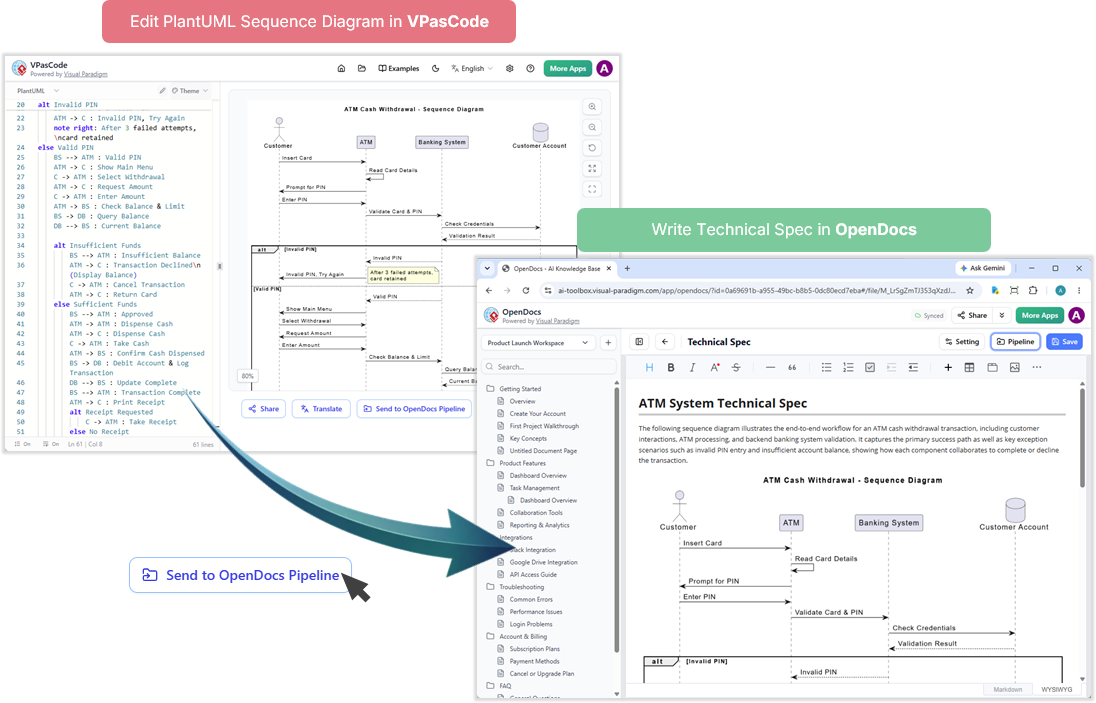
This workflow ensures that the architectural diagram remains synchronized with the written specification. When the system evolves, the engineer simply edits the PlantUML code in VPasCode, sends it through the pipeline again, and the documentation updates automatically.
Agile Sprint Retrospectives & Roadmaps
Project managers benefit significantly from this integration when documenting sprint activities. A project manager can outline a project timeline, create a Gantt chart, or design a Kanban workflow textually in VPasCode using Mermaid syntax. Instead of saving the diagram locally and manually attaching it to team documents, they pipeline it directly to OpenDocs, dropping it into a shared team handbook or sprint documentation page for collaborative viewing.
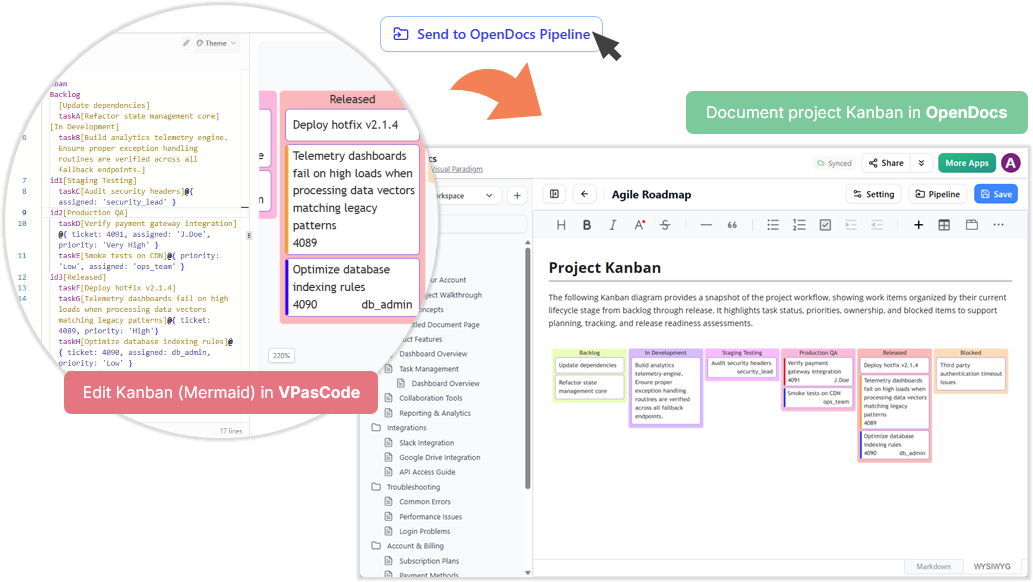
Team members can view the live diagram within the context of sprint notes, retrospective findings, and action items. If priorities shift mid-sprint, the project manager updates the Mermaid code, and the documentation reflects the change immediately.
Rapid Documentation Updates
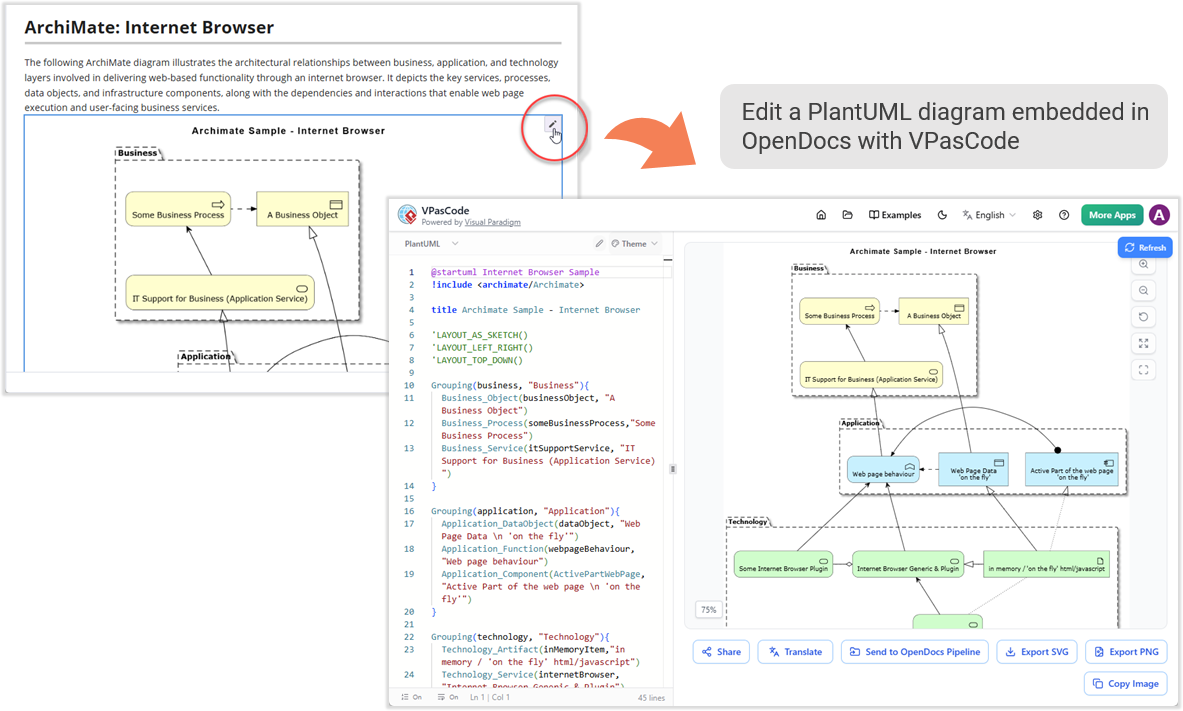
Perhaps the most compelling use case involves rapid iteration. Imagine a system flow changes due to a bug fix or feature enhancement. Instead of regenerating the entire asset through manual processes, a technical writer clicks the edit pencil directly inside OpenDocs. This action opens the text-to-diagram script in VPasCode, where the writer refines the code and updates the documentation instantly via the pipeline. This ensures documentation keeps pace with rapid code alterations, eliminating the lag that traditionally plagues technical documentation.
How It Works: A 5-Step Guide to the Pipeline
Moving diagrams from drafting to documentation takes only seconds. Here is the complete workflow:
Step 1: Initiate the Transfer
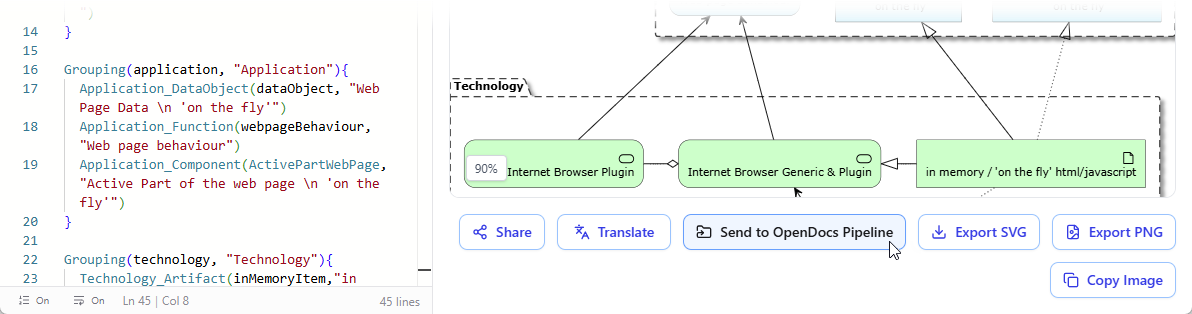
Inside the VPasCode interface, look under the diagram viewer on the right-hand side and click the “Send to OpenDocs Pipeline” button.
Step 2: Add Context (Optional)
A prompt will appear asking for an optional description. You can use this field to note down details about the diagram, log a brief changelog, or simply skip it if you are in a rush.
Step 3: Confirm and Send
Click Confirm. Your diagram code and preview are instantly packaged and securely routed to your OpenDocs workspace pipeline. You can choose to keep refining your code in VPasCode or head directly over to OpenDocs.
Step 4: Access the Pipeline
Navigate to your OpenDocs Dashboard. Edit any documentation page where you want the visual to live and open up the Pipeline pane. Your newly sent diagram will be waiting for you in the list.
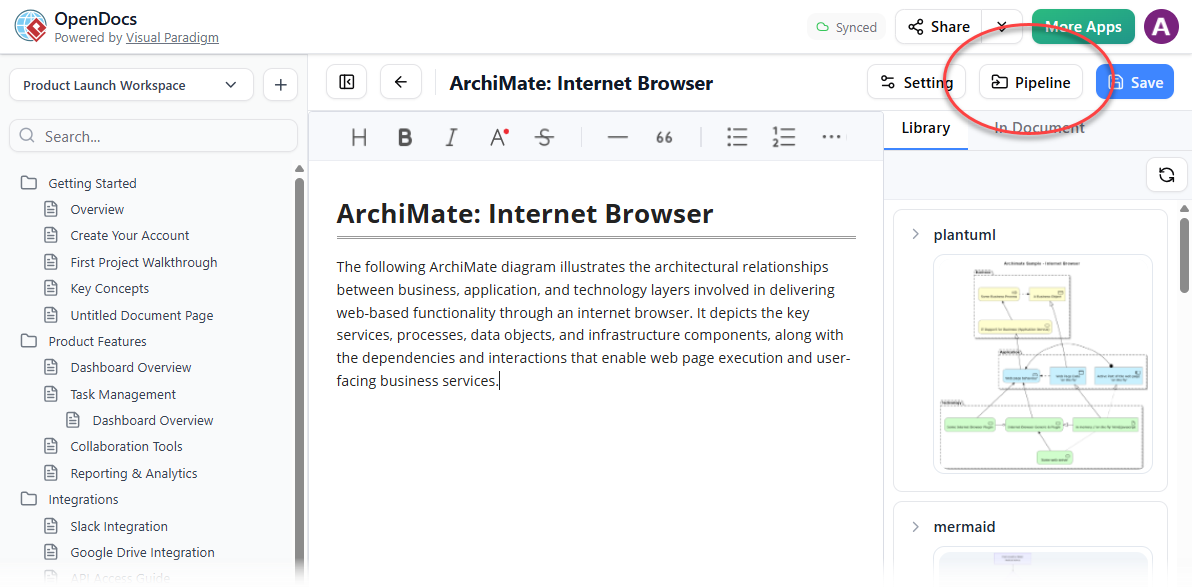
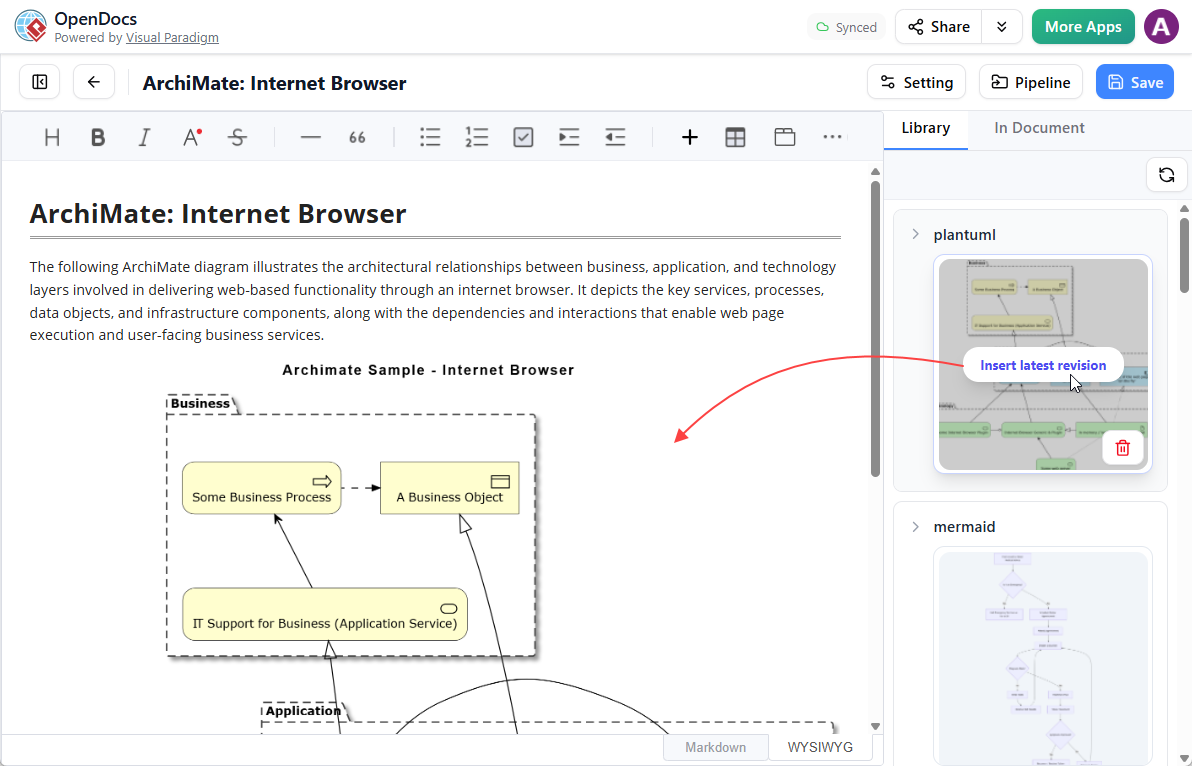
Step 5: Insert and Publish
Hover over the thumbnail of your diagram inside the Pipeline pane, click the Insert button, and watch it drop perfectly into your document. From there, you can continue typing out the rest of your knowledge base page.
Making Quick Changes
If you spot an error or need to expand the diagram later, there is no need to rebuild it from scratch. Simply click the tiny Pencil button located at the top right of the inserted image inside OpenDocs. This action securely opens up the code script back inside the VPasCode editor. Modify the text syntax, rerun the pipeline steps above, and replace the old image in your documentation flawlessly.
Part of a Highly Integrated Visual Paradigm Ecosystem
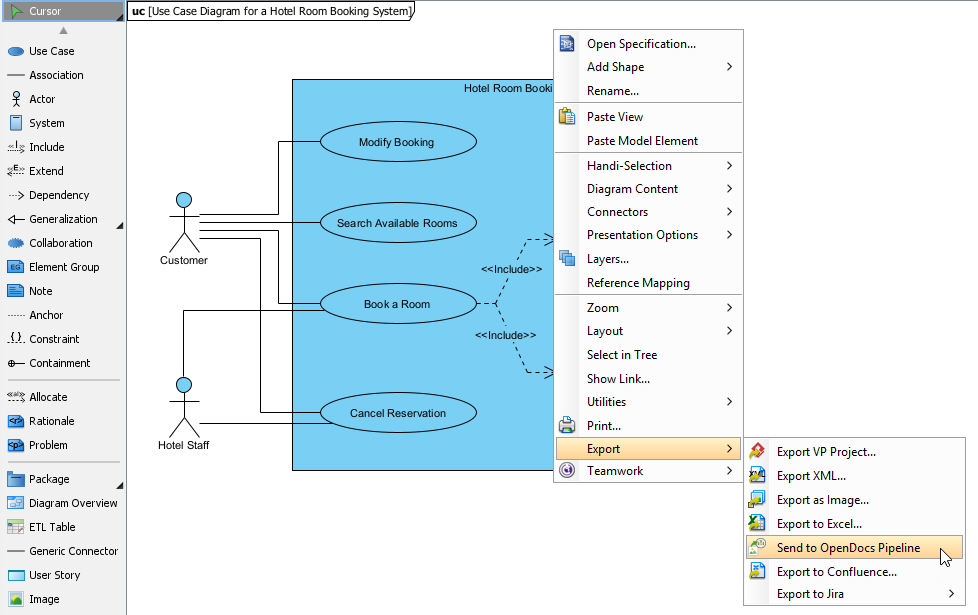
The VPasCode-to-OpenDocs pipeline is not an isolated feature but part of Visual Paradigm’s broader vision to position itself as a highly cohesive ecosystem where design and knowledge retention live hand-in-hand. OpenDocs acts as the central repository for team collective intelligence, and content can be piped into it from virtually all favorite Visual Paradigm platforms.
Desktop Modeling to Docs
Users can send enterprise-grade blueprints from Visual Paradigm Desktop seamlessly to their documentation pipeline. This integration ensures that complex models created in the desktop environment maintain their fidelity and interactivity when embedded in documentation.
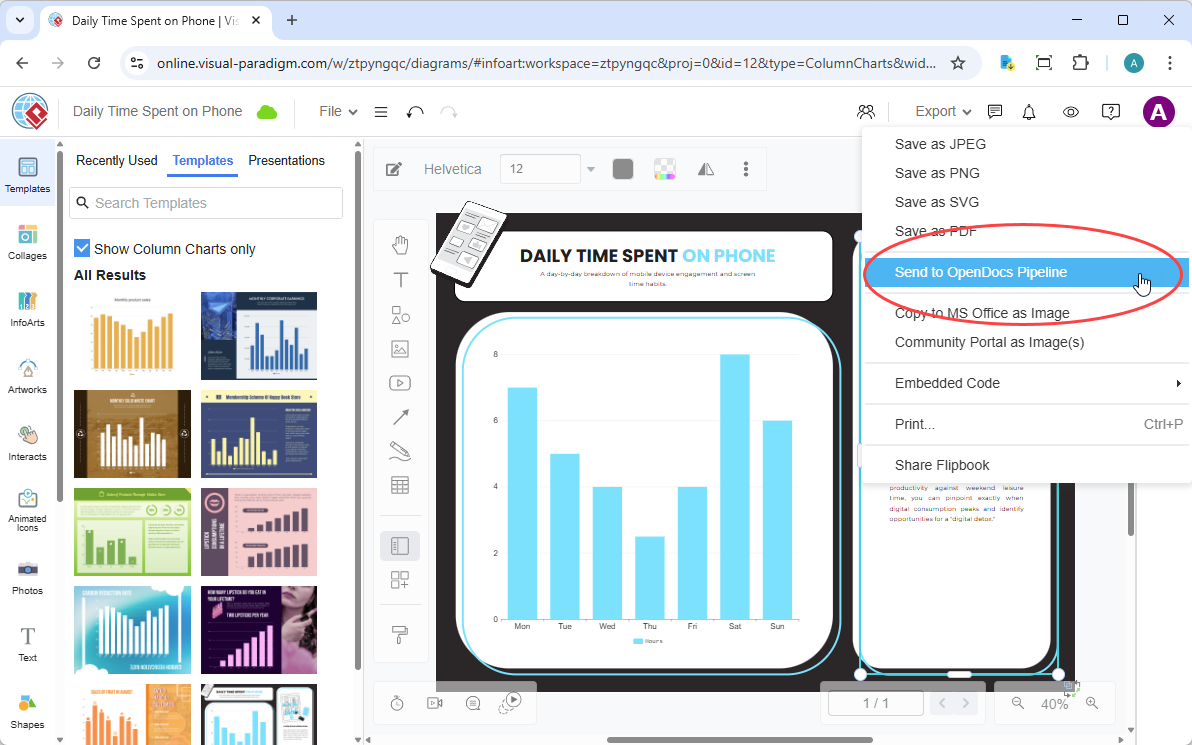
VP Online to Docs
Web-based cloud diagrams or structural graphs can be exported natively from Visual Paradigm Online into OpenDocs. This capability bridges the gap between cloud-based modeling and centralized documentation.
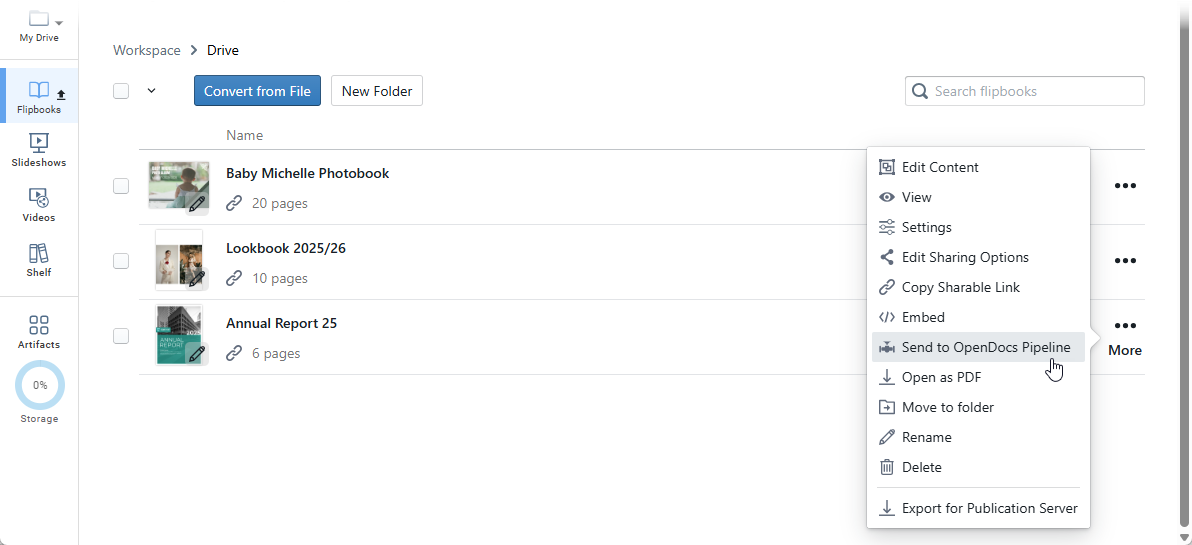
Digital Bookshelves to Docs
Interactive flipbooks and organized digital bookshelves from VP Online can be embedded or shared straight into knowledge portals. This feature enhances documentation with rich, interactive learning materials.
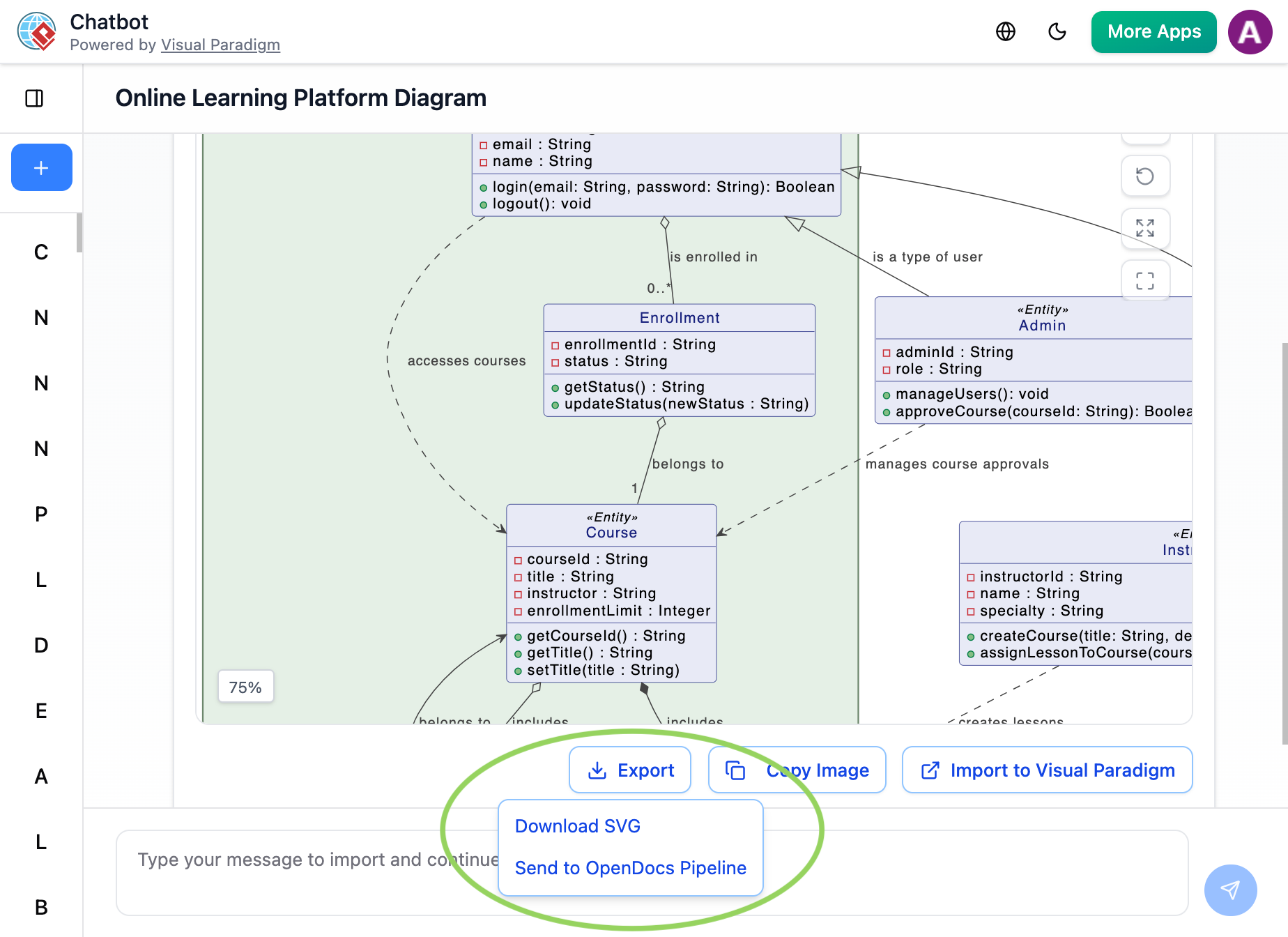
AI Chatbots to Docs
Users can prompt the AI system to generate brand-new visual concepts and send them directly into the OpenDocs pipeline for immediate context building. This accelerates the creation of documentation by combining AI-generated insights with structured knowledge management.
Benefits and Impact
The integration delivers measurable benefits across organizations:
Time Savings: Eliminating manual export-import cycles saves engineers and technical writers significant time. What previously took minutes now takes seconds.
Accuracy: Live diagrams ensure documentation always reflects the current state of systems, reducing errors caused by outdated information.
Collaboration: Team members can view and interact with diagrams within the context of comprehensive documentation, improving understanding and alignment.
Version Control: Automatic tracking of diagram changes maintains a clear history of evolution, supporting audit requirements and knowledge retention.
Accessibility: Web-based access means team members can contribute to and consume documentation from anywhere, on any device.
Who Benefits Most?
The VPasCode-to-OpenDocs integration serves multiple professional roles:
Development & DevOps Teams: Maintaining living system architectures, API schemas, and deployment runbooks becomes straightforward when diagrams update automatically alongside code changes.
Enterprise Architects: Structuring complex enterprise layers like ArchiMate, BPMN, and UML models within comprehensive documentation supports strategic planning and communication.
Project Managers & Business Analysts: Mapping user journeys, breakdown hierarchies, and shifting deadlines via AI timeline tools within contextual documentation improves project visibility and stakeholder alignment.
Conclusion
The VPasCode to OpenDocs Pipeline Integration represents a significant advancement in how organizations manage technical knowledge. By treating diagrams as living, editable components rather than static snapshots, Visual Paradigm has solved the longstanding problem of documentation drift. Engineers can focus on creating accurate models, technical writers can concentrate on clear explanations, and organizations benefit from documentation that remains synchronized with reality.
This integration exemplifies the future of technical documentation: dynamic, interconnected, and intelligent. As software systems grow more complex and change more rapidly, tools that keep pace with this evolution become essential. The seamless connection between VPasCode and OpenDocs provides exactly that—a unified platform where visual design and textual documentation coexist harmoniously, ensuring that organizational knowledge remains accurate, accessible, and actionable.
For teams ready to supercharge their technical documentation workflow, the combination of VPasCode’s text-to-diagram capabilities and OpenDocs’ AI-powered knowledge management offers a compelling solution. By visiting VPasCode and setting up a workspace on OpenDocs, organizations can experience firsthand the unified power of integrated diagramming and fluid knowledge management.
Reference
- Visual Paradigm OpenDocs Features: Overview of OpenDocs capabilities as an AI-powered knowledge management platform that merges technical documentation with live diagramming.
- From Static Snapshots to Living Knowledge: Article discussing how Visual Paradigm OpenDocs unifies documentation and modeling to eliminate documentation drift through live, interactive diagrams.
- Visual Paradigm Official Website: Main website for Visual Paradigm, providing comprehensive information about their suite of diagramming and knowledge management tools.
- Visual Paradigm OpenDocs Beginner’s Guide: Beginner’s guide to getting started with Visual Paradigm OpenDocs, covering basic setup and usage.
- From Concept to Knowledge Base: A Third-Party Review: Third-party review examining Visual Paradigm’s OpenDocs workflow from initial concept through knowledge base creation.
- Sync AI Diagram to OpenDocs Pipeline Guide: Comprehensive guide explaining how to sync AI-generated diagrams to the OpenDocs pipeline for seamless documentation integration.
- Visual Paradigm Cloud Diagramming Tool: Information about Visual Paradigm’s cloud-based diagramming solutions for collaborative visual modeling.
- AI Profile Diagram Generation in OpenDocs: Release announcement detailing AI-powered UML Profile Diagram generation capabilities within OpenDocs.
- AI-Powered Data Flow Diagram Support in OpenDocs: Update introducing AI-powered Data Flow Diagram (DFD) support in OpenDocs for automated diagram creation.
- OpenDocs AI Timeline Diagram Integration: Release update covering AI timeline diagram integration features in OpenDocs for project management documentation.
- OpenDocs AI-Powered Knowledge Platform Launch: Announcement of OpenDocs as an AI-powered knowledge platform combining documentation and diagramming capabilities.
- OpenDocs Video Tutorial: Video tutorial demonstrating OpenDocs features and functionality for new users.
- OpenDocs AI Tool: Direct access to the OpenDocs AI tool for generating and managing documentation with artificial intelligence assistance.
- Visual Paradigm Team Collaboration Guide: Official team collaboration guide introducing Visual Paradigm’s collaborative features and workflows.
- Share Digital Bookshelf to OpenDocs: Guide explaining how to share digital bookshelves from VP Online directly into OpenDocs documentation.
- AI Breakdown Structure Chart Maker in OpenDocs: Release featuring AI-powered breakdown structure chart creation capabilities within OpenDocs.
- Visual Paradigm Online Export to OpenDocs: Guide for exporting diagrams from Visual Paradigm Online directly to OpenDocs for integrated documentation.