


Introduction: The Documentation Dilemma Every Team Knows Too Well
If you’ve ever spent an afternoon hunting for the “final” version of a system architecture diagram, only to discover three different iterations scattered across email attachments, local drives, and outdated Confluence pages—you understand the pain. Technical teams everywhere face the same frustrating reality: creating great visual models is only half the battle; keeping documentation synchronized with those models is where workflows break down.
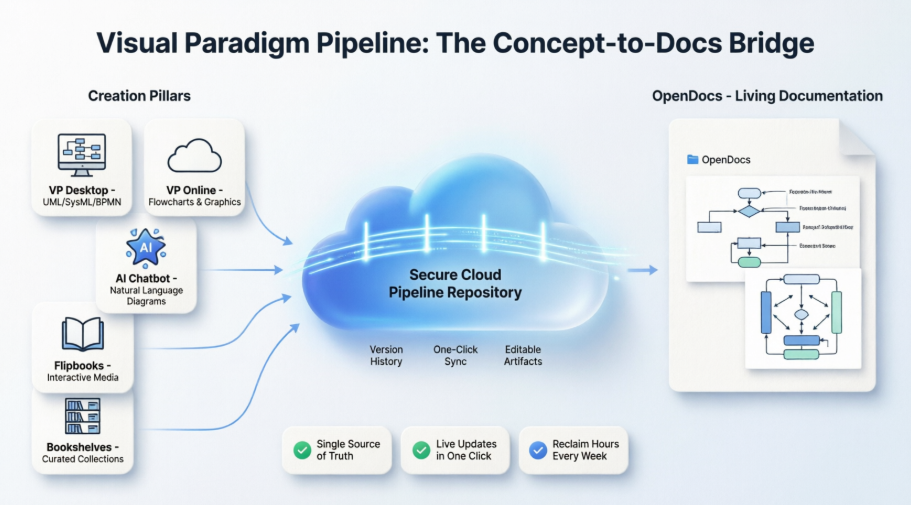
After integrating Visual Paradigm’s Pipeline into our organization’s documentation ecosystem for the past month, I can confidently share that this isn’t just another incremental feature. It’s a purposeful reimagining of how visual knowledge should flow from creation to consumption. In this review, I’ll walk through the real-world problems the Pipeline solves, the tangible benefits it delivers, and why its “Concept-to-Docs” philosophy is transforming how modern teams document complex systems. [[12]]
What Is the Pipeline? A Practitioner’s Perspective
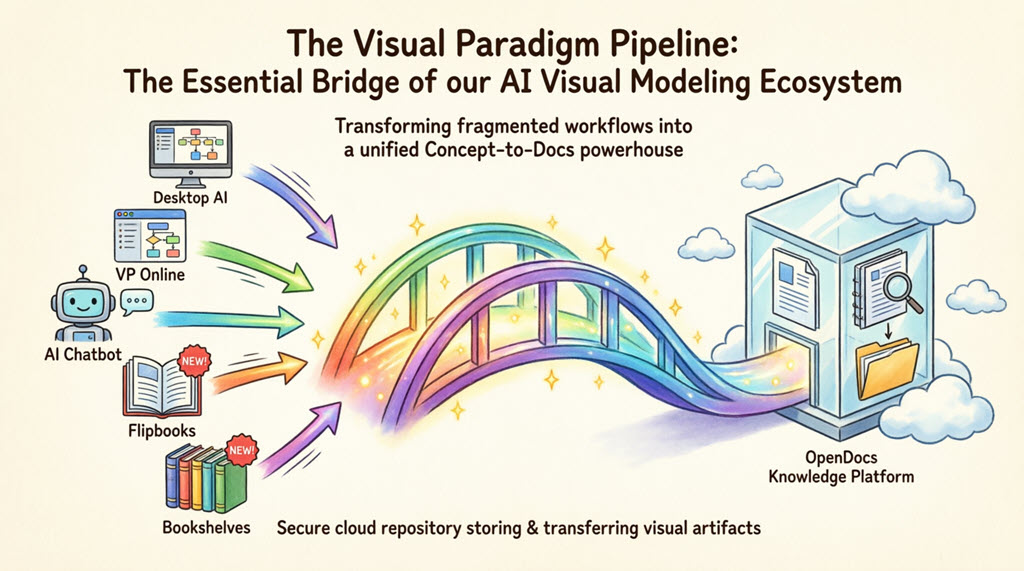
The Pipeline serves as the high-speed connective tissue of the Visual Paradigm ecosystem—a secure, cloud-based centralized repository designed to store, manage, and transfer artifacts: the valuable visual assets created across Visual Paradigm’s platforms. [[23]]
In practical terms, the Pipeline acts as the vital bridge between Visual Paradigm’s four core pillars:
-
Visual Paradigm Desktop (professional UML, SysML, BPMN modeling)
-
AI Chatbot (natural language diagram generation)
-
OpenDocs Knowledge Management Platform (AI-powered documentation)
-
Visual Paradigm Online (cloud-native diagramming)
The Single Source of Truth Principle: The Pipeline eliminates the friction of manual downloads and uploads. It preserves the editability of your models and ensures every stakeholder accesses the most current revision of a design.
The Gateway to OpenDocs: Where Models Become Living Documentation
While the Pipeline is the vehicle, Visual Paradigm OpenDocs is the destination. OpenDocs is engineered to be “diagram-aware”—unlike conventional documentation tools, it integrates directly with a robust diagram editor, allowing you to insert diagrams and re-edit them later without leaving the document. [[2]]
This “Work-to-Publish” workflow enables teams to:
-
Model with Precision: Create complex system architectures using professional desktop or online tools
-
Generate with Speed: Use AI to brainstorm and visualize ideas instantly
-
Publish with Authority: Seamlessly embed visuals into OpenDocs to create living documentation that evolves alongside your project [[3]]
The Five Core Connections: Real-World Workflow Applications
1. Visual Paradigm Desktop → OpenDocs: Power Modeling Meets Accessible Documentation
For enterprise architects and senior engineers creating intricate UML, BPMN, or SysML models, the Pipeline eliminates the barrier between sophisticated modeling and stakeholder accessibility. [[2]]
My Step-by-Step Workflow:
-
In Visual Paradigm Desktop, open the diagram you wish to send
-
Right-click on the diagram and select Export > Send to OpenDocs Pipeline
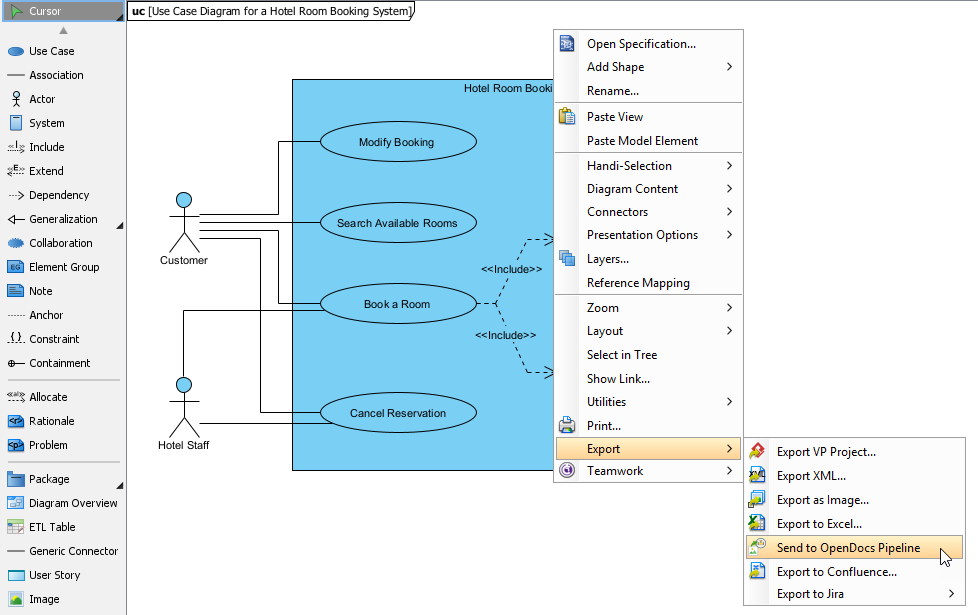
When prompted, save your project by clicking OK
(Optional) Enter a comment for version tracking—visible in the Pipeline pane within OpenDocs
Confirm the export to output your diagram to the cloud
In OpenDocs: Open any document page → Click Edit → Click Insert → Select Pipeline from the sidebar → Choose your artifact
Real-World Impact: This pathway moves local modeling expertise into a global, accessible knowledge base without losing fidelity or editability. [[2]]
2. Visual Paradigm Online → OpenDocs: Cloud-Native Collaboration
For browser-based diagramming, the Pipeline ensures quick iterations and collaborative sessions flow directly into documentation without local file handling.
How to Send from VP Online:
-
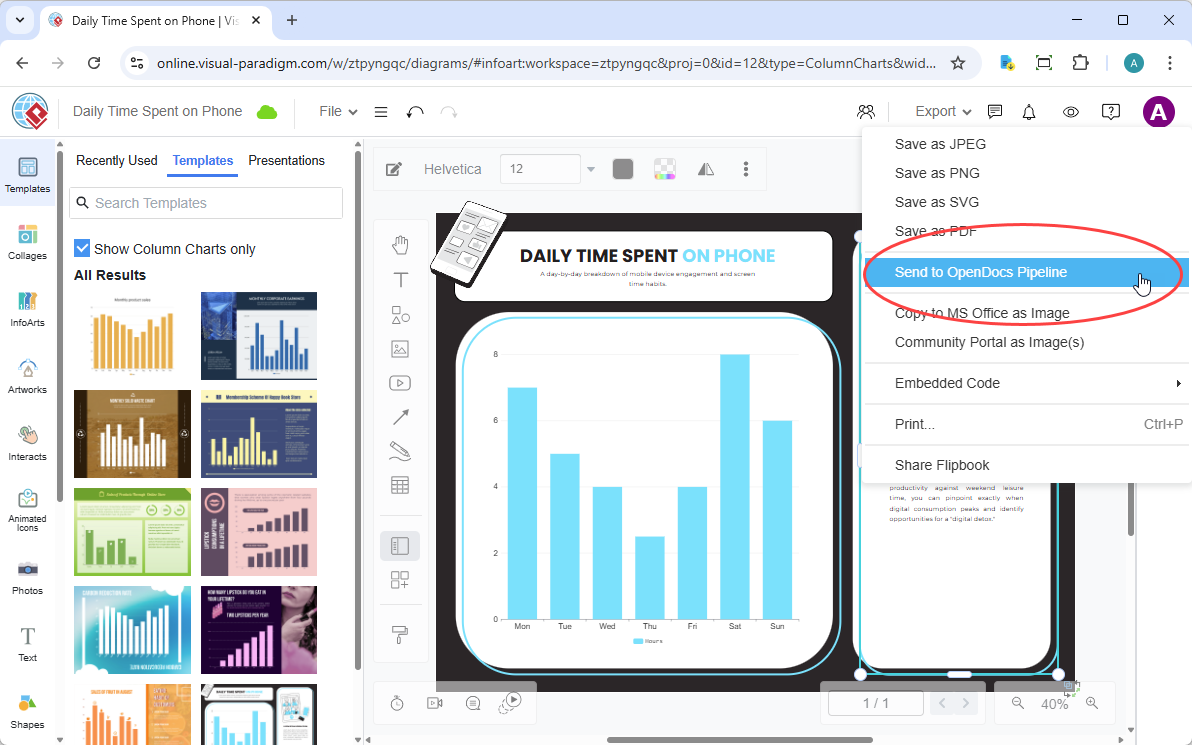
Open your diagram or graphic in Visual Paradigm Online
-
In the top menu, select Export > Send to OpenDocs Pipeline
-
(Optional) Add a descriptive comment to simplify future retrieval
-
Confirm the export—your visual is now securely stored in the Pipeline
-
Insert into OpenDocs using the same Pipeline sidebar workflow
The Benefit: When my team collaborates on a process flow in VP Online during a video call, we can send the result to OpenDocs before the meeting ends. No downloads, no email attachments—documentation updates in real-time. [[7]]
3. AI Chatbot → OpenDocs: Conversational Creation to Publication
This pathway embodies the Pipeline’s purpose most dramatically. Ask the AI to generate a diagram, and with one click, it’s ready for your documentation. [[9]]
My Experience Flow:
-
Generate or refine your diagram (UML, flowchart, architecture, BPMN, etc.) in the AI Chatbot
-
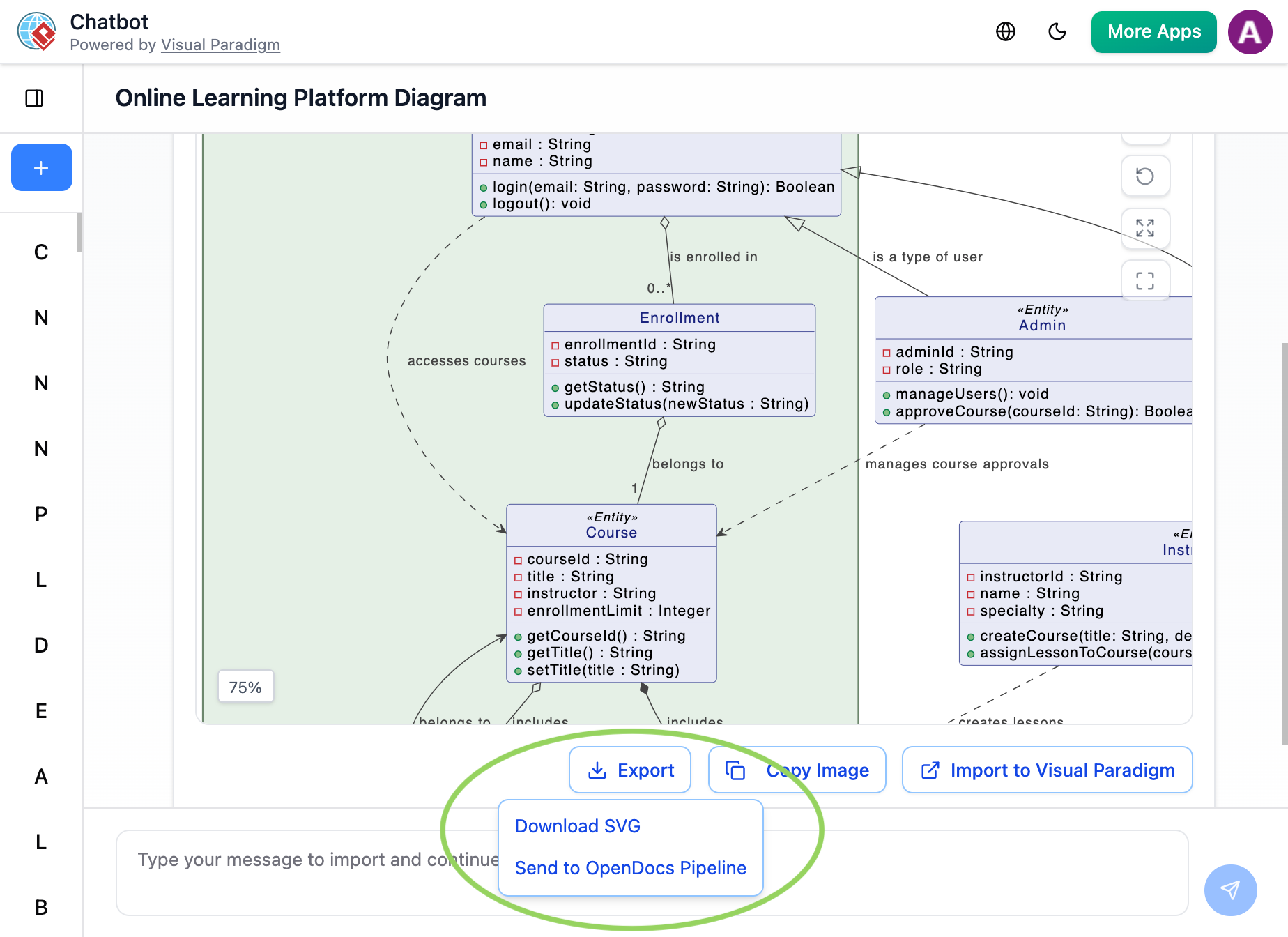
Once the AI produces the visual you need, click Export and select Send to OpenDocs Pipeline
-
Go to your desired OpenDocs page → Click Insert → Select Pipeline → Your AI-generated diagram appears in the asset list
The Purpose Realized: From idea to published documentation in under 5 minutes. This is the “Concept-to-Docs” promise in its purest form. [[9]]
4. Flipbooks → OpenDocs (New!): Interactive Content Without Complexity
Bring interactive media into your knowledge management. You can now send digital Flipbooks through the Pipeline, allowing you to embed rich, flippable catalogs or brochures directly within OpenDocs pages. [[7]]
Use Case Example: I created a product training Flipbook and sent it through the Pipeline. Now it’s embedded directly in our onboarding documentation, where new hires can flip through it without leaving the learning portal.
5. Bookshelves → OpenDocs (New!): Scaling Knowledge Organization
Organize and publish at scale. Send entire Bookshelves to OpenDocs to create a centralized library of resources within your documentation workspace, making it easier than ever to manage large volumes of information. [[8]]
The Benefit: Instead of embedding 20 individual Flipbooks or diagrams, I can curate them into a Bookshelf and embed the entire collection—perfect for training programs, product documentation suites, or compliance resource centers.
Why the Pipeline Changes Everything: A Comparative View
| Traditional Workflow | The Pipeline Workflow |
|---|---|
| Manual Export (PNG/JPG) | Instant “Send to Pipeline” |
| Manual Re-uploading on changes | “Update to Latest Revision” in one click |
| Disconnected, static images | Deep-linked, editable artifacts |
| Scattered files on local drives | Centralized cloud repository |
The Five Tangible Benefits I Experienced
✅ Single Source of Truth: Ending Version Chaos
Before: Diagrams scattered across local drives, cloud storage, email attachments. When architecture changed, we’d update the source but often forget embedded versions.
After: Every diagram sent through Pipeline becomes a centralized, cloud-based artifact. One authoritative version flows to every OpenDocs page where it’s embedded.
Impact: Eliminated 2-3 hours/week previously spent reconciling version conflicts; prevented potential implementation errors from outdated diagrams. [[12]]
✅ Live Updates with One-Click Sync: Documentation That Evolves
Before: Every diagram change required manual re-export, re-upload, re-embedding—documentation lagged weeks behind reality.
After: The “Update to Latest Revision” button in OpenDocs refreshes every instance of a diagram across the knowledge base with a single click.
How It Works: Update source diagram → Send to Pipeline (2 seconds) → Open OpenDocs page → Click “Update to Latest Revision” → Done. [[2]]
✅ Editable Artifacts, Never Static Images: Preserving Intelligence
Before: Exporting as PNG/JPG meant losing underlying model data, relationships, and editability.
After: Artifacts flowing through Pipeline remain intelligent, editable models. Embed a SysML diagram, and it’s a live connection to the actual model—not a flattened image.
Why This Matters: Documentation remains a working tool, not just a reference. New team members can explore actual model structure. [[1]]
✅ Eliminates Manual Exports: Reclaiming Hours Every Week
Before: 10 diagrams/week × ~4 minutes each for export/upload/embed = 40 minutes/week on administrative tasks.
After: “Send to OpenDocs Pipeline” eliminates every step. One click from within any Visual Paradigm tool, and your artifact is ready.
My Time Tracking:
-
Before Pipeline: 3.5 hours/week on diagram export, upload, version management
-
After Pipeline: 15 minutes/week on same tasks
-
Time Reclaimed: ~3 hours 15 minutes weekly, or ~169 hours annually [[12]]
✅ Secure Cloud Repository: Centralized, Safe, Accessible
Before: Diagrams scattered everywhere; when team members left, we’d lose access to critical models.
After: Every Pipeline artifact lives in a secure, cloud-based repository with version history, comments, and access controls.
Organizational Benefit: First complete inventory of visual assets. Pipeline pane in OpenDocs shows everything sent, when, and where it’s used—essential for compliance and scaling. [[4]]
Keeping Documentation in Sync: The Update Workflow
One of the Pipeline’s most powerful capabilities is maintaining synchronization between source models and embedded documentation.
Step-by-Step Update Process:
1. Open the Source Diagram
In OpenDocs, click the Edit icon at the top right of the diagram image to open the Edit Diagram window. Copy the diagram link provided. In Visual Paradigm Desktop, go to Project > Open, paste the link, and the software opens the source model. [[2]]
2. Edit and Re-send
Modify your diagram in Visual Paradigm Desktop. Once finished, right-click the diagram and select Export > Send to OpenDocs Pipeline again. Alternatively, commit changes to VP Online, which automatically creates a new revision. [[7]]
3. Swap to the Latest Revision
Back in the OpenDocs editor, click Pipeline at the top right. You’ll see artifacts currently used on that page. Select the diagram to view revision history. Click the latest revision to instantly swap the old diagram for the updated version. [[2]]

April 2026 OpenDocs Enhancements: Amplifying the Pipeline’s Value
Recent OpenDocs updates reinforce the Pipeline’s core purpose of frictionless Concept-to-Docs workflow:
📐 Flexible Page Width Settings
Adjust page width to match content—narrow for text, wide for complex diagrams. Ensures Pipeline artifacts display optimally, not crammed into inappropriate layouts. [[1, 6, 7, 8]]
📊 Interactive Table Column Resizing
When Pipeline artifacts include tabular data, resize columns directly on the page. Eliminates another friction point in documentation workflow. [[1, 6, 7, 8]]
🌐 Export to WordPress
Publish OpenDocs pages directly to WordPress. A diagram created in Visual Paradigm Desktop can flow through Pipeline into OpenDocs and then to a public-facing WordPress site—all without manual reformatting. [[3, 9, 11]]
📚 Digital Bookshelves and Flipbook Integration
Rich, interactive content flows from creation to publication. A Flipbook created in VP Online reaches end users through OpenDocs with zero friction. [[4, 8]]
🔗 Website Embedding
The “Embed Code” feature means OpenDocs content (populated via Pipeline) can become native parts of external websites—extending reach beyond internal documentation to customer-facing resources. [[10]]
⚙️ Static vs. Live Sharing
For formal releases, create Static Snapshots. For evolving projects, Live Update keeps documentation current. Both options serve the Pipeline’s purpose of reducing friction—just in different ways. [[1, 9, 12]]
📜 Browse Share History
The audit dashboard provides visibility into Pipeline output. See what’s been shared, when, and manage links—essential for governance and compliance. [[12]]
Conclusion: The Pipeline’s Purpose Realized
After a month of intensive, real-world use across multiple projects and teams, I can state unequivocally: the Visual Paradigm Pipeline delivers on its promise of creating a frictionless Concept-to-Docs workflow.
✅ Problems It Solves:
-
Version chaos and outdated documentation
-
Time wasted on manual export/upload cycles
-
Static images that lose modeling intelligence
-
Scattered files and lost institutional knowledge
-
Documentation that lags behind development velocity
✅ Benefits It Delivers:
-
Single source of truth for all visual assets
-
One-click updates that keep documentation current
-
Editable artifacts that preserve model intelligence
-
Centralized, secure cloud repository with version history
-
Reclaimed hours every week for value-adding work
✅ The Overarching Purpose:
To eliminate the barriers between creating visual models and publishing living documentation—enabling teams to share knowledge as fast as they create it.
✅ Who Should Adopt This:
-
Teams struggling with documentation version control
-
Organizations where diagrams become outdated within weeks
-
Technical writers spending more time on file management than content quality
-
Any group committed to accurate, accessible, up-to-date documentation
The Visual Paradigm Pipeline isn’t just a feature—it’s a philosophy made manifest. It recognizes that in modern development and business processes, documentation shouldn’t be a separate activity from creation; it should be a natural extension of it. By building a secure, intelligent bridge between Visual Paradigm’s creation tools and OpenDocs’ publication platform, the Pipeline makes this vision a reality.
For teams tired of the documentation dance, ready to reclaim hours every week, and committed to maintaining accurate, living knowledge bases—the Pipeline isn’t just worth trying. It’s essential infrastructure for modern knowledge work.
References
- Export Diagrams from Visual Paradigm Desktop to OpenDocs Pipeline: Technical guide for setting up the OpenDocs Pipeline to sync desktop and cloud diagrams, including step-by-step export instructions and revision management workflows.
- Export Cloud Diagrams from Visual Paradigm Online to OpenDocs: Official release documentation for connecting cloud-based Visual Paradigm Online visuals to OpenDocs via Pipeline for seamless documentation integration.
- Sending Diagrams from Visual Paradigm Desktop to OpenDocs: Video tutorial demonstrating the complete workflow for exporting desktop diagrams to OpenDocs Pipeline and maintaining synchronization.
- Visual Paradigm Pipeline: The Bridge for AI Modeling Ecosystem: Comprehensive overview of the Pipeline’s role as connective tissue across Visual Paradigm’s AI Visual Modeling Ecosystem.
- Visual Paradigm Online Tutorial: Introduction to Visual Paradigm Online’s cloud-native diagramming capabilities and integration points with the Pipeline.
- Comprehensive Guide: Visual Paradigm’s Full Support for C4 Diagrams: Third-party analysis of C4 modeling workflows and how Pipeline integration enhances architecture documentation.
- New Integration: Seamlessly Share Your Flipbooks to OpenDocs: User-focused guide on embedding interactive Flipbooks into OpenDocs documentation via the Pipeline.
- AI Diagram to OpenDocs Pipeline Feature: Official announcement and technical documentation for sending AI Chatbot-generated diagrams directly to OpenDocs.
- Solving Documentation Chaos: Visual Paradigm’s Pipeline Workflow: Practitioner review detailing time savings, workflow improvements, and real-world adoption experiences with the Pipeline.
- Visual Paradigm Online to OpenDocs Export Guide: Detailed technical reference for connecting cloud visuals to documentation via Pipeline.
- AI Chatbot Diagram Export Tutorial: Video walkthrough of generating diagrams via natural language prompts and exporting them to OpenDocs through the Pipeline.
- My Journey to Seamless Documentation: First-person account of adopting the Pipeline workflow, including time-tracking data and practical implementation tips.