


Creating a Cinematic Theme Park Adventure: An AniFuzion Animation Guide
Imagine two friends standing in front of a giant, colorful Ferris wheel, their eyes wide with excitement as they declare, “Definitely! We can’t miss that!” — all rendered in 3D with lifelike character expressions and vibrant park scenery. This isn’t fantasy. It’s a snapshot from an AI-powered, browser-based animation tool called AniFuzion, part of Visual Paradigm’s suite. You can build this kind of immersive, story-driven scene — complete with speech bubbles, dynamic backgrounds, and synchronized character movements — without ever touching a traditional animation software. Let’s break down how.
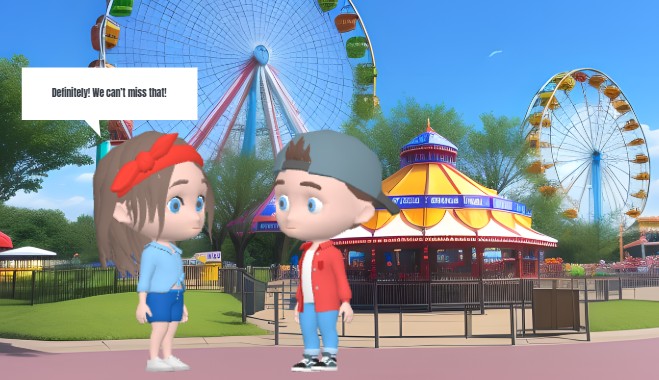
What makes this animation special isn’t just the Ferris wheel or the candy-colored carousel, but the way the characters react. Their poses, the way they’re positioned, and even their dialogue — all animated with precision. That’s because AniFuzion lets you drag-and-drop 3D characters, apply pre-built actions, and sync their mouths to voiceovers automatically. You’re not just creating a picture — you’re building a moment that feels alive, like you’re standing right there with them.
How This Theme Park Scene Was Built in AniFuzion
Creating this scene wasn’t about drawing every single detail from scratch. It was about picking the right tools and assembling them like puzzle pieces. The first step? Choosing a character. In this case, two kids — one with a red headband and a blue jacket, the other in a red hoodie and jeans — were pulled from the 3D character library. You can mix and match body parts, textures, and colors, and even rig them for movement. The animation maker lets you assign actions like “looking at each other” or “walking toward the ride,” and you can even retarget those motions to different characters if you want to show them in different outfits or poses.
Next, the environment. The Ferris wheel, the carousel, the grassy park, and even the distant buildings — these were all chosen from pre-built scene templates. No need to design every surface or object. Just drag and drop a background, add props like benches or ticket booths, and you’re ready to set the stage. Then, you add text — like the speech bubble — using the animation presets. You can make it pop in, fade out, or bounce slightly to match the excitement of the moment. It’s all done with simple clicks, not complex code.
Why This Works: The Magic of AI and Drag-and-Drop
The real magic here is how seamlessly everything connects. The AI Text-to-Speech feature generated the voice for the characters’ dialogue — “Definitely! We can’t miss that!” — and automatically synced their mouths to the words. No manual lip-syncing required. That’s a huge time saver, especially if you’re creating multiple scenes or characters. And the fact that you can export this as a video or turn it into an interactive flipbook? That’s the bonus. You can share it on social media, embed it on a website, or even turn it into a presentation for a school project or marketing campaign.
But it’s not just about the visuals. It’s about the story. The characters aren’t just static figures. They’re part of a narrative — a theme park adventure that’s full of energy, color, and emotion. That’s what makes this animation feel like more than a slideshow. It’s a story that moves, that breathes, that pulls you in. And you can create that kind of experience with AniFuzion — even if you’ve never touched animation software before.
What You Can Build with AniFuzion (Beyond Theme Parks)
Of course, this isn’t the only kind of animation you can make. The same tools that built this theme park scene can be used for anything — from educational explainer videos to product demos, from onboarding materials to YouTube shorts. You can rig and customize characters for science lessons, animate flipbooks for presentations, or even create 3D animated characters for storytelling. The drag-and-drop interface makes it easy to experiment, and the AI features — like voiceovers and automatic lip-sync — mean you can focus on the story, not the tech.
And the best part? You don’t need to install any software. It’s all in your browser. Whether you’re on a laptop, tablet, or phone, you can create, preview, and export your animation in minutes. No downloads. No crashes. Just pure, creative freedom.
Key Takeaways
-
You can create dynamic, cinematic scenes like a theme park adventure using AniFuzion’s drag-and-drop interface and AI tools.
-
The tool lets you combine 2D and 3D elements, apply motion presets, and sync character mouths to voiceovers automatically.
-
It’s designed for beginners but offers advanced customization for pros — no design skills required.
-
Export your animations as MP4 videos or interactive flipbooks — perfect for social media, presentations, or marketing.
-
Build confidence as a creator by experimenting with characters, scenes, and effects — and refine your work with easy preview and editing tools.
Why This Matters for Your Projects
Whether you’re a student, educator, marketer, or content creator, this kind of animation can make your message stand out. It’s not just about visuals — it’s about engagement. People remember stories, not static images. And with AniFuzion, you can turn your ideas into animated, immersive experiences that hold attention and spark imagination. It’s not just a tool — it’s a creative partner.
And if you’re wondering how to get started? The process is simple: sign up for a free account, create a new animation project, drag in your characters, add actions, sync voiceovers, and export. You’re not just creating an animation — you’re creating a moment. A story. A memory.
Ready to Build Your Own Animated World?
Take the first step today. Visit https://explainer.visual-paradigm.com/templates/ to start your own animation project — and let your imagination run wild. You’ll be amazed at what you can create in minutes, with no experience required.
Related Links
-
Mastering Anifuzion: A Comprehensive Guide to Creating Professional Animations: This in-depth guide walks users through the core features and advanced techniques of Anifuzion, empowering creators to produce polished, professional-grade animations with ease.
-
Creating Seamless Animations in Anifuzion with Automatic Motion Retargeting: Discover how Anifuzion’s automatic motion retargeting enables smooth, realistic animations across different character models with minimal manual effort.
-
Anifuzion Feature Overview: Advanced Animation Capabilities: An interactive overview of Anifuzion’s key animation features, highlighting its capabilities for creating dynamic, interactive, and professional animations.
-
Comprehensive Guide to Using Visual Paradigm Online’s Anifuzion: A detailed walkthrough of integrating and mastering Anifuzion within Visual Paradigm Online for seamless, high-quality animation production.
-
Beginner’s Guide to 3D Character Creation and Rigging in Anifuzion: A comprehensive tutorial for beginners on how to model, rig, and animate 3D characters using the Anifuzion tool within Visual Paradigm.
-
Streamlining Class Diagrams with Visual Paradigm’s AI: This article explains how Visual Paradigm’s AI-powered tools reduce the complexity and time required to create accurate class diagrams for software projects.
-
Comprehensive Guide to Creating Animated Videos with Visual Paradigm Anifuzion: A detailed walkthrough on using Visual Paradigm Anifuzion to design and produce professional animated videos for presentations, training, and marketing.