
The Visual Paradigm BPMN Lifecycle: Architecting Professional Models with AI Assistance
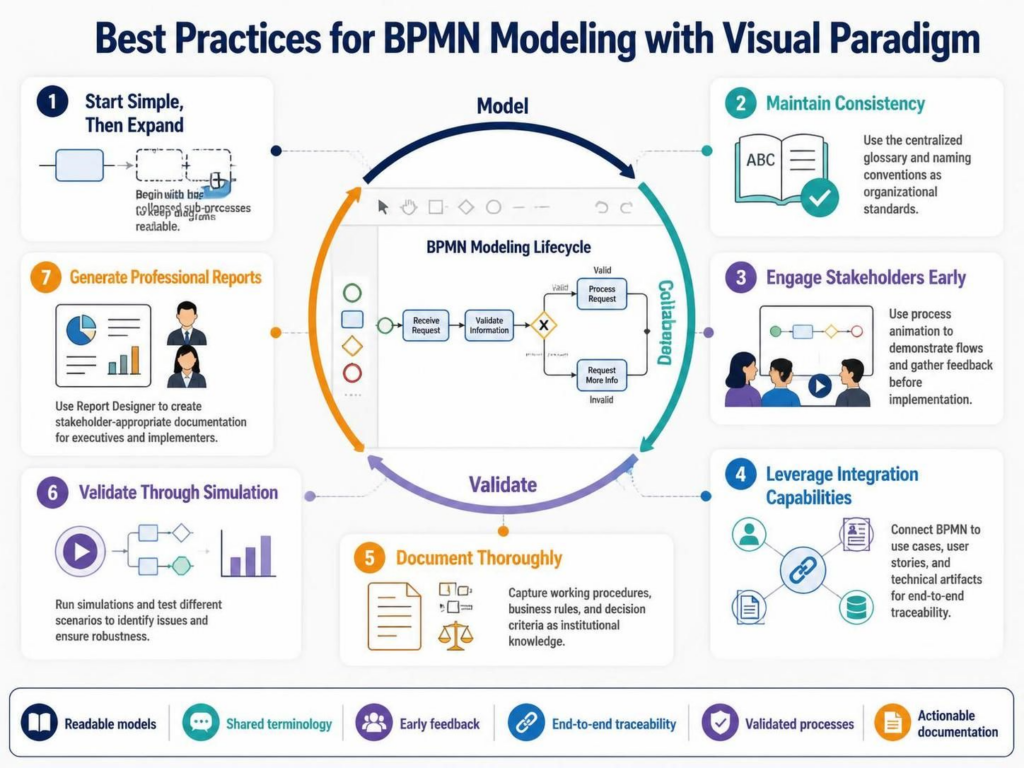
Welcome to this technical deep-dive into the Visual Paradigm BPMN Modeling Lifecycle. In modern enterprise architecture, a Business Process Model and Notation (BPMN) diagram is not merely a drawing; it is a dynamic asset that drives continuous improvement. This tutorial explores the seven best practices illustrated in Visual Paradigm’s ecosystem, integrating the power of AI-assisted tools to streamline the journey from high-level concept to validated implementation.
The Core Architecture: The BPMN Lifecycle
At the heart of the Visual Paradigm workflow is a continuous loop designed to maximize efficiency and accuracy. Unlike linear documentation tools, Visual Paradigm treats process modeling as an iterative lifecycle consisting of three primary phases:
- Model: The phase of construction where high-level flows are refined.
- Collaborate: The phase of engagement where stakeholders validate flows.
- Validate: The phase of rigorous testing through simulation and traceability.
This cycle ensures that processes are not only defined correctly but are also executable and robust before they reach the production environment.
Phase 1: Strategic Modeling (Practices 1 & 2)
The modeling phase requires a balance between abstraction and detail. Visual Paradigm supports this through specific architectural patterns.
1. Start Simple, Then Expand
A common mistake in process modeling is “boiling the ocean” by detailing every single step immediately. The recommended approach is to begin with high-level processes. Visual Paradigm facilitates this using Collapsed Sub-processes.
When you create a sub-process, you can define its entry and exit points without immediately detailing the internal logic. This maintains the readability of the global context diagram. As you drill down, the sub-process can be expanded to reveal the granular steps, creating a hierarchical structure that scales from executive dashboards to operational manuals.
2. Maintain Consistency
Inconsistency in terminology is a major source of confusion in large organizations. Visual Paradigm solves this via a Centralized Glossary. By establishing naming conventions as organizational standards, you ensure that “Customer Request” in the Sales department is semantically identical to “Customer Request” in the Logistics department.
Phase 2: AI-Assisted Acceleration
The supplementary note mentions VPasCode (Visual Paradigm as Code), a powerful feature that integrates AI assistance into the modeling workflow.
Traditionally, diagramming requires manual drag-and-drop actions. With VPasCode, you can leverage AI to generate BPMN models programmatically. This is particularly useful for:
- Rapid Prototyping: Describe a process in plain text, and the AI generates the corresponding BPMN structure.
- Refactoring: Convert legacy flowcharts into standard BPMN 2.0 syntax automatically.
- Standardization: Ensure that generated models adhere to the organizational standards defined in the Glossary.
For example, you might input a natural language description of a “Loan Approval Process,” and the AI-assisted engine creates the Start Event, Gateways, and End Events, which you can then refine.
Phase 3: Collaboration & Validation (Practices 3 & 4)
Once the initial model is constructed, it must be validated against reality.
3. Engage Stakeholders Early
Static diagrams are often difficult for business users to interpret. Visual Paradigm offers Process Animation, which allows you to “walk through” the process flow visually. By highlighting the active token as it moves through tasks, you can demonstrate the logic to business users immediately. Feedback gathered during this phase is significantly less costly to implement than changes required after software development has begun.
4. Leverage Integration Capabilities
A BPMN model should never exist in isolation. To ensure end-to-end traceability, Visual Paradigm integrates BPMN with:
- Use Cases & User Stories: Linking process steps to specific functional requirements.
- Technical Artifacts: Mapping process steps to database tables, API endpoints, or microservices.
Phase 4: Documentation & Simulation (Practices 5, 6 & 7)
The final phase focuses on ensuring the process is robust and well-documented.
5. Document Thoroughly
Visual Paradigm’s documentation features allow you to capture working procedures, business rules, and decision criteria directly within the model. This creates a single source of truth, preserving institutional knowledge even as personnel change.
6. Validate Through Simulation
Before a process is deployed, it must be stress-tested. The Simulation feature allows you to run different scenarios (e.g., high volume, low volume) to identify bottlenecks. This is where you verify the robustness of your logic and ensure that the process can handle real-world variance.
7. Generate Professional Reports
Different stakeholders need different views. The Report Designer allows you to customize output for various audiences:
- Executives: High-level KPI dashboards and strategic flow summaries.
- Implementers: Detailed technical specifications and data flow definitions.
Conclusion
Visual Paradigm transforms BPMN from static documentation into a dynamic, executable asset. By combining the structured lifecycle of modeling, collaboration, and validation with the efficiency of AI-assisted tools like VPasCode, organizations can achieve true process excellence. Whether you are managing complex enterprise architectures or simple workflows, this comprehensive approach ensures that your business processes drive measurable results.