
Mastering Enterprise Modeling: A Guide to Choosing Visual Paradigm UML
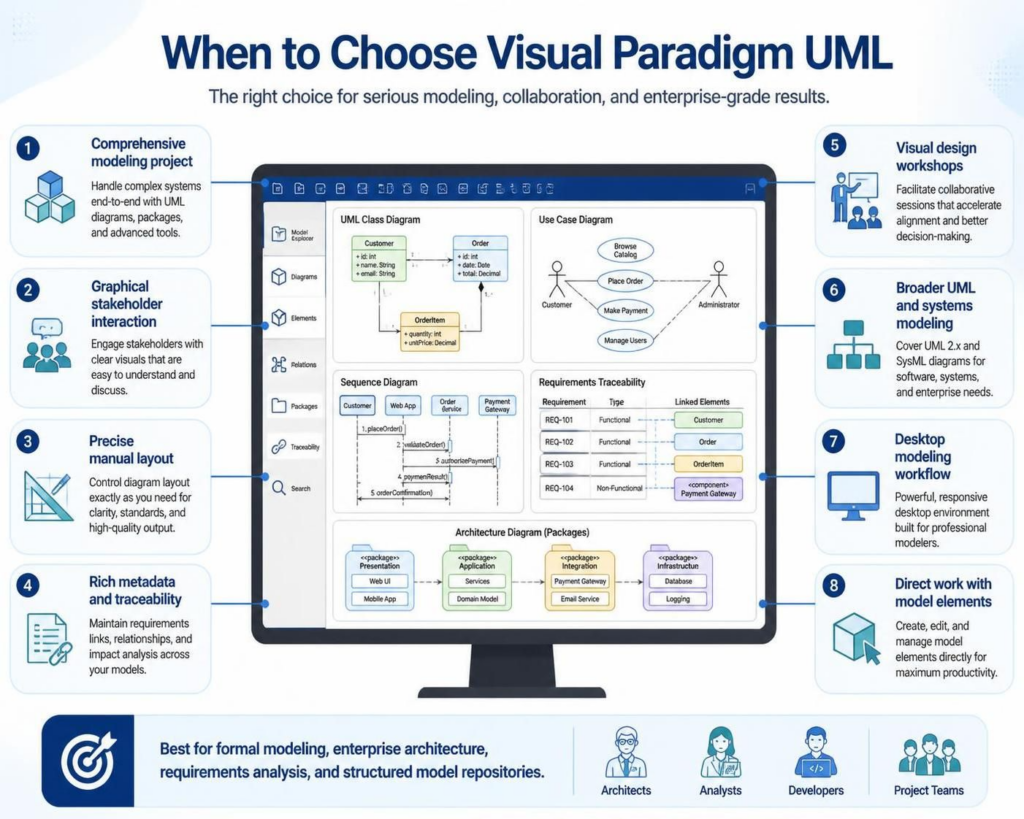
When approaching complex software architecture or enterprise system design, the choice of tool is just as critical as the modeling methodology itself. Visual Paradigm UML stands out as a comprehensive solution for professionals who require more than just simple diagramming. This tutorial explores the specific architectural scenarios and project requirements where Visual Paradigm becomes the ideal choice for your modeling workflow.
1. The Power of Comprehensive Modeling
At the core of Visual Paradigm’s utility is its ability to handle end-to-end modeling projects. Unlike lightweight drawing tools that treat diagrams as isolated images, Visual Paradigm treats diagrams as interconnected data within a structured model.
- End-to-End Support: From the initial requirements phase to the final code generation, the tool maintains a unified data repository.
- Advanced Tooling: It supports complex modeling techniques including UML, SysML, and BPMN within a single environment.
- Package Management: Large systems are broken down into manageable packages, allowing for hierarchical organization of your architecture.
2. Facilitating Stakeholder Interaction
One of the primary challenges in system analysis is bridging the gap between technical developers and business stakeholders. Visual Paradigm excels in this area by prioritizing graphical interaction.
Stakeholders often struggle with textual requirements or abstract logic. By providing clear, standardized visuals (such as Use Case and Activity diagrams), the tool ensures that business processes are easily understood and discussed without requiring deep technical knowledge.
Visual Design Workshops
For teams that facilitate visual design workshops, Visual Paradigm offers a responsive environment. It allows architects to sketch out ideas in real-time, instantly converting loose concepts into formal diagrams that can be saved and iterated upon.
3. Precision and Control in Layout
While many tools rely on automatic layout algorithms that can rearrange elements unpredictably, Visual Paradigm offers precise manual layout control. This is essential for:
- Clarity Standards: Ensuring diagrams adhere to strict corporate or industry documentation standards.
- High-Quality Output: Generating diagrams that are publication-ready for reports or presentations.
- Complex Interactions: Managing dense diagrams where element placement is critical for understanding data flow.
4. The Importance of Metadata and Traceability
In enterprise-grade projects, the “why” behind a design decision is often as important as the design itself. Visual Paradigm shines when the model requires rich metadata and traceability.
This capability allows analysts to link specific diagram elements (like a class or a requirement) to external artifacts. For example, you can trace a specific database requirement (REQ-101) directly to a specific table in your class diagram, ensuring that every requirement is fulfilled in the design.
5. Broader UML and Systems Capabilities
The tool supports a vast array of diagram types beyond standard UML. Whether you are working with UML 2.x or Systems Modeling Language (SysML), Visual Paradigm covers the spectrum of software, systems, and enterprise needs.
This breadth is particularly useful for:
- Architecture Diagrams: Visualizing packages, components, and infrastructure layers.
- Requirements Traceability: Managing the lifecycle of requirements alongside the design.
- System Modeling: Handling hardware, software, and human elements in a unified view.
6. Desktop Workflow and Direct Element Manipulation
For analysts and architects who prefer a robust desktop environment, Visual Paradigm provides a powerful workflow. It is designed for professionals who need to work directly with model elements.
Instead of drawing “pictures” of a system, you create a data model. You can create, edit, and manage model elements directly. This supports a structured model repository approach, which is the industry standard for formal modeling, enterprise architecture, and rigorous requirements analysis.
Best Practices for Structured Modeling
To maximize the value of Visual Paradigm, it is recommended to establish a structured workflow early in the project. This involves setting up a consistent naming convention for packages and ensuring that all diagram elements are linked to the central model repository.
Conclusion
Whether you are an architect designing a new enterprise system, an analyst documenting requirements, or a developer needing precise technical specifications, Visual Paradigm UML offers the depth and structure required for serious modeling. Its combination of precise layout control, rich metadata support, and comprehensive diagramming capabilities makes it a robust choice for managing complex projects.