
AWS Cloud Architecture with VPasCode: AI Chatbot Fixes Syntax Errors
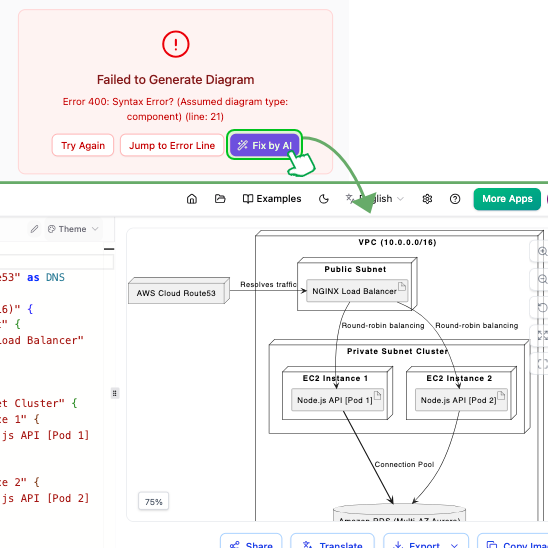
In the realm of technical documentation and system architecture, clarity is paramount. However, translating complex cloud infrastructures into readable diagrams often hits a wall: syntax errors. Whether you are a DevOps engineer or a Solution Architect, spending time debugging Mermaid code can be frustrating. This tutorial explores how the Visual Paradigm VPasCode tool, powered by AI assistance, transforms the diagramming experience by automating error correction and explaining the underlying logic.
Based on the interface shown in the provided context, we will walk through a real-world scenario: generating a component diagram for an AWS architecture, encountering a syntax error, and using AI to resolve it instantly while learning the correct syntax.
Understanding the Challenge: Syntax Errors in Code-Based Diagramming
Diagramming tools that rely on code (like Mermaid.js) require precise syntax. A missing brace, a misspelled entity type, or an incorrect connector definition can cause the entire rendering engine to fail. In the context of AWS architecture modeling, these errors often occur when defining complex relationships between subnets, load balancers, and clusters.
When a syntax error occurs, the tool typically throws a generic error message. For example, a “Syntax Error? (Assumed diagram type: component)” error might appear at a specific line number (e.g., Line 21). Without immediate feedback, the user must manually hunt for the typo, break the logical flow, and restart the debugging process.
The Solution: AI-Powered Instant Fixing
VPasCode introduces a game-changing workflow: Instant Syntax Error Fixing. Instead of manually debugging, the tool offers a “Fix by AI” button that leverages an AI Chatbot to:
- Identify the specific line causing the failure.
- Correct the syntax automatically.
- Explain why the error occurred, turning a mistake into a learning opportunity.
This approach not only saves time but also helps users master the specific syntax rules required for Mermaid diagrams over time.
Case Study: Modeling an AWS VPC Architecture
Let’s analyze the successful diagram displayed in the context. It depicts a standard AWS architecture pattern involving a Virtual Private Cloud (VPC), a Public Subnet with a Load Balancer, and a Private Subnet Cluster with EC2 instances.
1. The VPC and Subnet Structure
The diagram begins with a top-level container representing the VPC. Inside, we see a clear separation of concerns:
- Public Subnet: Accessible from the internet, housing the load balancer.
- Private Subnet Cluster: Isolated from the internet, housing the compute resources.
2. Traffic Flow and Routing
The diagram illustrates the data path effectively:
- Ingress Traffic: Incoming traffic is routed via
AWS Cloud Route53to theNGINX Load Balancer. - Load Balancing: The load balancer distributes traffic using a
Round-robin balancingstrategy to the backend instances.
3. Backend Components
The Private Subnet Cluster contains two distinct EC2 Instances. These instances are labeled with their specific roles:
Node.js API [Pod 1]Node.js API [Pod 2]
This detail is crucial for modern cloud modeling, as it implies a containerized or microservices architecture running on virtual machines.
Deep Dive: The Code Behind the Diagram
To replicate this architecture, you need to understand the Mermaid syntax used in VPasCode. Below is the code structure that generates the diagram shown, broken down by its logical components.
graph TB
    subgraph VPC [VPC (10.0.0.0/16)]
        direction TB

        subgraph Public_Subnet [Public Subnet]
            LB[NGINX Load Balancer]
        end

        subgraph Private_Subnet [Private Subnet Cluster]
            direction LR
            Instance1[EC2 Instance 1
Node.js API [Pod 1]]
            Instance2[EC2 Instance 2
Node.js API [Pod 2]]
        end
    end

    Route53[AWS Cloud Route53]
    DB[(Amazon RDS)]

    %% Traffic Flow
    Route53 -->|Resolves traffic| LB
    LB -->|Round-robin balancing| Instance1
    LB -->|Round-robin balancing| Instance2

    %% Backend Connectivity
    Instance1 -->|Connection Pool| DB
    Instance2 -->|Connection Pool| DB
Notice how the subgraphs are nested, and how the edges (arrows) are labeled to describe the traffic flow. A common error in this syntax is forgetting to close the subgraph tags or misnaming the container IDs, which would trigger the error message seen in the screenshot.
Conclusion
The integration of AI into VPasCode removes the friction of syntax debugging. By clicking “Fix by AI,” users are empowered to focus on the architecture itself—the relationships between the Load Balancer, the EC2 instances, and the Database—rather than the rigid rules of the code. This tooling is essential for modern teams that need to visualize complex cloud infrastructures quickly and accurately.