
Mastering BPMN Gateways: A Technical Guide to Decision Modeling
In the world of Business Process Model and Notation (BPMN), clarity is king. While standard tasks represent work to be done, the true logic of a process—its branching, merging, and conditional paths—is governed by a critical flow object known as the Gateway. This tutorial dives deep into the architecture of BPMN gateways, explaining how they direct sequence flows and control the lifecycle of a business process.
What is a BPMN Gateway?
A BPMN Gateway acts as a traffic controller within a process diagram. It is a specific type of flow object used to direct sequence flows based on specific conditions. Think of a gateway as a gate in a dam: it decides whether water (or in this case, process flow) is allowed to pass, and if so, which channel it takes.
Gateways are distinct from other elements because they do not perform work themselves; rather, they influence the control flow. They are essential for modeling real-world scenarios where decisions must be made, such as “Is the credit score sufficient?” or “Has the invoice been paid?”
Architecture of Gateway Types
BPMN standardizes several gateway types to handle different control behaviors. Each type serves a unique architectural purpose in the process graph:
1. Exclusive Gateway (XOR)
The Exclusive Gateway is the most common type used for decision making. It is used to model alternative paths where only one outgoing flow can be taken based on a condition. It functions like a logical “XOR” (Exclusive OR) operator in programming.
- Function: Diverts the flow to one path based on a condition evaluation.
- Condition: All conditions on outgoing paths are evaluated, but only the first one that returns
trueis taken. If none match, the process may stop or follow a default path.
2. Inclusive Gateway (OR)
Unlike the Exclusive Gateway, the Inclusive Gateway allows for more complex branching where multiple paths can be taken simultaneously. It models “OR” logic where one, some, or all conditions can be true.
- Function: Evaluates all outgoing condition expressions.
- Behavior: Any path with a positive evaluation result will be activated. This is crucial for scenarios where multiple outcomes can happen at once.
3. Parallel Gateway (AND)
The Parallel Gateway is used to split a single flow into multiple parallel flows that execute simultaneously, or to synchronize (wait for) multiple parallel flows to complete before continuing.
- Function: Creates paths without checking any conditions.
- Behavior: It is the standard mechanism for forking (splitting) and joining (merging) parallel tasks.
4. Event-Based Gateway
This gateway models situations where the next step depends on an event occurring rather than a data condition. It is often used in scenarios involving waiting for a timer, a message arrival, or a signal.
5. Complex Gateway
Used for highly complex synchronization behaviors that cannot be easily modeled by the standard gateways above. It allows for custom logic that doesn’t fit the strict XOR, OR, or AND patterns.
Visualizing the Logic: The Approval Process
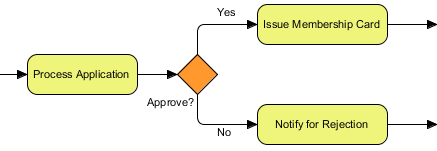
To understand how these concepts apply in a real architecture, consider a standard membership application workflow. The process begins with an application, which triggers a decision point.
In the diagram below, we see an Exclusive Gateway (represented by the orange diamond) labeled “Approve?”. This gateway directs the flow based on the result of the approval check:
- If Yes: The process flows to the Issue Membership Card task.
- If No: The process flows to the Notify for Rejection task.
This structure ensures that the process never attempts to issue a card and send a rejection notice for the same application simultaneously. The gateway enforces mutual exclusivity.
Configuration and Best Practices
When modeling these processes in tools like Visual Paradigm, visual clarity is key. The Exclusive Gateway has a specific configuration option that aids in distinguishing it from other gateways.
By default, an Exclusive Gateway is often rendered as a diamond. However, to adhere to strict BPMN standards or for enhanced readability, you can display an internal indicator. This is done by right-clicking the background of the diagram, selecting Presentation Options, and enabling Gateway Display Options > Data-Based gateway Markers Visible. This will display the letter “X” inside the shape, explicitly marking it as an Exclusive Gateway.
Conclusion
Understanding the nuances between Exclusive, Inclusive, and Parallel gateways is fundamental to mastering BPMN. By correctly applying these flow objects, you can create process models that are not only visually appealing but logically sound and executable by BPM engines.