
Introduction
For modern agile teams, the gap between architectural modeling and technical documentation has long been a source of friction. We’ve all been there: spending hours exporting diagrams as images, uploading them to Confluence or Google Docs, and then realizing that every subsequent model change requires repeating the entire process. The result? Outdated documentation that no one trusts, and valuable time lost to manual synchronization.
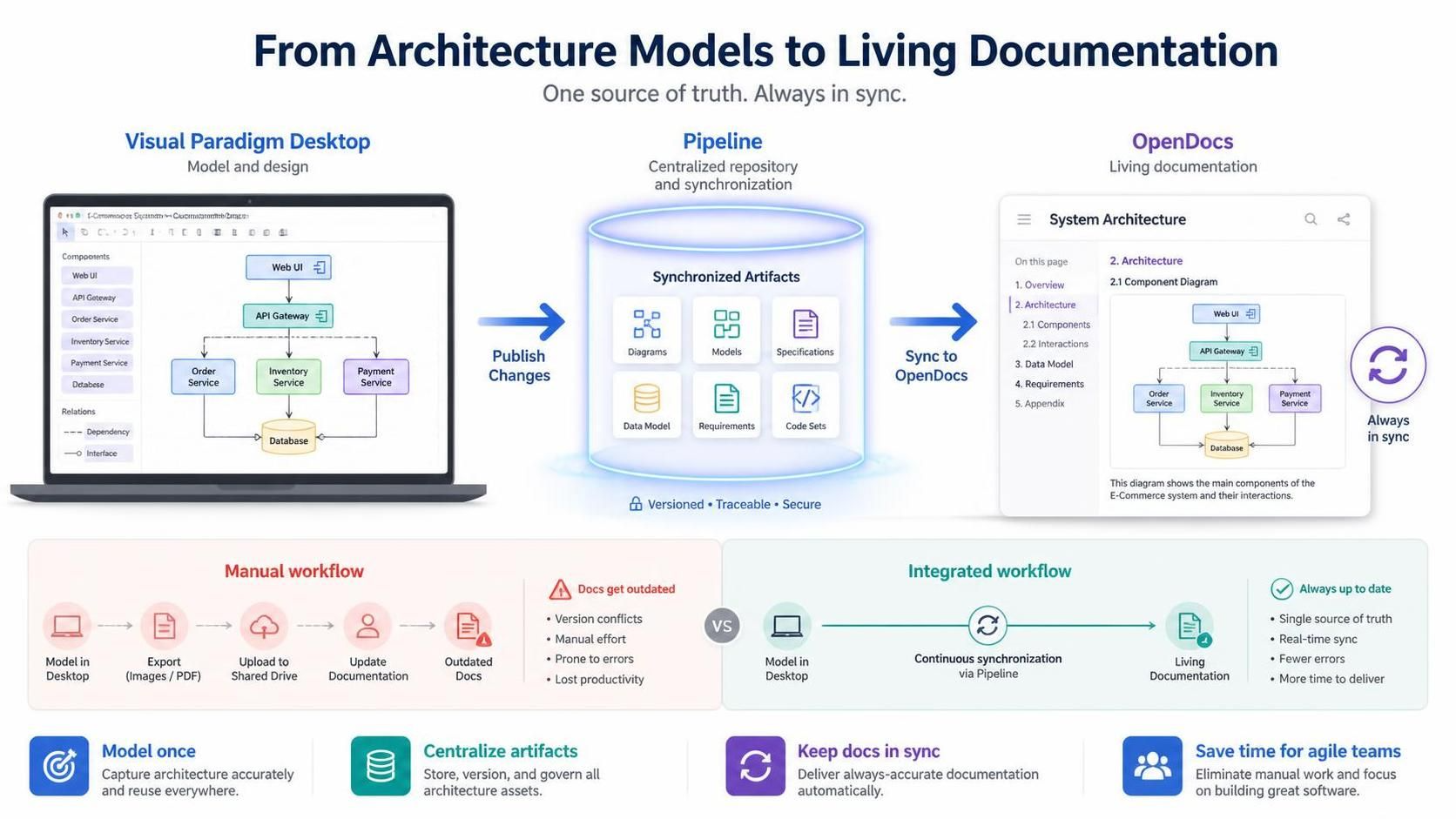
Visual Paradigm’s integration between Visual Paradigm Desktop and OpenDocs promises to eliminate this pain point entirely. By leveraging the Pipeline—a centralized artifact repository—teams can now move seamlessly from concept modeling to living documentation. After putting this workflow through rigorous testing, I’m sharing a comprehensive guide on how to master this integration, why it matters for agile teams, and how it transforms the way we maintain technical knowledge.
Key Concepts: Understanding the Ecosystem
Before diving into the workflow, it’s essential to understand the core components that make this integration powerful.
What Is OpenDocs?
OpenDocs is not just another documentation platform—it’s a specialized knowledge management system designed for teams who rely heavily on visual modeling. Unlike conventional tools like Confluence or Notion, OpenDocs offers native integration with a robust diagram editor. You can insert diagrams into your pages and re-edit them later without ever leaving the document. This bidirectional editability is what sets it apart.
With support for exports from Visual Paradigm Desktop, OpenDocs has evolved into a central hub for professional modeling and documentation. It’s particularly valuable for enterprise architects, business analysts, and development teams who need to maintain living documentation that evolves alongside their systems.
The Pipeline: The Glue That Holds It All Together
The Pipeline is the backbone of this integration. Think of it as a secure, centralized repository for “artifacts”—all the assets you create across the Visual Paradigm ecosystem. Since Visual Paradigm tools cover everything from enterprise architecture to agile development, the Pipeline serves as the essential bridge to hold and transfer these artifacts.
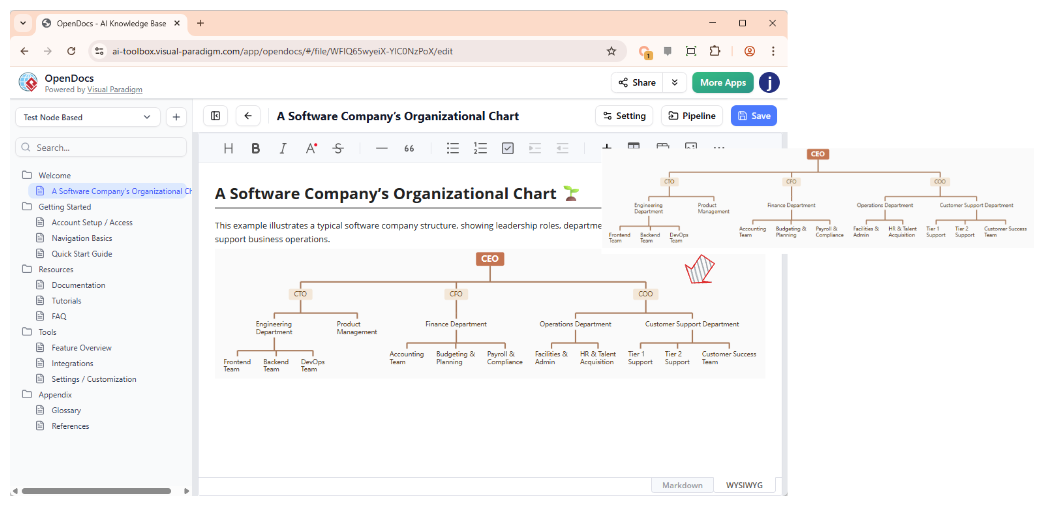
The beauty of this system is that it allows the output from one tool (say, an AI-generated UML diagram) to become the input for another (such as a technical manual in OpenDocs). It’s this seamless handoff that makes the integration so powerful.
Visual Paradigm Desktop: The Modeling Powerhouse
Visual Paradigm Desktop is the professional-grade modeling tool where complex diagrams are created, refined, and managed. Whether you’re building use case diagrams, deployment architectures, or data flow models, Desktop provides the depth and precision needed for enterprise-level work. The new integration allows these sophisticated models to flow directly into documentation without losing fidelity or editability.
Why This Matters for Modern Agile Teams
Agile teams thrive on speed, collaboration, and adaptability. Traditional documentation workflows often work against these principles by introducing bottlenecks and creating static artifacts that quickly become obsolete. Here’s why the Desktop-to-OpenDocs pipeline is a game-changer:

1. Speed and Efficiency
What used to take 15–20 minutes (export, upload, replace, reformat) now takes under a minute. Over a project lifecycle, this adds up to hours saved.
2. Living Documentation
Documentation is never static, and neither are your models. The ability to update your documentation as your models evolve—without starting from scratch—is invaluable. The revision system in the Pipeline is intuitive, allowing you to see the history of changes and roll back if needed.
3. AI-Enhanced Workflows
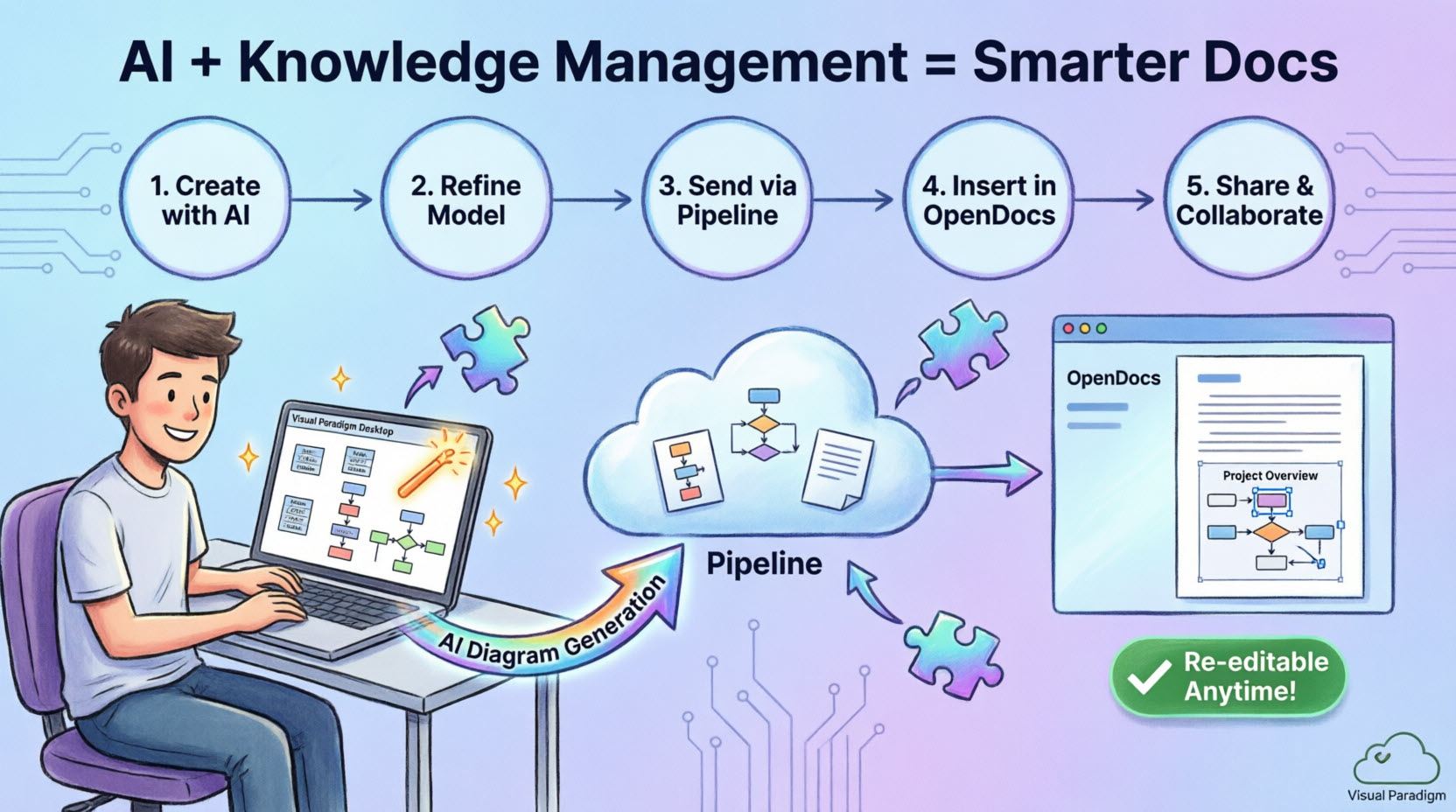
Using Visual Paradigm’s AI diagram generation to quickly prototype, then sending directly to OpenDocs for stakeholder review, has streamlined initial design phases significantly. Teams can generate UML diagrams, flowcharts, mind maps, and more from natural language prompts, then refine them professionally before embedding them in documentation.
4. No Quality Loss
Unlike screenshot workflows, the diagrams maintain their vector quality and remain fully editable. This is crucial for professional documentation where clarity and precision matter.
5. Version Control and Traceability
Every artifact sent to the Pipeline is versioned. This means you can track changes over time, compare revisions, and ensure that your documentation always reflects the current state of your architecture.
Step-by-Step Workflow: Exporting Diagrams from Desktop to OpenDocs
Whether you’ve created your diagram manually or used Visual Paradigm’s AI generation tool, the export process to your documentation is refreshingly simple.
Step 1: Prepare Your Diagram
In Visual Paradigm Desktop, open the diagram you want to send. In my case, it was a use case diagram for a customer management system I’d been modeling.
Step 2: Initiate the Export
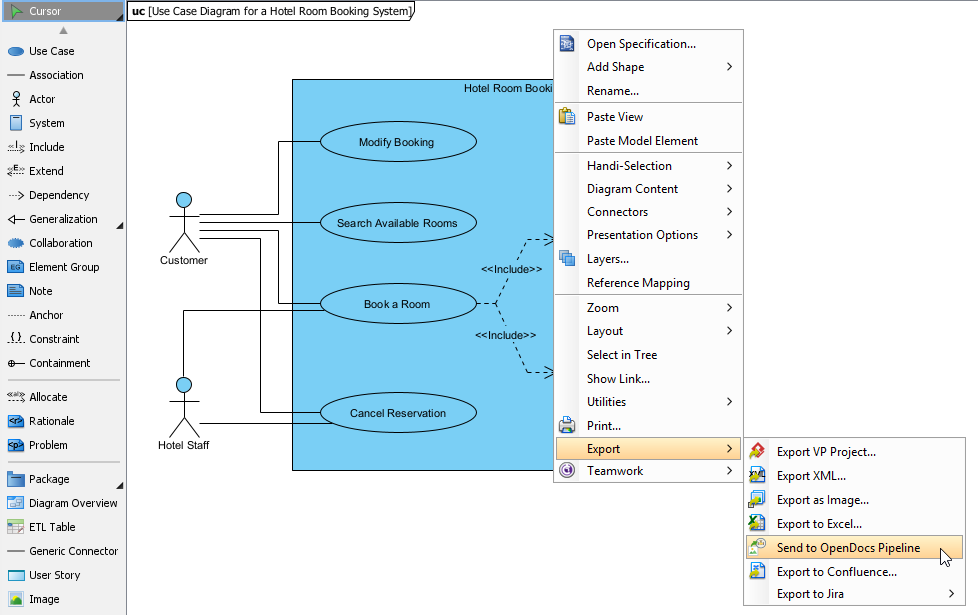
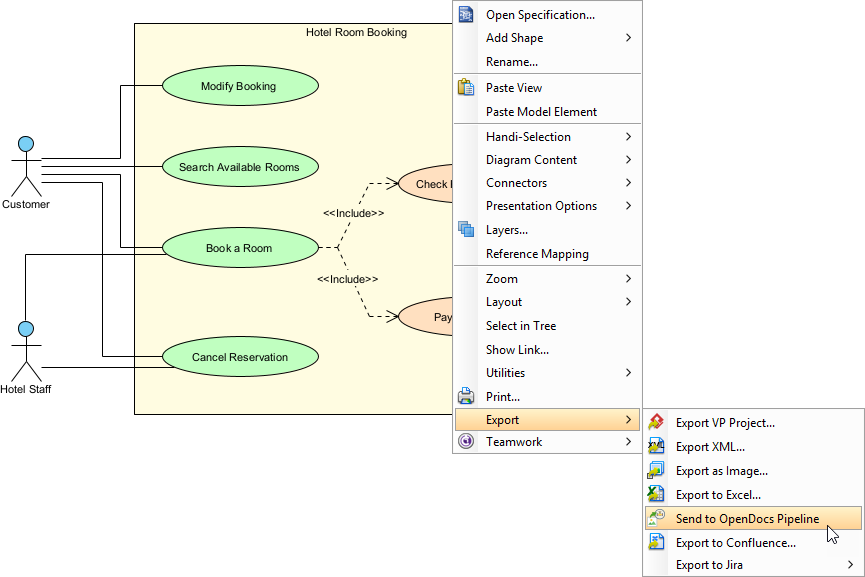
Right-click on the diagram and select Export > Send to OpenDocs Pipeline from the popup menu.
Step 3: Save and Add Context
When prompted, save your project by clicking OK. The system then gives you an optional field to enter a comment—this appears in the Pipeline pane within OpenDocs and helps identify the version or purpose of the artifact. I highly recommend using this; future you will thank present you.
Step 4: Confirm and Upload
Confirm the export, and your diagram is uploaded to the cloud. The entire process takes less than 30 seconds.
Inserting Artifacts Into Your Documentation
Once your diagram lands in the Pipeline, placing it in your knowledge base is straightforward.
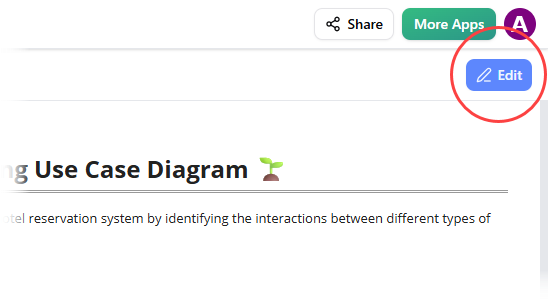
Step 1: Enter Edit Mode
Open your document page in OpenDocs and click the Edit button at the top right.
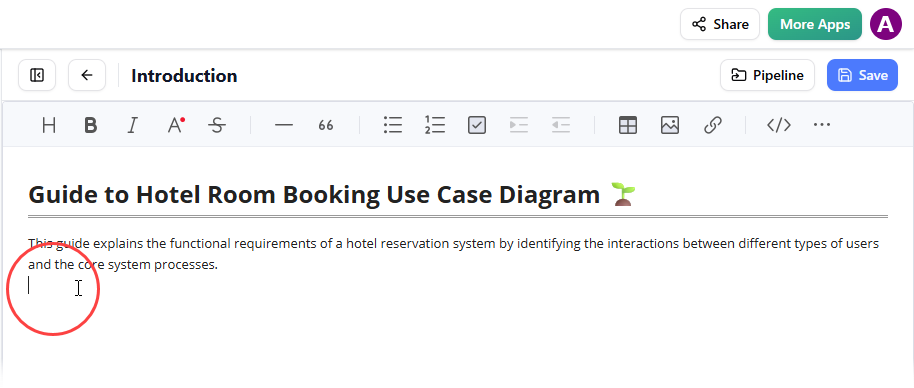
Step 2: Position Your Cursor
Click on the exact spot in the page where you want the diagram to appear.
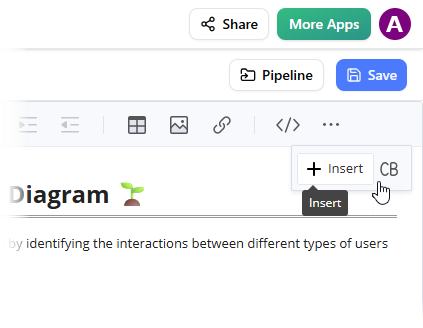
Step 3: Access the Insert Menu
On the toolbar, click Insert to open the insertion options.
Step 4: Select from Pipeline
In the Insert window, select Pipeline from the left-hand sidebar. All your sent diagrams appear here, ready to use.
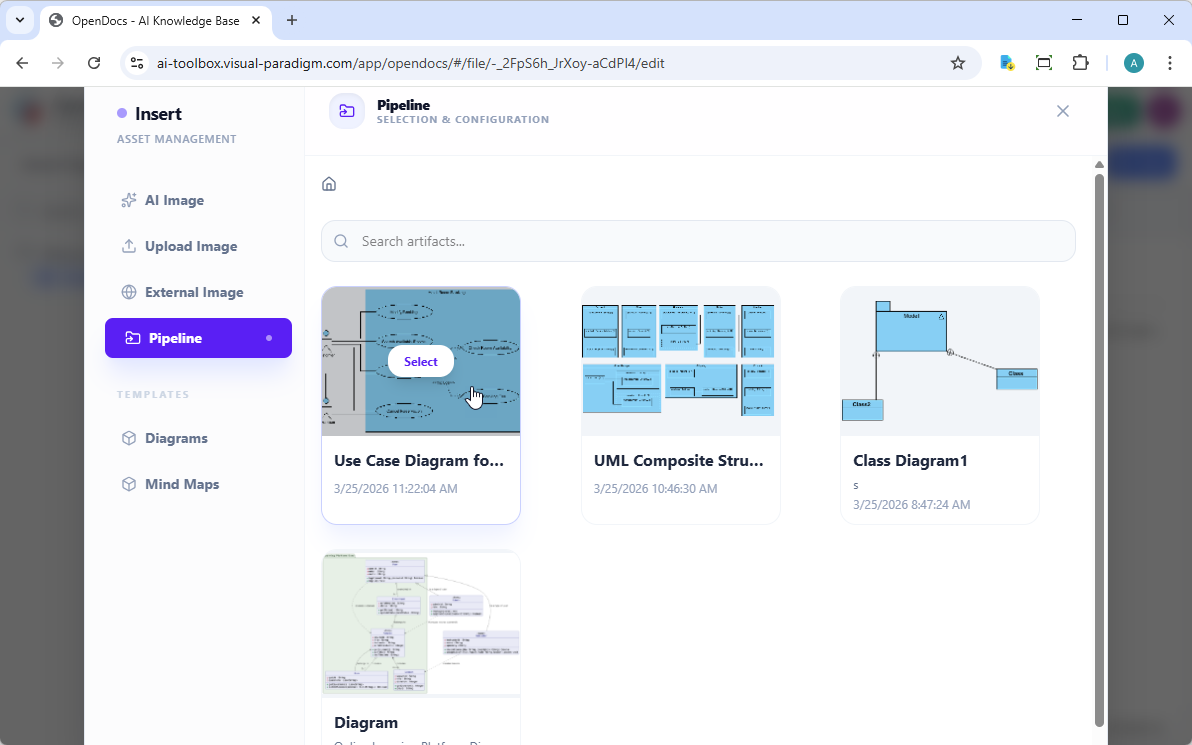
Step 5: Insert the Diagram
Click on your diagram, and it is inserted directly at your cursor position. The image quality is crisp, and the diagram is fully interactive.
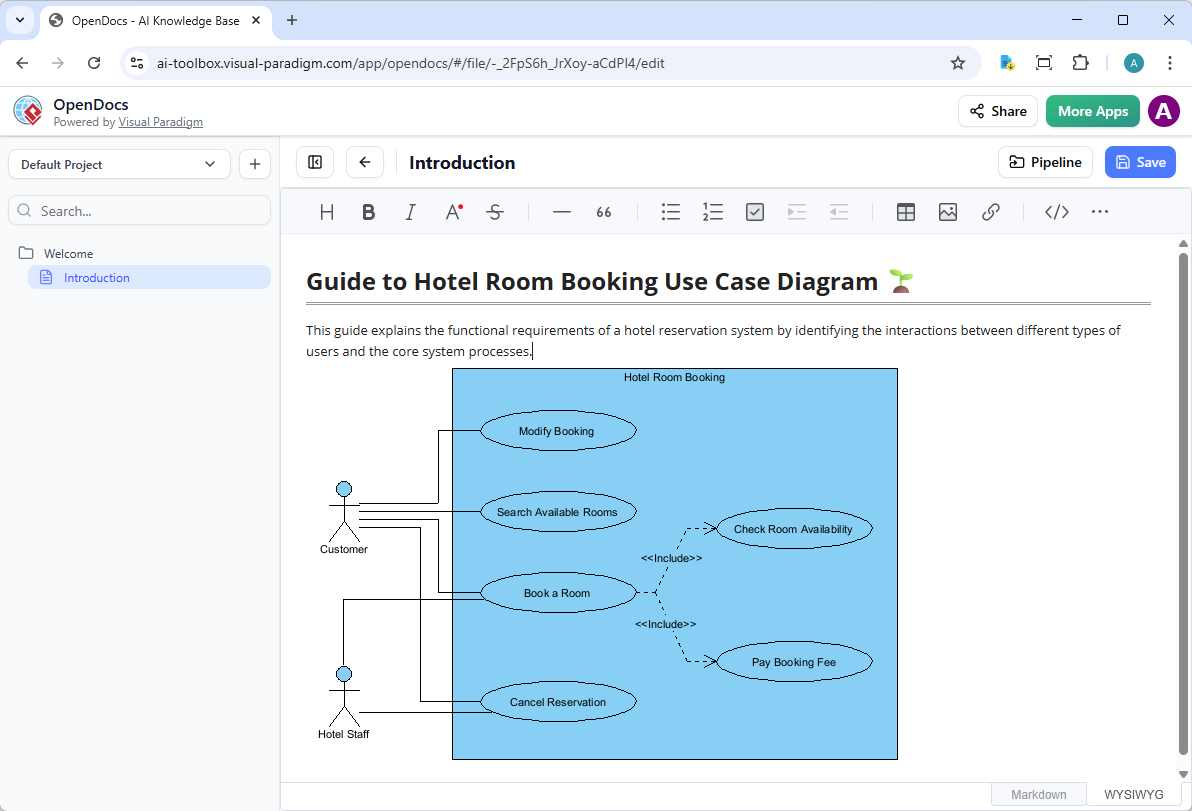
The Game-Changer: Keeping Documentation in Sync
Here’s where this integration truly shines. Documentation is never static, and neither are your models. The ability to update your documentation as your models evolve without starting from scratch is invaluable.
Step 1: Open the Source Diagram
In OpenDocs, click the Edit icon at the top right of the diagram image to open the Edit Diagram window.
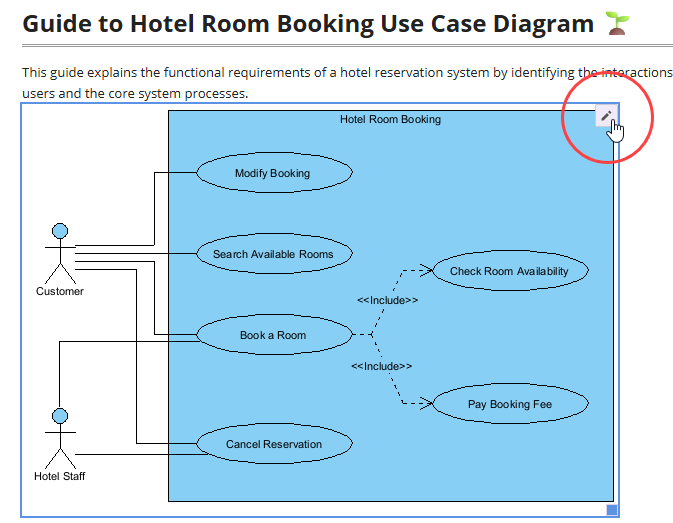
Copy the diagram link provided. Back in Visual Paradigm Desktop, go to Project > Open, paste the link, and the software opens the source model automatically. If you already have the project open, you can skip this step.
Step 2: Edit and Re-send
Make your modifications to the diagram in Visual Paradigm Desktop. Once finished, right-click the diagram and select Export > Send to OpenDocs Pipeline again. Alternatively, you can simply commit your changes to VP Online, which automatically creates a new revision of the artifact.
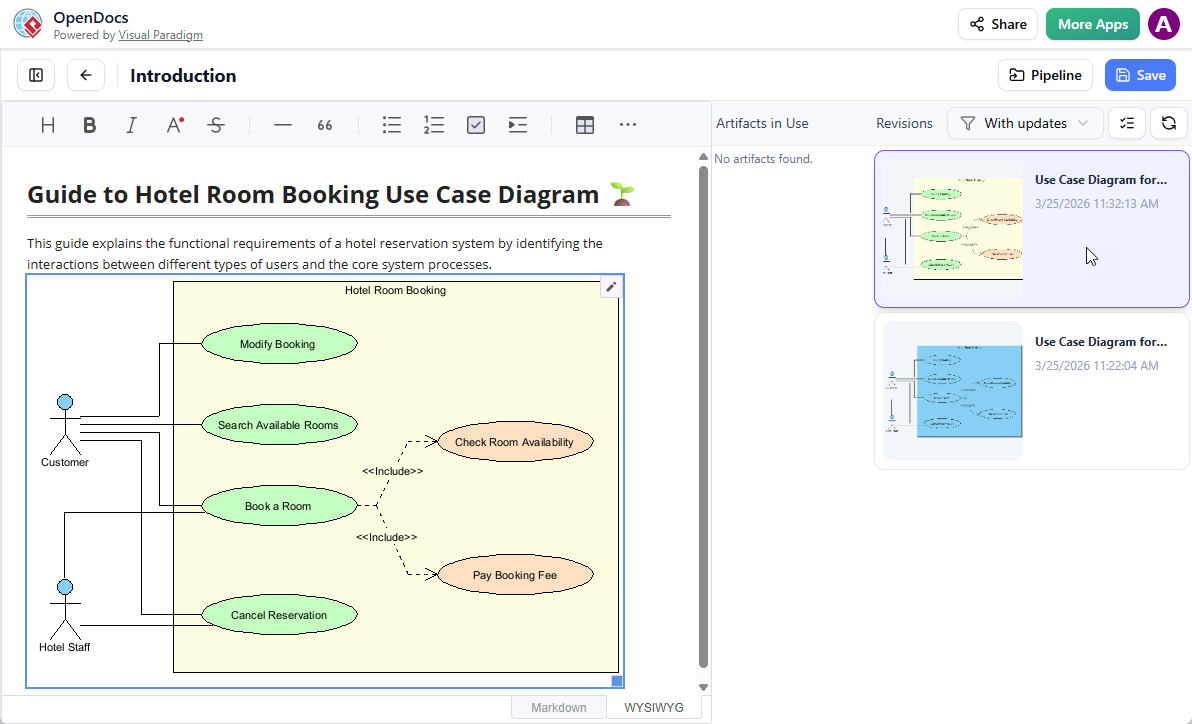
Step 3: Swap to the Latest Revision
Back in the OpenDocs editor, click Pipeline at the top right to access the artifact manager.
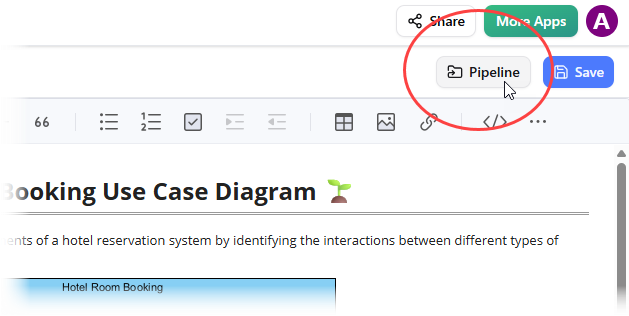
You’ll see all the artifacts currently used on that page. When you select your diagram, a list of revisions appears. With a single click on the latest revision, the old diagram is instantly swapped for the updated version.
Practical Use Cases for Agile Teams
1. Enterprise Architecture Documentation
Enterprise architecture teams can maintain living documentation that reflects the current state of their systems. As architectures evolve, diagrams are updated in Desktop and seamlessly synchronized to OpenDocs, ensuring stakeholders always have access to accurate information.
2. Agile Sprint Deliverables
Development teams can use AI-generated diagrams to quickly prototype features during sprint planning, then refine them in Desktop and embed them in sprint documentation. This keeps technical specs current and reduces the overhead of maintaining separate modeling and documentation repositories.
3. Business Process Mapping
Business analysts creating process documentation can leverage Data Flow Diagrams (DFDs) and BPMN models generated in Desktop, then send them to OpenDocs for collaborative review and approval. The revision history ensures accountability and traceability.
4. Client Deliverables
Consultants delivering professional modeling artifacts to clients can use this workflow to provide polished, up-to-date documentation. The ability to swap revisions ensures that client-facing materials always reflect the latest decisions.
5. Onboarding and Knowledge Transfer
New team members can access comprehensive, visually-rich documentation that includes interactive diagrams. Because the diagrams are editable, they can explore the models in depth, accelerating the learning curve.
Benefits Summary
| Benefit | Description |
|---|---|
| Time Savings | Reduce documentation updates from 15–20 minutes to under 1 minute |
| Version Control | Intuitive revision system with rollback capabilities |
| AI Integration | Leverage AI diagram generation for rapid prototyping |
| Quality Preservation | Maintain vector quality and full editability |
| Collaboration | Real-time updates ensure all stakeholders see the latest version |
| Traceability | Full audit trail of changes and revisions |
Considerations and Limitations
While this integration is powerful, there are a few considerations to keep in mind:
-
Learning Curve: Team members unfamiliar with Visual Paradigm’s ecosystem may need about a week to become comfortable with the Pipeline concept.
-
Professional Edition Requirement: This feature is only available to Visual Paradigm Professional Edition users and above, which may be a barrier for smaller teams or individual consultants.
-
Internet Dependency: Since this is cloud-based, you need a stable internet connection. Offline work requires a different workflow.
Conclusion
After several weeks of daily use, I can confidently say that Visual Paradigm’s Desktop-to-OpenDocs integration delivers on its promise to bridge the gap between modeling and documentation. The “Concept-to-Docs” workflow isn’t just a marketing slogan—it’s a genuine productivity enhancer that eliminates the manual friction that has plagued modelers for years.
The ability to use AI diagram generation, refine models professionally, and send them directly to a knowledge management platform with full editability and version control is transformative. While the Professional Edition requirement may limit accessibility for some users, for teams already invested in the Visual Paradigm ecosystem, this integration is a no-brainer.
My documentation is now more accurate, more current, and takes less time to maintain. In a world where technical debt often includes outdated documentation, this tool helps ensure your knowledge base evolves alongside your systems. If you’re serious about maintaining living documentation that reflects your actual architecture and processes, this integration is worth exploring.
Final Verdict: 4.5/5 stars. A powerful, time-saving integration that delivers real value to professional modeling teams.
Recommended Resources
- OpenDocs: AI-Powered Knowledge Management Platform: Comprehensive overview of Visual Paradigm OpenDocs, a unified knowledge base and documentation hub that combines rich Markdown editing, integrated diagram creation, and AI-powered diagram generation.
- The Unified Cloud Workflow: Visual Paradigm Online to OpenDocs Export: Announcement detailing the direct integration between Visual Paradigm Online and OpenDocs via the Pipeline feature, enabling seamless transfer of diagrams and graphics from cloud-based editing to centralized documentation.
- Visual Paradigm OpenDocs: Beginner’s Guide to Getting Started: Beginner-friendly walkthrough covering OpenDocs setup, core workflows, AI assistant usage, real-time collaboration features, and practical tips for new users.
- AI Breakdown Structure Chart Maker in OpenDocs: Feature update introducing AI-powered Breakdown Structure chart generation in OpenDocs, allowing users to transform text descriptions into professional Work Breakdown Structures instantly.
- Introduce OpenDocs – Official Tutorial Video: Official 3-minute video walkthrough demonstrating OpenDocs core capabilities including tree-structured knowledge bases, Markdown/WYSIWYG editing, and AI diagram generation.
- OpenDocs AI Mind Map Integration Update: Release announcement for the AI-powered mind map editor in OpenDocs, featuring “Create with AI” functionality that generates structured mind maps from natural language prompts.
- AI Deployment Diagram Generator for OpenDocs: Update adding UML Deployment Diagram support to OpenDocs with AI generation capabilities, enabling software architects to create physical architecture diagrams from text descriptions.
- Best Use Case Tool: Visual Paradigm Requirements Management: Overview of Visual Paradigm’s use case modeling capabilities, featuring UML use case diagrams, flow of events documentation, and requirements traceability.
- Unlock the Power of Data Flow Diagrams (DFD) with Visual Paradigm: Guide covering Data Flow Diagram creation in Visual Paradigm, addressing integration challenges, reporting capabilities, and multi-modeling support.
- AI Data Flow Diagram Generator: Effortless Data Flow Modeling: Comprehensive guide to AI-powered DFD generation across Visual Paradigm’s ecosystem, featuring step-by-step workflows for generating professional Data Flow Diagrams from natural language descriptions.
- OpenDocs AI Organization Chart Integration Update: Announcement of integrated Organization Chart editor in OpenDocs with AI generation capabilities, enabling HR professionals to visualize team hierarchies from text descriptions.
- OpenDocs AI Timeline Diagram Integration Update: Feature release adding Timeline editor to OpenDocs with AI-powered generation, allowing users to create professional project roadmaps from plain English descriptions.
- Organization Chart Maker: OpenDocs Update: Update detailing manual Organization Chart creation capabilities in OpenDocs, covering professional styling options and embedding workflows.
- Visual Paradigm OpenDocs: The Complete Developer’s Guide to AI-Powered Technical Documentation: Comprehensive developer-focused guide covering Markdown workflows, code block support, UML/ERD diagram integration, and Pipeline synchronization best practices.
- OpenDocs WYSIWYG Editor Update: AI Knowledge Management Tool: Release notes for the optional WYSIWYG editor mode in OpenDocs, providing visual formatting controls as an alternative to Markdown.
- OpenDocs AI Concept Map Maker Update: Feature announcement for AI-powered Concept Map generation in OpenDocs, enabling users to create knowledge relationship diagrams from descriptive text inputs.
- Sending Artifacts from Visual Paradigm Online to OpenDocs Pipeline – Video Tutorial: Step-by-step video demonstration showing how to export diagrams and design artifacts from Visual Paradigm Online directly into OpenDocs using the Pipeline integration.
- Visual Paradigm OpenDocs: Real-Time Collaboration Update: Announcement of enhanced real-time collaboration features in OpenDocs, including simultaneous editing and conflict resolution workflows.
- AI Flowchart Generator: OpenDocs Update: Update introducing improved AI flowchart generation in OpenDocs with enhanced prompt understanding and layout optimization.
- OpenDocs: Browse Share History Guide: Tutorial covering the Share History feature in OpenDocs, enabling users to audit shared links and manage access permissions.
- From Model to Manual: Syncing Visual Paradigm Desktop Diagrams with OpenDocs: Engineering-focused guide detailing the Pipeline integration workflow between Visual Paradigm Desktop and OpenDocs, covering artifact export and version synchronization.
- Sending Diagrams from Visual Paradigm Desktop to OpenDocs Pipeline – Video Tutorial: Video walkthrough demonstrating how to trigger diagram exports from Visual Paradigm Desktop to the OpenDocs Pipeline and manage revisions.
- OpenDocs Feature Overview – Official Video: Official promotional video showcasing OpenDocs core capabilities including knowledge tree organization, AI diagram generation, and secure sharing features.
- Beyond Notes and Diagrams: Hands-On Review of Visual Paradigm OpenDocs: Independent third-party review evaluating OpenDocs as an all-in-one knowledge hub, covering editor experience, diagramming workflows, and AI capabilities.
- OpenDocs AI Tool – Official Landing Page: Direct access point for the OpenDocs application featuring AI-powered knowledge management, diagram generation, and documentation workflows.