
Mastering PlantUML Object Diagrams: Visualizing Instantaneous Data States with VPasCode
In the realm of software architecture and system design, we often think about how a system behaves over time (Sequence Diagrams) or its structure (Class Diagrams). However, there is a specific, critical moment in system analysis that is often overlooked: the state of the data at a single, frozen point in time. This is where the Object Diagram becomes indispensable.
This tutorial explores how to leverage the VPasCode tool by Visual Paradigm to create Object Diagrams using PlantUML syntax. We will dissect a real-world scenario involving an online order process, demonstrating how to define concrete instances, assign specific attribute values, and establish relationships between objects.
Understanding the Object Diagram Concept
An Object Diagram is essentially a snapshot of a Class Diagram at a specific moment. While a Class Diagram defines the blueprint (the type of data), an Object Diagram defines the actual data (the instance). It is particularly useful for:
- Illustrating Example Data: Showing exactly what data looks like in a database or memory at a specific moment.
- Explaining Complex Scenarios: Clarifying how specific objects relate to one another in a complex business logic scenario.
- Debugging: Visualizing the state of objects during runtime.
In PlantUML, we use the object keyword to declare these instances, distinguishing them from the class keyword used in class modeling.
Step-by-Step: Defining Object Instances
Let’s walk through the syntax required to define an object in PlantUML. The general structure involves declaring the object’s name and its type, followed by a block containing its specific attribute values.
1. Declaring the Object Header
The syntax follows this pattern: object "Name:Type" as Alias { ... }.
object "alice:Customer" as alice {
  id = C104
  email = [email protected]
}
In this example:
aliceis the name of the specific instance.Customeris the Class type (the blueprint) this instance belongs to.as alicecreates a short alias for easier referencing in relationships.- The attributes
idandemailare assigned specific, concrete values.
2. Modeling Composite Objects (The Order)
In our scenario, we have an Order object. Notice how we can model complex objects with multiple attributes:
object "order:Order" as order {
  number = O9001
  status = PAID
}
3. Modeling Aggregations (Order Lines & Products)
Orders are often composed of multiple line items. In an Object Diagram, we model the specific line item (an instance of OrderLine) just like any other object:
object "line:OrderLine" as line {
  quantity = 2
  unitPrice = 19.99
}
Similarly, we define the product being sold:
object "mug:Product" as mug {
  sku = MUG-01
  name = Travel mug
}
Visualizing Relationships
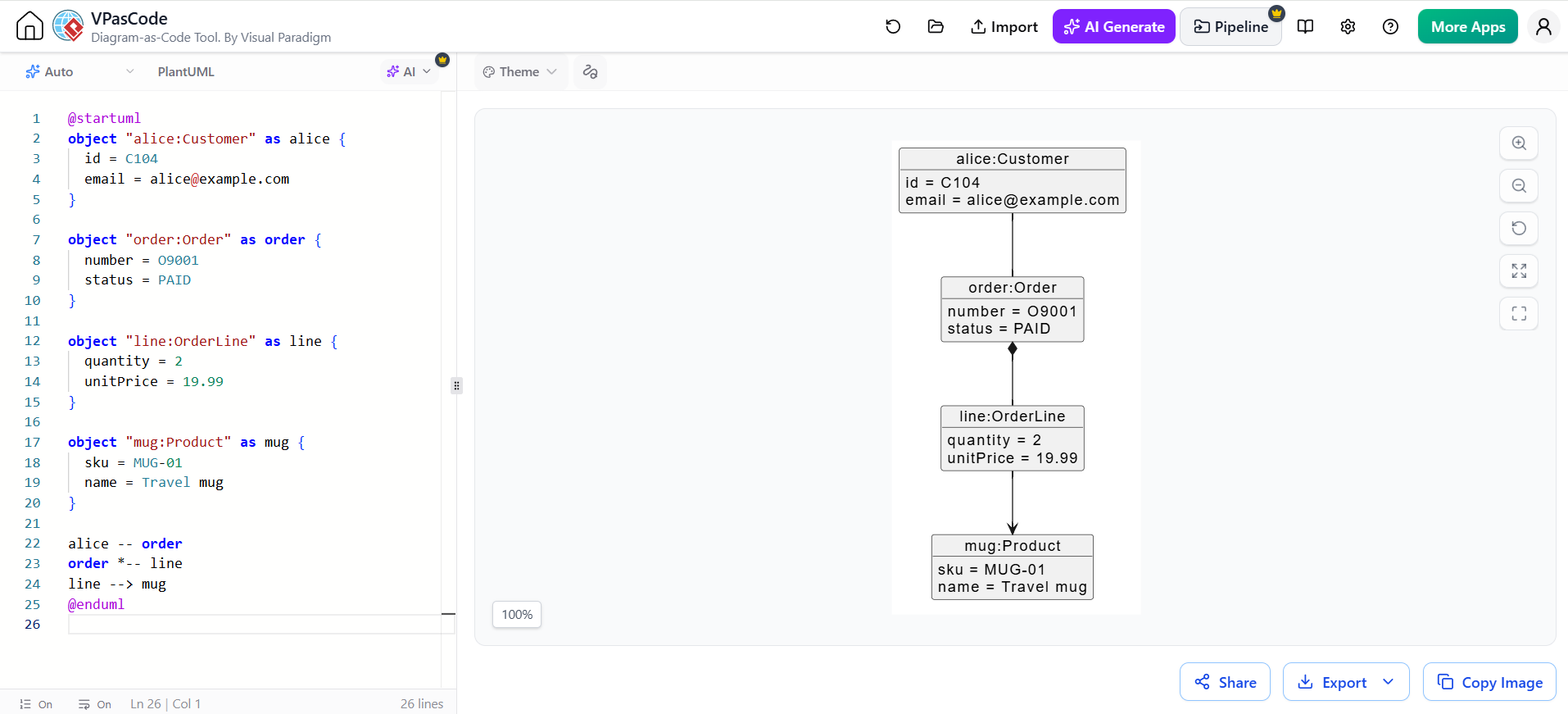
Once your objects are defined, the next step is to link them to show how they interact. PlantUML supports standard association arrows. In the context of the diagram provided, we see a hierarchy of ownership:
- Customer to Order: A customer places an order.
alice -- order - Order to OrderLine: An order contains line items. The
*symbol indicates multiplicity (one or more).order *-- line - OrderLine to Product: A line item refers to a specific product.
line --> mug
Integrating with VPasCode
The VPasCode tool (Visual Paradigm as Code) bridges the gap between textual code and visual diagrams. By writing the PlantUML code in the editor pane (as seen in the left side of your screenshot), the tool automatically renders the Object Diagram in the preview pane (right side).
This “Diagram-as-Code” approach allows you to:
- Version control your diagrams alongside your source code.
- Use AI tools to generate diagram code from natural language.
- Ensure consistency across your documentation.
When you run the full script below, VPasCode renders the structure into a visual hierarchy:
@startuml object "alice:Customer" as alice {
  id = C104
  email = [email protected]
}
object "order:Order" as order {
  number = O9001
  status = PAID
}
object "line:OrderLine" as line {
  quantity = 2
  unitPrice = 19.99
}
object "mug:Product" as mug {
  sku = MUG-01
  name = Travel mug
}

alice -- order
order *-- line
line --> mug
@endumlConclusion
By using VPasCode and PlantUML, you can quickly create and iterate on Object Diagrams. This specific example demonstrates how a simple text file can represent a complex transactional state, making it an essential tool for system architects and developers alike.