
Mastering Visual Modeling with VPasCode: A Comprehensive Guide to Text-Based Diagramming
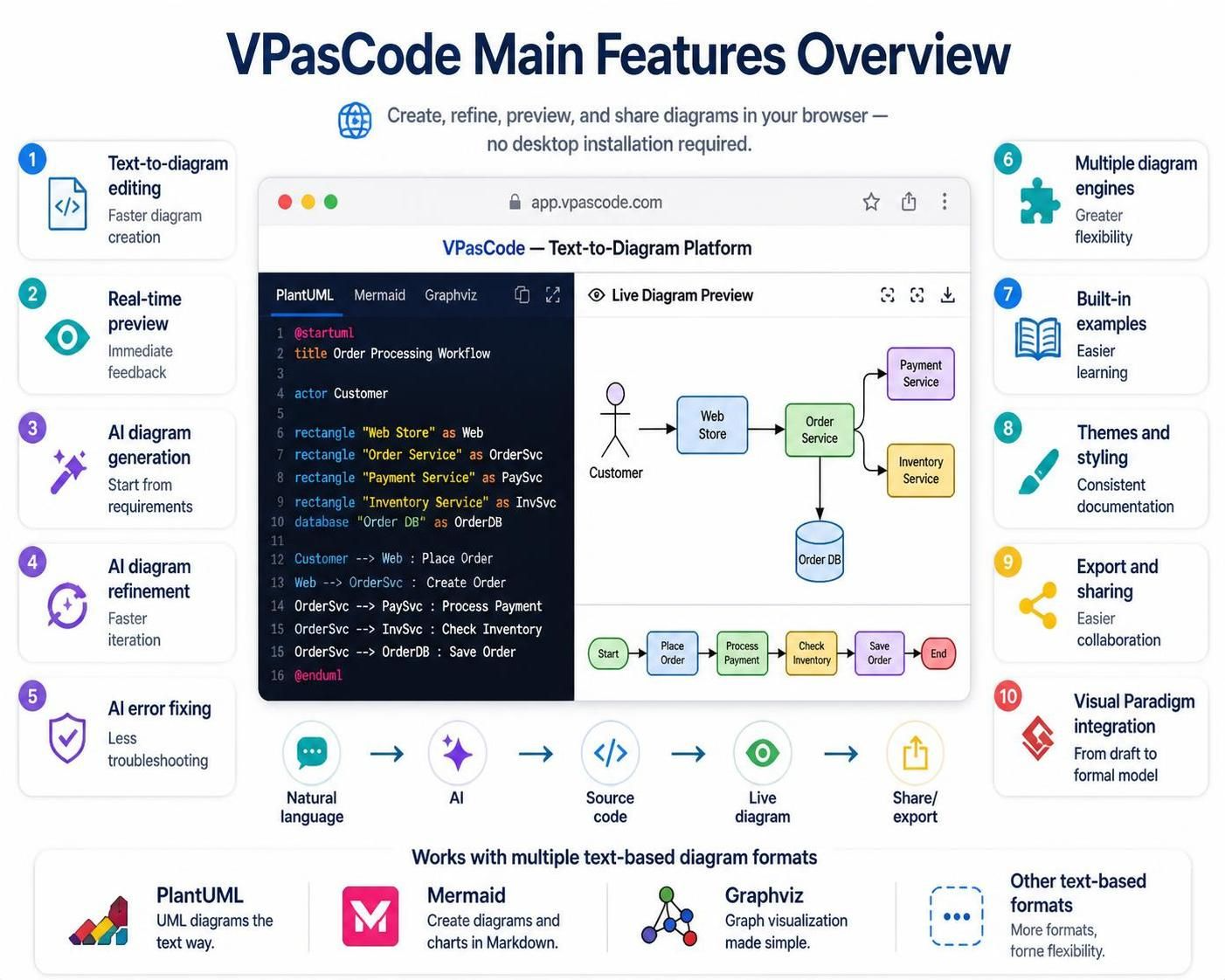
In the evolving landscape of software architecture and system design, the ability to communicate complex ideas clearly is paramount. Historically, this required expensive desktop software or intricate drag-and-drop interfaces. Today, a paradigm shift has occurred toward text-based diagramming, allowing engineers to define visual models using code. The platform VPasCode represents the cutting edge of this technology, combining multiple diagramming engines with advanced AI capabilities to streamline the modeling lifecycle.
This tutorial explores the architecture and workflow of VPasCode, demonstrating how to leverage its features to create, refine, and export professional system models directly from a web browser.
The Architecture of VPasCode
VPasCode is architected as a cloud-native, web-based platform. Unlike traditional modeling tools that rely on heavy desktop installations and local configuration, VPasCode operates entirely within the browser environment. This architecture ensures that users can access powerful modeling tools without the overhead of software maintenance.
The core of the platform is its ability to render text-based syntax into graphical representations. By utilizing a split-pane interface, the system provides:
- Source Code Editor: A dedicated area for writing diagram definitions using specific syntax languages.
- Live Diagram Preview: A real-time rendering engine that instantly translates code into visual artifacts.
Understanding the Core Diagramming Engines
A defining feature of VPasCode is its support for multiple diagramming engines. This flexibility allows modelers to select the syntax best suited to the specific task at hand. The platform primarily integrates three powerful engines:
1. PlantUML
PlantUML is widely regarded as the standard for “UML diagrams the text way.” It is ideal for creating complex architectural diagrams, including Class Diagrams, Component Diagrams, and Sequence Diagrams. As demonstrated in the platform’s example, PlantUML excels at defining actors, database schemas, and workflow logic using concise text commands.
2. Mermaid
Mermaid is designed to create diagrams and charts using Markdown-style text. It is particularly popular in documentation repositories (like GitHub or GitLab) due to its seamless integration with Markdown files. Mermaid is excellent for flowcharts, Gantt charts, and user journey maps.
3. Graphviz
Graphviz (specifically DOT language) focuses on graph visualization made simple. It is often used for network topology diagrams and hierarchical tree structures where automatic layout algorithms are preferred over manual positioning.
The AI-Driven Modeling Workflow
VPasCode introduces a sophisticated workflow that bridges the gap between abstract requirements and concrete technical diagrams. This process is powered by Artificial Intelligence, which acts as an intelligent assistant throughout the modeling lifecycle.
Step 1: Natural Language to Diagram (Generation)
The process begins with AI Diagram Generation. Instead of starting with blank syntax, users can provide natural-language descriptions of their system requirements. The AI engine parses these descriptions and converts them into valid diagram code. This is invaluable for rapidly prototyping system architecture from high-level requirements.
Step 2: Refinement and Iteration
Once the initial draft is generated, the AI Diagram Refinement feature allows for faster iteration. Users can provide plain-language instructions to modify existing diagrams—such as changing a component’s shape, altering a relationship type, or adding new actors. This eliminates the need to memorize complex syntax for minor adjustments.
Step 3: Error Correction
Syntax errors are a common hurdle in text-based modeling. VPasCode employs AI Error Fixing to detect and correct syntax problems automatically. This feature significantly reduces troubleshooting time, ensuring that the modeling process remains fluid and uninterrupted.
Advanced Features for Professional Documentation
Beyond the core generation capabilities, VPasCode offers several features essential for professional documentation and collaboration:
Real-Time Preview and Feedback
The platform utilizes a real-time preview mechanism. As code is typed or AI-generated, the visual result updates immediately. This immediate feedback loop allows architects to visualize the impact of their code instantly, fostering a deeper understanding of the system structure.
Themes and Styling
To ensure consistency across documentation, VPasCode supports theme and styling. Users can apply specific visual styles to their diagrams, ensuring that all generated models adhere to organizational branding or standard documentation styles.
Visual Paradigm Integration
For organizations utilizing the broader Visual Paradigm ecosystem, VPasCode offers seamless integration. Diagrams created in the browser can be transitioned smoothly into formal models within the desktop application, bridging the gap between rapid drafting and rigorous engineering.
Practical Example: Modeling an Order Processing Workflow
To illustrate the power of VPasCode, let us analyze the example provided in the platform’s overview: an Order Processing Workflow.
The code snippet below demonstrates how VPasCode handles PlantUML syntax to define a system involving a Customer, a Web Store, and backend services.
@startuml title Order Processing Workflow actor Customer rectangle "Web Store" as Web rectangle "Order Service" as OrderSvc rectangle "Payment Service" as PaySvc rectangle "Inventory Service" as InvSvc database "Order DB" as OrderDB
Customer --> Web : Place Order Web --> OrderSvc : Create Order OrderSvc --> PaySvc : Process Payment OrderSvc --> InvSvc : Check Inventory OrderSvc --> OrderDB : Save Order @enduml
In this example, the AI engine or the user defines the actors and components using text. The platform then renders the “Order Service” as the central hub, connecting the front-end web store to the necessary backend services like Payment and Inventory management.
Conclusion
VPasCode represents a significant advancement in system architecture tools. By combining the flexibility of multiple diagramming engines with the speed of AI-driven generation and the accessibility of a web-based interface, it empowers teams to create high-quality documentation faster than ever before. Whether you are refining a complex sequence diagram or drafting a high-level architecture overview, VPasCode provides the tools necessary to turn text into visual insight.