Introduction
In today’s rapidly evolving software development landscape, visual modeling has become essential for translating complex ideas into clear, actionable designs. Visual Paradigm Community Edition, launched in 2004, stands as the premier free UML software designed specifically for non-commercial purposes, serving over 1 million installations worldwide [[8]]. Whether you’re a student embarking on your first UML modeling project, an educator teaching system design principles, or an individual developer working on personal projects, Visual Paradigm Community Edition provides professional-grade tools without cost barriers.
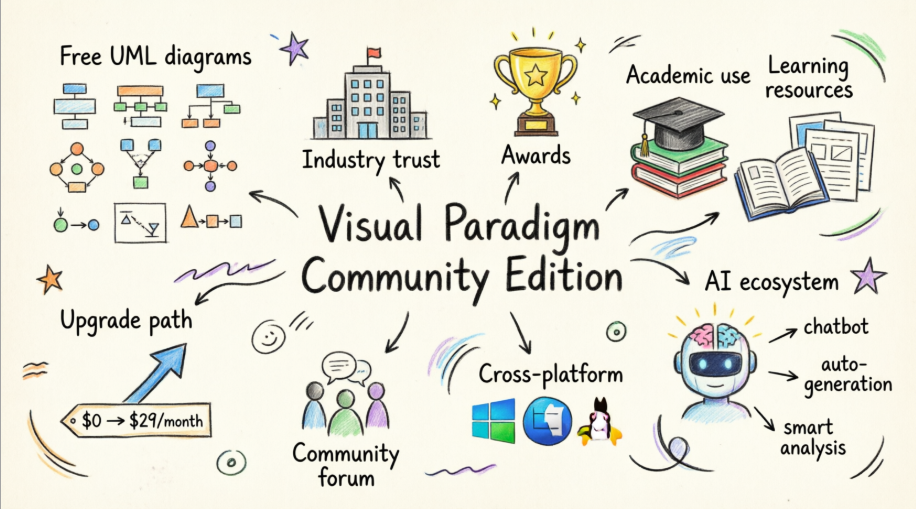
What makes Visual Paradigm particularly powerful in 2026 is its comprehensive AI ecosystem that complements the free Community Edition. While the Community Edition provides robust offline modeling capabilities, users can leverage Visual Paradigm’s cloud-based AI tools—including the revolutionary AI Chatbot, AI-assisted diagram generators, and guided web applications—to accelerate their modeling workflow, generate diagrams from natural language descriptions, and receive intelligent design recommendations [[6]]. This guide explores how Visual Paradigm Community Edition, combined with its AI-powered ecosystem, creates an unparalleled platform for learning, experimentation, and professional visual modeling.
Why Visual Paradigm?

Reason 1: Comprehensive UML 2.x Support — Free for Non-Commercial Use
Complete Diagram Coverage with AI Enhancement

Visual Paradigm Community Edition supports all 13 UML 2.x diagram types, providing a complete modeling environment for system design, analysis, and documentation. With over 1 million installations globally and growing daily, Visual Paradigm has become the trusted choice for individuals taking their first steps in UML modeling [[1]].
How AI Enhances Your UML Modeling:
While the Community Edition provides full manual diagramming capabilities, Visual Paradigm’s AI ecosystem offers powerful assistance when you need it:
-
AI Chatbot for Instant Diagram Generation: Describe your system in plain language (e.g., “Create a use case diagram for an online shopping system”), and the AI generates professional, standards-compliant diagrams in seconds [[6]]. The AI Chatbot supports UML, SysML, C4, ArchiMate, and numerous other diagram types [[16]].
-
AI-Assisted Refinement: Once your diagram is generated, you can refine it through conversational commands like “Add payment gateway” or “Rename Customer to Buyer,” with the AI updating your diagram immediately [[6]].
-
Intelligent Analysis & Best Practices: Ask questions like “What are the main use cases?” or “Generate a project summary,” and receive AI-powered insights and design improvement suggestions [[6]].
-
Step-by-Step Guided Tools: Specialized web applications like the AI-Powered Use Case Modeling Studio and AI-Assisted UML Class Diagram Generator provide structured workflows with AI guidance, ensuring best practices and maintaining traceability across your models [[2]].
The Community Edition’s 13 UML diagrams include:
-
Use Case Diagrams
-
Class Diagrams
-
Sequence Diagrams
-
Activity Diagrams
-
State Machine Diagrams
-
Component Diagrams
-
Deployment Diagrams
-
Communication Diagrams
-
Object Diagrams
-
Timing Diagrams
-
Package Diagrams
-
Composite Structure Diagrams
-
Profile Diagrams
Reason 2: Trusted by Industry Leaders and Global Organizations
Enterprise-Grade Quality, Free for Learning

Visual Paradigm’s reputation extends far beyond the free Community Edition. Thousands of blue-chip organizations, IT companies, consultants, universities, NGOs, and government units worldwide rely on Visual Paradigm’s paid editions for mission-critical system and database design. The figure above showcases just a fraction of our esteemed paid customers.
What This Means for Community Edition Users:
When you learn and work with Visual Paradigm Community Edition, you’re using the same core modeling engine trusted by Fortune 500 companies and leading institutions. The skills you develop, the diagrams you create, and the modeling principles you master are directly transferable to professional environments.
AI-Powered Enterprise Features:
Organizations leveraging Visual Paradigm’s commercial editions benefit from advanced AI capabilities that demonstrate the platform’s continuous innovation:
-
DBModeler AI: Transforms problem descriptions into normalized, production-ready database schemas with interactive SQL playgrounds [[25]].
-
AI Cloud Architecture Studio: Creates professional cloud architecture diagrams for AWS, Azure, Google Cloud, and other platforms from simple text descriptions [[5]].
-
AI-Powered Value Stream Mapping: Analyzes and optimizes business processes with data-driven precision [[3]].
-
Agilien: AI-Powered Jira Backlog Planner: Integrates AI-powered planning with Agile project management workflows [[5]].
These enterprise AI tools showcase the innovation trajectory of Visual Paradigm, ensuring that the modeling techniques you learn today remain relevant as the platform evolves.
Reason 3: Award-Winning Quality and Industry Recognition
Validated Excellence in Visual Modeling

Visual Paradigm isn’t just trusted by the world’s best-known enterprises—it’s recognized by the industry itself. Visual Paradigm is a multiple international award winner, reflecting our commitment to innovation, usability, and excellence in visual modeling software.
AI Innovation Awards:
Visual Paradigm’s AI capabilities have set new industry standards:
-
World’s First Purpose-Built AI Assistant for Visual Modeling: Visual Paradigm’s AI Chatbot is the first native AI co-pilot deeply integrated into a visual modeling ecosystem, trained extensively on UML, SysML, ArchiMate, and other modeling languages [[14]].
-
Superior Accuracy vs. General LLMs: Unlike generic AI tools, Visual Paradigm AI specializes in visual modeling, delivering higher accuracy, better editability, advanced refinement capabilities, and seamless ecosystem integration [[7]].
-
Continuous Innovation: Visual Paradigm regularly releases enhanced AI features, such as improved AI deployment diagram generation with smarter relationship handling and more professional appearance [[17]].
Reason 4: The Academic Standard for UML Education
Empowering the Next Generation of System Designers

Visual Paradigm stands as the most widely-used UML tool in academia, adopted by thousands of universities and colleges worldwide. The figure above represents just a sample of the educational institutions that trust Visual Paradigm to teach UML modeling, system design, and software engineering principles.
Why Universities Choose Visual Paradigm:
-
Free for Students: The Community Edition provides full UML 2.x support for student projects, coursework, and thesis work—completely free for non-commercial academic use.
-
Cross-Platform Compatibility: Runs seamlessly on Windows, Linux, and Mac, ensuring all students can access the tools regardless of their operating system.
-
Industry-Relevant Skills: Students learn on the same platform used by leading companies, making them job-ready upon graduation.
AI Tools for Enhanced Learning:
Visual Paradigm’s AI ecosystem provides powerful educational support:
-
Instant Concept Visualization: Students can describe a system concept and see it visualized immediately, helping bridge the gap between abstract thinking and concrete diagramming [[6]].
-
AI-Powered Learning Resources: The VP Community Circle offers hundreds of UML and ERD diagram examples and templates ready for importing and experimentation—all free [[5]].
-
Intelligent Feedback: AI analysis tools can review student diagrams and suggest improvements, providing 24/7 learning support [[6]].
-
Textual Analysis Tool: AI can analyze text documents and automatically generate diagrams, helping students understand the relationship between requirements and visual models [[30]].
Reason 5: Extensive Free Learning Resources and Community Support
Learn, Share, and Grow with VP Community Circle

Visual Paradigm provides an unparalleled collection of free learning resources through the VP Community Circle platform. Access hundreds of UML and ERD diagram examples and templates ready for importing into Visual Paradigm for instant experimentation or to jumpstart your own UML models—all completely free [[5]].
VP Community Circle Resources:
-
Pre-Built Templates: Jumpstart your projects with professionally designed templates for common scenarios
-
Example Libraries: Study real-world diagram examples across all UML 2.x diagram types
-
Best Practices: Learn industry-standard modeling techniques from expert-created examples
-
Instant Import: One-click import of examples into your Visual Paradigm workspace
AI-Powered Learning Acceleration:
Visual Paradigm’s AI tools transform how you learn and create:
-
Conversational Learning: Ask the AI Chatbot to explain complex concepts, generate examples, or walk through modeling scenarios in natural language [[11]].
-
AI Diagram Generation from Examples: Describe what you want to create based on examples you’ve studied, and the AI generates customized versions for your specific needs [[6]].
-
Interactive Tutorials: AI-guided step-by-step tools provide structured learning paths for specific diagram types, ensuring you master best practices [[2]].
-
Documentation Generation: AI can automatically generate detailed reports and documentation from your diagrams, helping you understand the connection between visual models and written specifications [[6]].
Reason 6: Seamless Upgrade Path to Professional Capabilities
Grow with Visual Paradigm

Visual Paradigm Community Edition provides an excellent foundation for learning and personal projects, but when you’re ready for more, upgrading is simple and affordable. Access a huge set of additional features—including BPMN, team collaboration support, advanced AI tools, and commercial use rights—starting at just $6/month [[9]].
What You Gain with Commercial Editions:
-
Advanced AI Features: Full access to AI Chatbot, AI-assisted diagram generators, DBModeler AI, and the complete suite of intelligent modeling tools
-
BPMN & Business Process Modeling: Comprehensive support for business process modeling and analysis
-
Team Collaboration: Version control, team repositories, and real-time collaboration features
-
Code Engineering: Forward and reverse engineering for multiple programming languages
-
Enhanced Export Options: Professional reporting, documentation generation, and presentation exports
-
Commercial Use Rights: License to use Visual Paradigm for commercial projects and client work
AI Ecosystem Access:
Upgrading unlocks Visual Paradigm’s complete AI-powered ecosystem across four integrated platforms [[9]]:
-
VP Desktop with AI Integration: Deep engineering capabilities with embedded AI assistance for complex enterprise systems
-
OpenDocs: Knowledge management platform combining document creation with live, AI-assisted diagramming
-
AI Visual Modeling Chatbot: Conversational AI for instant diagram generation and refinement
-
Guided Web Applications: Specialized AI-powered studios for specific modeling paradigms (C4, Use Case, Cloud Architecture, etc.)
The upgrade path ensures you can start free, learn effectively, and scale your capabilities as your needs grow—without ever outgrowing the platform.
Reason 7: Active Community Forum for Collaboration and Support
Connect, Learn, and Share with Global Users

Join Visual Paradigm’s active user forum to get help, share ideas, and exchange experiences with thousands of users worldwide [[7]]. Whether you’re troubleshooting a modeling challenge, seeking best practices, or sharing innovative approaches, the community is here to support your journey.
Community Forum Benefits:
-
Expert Support: Get answers from Visual Paradigm experts and experienced practitioners
-
Peer Learning: Learn from other users’ questions, solutions, and modeling approaches
-
Feature Requests: Influence Visual Paradigm’s development by suggesting new features
-
Troubleshooting: Quick solutions to technical issues and modeling challenges
-
Networking: Connect with fellow modelers, students, and professionals
AI-Enhanced Community Resources:
Visual Paradigm’s AI tools complement community support:
-
24/7 AI Assistance: Get instant answers to common questions and diagramming help anytime, without waiting for forum responses [[11]]
-
AI-Powered Documentation: Access intelligent documentation that adapts to your specific modeling context
-
Community-Shared AI Templates: Leverage AI-generated diagrams and templates shared by community members
-
Collaborative AI Refinement: Share AI-generated diagrams with the community for feedback and collaborative improvement
Reason 8: Cross-Platform Excellence with Intuitive Design
Model Anywhere, Model Efficiently

Visual Paradigm runs seamlessly across Windows, Linux, and Mac platforms, ensuring you can model on your preferred operating system without compromise. Its intuitive interface and powerful modeling features make professional UML modeling fast, easy, and accessible to users at all skill levels.
Cross-Platform Advantages:
-
Native Performance: Optimized for each operating system for maximum speed and responsiveness
-
Consistent Experience: Same powerful features and interface across all platforms
-
File Compatibility: Seamless project file sharing between different operating systems
-
Regular Updates: All platforms receive simultaneous updates and new features
AI Integration Across Platforms:
Visual Paradigm’s AI ecosystem enhances the cross-platform experience:
-
Cloud-Based AI Tools: Access AI Chatbot and web-based AI studios from any platform with an internet connection
-
Synchronized Workspace: Your AI-generated diagrams and models sync across devices through your Visual Paradigm account [[6]]
-
Platform-Agnostic AI: AI tools work identically whether you’re on Windows, Mac, or Linux
-
Mobile-Friendly Web Apps: Access guided AI modeling tools from tablets and mobile devices for on-the-go diagramming
Fast & Responsive Performance:
-
Optimized Rendering: Quick diagram rendering even for complex models
-
Efficient Resource Usage: Runs smoothly on standard hardware
-
Intelligent Caching: Fast project loading and switching
-
AI-Assisted Speed: Generate complex diagrams in seconds rather than hours [[6]]
How Visual Paradigm’s AI Ecosystem Transforms Your Modeling Workflow
Visual Paradigm in 2026 isn’t just a diagramming tool—it’s a comprehensive AI-powered visual modeling ecosystem. Here’s how the AI ecosystem enhances every stage of your modeling journey:
1. From Idea to Diagram in Seconds
Traditional Approach: Hours of manual diagram creation, element placement, and relationship mapping.
AI-Powered Approach: Simply describe your system in natural language, and Visual Paradigm’s AI generates a complete, standards-compliant diagram instantly [[6]].
Example: Type “Create a class diagram for a library management system with books, members, and loans,” and watch as the AI generates classes, attributes, relationships, and cardinalities automatically.
2. Conversational Refinement
Traditional Approach: Manual selection, dragging, and editing of individual diagram elements.
AI-Powered Approach: Refine your diagram through conversation. Say “Add an abstract BookItem class,” “Change the relationship between Member and Loan to composition,” or “Make all class names bold,” and the AI executes your commands immediately [[6]].
3. Intelligent Analysis and Insights
Traditional Approach: Manual review and self-assessment of diagram quality and completeness.
AI-Powered Approach: Ask the AI to analyze your diagram: “Are there any missing relationships?” “Does this follow UML best practices?” “What are the key use cases?” Receive intelligent feedback and improvement suggestions [[6]].
4. Automated Documentation
Traditional Approach: Time-consuming manual documentation writing.
AI-Powered Approach: Generate comprehensive reports, summaries, and professional documentation on demand from your visual models. The AI extracts insights from your diagrams and creates structured documentation [[6]].
5. Multi-Platform AI Access
Visual Paradigm’s AI ecosystem operates across four integrated platforms [[9]]:
-
Desktop Integration: AI Chatbot and AI tools embedded directly in Visual Paradigm Desktop
-
OpenDocs: AI-assisted diagramming within collaborative knowledge documents
-
Standalone Chatbot: Web-based conversational AI for quick diagram generation
-
Guided Studios: Specialized AI-powered web applications for specific modeling paradigms
6. Comprehensive Diagram Coverage
Visual Paradigm’s AI supports an extensive range of diagram types [[9]]:
UML Diagrams: All 13 UML 2.x diagrams with AI generation and refinement
SysML Diagrams: Requirements, Block Definition, Internal Block diagrams
C4 Model: Context, Container, Component, and Deployment diagrams
Enterprise Architecture: ArchiMate diagrams with 26+ viewpoints
Business Analysis: SWOT, PESTLE, Porter’s Five Forces, Balanced Scorecard
Agile & Project Management: User stories, backlogs, roadmaps, Gantt charts
Database Design: ERD with AI-powered normalization
Cloud Architecture: AWS, Azure, Google Cloud, and multi-cloud diagrams
7. Learning Acceleration
For students and newcomers to UML, Visual Paradigm’s AI acts as a personal tutor:
-
Instant Visualization: See concepts materialize as diagrams immediately
-
Error Prevention: AI guides you toward correct UML syntax and semantics
-
Example Generation: Request examples of specific diagram patterns
-
Concept Explanation: Ask “What is the difference between aggregation and composition?” and receive clear explanations with visual examples
Getting Started: Your Path to UML Mastery
Step 1: Download Visual Paradigm Community Edition
Start with the free Community Edition for non-commercial use. Install on Windows, Mac, or Linux and begin creating professional UML diagrams immediately.
Step 2: Explore VP Community Circle
Visit VP Community Circle to access hundreds of free UML and ERD diagram examples and templates. Import examples directly into Visual Paradigm to study, modify, and learn from real-world models [[5]].
Step 3: Leverage AI Tools
Create a free Visual Paradigm Online account to access:
-
AI Chatbot: Generate diagrams through conversation
-
Guided Web Studios: Step-by-step AI-assisted modeling
-
Free AI Tools: Select AI-powered diagram generators available at no cost
Step 4: Join the Community
Participate in the Visual Paradigm forums to ask questions, share your work, and learn from thousands of active users worldwide [[7]].
Step 5: Upgrade When Ready
When you need advanced features, team collaboration, or commercial use rights, upgrade to a commercial edition starting at $6/month [[9]]. Your skills and models transfer seamlessly.
Conclusion
Visual Paradigm Community Edition represents more than just a free UML tool—it’s a comprehensive visual modeling platform backed by over two decades of innovation, trusted by millions of users and thousands of organizations worldwide. Since its launch in 2004, Visual Paradigm has remained committed to providing accessible, professional-grade UML modeling software for students, educators, and individual developers pursuing non-commercial projects.
What sets Visual Paradigm apart in 2026 is its revolutionary AI ecosystem that complements the free Community Edition. While you can create all 13 UML 2.x diagrams manually with the Community Edition, Visual Paradigm’s AI-powered tools—including the industry-first AI Chatbot, intelligent diagram generators, and guided modeling studios—offer unprecedented acceleration and assistance when you need it. These AI tools transform natural language descriptions into professional diagrams, provide intelligent design recommendations, automate documentation, and serve as a 24/7 modeling assistant.
Whether you’re a student learning UML for the first time, an educator teaching system design principles, or a developer working on personal projects, Visual Paradigm Community Edition provides the foundation you need. Combined with extensive free learning resources through VP Community Circle, active community support, cross-platform compatibility, and a clear upgrade path to professional features, Visual Paradigm grows with you from your first diagram to enterprise-level system architecture.
The combination of free, professional-grade modeling tools and cutting-edge AI assistance makes Visual Paradigm the most complete and accessible UML modeling solution available today. Start modeling for free, enhance your workflow with AI, and join over 1 million users who trust Visual Paradigm to bring their ideas to life through visual modeling.
References
- Visual Paradigm Community Circle – Free UML Resources: Access hundreds of free UML and ERD diagram examples, templates, and learning resources for instant experimentation and project kickstarts.
- Visual Paradigm Pricing and Editions: Explore Visual Paradigm’s commercial editions starting at $6/month, featuring advanced AI tools, BPMN support, team collaboration, and commercial use rights.
- Visual Paradigm User Forum: Join the active community forum to get help, share ideas, exchange experiences, and connect with thousands of Visual Paradigm users worldwide.
- AI Chatbot – Visual Paradigm: Discover Visual Paradigm’s AI Chatbot, the world’s first purpose-built AI assistant for visual modeling that generates UML, SysML, C4, ArchiMate, and business diagrams from natural language prompts.
- Visual Paradigm AI Tools: Explore Visual Paradigm’s comprehensive suite of AI-powered intelligent tools including DBModeler AI, AI Cloud Architecture Studio, Use Case Modeling Studio, and specialized diagram generators.
- AI Diagram Generators – Visual Paradigm Ecosystem: Comprehensive guide to Visual Paradigm’s AI-powered visual modeling ecosystem covering Desktop integration, OpenDocs, AI Chatbot, and guided web applications across all diagram types.