ArchiMate is not just a language of shapes; its real strength lies in the relationships that tie those shapes together. A well-designed ArchiMate model tells a story. It shows how business activities rely on applications, how data moves between systems, and how technology supports every layer of the organization. When relationships are used correctly, your architecture becomes clear, traceable, and strategically meaningful. When they are misused or neglected, even the best diagrams can become disconnected or misleading.
This article explores why relationships are so powerful in ArchiMate and how you can connect elements in a way that brings your models to life.
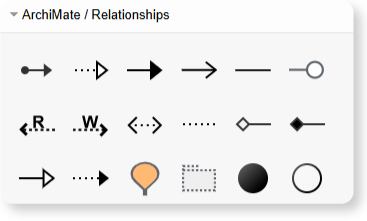
Why Relationships Matter More Than Symbols
Many first-time architects focus heavily on choosing the “right” element—Business Role, Application Component, Technology Device, and so on. But in practice, it is the relationships between these elements that express the architecture’s logic.
Relationships show:
- How a process uses a service
- How data is exchanged between applications
- How an application relies on specific infrastructure
- How motivation elements influence design decisions
- How changes propagate across layers
Without these connections, an ArchiMate model becomes nothing more than a disconnected collection of boxes. Relationships are what turn it into a coherent architectural map.
Modern EA modeling software enhances this by automatically maintaining consistency, highlighting broken dependencies, and offering relationship suggestions based on best practices.
The Idea Behind “Correct” Relationships
Connecting elements correctly is not about memorizing every rule. Instead, it is about understanding the intent of each connection. ArchiMate relationships fall into three broad categories:
- Structural relationships, which describe how things are composed or assigned
- Dependency relationships, which describe influence, access, or usage
- Dynamic relationships, which describe behavior, flow, or events
These categories help architects express different viewpoints with clarity. For example, showing how an application supports a process requires a different relationship than showing how it stores data or how it communicates with another system.
When the intent is clear, the choice of relationship becomes intuitive.
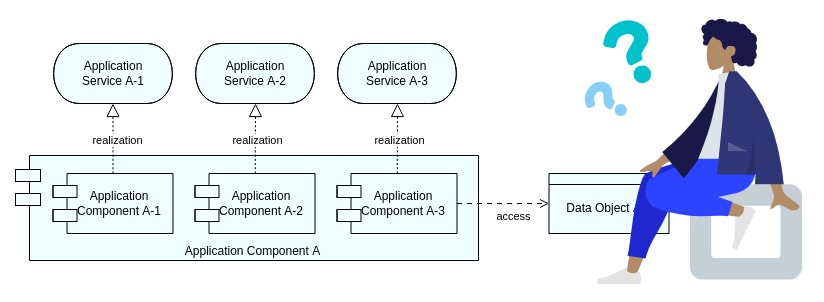
Creating Clear Flow and Logic Across Layers
The real power of ArchiMate emerges when relationships form a narrative that spans multiple viewpoints. A business process can lead to an application service, which is realized by an application component, which in turn is hosted on infrastructure. When these relationships are used correctly, the viewer can trace:
- Why a capability exists
- How it is executed
- Which applications enable it
- What technology supports those applications
This vertical traceability is the foundation of strategic architecture modeling. It provides a clear understanding of how changes at one layer affect everything above and below it.
Using Relationships to Support Real Decision-Making
When relationships are mapped accurately, your ArchiMate model becomes more than documentation—it becomes a decision-support tool.
Teams can quickly identify:
- Where redundant applications support the same processes
- Which infrastructure components are critical and high-risk
- How data dependencies impact modernization initiatives
- Where integration gaps or broken flows exist
- How organizational changes affect system behavior
The clarity of relationships allows architects to answer complex questions with confidence, based on visual evidence rather than assumptions.
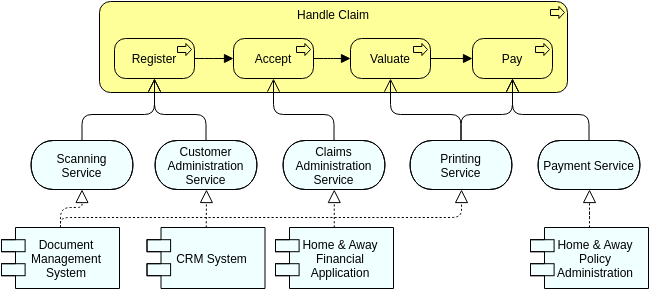
Conclusion: Relationships Bring ArchiMate to Life
ArchiMate is at its best when relationships are used thoughtfully and precisely. They connect layers, reveal dependencies, and tell a clear architectural story that supports both analysis and communication. By understanding how relationships express structure, behavior, and dependencies, architects can turn their diagrams into powerful tools for planning, decision-making, and transformation.
Good modeling is not about drawing more—it is about connecting better. And in ArchiMate, the connections are what make everything work.