
Mastering BPMN Gateways: Splitting and Merging Process Flows with VPasCode
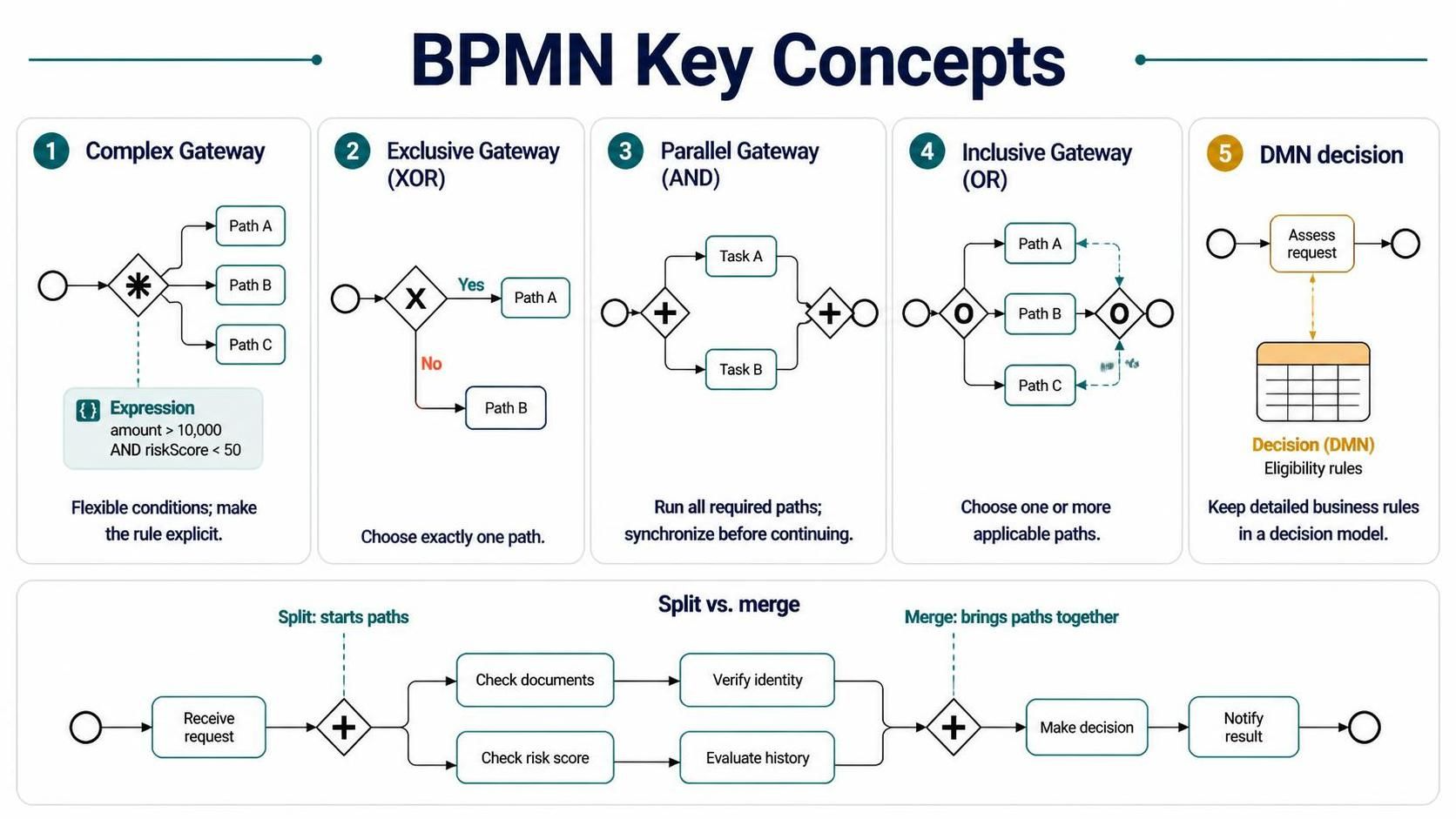
In the world of Business Process Model and Notation (BPMN), the Gateway is the traffic controller of your workflow. It dictates where the process goes next based on logic, data, and timing. However, the most common mistake in modeling is treating gateways as mere visual connectors rather than functional logic nodes.
This tutorial explores the five critical gateway types and the architectural concept of “Split vs. Merge.” We will analyze how to structure your diagrams using Visual Paradigm and how to leverage VPasCode to generate these structures programmatically.
1. The Five Pillars of BPMN Gateways
Understanding the nuances between gateway types is essential for creating diagrams that are both executable and readable. Let’s break down the specific behaviors of the five gateways shown in our reference diagram.
Complex Gateway (The “It Depends” Gateway)
The Complex Gateway is the most flexible but also the most dangerous to use casually. It is designed for situations where the conditions for outgoing paths or the synchronization of incoming paths do not fit the simpler patterns.
- Behavior: It relies on a defined expression or condition to determine the flow.
- Visual Syntax: Represented by a diamond with an asterisk (*).
- Best Practice: Avoid using this for simple “if-else” logic. If the logic is implicit or lengthy, it makes the diagram difficult to read. As the reference text suggests, keep operational steps in BPMN and detailed business rules in a decision model.
Exclusive Gateway (XOR)
The Exclusive Gateway is the standard “Choice” node. It routes a process down exactly one outgoing path.
- Use Case: A mutually exclusive choice, such as approving or rejecting an application.
- Logic: If condition A is met, take Path A. If condition B is met, take Path B. You cannot take both.
- Visual Syntax: A diamond with an ‘X’ inside.
Parallel Gateway (AND)
The Parallel Gateway is the engine of concurrency. It activates all outgoing paths simultaneously and synchronizes incoming paths before the process continues.
- Use Case: When multiple activities must happen, not when a business rule selects among alternatives.
- Split vs. Merge: When splitting, all branches start. When merging, the process waits for all branches to complete before proceeding.
- Visual Syntax: A diamond with a plus sign (+) inside.
Inclusive Gateway (OR)
The Inclusive Gateway is a powerful hybrid. It activates one or more outgoing paths based on conditions.
- Use Case: When several options may apply at once, but not necessarily all of them (e.g., “Check Credit” AND “Check Inventory” if both exist).
- Logic: It evaluates conditions for each path. If a condition is true, that path is activated.
- Visual Syntax: A diamond with an ‘O’ (or circle) inside.
DMN Decision (The External Logic)
DMN (Decision Model and Notation) is not a gateway, but a distinct modeling artifact. It represents decision logic separately from the process flow.
- Architecture: A BPMN process invokes a Decision Service (the table icon) and then routes according to its result.
- Benefit: This keeps operational steps in BPMN and detailed business rules in a decision model. It allows business rules to evolve without changing the process structure.
2. The Architecture of Split and Merge
A fundamental concept in BPMN is the intentional design of splits and merges. A split determines which paths begin, while a merge brings paths together. Their behavior must be designed with precision to avoid deadlocks or lost information.
Consider the workflow pattern: Receive Request -> Split -> Parallel Tasks -> Merge -> Make Decision.
The Parallel Split (AND):
When a process reaches a parallel gateway (the + symbol), it forks. In our diagram, after receiving a request, the process splits into two parallel tracks:
- Check documents
- Check risk score
The Synchronization (AND Merge):
Crucially, the next gateway is a merge. Because the split was parallel, the merge must be a Parallel Gateway (AND) as well. The process cannot proceed to “Make decision” until both “Check documents” and “Check risk score” have finished. If we used an Exclusive Gateway here, we might skip a task, leading to a process error.
3. Implementation with VPasCode
Visual Paradigm’s VPasCode allows you to define these architectural patterns using code. Below is an example of how to programmatically create the “Split vs. Merge” parallel process structure described in the image.
// Define the Process
Process "Loan Approval Process" {
    // Start Event
    StartEvent "Start";

    // Task: Receive Request
    Task "Receive Request" {
        StartEvent.connectTo("Receive Request");
    };

    // Parallel Split (AND Gateway)
    // This activates all outgoing paths
    ParallelGateway "Split Tasks";
    "Receive Request".connectTo("Split Tasks");

    // Branch 1: Check Documents
    Task "Check Documents" {
        "Split Tasks".connectTo("Check Documents");
    };

    // Branch 2: Check Risk Score
    Task "Check Risk Score" {
        "Split Tasks".connectTo("Check Risk Score");
    };

    // Parallel Merge (AND Gateway)
    // This waits for BOTH branches to complete
    ParallelGateway "Merge Tasks";
    "Check Documents".connectTo("Merge Tasks");
    "Check Risk Score".connectTo("Merge Tasks");

    // Subsequent Task
    Task "Make Decision" {
        "Merge Tasks".connectTo("Make Decision");
    };

    // End Event
    EndEvent "End";
    "Make Decision".connectTo("End");
}
4. Why Avoid Complex Gateways in Many Business Diagrams?
The reference text highlights a critical architectural principle: Separation of Concerns.
A Complex Gateway often combines two distinct concerns:
- Process Flow: What activities happen, and in what order?
- Business Decision: Which outcome applies, given the data and rules?
Keeping these concerns distinct makes the diagram easier to discuss and change. If you use a Complex Gateway with a long expression (e.g., amount > 10,000 AND riskScore < 50), the reader must inspect a specialized expression to understand the flow. If you move this logic to a DMN Decision Table, the BPMN diagram remains clean, showing only the high-level flow: Check Eligibility -> Route Result.
Conclusion
By mastering the distinction between Exclusive, Parallel, and Inclusive gateways, and by utilizing DMN for complex logic, you ensure that your BPMN models are not just drawings, but robust specifications. Remember: a split needs a corresponding merge, and a business rule should live in a decision model whenever possible.