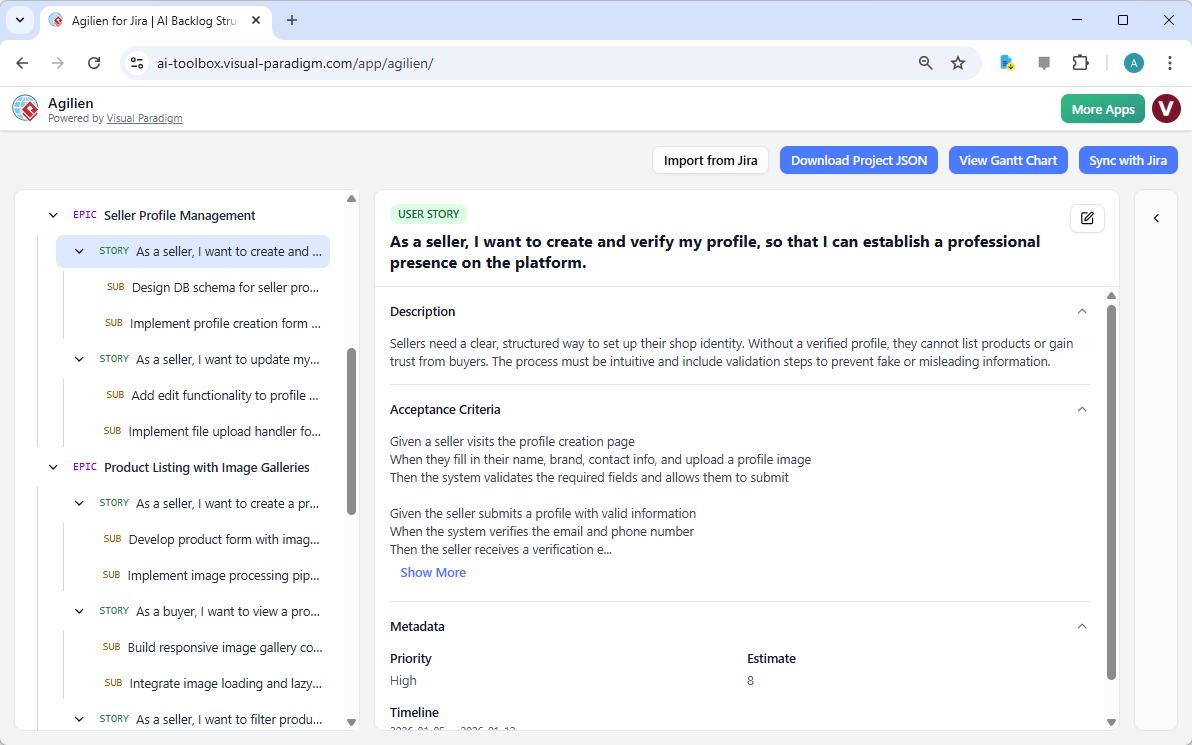
Imagine you’re a product manager for a new e-commerce startup, and you need to launch a platform for curated vintage clothes. You have a vision, but the project plan? It’s a mess. That’s where Agilien, the AI-powered project planning tool from Visual Paradigm, comes in. It’s like having a super-smart project manager who can turn your rough idea into a fully structured, actionable backlog in seconds. The image you see? That’s a real-world example of how it works. A user entered a simple project description—“An e-commerce platform specializing in curated vintage and second-hand clothing”—and within moments, Agilien generated a complete, hierarchical product backlog. No more guessing games or endless meetings. Just a clear, visual roadmap for your team to build the right thing, fast.
How Agilien Turns Ideas into Action: A Deep Dive
Let’s break down what you’re seeing in the screenshot. This isn’t just a list of tasks; it’s a beautifully structured project plan, generated by AI. The magic happens in the Project Hierarchy on the left, which is organized in a clean, collapsible tree. You can see it starts with Epics like “Seller Profile Management” and “Product Listing with Image Galleries.” These are the big, high-level goals. Under each epic, there are User Stories—the smaller, user-centric tasks that deliver value. And under each story, there are Sub-tasks, which are the concrete, technical actions your developers need to take. It’s a perfect, logical structure that makes planning and execution a breeze.
Now, look at the right side. This is the Detail Panel, where you can dive into the specifics of any item. In the image, the user is looking at a user story: “As a seller, I want to create and verify my profile, so that I can establish a professional presence on the platform.” You can see the full description, the acceptance criteria (the conditions that must be met for the story to be considered complete), and even metadata like priority and estimate. This level of detail ensures everyone on the team—product managers, developers, QA—has a crystal-clear understanding of what needs to be built.
But the real power of Agilien isn’t just in the planning. It’s in how it connects that plan to the actual design. The image shows the Diagram Workbench on the right, which is where the magic happens. You can select any user story and click a button to generate a visual representation of it. For instance, you could generate a Sequence Diagram to show how the user profile creation process works, or a Class Diagram to define the data structures. This bridges the gap between “what” we want to build and “how” we’re going to build it, ensuring the team is aligned from day one.
Key Takeaways from the Agilien Workflow
-
AI-Powered Planning: Simply describe your project, and Agilien generates a complete, structured backlog of epics, user stories, and sub-tasks. No more manual brainstorming.
-
Visual Hierarchy: The project is displayed in a clean, collapsible tree structure, making it easy to see the big picture and drill down into details.
-
Integrated Design: You can generate UML diagrams (like Sequence or Class diagrams) directly from your user stories, creating a living link between requirements and architecture.
-
Clear Documentation: Every user story comes with a detailed description and acceptance criteria, and diagrams can be attached directly to the stories for easy reference.
And the best part? You can do it all in a single, intuitive interface. You don’t need to juggle multiple tools. The AI does the heavy lifting of structuring your project, and you can then use the Live PlantUML Editor to fine-tune the diagrams if needed. It’s a game-changer for teams that want to move fast and build software that’s both functional and well-designed.
From Vision to Reality: How Agilien Accelerates Your Project
Let’s be real—starting a new project is tough. You have a vision, but turning that vision into a detailed plan takes time, effort, and a lot of collaboration. Agilien cuts through all that noise. Instead of spending days or weeks on planning meetings, you can get a solid foundation for your project in minutes. The AI takes your high-level idea and breaks it down into a structured, actionable plan. It’s like having a brainstorming session with your entire team, but with a supercharged AI that’s already done the work for you.
But Agilien isn’t just about speed. It’s about clarity and alignment. When everyone on the team—product, design, engineering—can see the same visual representation of the project, misunderstandings are minimized. The diagrams generated from your user stories act as a universal language, making complex technical concepts easy to understand. This reduces ambiguity and ensures that the team is building the right thing, not just the thing that was described.
And for teams that already use Jira, the integration is a huge plus. You can import your existing Jira project into Agilien to visualize and enhance it, or sync your Agilien plan back to Jira. This means you can use Agilien as your primary planning and design workbench while keeping your official record in Jira perfectly in sync.
Ready to Build Your Next Project?
If you’re tired of the endless planning process and want a smarter, faster way to build software, it’s time to try Agilien. It’s the AI-powered tool that turns your project ideas into a clear, visual roadmap in minutes. Whether you’re a product manager, a software architect, or a developer, Agilien can help you plan, design, and build your next big thing with confidence.
Don’t just take our word for it—try it out for yourself. Click the link below to get started with Agilien and see how it can transform your project planning process.
Visual Reference:
Related Links
Visual Paradigm provides a comprehensive set of agile tools designed to improve backlog management, sprint planning, and team collaboration through visual modeling and AI-driven automation,,.
-
Agile User Story Mapping Tool – Prioritize Features Effectively: This tool allows agile teams to visualize product backlogs, prioritize features, and plan sprints effectively within a collaborative environment.
-
A Comprehensive Guide to User Story Mapping: This resource explains how to use story maps to align teams and prioritize development tasks to ensure overall project success.
-
Sprint Planning in Agile: Step-by-Step Guide: A detailed guide covering backlog prioritization, task breakdown, and team alignment for more effective agile project management.
-
Visual Paradigm Jira Integration – Seamless Diagramming & Workflow: This feature enables users to synchronize diagrams, models, and agile workflows directly within Jira to enhance project visibility and collaboration.
-
Agilien AI-Powered Jira Backlog Planner: This tool leverages AI to intelligently structure user stories and epics, facilitating more efficient sprint cycles for product management.
-
Adopting UML in Agile Projects – Comprehensive Tutorial: This tutorial explores the integration of UML into Agile workflows to improve planning, communication, and project clarity.
-
Unleash the Power of Agile and Scrum with Visual Paradigm: A guide demonstrating how specialized visual tools enhance planning, collaboration, and value delivery in Scrum practices.
-
Agile Methodology Tutorial – Principles and Practices Explained: A comprehensive resource covering Agile principles, frameworks, and practical applications within the software development lifecycle.
-
User Story Guide in the Agile Handbook: This resource details the full lifecycle of user stories, from initial concept to acceptance criteria and sprint implementation.
-
Enhancing Visual Modeling and Backlog Planning with Agilian: A tutorial showcasing how the integration of visual modeling enhances backlog planning and streamlines agile workflows.