Diagram-as-Code: Automating Docs with Mermaid and VPasCode
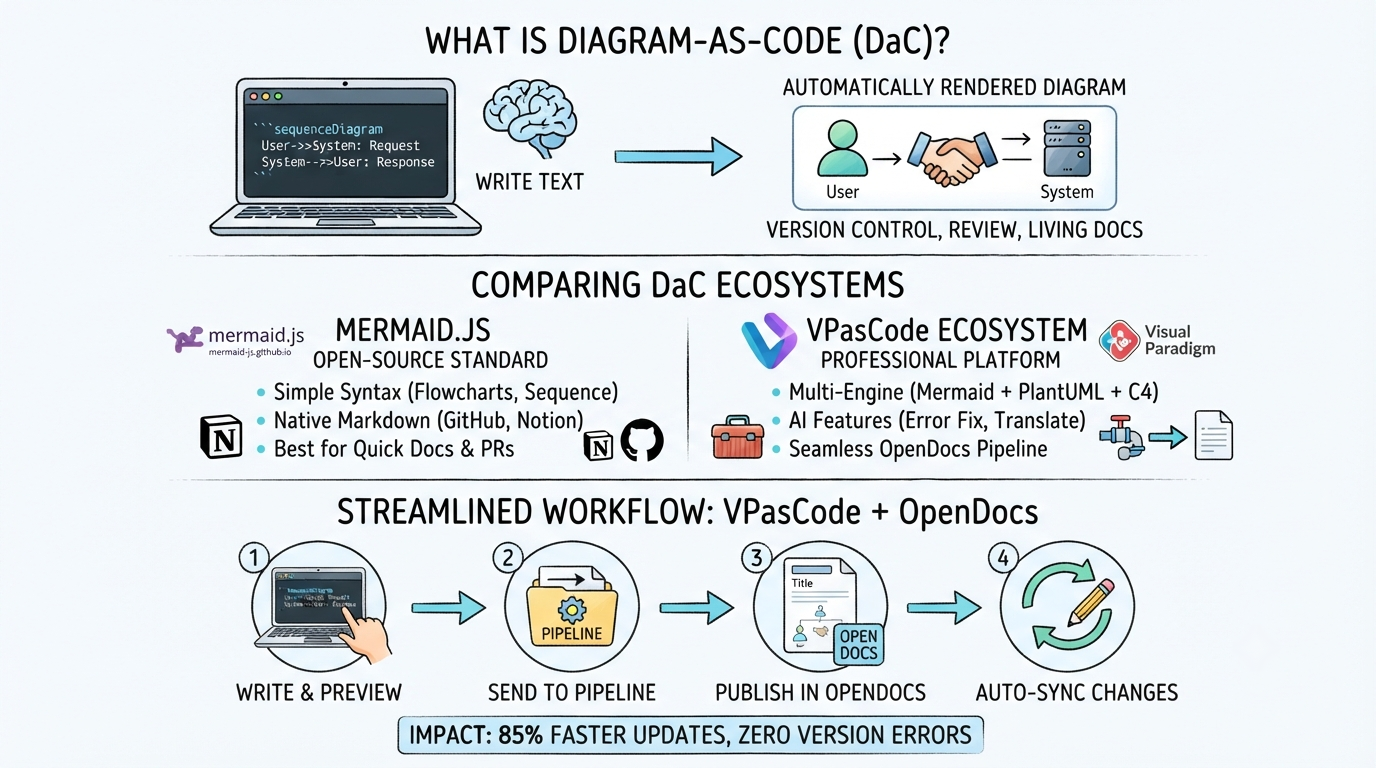
Modern technical teams are shifting away from static, manually drawn images towards a more robust methodology known as Diagram-as-Code (DaC). This paradigm treats diagrams not as static illustrations, but as software artifacts. By writing diagram definitions in plain text using structured syntax, teams can leverage the full power of version control systems like Git, automated testing, and continuous integration pipelines.
This tutorial explores the core concepts of DaC, compares the leading ecosystems—specifically Mermaid.js and Visual Paradigm’s VPasCode—and demonstrates how to build a streamlined workflow for automated documentation.
What Is Diagram-as-Code?
Diagram-as-Code is the practice of defining visual representations (flowcharts, sequence diagrams, architecture models) using code. Instead of dragging and dropping shapes in a GUI, you write a script that describes the nodes and connections. This approach offers four distinct advantages over traditional drawing tools:
- Version Control: You can track changes to your architecture in Git, view diffs, and revert to previous states just like you would with application code.
- Review Workflows: Diagram changes can be reviewed via Pull Requests (PRs), ensuring that architectural decisions are vetted by peers before being merged.
- Living Documentation: Diagrams stay synchronized with the system. If the code changes, the documentation can be updated automatically.
- Automation: Diagrams can be generated as part of a CI/CD pipeline, ensuring that the documentation is always up-to-date with the latest build.
At the heart of this ecosystem are three major engines that dominate the industry:
- Mermaid: Known for its simple, Markdown-friendly syntax. It is the standard for quick documentation, flowcharts, and sequence diagrams.
- PlantUML: Favored for rigid engineering standards and robust UML support, often used for C4 architecture modeling.
- Graphviz: The powerhouse for complex relational logic and structural networks, such as dependency trees.
Comparing DaC Ecosystems
While Mermaid is the open-source standard, it is often limited to specific diagram types. This is where professional platforms like VPasCode (Visual Paradigm as Code) differentiate themselves by offering a multi-engine approach.
Mermaid.js: The Open-Source Standard
Mermaid is widely adopted because it renders directly in Markdown editors. Its syntax is concise, making it perfect for quick sequence diagrams or flowcharts.
%% Example: Mermaid Sequence Diagram
sequenceDiagram
    User->>System: Request Data
    System->>System: Process Data
    System-->>User: Response
Best For: Quick documentation, GitHub READMEs, and simple flowcharts.
VPasCode Ecosystem: The Professional Platform
VPasCode extends the concept of DaC by supporting multiple engines (Mermaid, PlantUML, and C4) within a unified platform. It is designed for teams that need complex modeling capabilities alongside AI-driven assistance.
- Multi-Engine Support: Seamlessly switch between Mermaid for speed and PlantUML/C4 for complex architecture.
- AI Features: Utilize AI to auto-generate diagrams from text or fix syntax errors automatically.
- OpenDocs Pipeline: A specialized workflow for publishing documentation.
Streamlined Workflow: VPasCode + OpenDocs
The true power of Diagram-as-Code is realized through a streamlined workflow that integrates writing, building, and publishing. Visual Paradigm’s VPasCode ecosystem facilitates this through the OpenDocs Pipeline.
Here is the step-by-step process for modernizing your documentation workflow:
- Write & Preview: You write the diagram code in your editor (e.g., VS Code) using VPasCode. The environment provides immediate rendering so you can see the result instantly.
- Send to Pipeline: When you commit your changes to Git, a CI/CD pipeline (such as GitHub Actions) detects the change. It runs a build job that compiles the raw text into visual assets.
- Publish in OpenDocs: The generated diagrams are published to your documentation site (OpenDocs), ensuring stakeholders have access to the latest version.
- Auto-Sync Changes: If a developer modifies the architecture in the code, the diagram updates automatically on the next build, eliminating version errors.
Conclusion
By adopting Diagram-as-Code, teams move from maintaining static images to managing a dynamic, code-driven documentation system. Whether you start with the simplicity of Mermaid or scale up with the power of VPasCode and OpenDocs, the result is the same: documentation that evolves with your software.