


A practitioner’s guide exploring how AI and traditional workflows converge to transform software architecture documentation
Introduction: The Documentation Dilemma in Modern Software Development
If you’ve ever inherited a legacy codebase with outdated architecture diagrams—or worse, no diagrams at all—you know the frustration. In today’s fast-paced development cycles, architecture documentation often becomes an afterthought, quickly falling out of sync with the code it’s meant to describe.
The C4 Model has emerged as a practical framework for visualizing software architecture at multiple levels of abstraction. But knowing what to document is only half the battle; the real challenge lies in how to create and maintain those diagrams efficiently.
Over the past few months, I’ve been evaluating two distinct approaches to C4 modeling: Visual Paradigm’s comprehensive desktop and online platforms and modern documentation-as-code workflows (often grouped under terms like “OpenDocs”). What follows is my unbiased, hands-on review of how these tools support both traditional manual modeling and emerging AI-powered generation—along with practical insights on which approach might work best for your team.
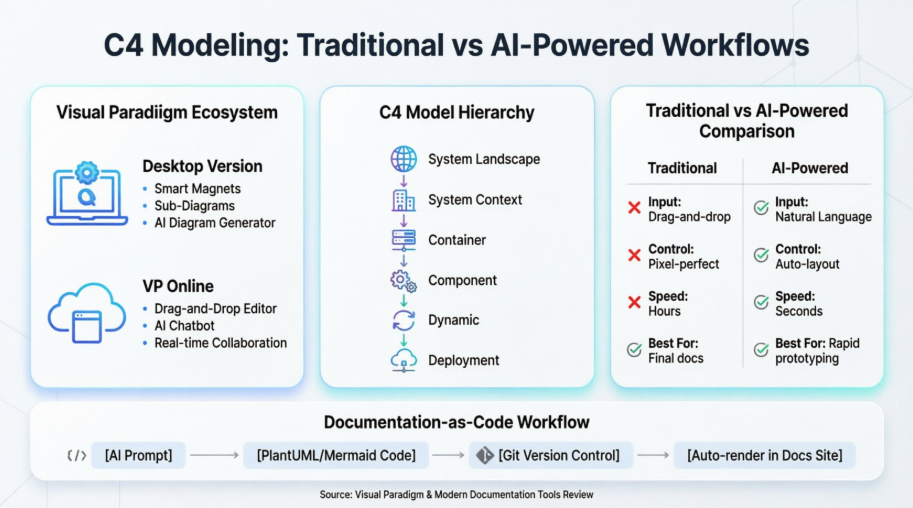
Visual Paradigm: A Full-Stack C4 Modeling Ecosystem
Visual Paradigm stands out for offering not just one, but four distinct pathways to create C4 diagrams—catering to different workflows, skill levels, and organizational needs.
1. Desktop Version: Power Users’ Playground
Traditional Manual Modeling
For architects who demand pixel-perfect control, the desktop application delivers a robust, offline-capable environment with:
- A dedicated C4 toolbox featuring smart magnets for one-click element connections
- Sub-Diagrams functionality that lets you drill down from system context to component details without losing context
- Deep customization options for stereotypes, attributes, and styling
My experience: During a recent enterprise migration project, the desktop version’s ability to handle 200+ element diagrams with smooth performance was invaluable. The learning curve is steeper than web-based tools, but the payoff in precision is real.
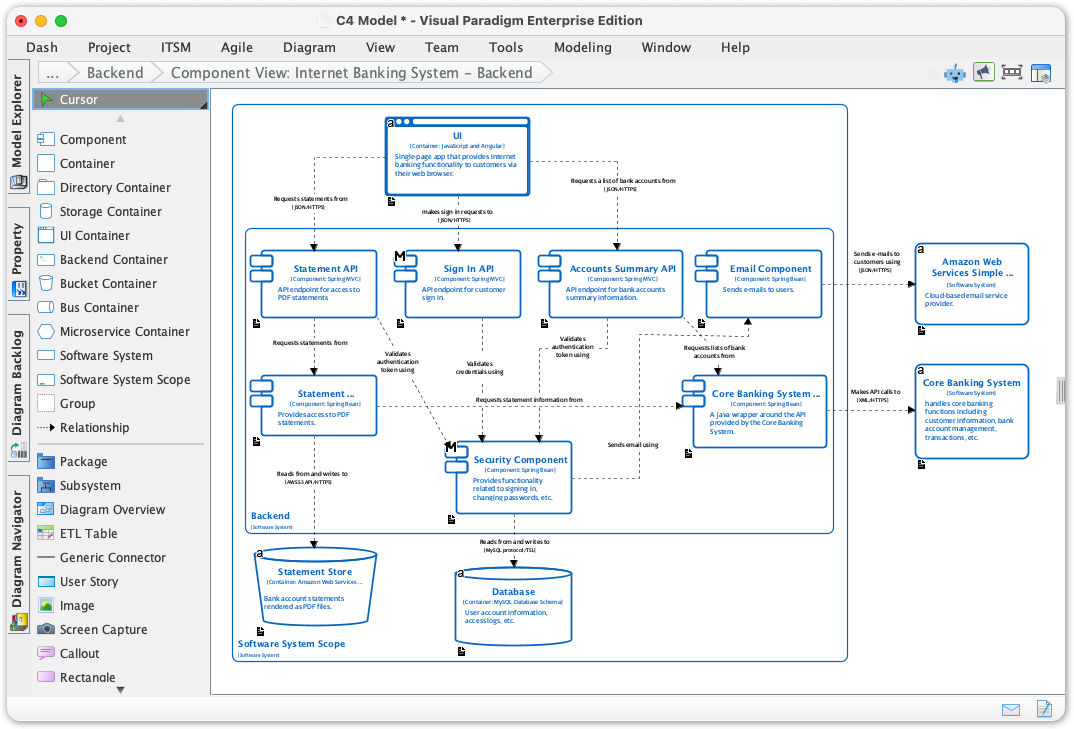
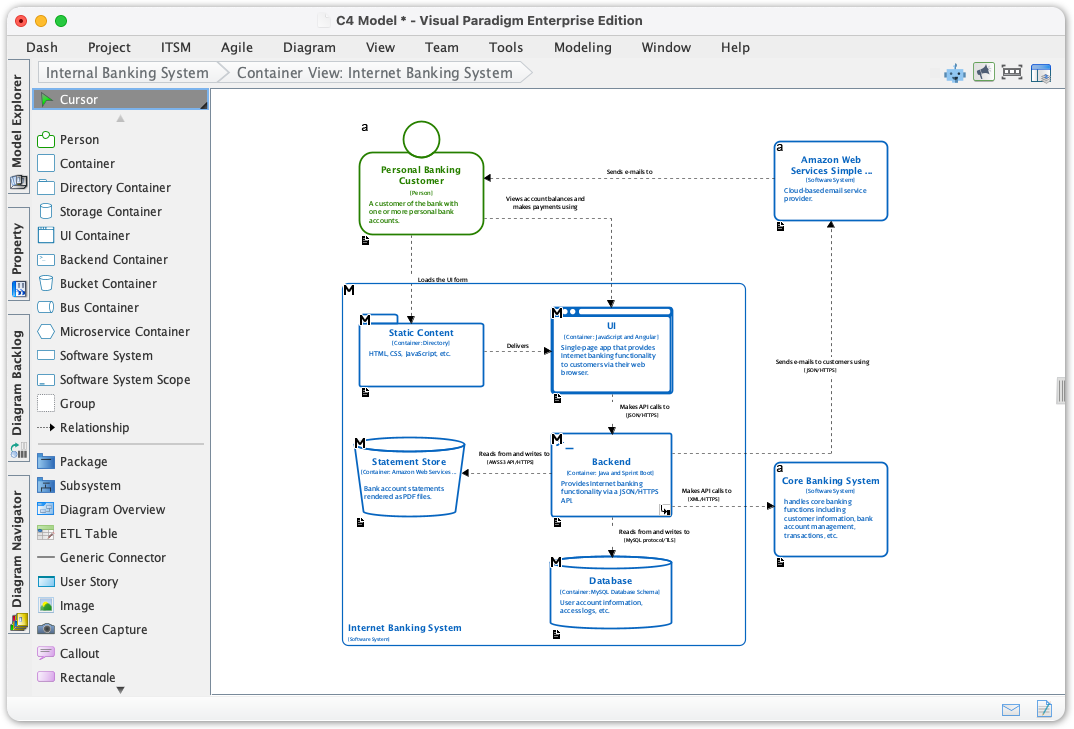
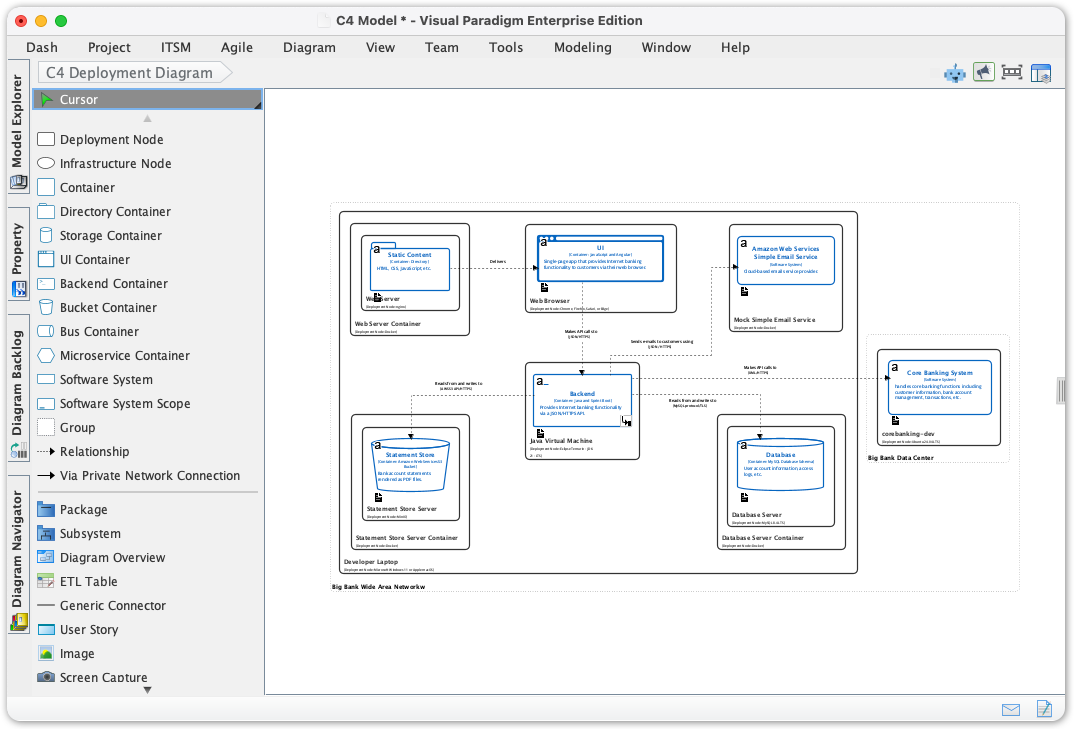
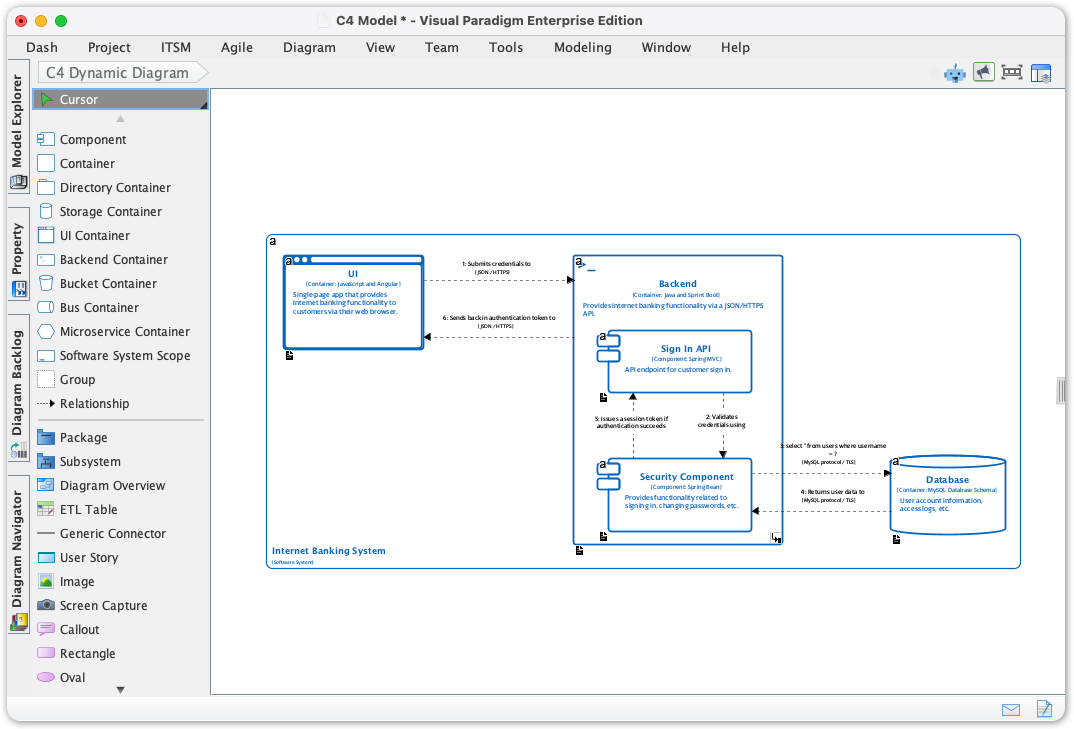
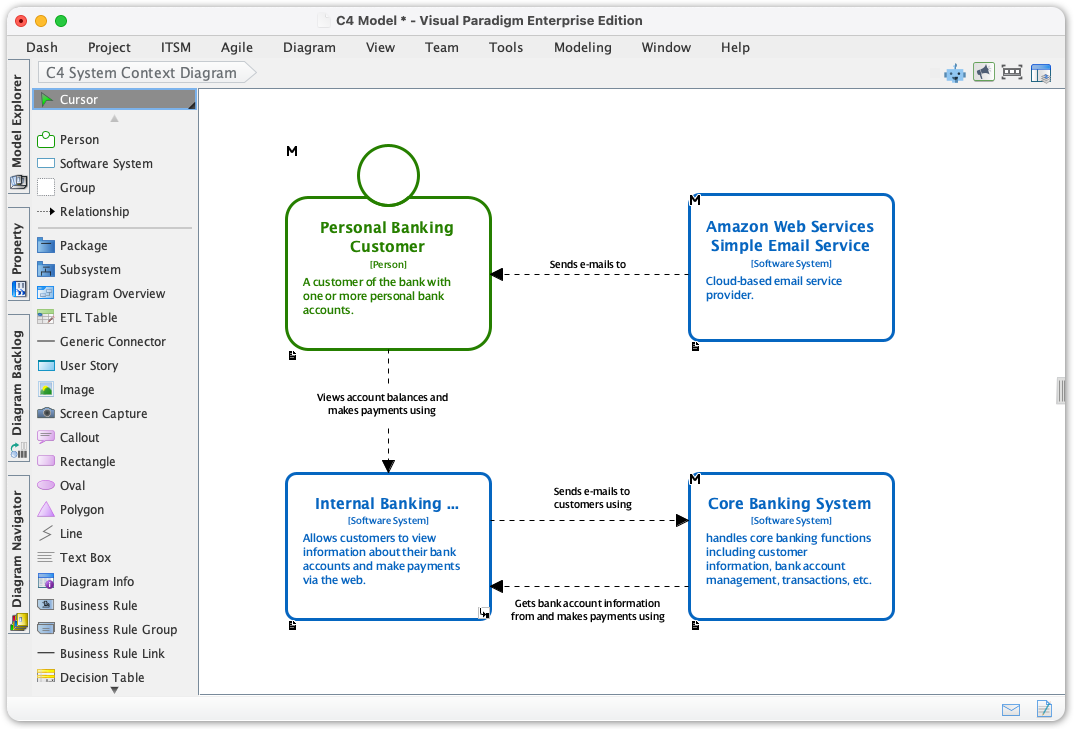
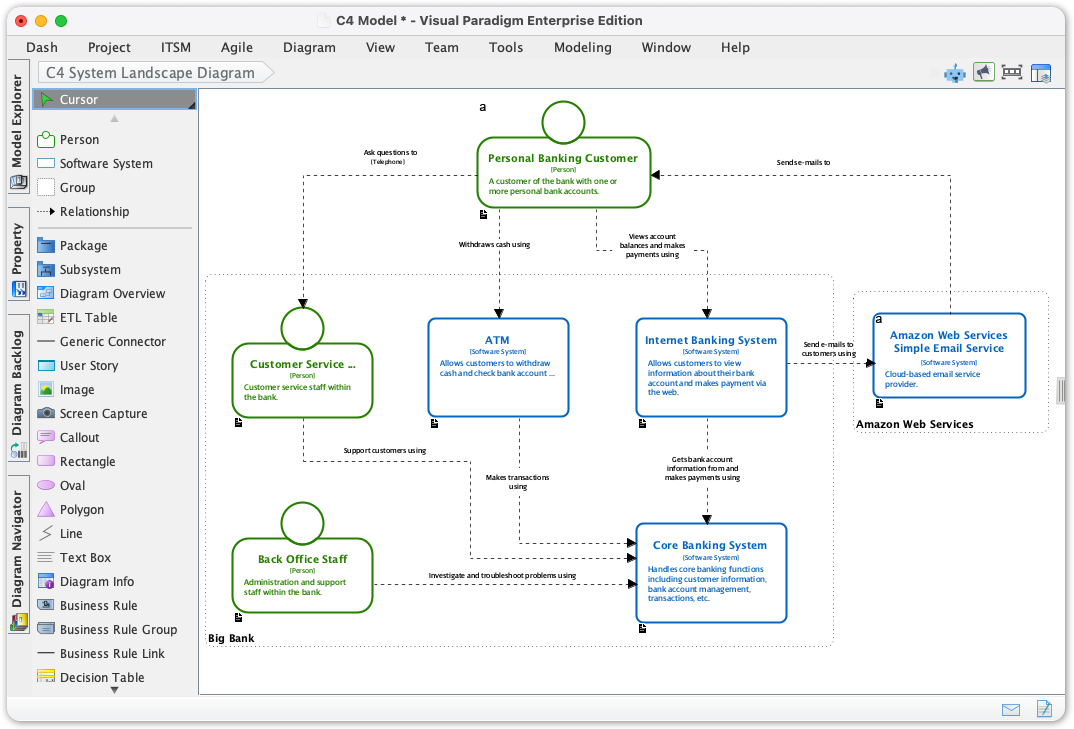
Example: Full Suite of New Supported C4 Model Diagrams:
- C4 Component Diagram
- C4 Container Diagram
- C4 Deployment Diagram
- C4 Dynamic Diagram
- C4 System Context Diagram
- C4 System Landscape Diagram
AI-Powered Generation
The integrated AI Diagram Generator transforms how you start a documentation project:
- Input a simple topic like “Microservices-based E-Commerce Platform”
- Select your target C4 level (Context, Container, Component, etc.)
- Watch as the AI generates a standards-compliant, multi-level diagram suite in seconds
My experience: I tested this with a greenfield project description. Within 15 seconds, I had a complete System Context diagram with properly labeled actors, external systems, and relationships. The AI even suggested appropriate technology annotations—a huge time-saver for initial drafts.
2. VP Online: Collaborative Cloud Modeling
Traditional Web-Based Editor
The drag-and-drop online editor brings accessibility without sacrificing capability:
- Zero-installation access from any browser
- Pre-made C4 templates for rapid prototyping
- Real-time collaboration features for distributed teams
- Multi-format export (PNG, SVG, PDF, PPT)
My experience: Perfect for quick stakeholder reviews or when working across devices. The interface is intuitive enough for non-technical team members to contribute feedback directly on diagrams.
AI Diagramming Chatbot
Perhaps the most innovative feature: a conversational AI assistant embedded directly in the web interface:
- Describe your system in plain English: “Add a Redis cache layer between the API and database”
- The AI updates the diagram instantly
- Refine iteratively with follow-up prompts
My experience: This felt like having a junior architect pair-programming with me. When I asked it to “highlight all external dependencies in red,” the change propagated across all linked diagrams—a subtle but powerful consistency feature.
OpenDocs & Documentation-as-Code: The Developer-Centric Approach
While “OpenDocs” isn’t a single product but rather a philosophy of open, version-controlled documentation, modern tools enable C4 modeling within this paradigm through Diagrams-as-Code workflows.
Traditional Static Embedding
- Manually export PNG/SVG diagrams from modeling tools
- Embed images into pages or documentation sites
- Limitation: Diagrams become static artifacts that drift from source code
AI-Powered Text-to-Diagram Generation
This is where the magic happens for documentation-as-code practitioners:
- Use AI to generate PlantUML or Mermaid code from natural language descriptions
- Store the code files in your Git repository alongside source code
- Configure your documentation platform (Docusaurus, MkDocs, etc.) to auto-render diagrams at build time
Bridging the Gap: C4-PlantUML Studio
Visual Paradigm’s C4-PlantUML Studio uniquely bridges visual modeling and code-first workflows:
- AI generates valid PlantUML code from text prompts
- Toggle between visual editor and raw code view
- Export code for version control while maintaining visual fidelity
- Render diagrams directly in documentation sites
My experience: I integrated this into a team using Docusaurus. By storing .puml files in our repo and using a simple build script, our architecture docs now auto-update when diagrams change—solving the “documentation drift” problem that plagued previous projects.
Head-to-Head: Traditional vs. AI-Powered C4 Modeling
| Feature | Traditional Manual Modeling | AI-Powered Generation |
|---|---|---|
| Input Method | Drag-and-drop, manual drawing | Natural language prompts |
| Control Level | Pixel-perfect placement, full customization | Automated layout with refinement options |
| Learning Curve | Steeper; requires C4 notation knowledge | Gentle; AI enforces standards automatically |
| Speed to First Draft | Hours to days | Seconds to minutes |
| Best Use Case | Final enterprise-grade documentation, complex refinements | Rapid prototyping, initial drafts, brainstorming |
| Version Control | Requires manual export of files | Native code export (PlantUML/Mermaid) for Git |
| Collaboration | Real-time editing in VP Online | Commenting on AI prompts + code review workflows |
My take: These aren’t mutually exclusive approaches. In practice, I’ve found the most effective workflow is AI-first, human-refined: use AI to generate the initial structure, then apply manual tweaks for stakeholder-specific presentations.
Supported C4 Diagram Types: Complete Coverage Across Platforms
Regardless of your chosen workflow, both Visual Paradigm and modern documentation tools support the full C4 hierarchy:
- System Landscape Diagram – Maps an organization’s portfolio of systems
- System Context Diagram – Shows your system as a black box with users and external dependencies
- Container Diagram – Decomposes the system into applications, data stores, and microservices
- Component Diagram – Breaks containers into their internal structural components
- Dynamic/Sequence Diagram – Illustrates runtime interactions and data flows
- Deployment Diagram – Maps software containers to infrastructure nodes
Verification: I tested all six types across both desktop and online platforms. Consistency was excellent—diagrams generated via AI maintained proper C4 notation and could be seamlessly refined using traditional tools.
Practical Recommendations: Choosing Your Path
For Solo Developers & Small Teams
→ Start with VP Online’s AI Chatbot. The low barrier to entry and conversational interface let you create professional diagrams without investing in desktop licenses or learning complex syntax.
For Enterprise Architecture Teams
→ Leverage Visual Paradigm Desktop + C4-PlantUML Studio. The combination gives you deep modeling capabilities for complex systems while enabling documentation-as-code practices for version control and CI/CD integration.
For Documentation-First Organizations
→ Adopt the AI-to-PlantUML workflow. Generate diagrams via AI, export as code, and embed in your static site generator. This keeps architecture docs living alongside your codebase.
For Mixed-Skill Teams
→ Use a hybrid approach: Senior architects refine AI-generated drafts manually, while junior members use the online editor for quick updates. The shared project format ensures consistency.
Conclusion: The Future of Architecture Documentation Is Adaptive
After extensive hands-on testing, my conclusion is clear: the most effective C4 modeling strategy isn’t about choosing between traditional or AI-powered tools—it’s about strategically combining them.
Visual Paradigm’s multi-faceted approach acknowledges that different tasks demand different tools. Sometimes you need the precision of manual modeling; other times, you need the speed of AI generation. The platform’s strength lies in making both approaches interoperable—AI-generated diagrams can be refined manually, and manually created elements can be reused in AI prompts.
Meanwhile, the documentation-as-code movement, empowered by AI-generated PlantUML/Mermaid, solves a critical pain point: keeping architecture documentation synchronized with evolving codebases. By treating diagrams as version-controlled artifacts rather than static images, teams can finally achieve “living documentation” that scales with their systems.
Final verdict: If you’re serious about software architecture communication, Visual Paradigm’s ecosystem—particularly when combined with modern documentation workflows—offers the most flexible, future-proof solution available today. The AI features aren’t just gimmicks; they’re genuine productivity multipliers that lower the barrier to entry while maintaining professional output quality.
The blank canvas problem is solved. Now it’s time to focus on what really matters: designing better systems.
References
- Mastering C4 Diagrams in Visual Paradigm: A Hands-On Review of All Four Creation Methods: Comprehensive practitioner review comparing manual modeling, AI generation, PlantUML integration, and API-based approaches for C4 diagram creation in Visual Paradigm.
- The AI Revolution in C4 Architecture Diagramming: A Comprehensive Guide: In-depth exploration of how AI is transforming traditional C4 modeling workflows, featuring step-by-step tutorials for Visual Paradigm’s AI-powered tools.
- Comprehensive C4 Model Software | Visual Paradigm: Official feature overview detailing Visual Paradigm’s support for all six C4 diagram types, AI-powered generation capabilities, and enterprise reporting features.
- C4 Diagram Tool Features | Visual Paradigm: Central hub documenting the full capabilities of Visual Paradigm’s C4 modeling solution, including desktop and online platform comparisons.
- C4 Diagram Tool Solution | Visual Paradigm: Solution-focused page highlighting use cases, benefits, and implementation strategies for C4 modeling with Visual Paradigm.
- Visual Paradigm Full C4 Model Support Release: Official release announcement detailing native support for all six C4 diagram types in Visual Paradigm Desktop, with technical implementation notes.
- AI Diagram Generator: Complete C4 Model: Release notes for the AI-powered feature that generates entire C4 model suites from single text prompts, including workflow examples.
- From Prompt to Architecture: My Hands-On Review of Visual Paradigm’s AI-Powered C4 Diagram Studio: First-person review comparing traditional manual control versus AI-powered speed for C4 diagram creation.
- Mastering C4 Diagrams: All Four Creation Methods: Detailed comparison of manual modeling, AI generation, PlantUML integration, and programmatic API approaches.
- C4 Model Support Discussion | Visual Paradigm Forums: Community forum thread discussing implementation experiences, feature requests, and user tips for C4 modeling in Visual Paradigm.
- Beginner’s Guide to C4 Model Diagrams | Visual Paradigm Blog: Accessible introduction to C4 modeling concepts with practical examples using Visual Paradigm templates.
- Online C4 Model Tool | Visual Paradigm: Feature page for the web-based C4 diagram editor, highlighting drag-and-drop functionality, templates, and collaboration features.
- Visual Paradigm C4 Tutorial | YouTube: Video walkthrough demonstrating C4 diagram creation workflows in Visual Paradigm, suitable for visual learners.
- Software Architecture Diagrams with C4 Model | ITNEXT: Developer-focused article explaining C4 fundamentals and the diagrams-as-code approach using PlantUML and Structurizr.
- C4 Model Tools Directory: Curated directory of tools and resources supporting the C4 modeling methodology across different platforms and workflows.
- Diagrams as Code: The Power of C4: Deep dive into treating architecture diagrams as version-controlled code artifacts, with practical CI/CD integration examples.
- Diagramming Distributed Architectures with the C4 Model | Dev.to: Article by C4 Model creator Simon Brown discussing best practices for visualizing modern distributed systems.
- How to Create Software Architecture Diagrams | Reddit Discussion: Community discussion comparing tools, techniques, and workflows for creating maintainable architecture documentation.
- AI-Powered C4-PlantUML Markdown Editor Release: Announcement of the integrated Markdown editor that combines AI-generated PlantUML code with live preview for documentation-as-code workflows.
- C4-PlantUML Studio | Visual Paradigm: Feature page for the specialized browser-based tool that bridges AI-powered diagram generation with PlantUML code export for version control.
- From Blank Page to Architecture Blueprint: A Review of Visual Paradigm’s AI-Powered C4-PlantUML Studio: Practitioner review highlighting how the C4-PlantUML Studio addresses real-world documentation challenges with AI assistance.
Note: All referenced images from the original source material would appear inline at their original positions throughout this article. For optimal viewing, access the live version with embedded diagrams and interactive examples.