Visual Paradigm has transitioned from a traditional modeling tool into a comprehensive AI-driven ecosystem. By grouping its capabilities into four distinct AI pillars, it provides a cohesive environment where ideas are born in chat, structured through guided apps, documented in smart hubs, and refined into enterprise-grade models on the desktop.
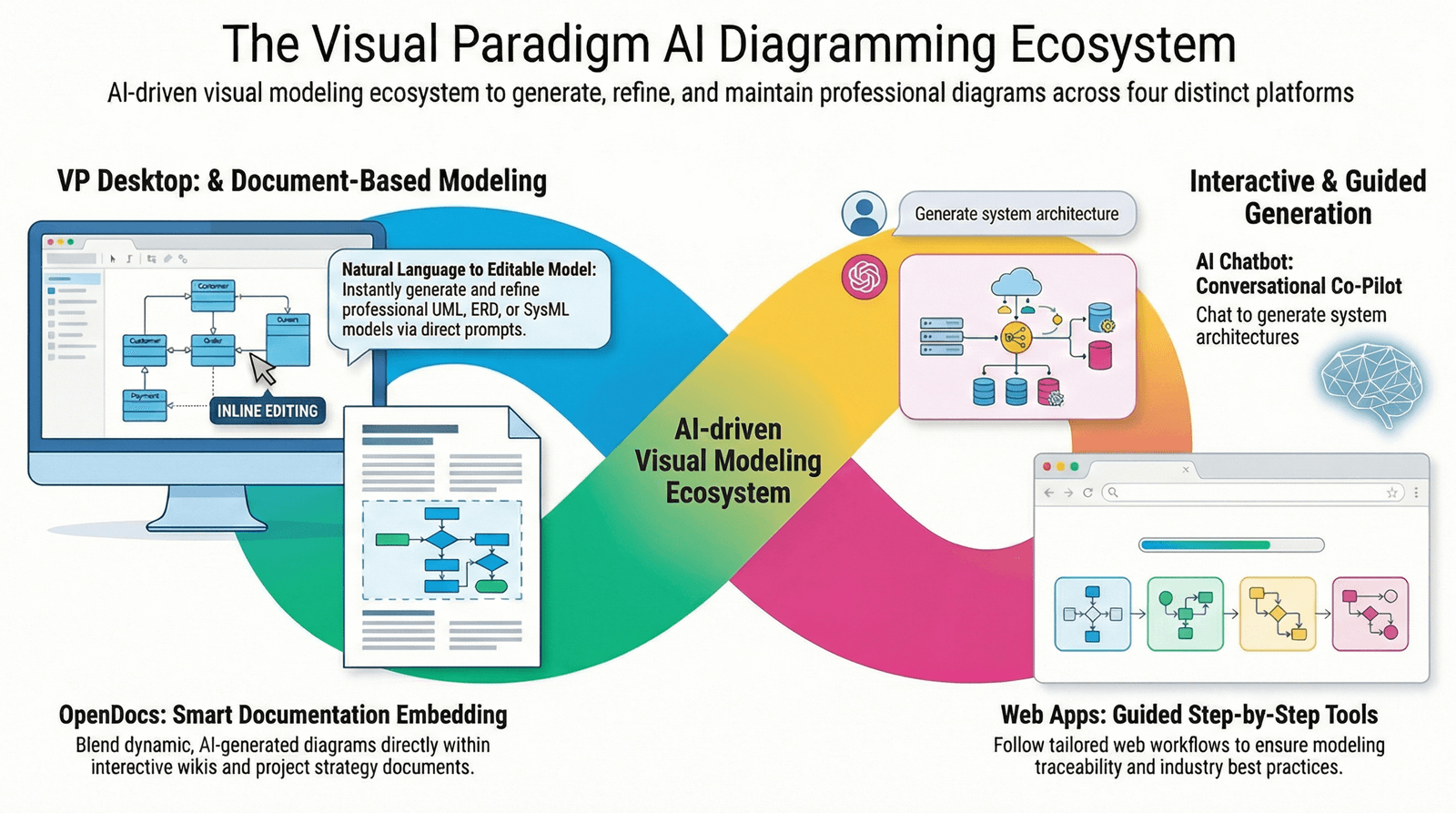
This guide explores how these pillars work individually and how they integrate to create a closed-loop, end-to-end workflow.
1. The Four AI Pillars
🔹 VP Desktop: The Professional Engine Room
The Desktop client remains the heavy-duty center of the ecosystem. Its AI integration is designed for power users who need high-fidelity, standards-compliant models that go beyond simple pictures.
-
Key Features: One-click AI diagram generation (UML, BPMN, SysML), code engineering (Java, C#, Python), and model validation.
-
AI Enhancement: Users can generate complex activity or sequence diagrams from text descriptions and immediately use them for reverse/forward engineering.
-
Ideal Use Case: Architects and developers building production-ready systems that require version control, traceability, and offline capability.
🔹 OpenDocs: The Living Knowledge Hub
OpenDocs is the collaborative document-centric pillar. It turns static project documentation into “living” content by embedding AI-generated visuals directly into textual reports.
-
Key Features: AI-powered “Smart Documents” where you can type a prompt to insert a diagram (e.g., C4 model or ERD) without leaving the editor.
-
AI Enhancement: It keeps the text and visuals in sync, allowing for the generation of project timelines (PERT charts) or requirement specs from natural language.
-
Ideal Use Case: Project managers and analysts who need to maintain up-to-date technical documentation and reports for stakeholders.
🔹 AI Visual Modeling Chatbot: The Conversational Ideation Co-pilot
Operating as the “brainstorming front-end,” the Chatbot allows users to iterate on designs using natural language. It functions like a design-savvy ChatGPT that understands the rules of formal modeling.
-
Key Features: Iterative refinement (e.g., “Add an authentication step,” “Rename Actor to Admin”).
-
AI Enhancement: It doesn’t just draw; it understands context. You can ask it to “Explain this flow” or “Find security risks in this deployment.”
-
Ideal Use Case: Early-stage brainstorming and requirements gathering where stakeholders want to see ideas visualized instantly during a meeting.
🔹 AI Apps & Studios: The Guided Domain Experts
These are specialized, web-based web apps that use a “guide-through” or “wizard” approach. They are designed to ensure completeness and compliance in specific domains.
-
Key Features: Step-by-step studios for C4 Modeling, Use Case Refinement, and Agile Backlog Planning.
-
AI Enhancement: Instead of a blank prompt, these apps ask for specific inputs (Actors, Flows, Exceptions) and use AI to stitch them into a structured, multi-diagram model.
-
Ideal Use Case: Users who need to follow a specific methodology (like TOGAF or Scrum) and want the AI to ensure no mandatory steps are missed.
2. The End-to-End Workflow: A Closed-Loop System
The true power of the ecosystem lies in how these pillars talk to each other to move a project from a raw idea to a delivery-ready model.
| Phase | Pillar | Action |
|---|---|---|
| Brainstorm | AI Chatbot | Converse with the AI to quickly sketch out a high-level system architecture or process flow. |
| Structure | AI Studios | Take that sketch into a “Studio” app to refine details (e.g., expanding a Use Case into a full Activity Diagram). |
| Detail | VP Desktop | Import the AI-generated models into Desktop for fine-tuning, linking to requirements, and generating source code. |
| Deliver | OpenDocs | Sync the models to OpenDocs to generate the final Project Specification or Technical Manual for stakeholders. |
Integration Highlights
-
Single Identity: Your Visual Paradigm account syncs models across the Chatbot, Web Apps, and Desktop.
-
Model Consistency: A diagram generated in the Chatbot is not just a flat image; it is a semantic model that retains its properties (names, relationships) when opened in VP Desktop.
-
Traceability: AI suggestions in the Studios help link high-level goals in your documentation to specific components in your architecture.
Resource
- AI Diagram Generators – Visual Paradigm Ecosystem: Detailed overview of Visual Paradigm’s four AI-powered platforms (VP Desktop, OpenDocs, AI Visual Modeling Chatbot, and Web Apps / Guided Tools), including use cases, benefits, and how they form a complete ecosystem for diagram generation and modeling.
- Visual Paradigm – AI-Powered Visual Modeling Platform: Official main page introducing the AI engine, core features like instant diagram generation, and references to the integrated tools including the chatbot, OpenDocs, and desktop modeling capabilities.
- AI Chatbot – Visual Paradigm: Official feature page for the AI Visual Modeling Chatbot, explaining instant diagram generation from text prompts, conversational refinement, supported diagram types (UML, SysML, ArchiMate, etc.), and integration with desktop and online tools.
- AI Chatbot | Diagramming & Modeling with Visual Paradigm: Direct access page to the standalone AI Visual Modeling Chatbot, highlighting its role as a co-pilot for creating and refining diagrams via natural language, with examples and export options to professional tools.
- Visual Paradigm AI: The Ultimate Guide to Intelligent Modeling for Engineers, Architects & Teams: In-depth user guide and review covering the four pillars of Visual Paradigm AI, with comparisons, workflows, and recommendations for different roles (e.g., architects, product managers).
- Harnessing Visual Paradigm’s AI for Diagram Generation: The Ultimate 2026 Guide: Comprehensive 2026 guide exploring Visual Paradigm’s AI capabilities across the four approaches (chatbot, guided apps/studios, desktop, and more), including methods, strengths, and real-world applications.
- Unlock the Future of Visual Modeling with Visual Paradigm AI – Where AI Meets Enterprise-Grade Design: Article introducing the four pillars (VP Desktop, AI Visual Modeling Chatbot, OpenDocs, and Web App Studios), emphasizing the closed-loop workflow from ideation to enterprise delivery.